
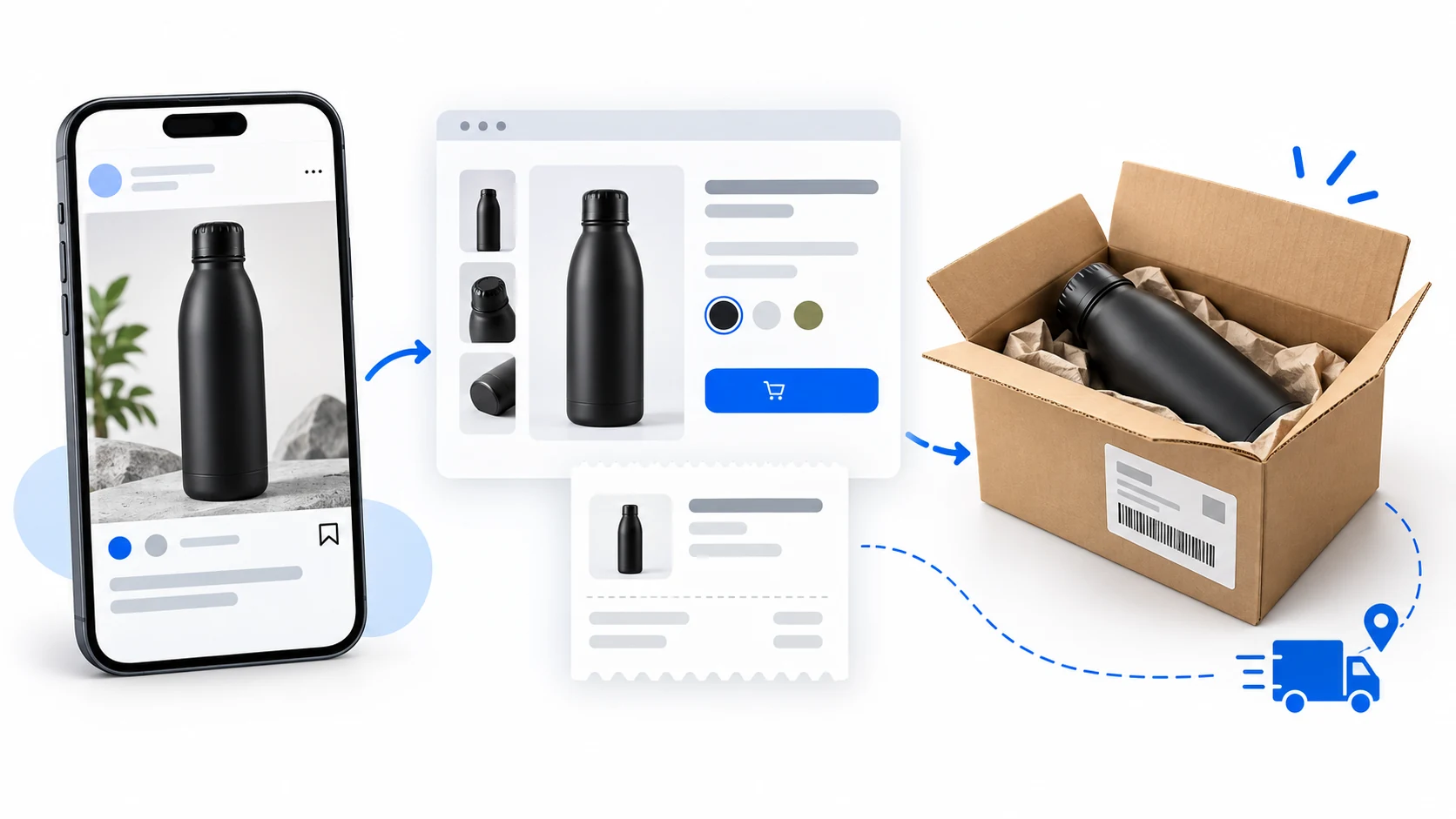
You can dropship through Instagram by sending shoppers from a post or product tag to a store that takes the order, then passing the exact paid item to a supplier for delivery. Use Shopping tags only if your account, market and item qualify; otherwise link to the product page from your profile. Instagram brings the buyer, while you still own the checkout promise, supplier handoff and customer help.
Imagine you sell a black, 750 mL insulated bottle. A shopper sees it in a post and taps through. One small error can change the order: the tag points to black, but the store defaults to blue, or the store records black while the supplier’s item code means blue. Follow the same item from tap to parcel before judging the post by its views.
01
Choose the route your account can actually use
Instagram Shopping lets eligible businesses display products on a profile and tag them in posts or stories. In Shopify‘s current Instagram Shopping documentation, the buyer selects a tagged product and completes checkout on the seller’s website. That is a specific Shopping route, not a promise about every checkout experience on every Meta surface.
Check checkout tax settings too
Shopify’s Instagram guide, rechecked October 11, says this route redirects to the store checkout. Since August 26, 2025, the merchant is responsible for collecting taxes on these orders. Check Settings → Taxes and Duties for the destinations you actually serve; Shopping tags do not settle tax treatment for you.
You can also publish useful product content and send people to a store page through your profile link. This route does not give you Shopping tags, but it still lets a buyer see the item, delivery terms, checkout and support contact in one place.
| Route | What the buyer taps | What you must check first |
|---|---|---|
| Instagram Shopping | A tag on an approved catalog item | Your account, market, domain and product are eligible; the tag opens the exact item and variant |
| Store link | A clear link from your profile or content to your product page | The link works on a phone and opens a page that can take payment in the buyer’s market |
On a phone, swipe the table sideways to compare every column.
For a Shopify store using the Meta sales channel, the current requirements include a working online store, connected business assets, a professional Instagram account associated with the business Page, an eligible product, a verified purchase domain and a supported Shops country. Other store platforms have their own connection steps. Check the current eligibility result in your account before planning a campaign around tags.
An unavailable Shop does not mean you must stop selling. It means you should use an ordinary store link while you resolve the account or product issue. If you are still choosing where the store itself should run, the platform comparison covers that earlier decision.
Open the link as a new phone visitor
For the link route, put the bottle’s direct product URL where a visitor can find it, and use the same name and photo in the post and on the store page. Open the link from the Instagram app, not only from your desktop browser. Check whether the page loads, shows the selected variant and lets a buyer in the intended country reach checkout. A link that works for you while you are logged in may still fail for a new visitor if the product is unpublished or the destination is blocked.
02
Make one product worth sending people to
Before connecting a catalog, match the seller page to the supplier’s actual item. For the bottle, record the model, capacity, color, lid type, included parts and care instructions. Give each sellable variant its own dependable stock and order identifier.
Get a deliverable variant
Ask the supplier for the current variant list, availability method, dispatch location, packed dimensions, destination coverage, handling time and return process. Put a delivery estimate on the store page only when its handling and transit assumptions fit that destination. A product can look polished on Instagram while the supplier cannot deliver its selected color.
Then read the page as a first-time buyer. Can you tell what arrives, what it costs with delivery, when it should ship, and whom to contact if it is wrong? If you use supplier images or video, confirm you have permission to publish them. A copied image is not proof that you sampled the bottle or that a future parcel will match it.
Shopify’s publishing guidance also checks whether an item is shippable, has a return policy, meets catalog rules and has usable title, description, image and variant data. Fix the field that the channel reports as an error. Do not assume a product is approved merely because it exists in your store.
03
Connect the catalog, then check the public item
If you use Shopify, add Facebook and Instagram by Meta as a sales channel and connect the business assets requested in setup. Choose the products you want to make available and inspect their status in the channel. Shopify’s setup guide notes that the connected business portfolio and Facebook Page need the right ownership and permissions; an Instagram login by itself may not finish setup.
The channel uses a shared product catalog for its Facebook and Instagram features. Making an item available through that channel is not an isolated Instagram-only switch. Publish just the bottle you are ready to sell, then check its product status and the item buyers actually see. If an image, category or variant is rejected, correct that specific field and wait for the updated catalog to appear before testing the tag again.
Fix the catalog error, then retap black
The current publishing instructions identify the item’s error. Use the Shopify product as the source of the connected listing.
Correct and save
Open Sales channels → Facebook & Instagram. In Product status, open View products and read the bottle’s Issues entry. Correct the required image, category or variant information and click Save. Keep black and blue as identifiable choices rather than renaming both “bottle.”
Retap the intended variant
After the product syncs, open its Instagram tag on a phone and select the black 750 mL variant. Compare the resulting page, cart choice and price. For a wrong tag price, check Shopify price and compare-at price, then any sale start or end date in Commerce Manager.
This is a proposed repair, not a store test. The shared Meta channel can affect Facebook and Instagram together; a saved correction still needs the public-item check.
For a store outside Shopify, use the platform’s currently supported Commerce Manager or catalog connection. The exact buttons differ, but the test does not: one eligible catalog item should lead to the same sellable item on your store.
04
Follow the shopper's tap before you promote the post
A product post works best when it answers one honest buyer question. If you have inspected the bottle, you might show its real size next to an everyday object and explain the lid. If you have not inspected it, stick to supplier-supported dimensions and approved images rather than staging a performance claim. The post’s job is to help the right shopper decide whether to open the product page.
Now tap the post yourself on a phone. For a Shopping tag, Shopify says a product with several variants needs a selected variant for the tag. Check that the tag points to the black bottle, not the default blue version. For a profile link, check that it opens this bottle’s page rather than a broad homepage where the item is hard to find.
Make black a traceable order choice
The post, catalog, store and supplier each hold their own version of the item. A photograph of a black bottle does not carry a reliable order instruction by itself. Give the advertised choice a traceable path: the tag or link selects the black variant; checkout records that variant on the paid order; your supplier mapping turns that choice into its black-bottle item code. If any step has only a generic “bottle” entry, stop there and make the choice explicit. This is why a visible tag and a paid receipt can both look correct while the wrong color still ships.
On the destination page, compare the selected item, price, shipping charge, delivery language and return policy with the post. A visible tag can lead to a stale page; repair the page before promoting it.
Before buying traffic, check whether the customer price covers the supplier item, parcel, payment fee and likely remedies. A completed Instagram order can still lose money; use the profit-margin guide to calculate the budget for promotion from your own costs.
Give the bottle a promotion budget
Suppose the bottle sells for $29. These USD amounts are invented to explain the decision, not a supplier quote or measured Instagram result.
What one paid order leaves
Subtract $13 goods, $4 shipping, $1.14 payment processing, $3 promotion, $1 remedy allowance and $1 overhead. $29 − $23.14 = $5.86 before any unlisted costs and tax. Replace every estimate with the actual offer and charges.
What you need before payout
Ten such orders need $170 for goods and shipping. If the assumed $3 promotion cost per order is also paid first, the example needs $200 before customer payouts, plus any other due bills or remedy cash. A profitable-looking receipt does not fund the supplier today.
If actual promotion costs $9 instead of $3, the remaining $5.86 becomes −$0.14 before those unlisted costs. Keep the same product, period and completed-order count when measuring the test.
Make a small content test answer an order question
You do not need a catalog of fifty items to learn whether Instagram can send a useful buyer to this bottle. Publish one accurate post that shows the item and gives a reason to inspect it: capacity, dimensions or the included lid, using material you have the right to use. A second piece can answer a real question from the first, such as which bottle color the tag selects. Keep the same destination page during the test so a changed page does not hide what the content did.
Find the stage that lost the buyer
Read the results in order. Views show that content appeared; tag taps or link visits show interest in the item; completed checkouts show a buyer accepted the offer; supplier acceptance and delivery show that the order could actually be served. A post with visits but no purchases calls for a look at the page, price, shipping and checkout. A post with paid orders but repeated wrong variants calls for an order-mapping repair, even if the content itself performs well. You can test more content after the product and order path work.
05
Check the paid order and the supplier order separately
When a buyer pays on your store, the store should create a paid order with the chosen variant and address. That does not automatically mean the supplier has accepted or been paid for it. Your app, agent or manual workflow still has to send the correct order and confirm what happens next.
Use this illustrative bottle order to see what each part must prove. The IDs, price and states below are invented for explanation; they are not an AIDrop transaction or a test of Instagram.
| Station | Expected record for the black bottle | If it fails |
|---|---|---|
| Instagram tap | Tag or link opens the black 750 mL variant | Repair the tag or link; do not send more traffic |
| Store page and checkout | Black variant, hypothetical $29 price, disclosed delivery and return terms | Correct the page or shipping rule before taking payment |
| Store payment | Example order IG-101 is paid once, with the buyer’s chosen address | Resolve checkout or duplicate-charge issue in the store |
| Supplier acceptance | Supplier receives the matching black-variant order, confirms availability and payment | Hold the order, check its reference and fix the handoff before resending |
| Parcel movement | A carrier records physical acceptance for the correct parcel | Ask the party holding the parcel or carrier account for the actual event |
On a phone, swipe the table sideways to compare every column.
The supplier may require payment before the store’s card payout reaches your bank. Keep enough cash to fund the item and a likely customer remedy during that gap. If an integration reports an error, look for an existing supplier reference before submitting the same order again; two submissions can create two bottles for one buyer. The broader fulfillment guide explains the order-to-supplier handoff beyond Instagram.
Compare the two order records
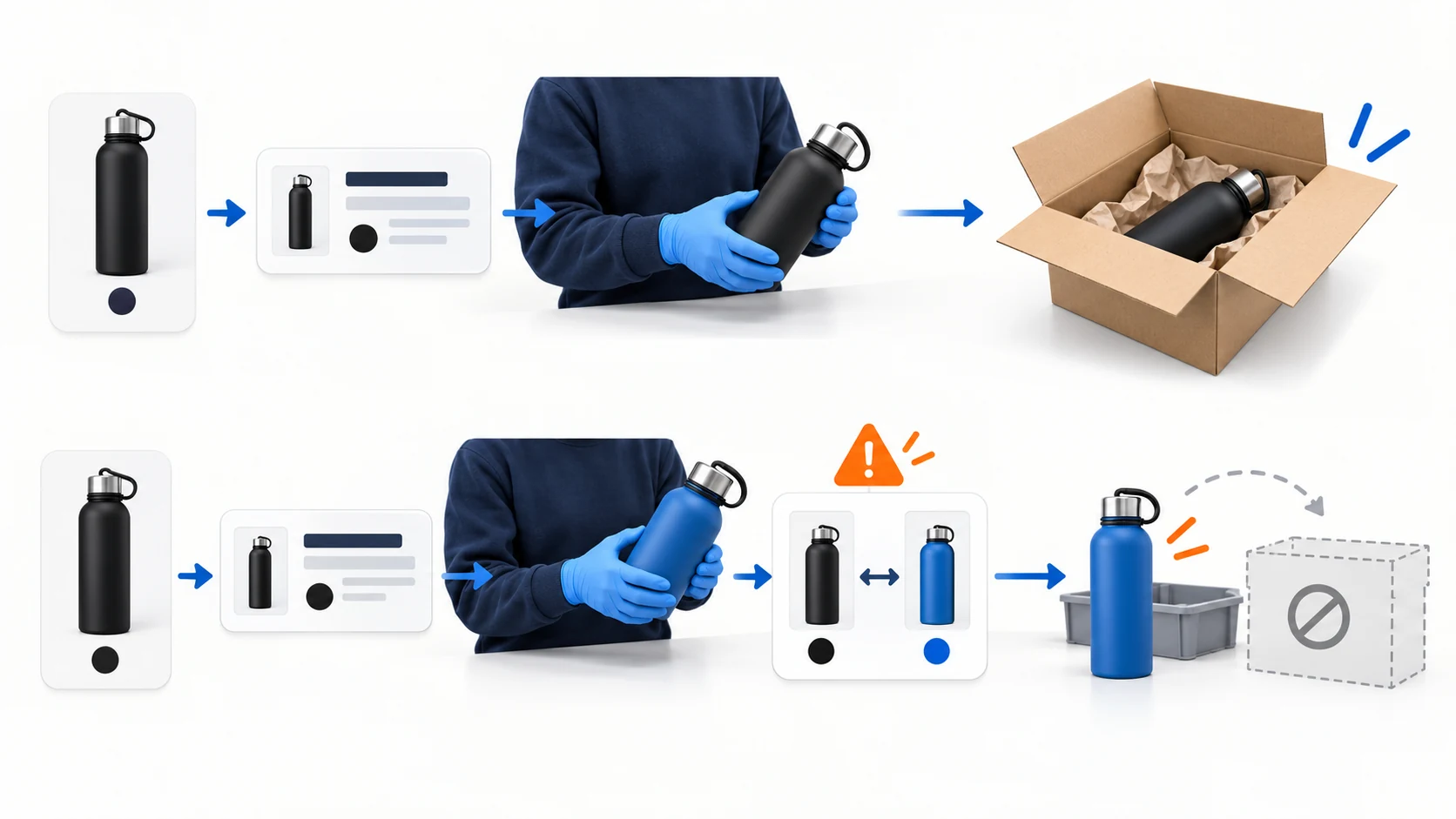
Run the first order deliberately. Read the buyer’s selected color and address in the paid store order, then compare them with the supplier-facing item code and address before release. Save the store order ID beside the supplier’s acceptance reference so a missing order can be investigated without sending a duplicate. If the supplier rejects black as out of stock, do not silently ship blue. Check a real replenishment date and let the buyer choose between waiting and the remedy your store offers. The same black-to-blue mismatch that seemed like a catalog problem at the tap can become a refund and a disappointed customer after dispatch.
06
Treat tracking and customer help as part of the sale
A label number is useful, but it is not the same as a carrier scan showing the parcel was accepted. Tell the buyer what you can confirm: the store received the order, the supplier accepted it, the parcel was handed to a carrier, or a delivery exception needs attention. Those are different events.
If tracking stops, open the carrier event history and identify the last confirmed movement. A wrong item, damaged bottle or missing parcel needs a customer remedy even if the supplier and carrier are still discussing responsibility. Your store took the sale, so give the buyer a contact and a clear next update. The tracking article goes deeper on labels, scans and stalled parcels.
Fix the mapping or the pick, then help the buyer
Suppose the buyer receives blue although the paid order says black. Read the saved tag and store order first, then the supplier pick record. If the store sent blue, repair the variant mapping; if the supplier packed blue, document the mismatch for its claim process. Either way, help the buyer under the store’s stated return or replacement terms before waiting for an upstream dispute to finish. This is also useful feedback for the next post: an attractive tag does not make a mispacked order acceptable.
07
Decide whether this item is ready for another post
Read the five-station order record above after the first test. If the route fails before payment, fix the tag, link or store page. If payment succeeds but supplier acceptance or carrier movement fails, pause promotion and repair that handoff. A second post will not fix a parcel the supplier never accepted.
Once the order reaches the buyer as promised, test another content format or item. If the weak point is China-side sourcing, variant mapping, packing or the supplier handoff, send AIDrop Agent the product link and target destination for a scoped review. Instagram account approval and advertising remain with the merchant and the platform.
Questions before selling through Instagram
Can I start without Shopping tags?
Yes. A profile link can lead to your product page and website checkout. It does not give you an approved Shop or tagging feature. Check the link from the app as a new visitor.
Do I need a certain follower count?
Use the eligibility result and notice for your account rather than an unofficial follower target. A large audience does not fix an ineligible product or a wrong supplier variant.
Must I run paid ads?
No. Start with accurate content and a usable destination. Track visits and complete orders; add paid promotion only when the offer can carry its actual cost.
Can I use the supplier’s bottle video?
Get permission and use claims supported for the exact bottle. A supplier video does not establish that you inspected its lid, insulation or leak performance.
Does a paid Instagram order start supplier shipping?
In this website-checkout route, it creates a store payment and order. Verify the separate supplier acceptance and charge, then carrier handoff. Do not resend blindly if the first reference is unclear.
Dropshipping Marketing: A Plan from First Visit to Repeat Order
Plan dropshipping acquisition, product-page conversion and repeat sales around realistic margins. Compare channels and measure costs and

Dropshipping SEO: Build Search Pages Customers Can Trust
A practical SEO plan for dropshipping stores: map searches to the right pages, verify supplier claims, link

Dropshipping Customer Retention: Earn the Next Order After the First Delivery
A practical retention plan for dropshipping stores: meet the first-order promise, choose a relevant follow-up, and measure