

Dropshipping SEO is the work of making a store’s products, collections and advice discoverable for the searches they actually answer. It starts with the item the customer will receive, not a keyword list. A useful search page names the right product, shows verified specifications and availability, explains the delivered offer, and links to the next page a buyer needs. If ten stores import the same supplier listing, changing the title tag alone gives a shopper little reason to choose yours.
To improve a dropshipping store’s SEO, choose a sellable product family, find the searches behind it, give each search a useful page, make those pages reachable and indexable, then check whether the visits lead to viable orders. Do that for one family before scaling across the catalog. For the broader business model, start with the dropshipping hub.
Explore the broader topic: Dropshipping Marketing: A Plan from First Visit to Repeat Order.
Explore this topic
01
Start with one product family: the five-part SEO pass
You can complete this pass with a collection, two or three products, and one genuinely useful guide. The output is a small set of pages that answer different searches, not a spreadsheet of keywords with nowhere to go.
- Choose products you can keep selling. Record each SKU, sellable variant, checked dimensions or materials, destination, shipping range and return route. If an important claim is unverified, resolve it before writing the page.
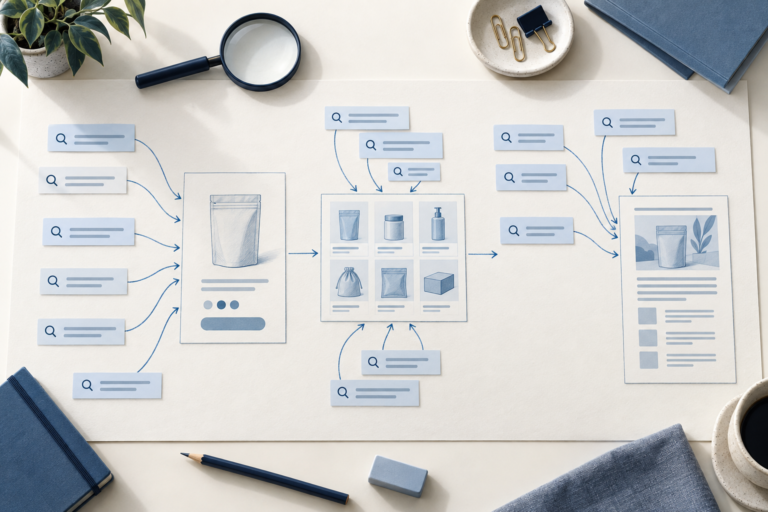
- Find the buyer searches. Collect the ordinary product name, a comparison phrase, a specific fit or feature phrase, and a use question. Inspect the results in your selling market; note whether shoppers are shown collections, products or guides. Group phrases that ask for the same decision.
- Assign and write the pages. Give the comparison phrase to a collection, exact-item phrases to product pages, and the use question to a guide only if it needs its own answer. Give each page one descriptive title and opening that actually answers that search. The product page must show the variant, price, proof of specifications and delivered offer.
- Connect and inspect them. Link from the menu to the collection, from the collection to each product, and from the guide to the relevant item or collection. Open every route on a phone. Use Search Console’s URL Inspection to check the important URLs; fix a blocked, broken or unintended canonical page before making more content. The live test checks potential indexability; Google’s selected canonical appears in the indexed result, not the live test.
- Review the result. In Search Console, compare queries and pages with product views, orders and support questions. If a page draws the wrong searches, revisit its page type and title. If the right buyer visits but cannot decide, fix missing product or delivery information before chasing more traffic.
The rest of this guide shows how to make each of those decisions, including what to do when supplier data changes.
02
Decide which page should answer each search
One keyword cannot carry the entire store. A shopper searching “waterproof travel pouch” may want to compare options; “blue zip travel pouch 2 liter” may call for a product; “how to keep chargers dry in a carry-on” needs a useful explanation. Check the live results for each query before assigning a page. Their page types, products and questions reveal intent more reliably than search volume alone.
On a phone, swipe sideways to compare all columns.
| Search job | Page to build | What the page must answer | Avoid |
|---|---|---|---|
| Compare a product type | Collection or category | Which options exist, who each fits, meaningful filters, delivery conditions | A thin collection with only a keyword-stuffed introduction |
| Inspect one item | Product | Exact variant, dimensions, material, contents, price, availability, shipping and returns | Supplier copy that could describe several products |
| Solve a use problem | Guide | Steps, limits, product-fit criteria and a route to relevant items | A generic article that hides the answer until the last paragraph |
| Compare alternatives | Comparison | Criteria, tradeoffs, evidence and a conditional recommendation | Calling an untested item “best” |
| Check business reliability | Shipping, returns or contact page | Policy, scope, timing, responsibility and contact route | Promises copied from a supplier without a route check |
For a small store, begin with a narrow family of products that can share one useful collection. Add product pages for the exact variants you can actually supply. Publish guides when a question needs more explanation than a product page can comfortably hold. Google’s ecommerce site-structure guidance recommends navigable links from categories to products; do not leave important items reachable only through site search.
03
Build product pages from facts you can verify
Import tools can save data-entry time. They do not establish that a supplier’s dimensions, photographs or performance claims match the item shipped today.
Before rewriting a page, collect an offer sheet for the exact SKU and market:
- Approved variant and current stock signal
- Physical dimensions, materials and included parts
- Packaging and eligible shipping route
- Processing time and return handling
- The source of each fact; mark uncertain fields for verification
Resolve uncertain fields before writing; do not invent smooth copy.
Example: an unsupported protection claim
Imagine a travel pouch sold in two sizes. “Waterproof pouch for every adventure” is a weak page title if you have not tested water resistance. A more useful product page might state the measured internal dimensions, fabric and closure, show the approved sample from several angles, and explain that the pouch is intended to organize accessories rather than protect electronics from immersion. If you have no approved sample or reliable specification, hold the claim. The product-selection guide covers the earlier choice of what to sell.
Use the following page order for one item:
- Name the product and variant plainly. Keep the model, size, color and purpose consistent across title, URL, images and order record.
- Show the item and its limits. Use images you have permission to use; label illustrative imagery. Explain what is included and what is not.
- Give decision-grade specifications. Dimensions, compatibility, materials and care matter more than repeated adjectives.
- Show the delivered offer. Price, destination-dependent shipping, processing, returns and customer contact should be findable before checkout.
- Answer the remaining question. A short FAQ or fit note belongs on the product page when it resolves a purchase doubt; a longer how-to deserves its own guide.
You do not need a unique poem for every SKU. You need distinct, accurate information where the products actually differ. Google’s people-first content guidance asks whether content helps the intended reader achieve a goal. Replacing supplier text with synonyms while retaining the same missing facts does not meet that test.
04
Give collections a job beyond displaying a grid
Choose a useful product distinction
A collection can help a buyer narrow choices faster than several unrelated product pages. Group items by a real purchasing distinction—capacity, compatibility, use environment or price band—then expose those differences in visible labels and filters. A collection for “travel cable organizers,” for example, could separate soft pouches from structured cases and show usable dimensions. A collection that mixes pouches, bottles and chargers because they all “travel” is harder to shop and harder to describe accurately.
Write a brief introduction that sets the boundary of the collection, not a long essay above the products. Place buying guidance where the choice becomes difficult: a fit table, short FAQ, or a link to a detailed comparison. Link to the product pages with descriptive anchor text. Link back from a relevant guide to the collection so the information and shopping paths meet. Shopify’s site-structure guidance likewise recommends descriptive internal links.
Collection decision: create a new indexable category when it helps customers choose among a stable set of items and has a distinct search task. A filter combination that merely rearranges the same products usually does not deserve a separate landing page.
05
Connect guides to products without writing filler
Guides earn their place when the buyer needs an answer before choosing a product: how to measure a carry-on compartment, which pouch closure works for loose cables, or how to compare two pack sizes. Give the answer first. Show the measurements, decision criteria or failure cases that support it. Then link to the relevant collection or exact product where the reader can act.
Build a small cluster around one product family rather than publishing dozens of barely different “best” articles. One guide can explain the problem, one comparison can test genuine alternatives, and each product page can resolve exact variant questions. The links should reflect those jobs. A guide that repeats a product description with a new title creates overlap; a comparison that uses no inspected specifications risks misleading the buyer.
Google says its ecommerce understanding depends partly on how pages link to one another, not merely URL structure. Use ordinary crawlable links in menus, collections, guides and product pages. A sitemap or Merchant Center feed can help discovery when navigation cannot expose every item, but neither repairs a page that gives customers no useful answer. The dropshipping guides organize the wider operating decisions behind the store.
06
Keep catalog changes from breaking search pages
Dropshipping catalogs change quickly. A supplier may replace a photograph, change a specification, pause a variant or move fulfillment to another route. SEO work must survive those changes. Assign someone to check the live page against the current offer sheet before major campaigns and whenever the supplier changes the item.
On a phone, swipe sideways to compare all columns.
| Change in the supply path | Page action | Order action |
|---|---|---|
| A color or size is temporarily unavailable | Update availability and any collection/filter labels; keep a useful page if the item will return | Prevent the unavailable variant from being sold |
| A replacement item is materially different | Recheck images, dimensions, claims and variant identity before using the old page | Approve the replacement; do not silently substitute it |
| A route or processing window changes | Update the relevant delivery statement and market scope | Recalculate the landed cost and customer promise |
| The product is permanently gone | Choose a relevant replacement or retire the page deliberately; inspect its links and search demand first | Resolve open orders and support requests |
Avoid automatic deletion of every out-of-stock product. A page may still help customers understand a product or find a substitute. Equally, do not leave a purchasable page live for an item that cannot be fulfilled. The shipping-times guide separates warehouse handling from carrier transit when a delivery promise needs review.
07
Fix the technical issues that block useful pages
Technical SEO cannot compensate for an inaccurate offer. It can keep useful pages discoverable. Check the route a visitor and crawler actually take, then inspect the page that receives the click:
- Follow the link path. Move from the homepage to a collection and then to a product. On a phone, confirm that the price, variant, key copy and onward links are visible without a broken script or hidden interaction. Check that sort orders and filters are not creating a large set of near-identical indexable pages.
- Name the real item. Write a distinct title and visible heading for the product or question. A meta description may summarize the offer, but Google can show a different snippet. Alt text should describe the image, not repeat a keyword string. Google’s SEO starter guide explains these signals and their limits.
- Inspect variant URLs. If a size or color has its own URL, ask whether it deserves its own landing page and how the platform relates it to the main product. Read Google’s ecommerce URL guidance before adding canonicals. A canonical is a signal; Google may choose another representative. Do not consolidate different products merely because supplier copy overlaps.
- Keep product data in sync. Structured data and Merchant Center can help Google understand price, availability and policies when they match the visible page and checkout. Google’s Product structured-data documentation lists supported fields. Use the store’s normal schema owner; markup cannot repair a wrong item or guarantee a rich result.
- Check the actual mobile images. Describe visible angles, scale and variants; compress files without hiding the detail a buyer needs. Test the loaded gallery on a phone, including the selected variant, rather than trusting the desktop preview.
Off-site attention should rest on information others can check: a useful size comparison, original photographs you may publish, or clear shipping and return terms. A relevant publication may send buyers and a link. Bulk paid links or invented reviews will not repair an untrustworthy catalog.
A URL check that separates old and current evidence
Use a short URL check record after changing a product page. The paths below are invented examples, not live store URLs or Search Console results.
On a phone, swipe sideways to compare all columns.
| Record | What to save | What changes your next action |
|---|---|---|
| Expected page | /products/compact-cable-pouch | Correct variant, usable size and onward links visible on a phone |
| Indexed observation | Last crawl date; fetch status; Google-selected canonical | If Google selected /collections/travel-cable-organizers instead, inspect the relationship before changing canonicals |
| Current live test | Fetch, indexing permission and tested rendered content | Current access can pass even when the indexed record still describes an older page |
Fix a broken link, blocked access or wrong rendered item at its source, then test that URL again. If the live test succeeds, you can request indexing; keep the request date and check the indexed observation later. Google’s URL Inspection guidance makes clear that the live test does not predict the selected canonical or guarantee indexing. A different canonical is a question to investigate, not proof that a technical setting alone caused the choice.
08
Measure the pages that bring qualified buyers
After publishing, use Search Console to inspect indexing and the queries and pages that receive impressions and clicks. Compare those records with product-page engagement, add-to-cart behavior, orders, returns and support questions. Search traffic alone is not the business result: a guide may attract readers who need education, while a lower-traffic product page can answer a ready-to-buy query.
Use a short diagnostic loop rather than rewriting every title each week:
- No impressions: confirm the page is accessible, indexable, linked from relevant pages and not competing with a near-duplicate URL. New pages also need time.
- Impressions but few relevant clicks: inspect the actual query and result page. The title or page type may be mismatched to intent.
- Clicks but weak product decisions: examine variant clarity, price, evidence, delivery and return information before adding more blog posts.
- Orders followed by preventable returns: compare the copy and images with what arrived. Fix the offer and supplier process; more traffic will amplify the error.
Search Console’s own guidance explains how its page, query and indexing reports work. It cannot tell you whether a supplier changed an item or whether a customer understood the delivery promise; combine it with order and support evidence.
09
What the finished page plan looks like
Suppose a store has verified two sizes of a travel cable pouch and can ship both to its target market. This is a hypothetical planning example, not an AIDrop product or a ranking result. A workable three-page plan is:

Collection: travel cable organizers
Search: “travel cable organizer” and similar comparison searches
Show the two sizes together, usable dimensions and a clear difference between them; link each card to its exact product.
Product: compact cable pouch
Search: “compact cable pouch” and size-specific searches
Title the exact item, show the selected variant and included parts, state its checked measurements and the destination-specific delivery terms; link back to the collection.
Guide: packing a travel charger
Search: “how to pack a charger for travel”
Give a packing method and a size check first; link to the compact pouch only where it actually fits the described charger.
A product title such as “Compact Travel Cable Pouch — Two-Pocket, [Verified Dimensions]” states the item and the distinguishing fact. Replace the bracketed field only after checking the measurement; do not publish a placeholder.
A meta description can summarize the same page’s size, contents and shipping scope, but it cannot substitute for those facts in visible copy. If a second pouch differs only in color, with the same dimensions and buyer task, keep it as a variant instead of creating a competing search page.
The first pass is complete when a shopper can reach each live item from the collection, distinguish the variants, see the delivered offer and move from the guide to an appropriate product. Then check indexing and query fit. If the facts or fulfillment path fail, repair the offer before expanding this cluster.
10
Frequently asked questions
Can a dropshipping store rank with the same products as other sellers?
It can compete for relevant searches, but carrying the same item does not make a copied page useful. Distinct product facts, clear variants, a credible delivered offer, helpful comparisons and a navigable store give shoppers reasons to use your page. No one can promise a ranking from these steps.
Should I rewrite every imported product description?
Prioritize items you can verify and intend to keep selling. Rewrite pages where the current copy hides important differences or repeats unsupported claims. Remove or hold products you cannot describe accurately; mass paraphrasing is a poor use of time.
Do I need blog articles before product pages?
Usually the product and collection pages establish what the store sells and how a customer can buy it. A guide is valuable when it answers a real question that those pages cannot answer well. Publish it with a route to the relevant items.
Will a sitemap make my products rank?
A sitemap can help discovery and monitoring. It does not make a weak page relevant or guarantee indexing or ranking. Make important products reachable through normal links and inspect their status in Search Console.
Dropshipping Keyword Research: Map Searches to Pages You Can Support
A practical query-to-page mapping workflow for product, collection and guide pages, grounded in product evidence and search
Dropshipping Product Descriptions: Write Copy You Can Actually Fulfill
A product-page writing method built around checked claims, variant fit, buyer questions and copy that fulfillment can
Dropshipping Marketing: A Plan from First Visit to Repeat Order
Plan dropshipping acquisition, product-page conversion and repeat sales around realistic margins. Compare channels and measure costs and
