

AutoDS, Wholesale2B, Inventory Source, Avasam and CJdropshipping are useful options to compare for eBay dropshipping, but they solve different problems. AutoDS emphasizes listing and monitoring; Wholesale2B combines a supplier catalog with eBay order processing; Inventory Source connects supplier feeds; Avasam offers UK supplier automation; CJ connects its catalog and fulfillment service to your store.
Choose the supplier arrangement first. A tool that imports thousands of products is of little use if those products cannot be supplied under eBay’s rules, at the advertised price and within the delivery promise.
The comparison below uses published provider documentation checked on September 19, 2026. It is a comparison of capabilities and buying considerations, not a claim that we ran identical live-store tests on every service.
01
Start with a supplier arrangement eBay allows
eBay’s dropshipping policy permits fulfillment directly from a wholesale supplier. It does not permit listing an item and, after it sells, buying it from another retailer or marketplace that ships it to your buyer. The seller remains responsible for delivery and the buyer’s experience.
That distinction applies to the transaction you automate. A software provider may support retail websites as well as wholesale suppliers, or sell automation for several channels with different rules. Its supported-supplier list is not a list of purchasing methods approved for your eBay account.
Before paying for an annual software plan, establish who will supply the product, how you are authorized to sell it and what happens when an order is accepted. Retain the supplier agreement and product documentation. Our eBay dropshipping guide explains the broader selling arrangement; this article focuses on choosing the software that connects it.
02
Compare five tools by the work they handle
| Option | Most relevant starting point | Published functions to examine | Important selection question |
|---|---|---|---|
| AutoDS | A seller needing listing, price and stock tools | Product imports, monitoring, pricing rules and order workflows | Does the exact supplier and fulfillment method fit eBay’s policy and the selected plan? |
| Wholesale2B | A seller choosing from a wholesale catalog | Bulk listing, stock updates, order processing and tracking | What are the supplier’s shipping, payment and return terms for this product? |
| Inventory Source | A seller working with supplier data feeds | Catalog import, inventory/pricing updates and optional order automation | Is the supplier approved and is this supplier–eBay connection supported? |
| Avasam | A seller considering UK-based suppliers | Order routing, automatic payment and inventory synchronization | Does the selected supplier cover the destination and service promise? |
| CJdropshipping | A seller sourcing and fulfilling through CJ | Store authorization, product listing/connection and order import | Are all variants connected, funded and available at the intended origin? |
AutoDS: useful monitoring, with sourcing choices still yours
AutoDS’s eBay page describes product imports, price and stock monitoring, pricing tools and order workflows. This is a relevant shortlist option when repetitive listing and monitoring are taking time across a growing catalog.
Its monitoring documentation describes minimum-stock settings and shipping-cost handling. Those controls are worth examining: a product can remain available at the supplier while falling below the quantity you are comfortable offering.
Read the plan and supplier requirements for each function you intend to use. Importing a product, monitoring it and buying it automatically are separate capabilities. A working importer does not establish that ordering is supported for the same supplier, nor that the purchasing arrangement is allowed on eBay.
Wholesale2B: catalog access with an order intermediary
Wholesale2B’s eBay integration combines product selection, bulk listing, inventory updates and order processing. The provider says it handles supplier accounts and helps obtain tracking and return instructions, so its role is broader than passing a file between two systems.
Inspect a product’s complete delivered cost before importing it. Also distinguish an order arriving in the dashboard from your paying to process it. Supplier access and listing automation do not remove that funding step.
This is a practical candidate when you want to choose from an existing supplier network. Verify product-level dispatch and return terms rather than assuming every supplier in a large catalog works identically. A return authorization from the intermediary also needs to fit the deadline you owe the buyer.
Inventory Source: a connection to an approved supplier
Inventory Source explains that its software account does not itself give you permission to sell a supplier’s products. In its direct-supplier model, you establish that relationship separately.
The service distinguishes inventory automation from full automation. Inventory updates alone should not be mistaken for order submission and tracking. On its pricing page, the published Starter prices at the time of review were $199 per month for Inventory Automation and $299 for Full Automation. The latter listed 500 monthly orders, with additional orders charged separately.
This option deserves consideration when the supplier feed is central to your business. Confirm the exact supplier, eBay account and required order functions before subscribing. Integration counts and order allowances can make a significant difference to the final bill.
Avasam: UK supplier automation with automatic payment
Avasam’s eBay integration focuses on UK-based suppliers. It describes automatic order routing, payments taken from a registered card and inventory synchronization every 30 minutes.
The payment detail matters as much as the synchronization interval. A customer payment through eBay and an available bank payout are different events. The card used for supplier orders needs capacity when the order is processed, even if the marketplace payout has not arrived.
Avasam is therefore a relevant candidate for a UK-oriented assortment. Check the specific supplier’s destination coverage and product availability before applying that fit to an international store. A UK supplier label alone does not establish every item’s location or delivery time.
CJdropshipping: connect the supplier you already intend to use
CJ provides its own eBay connection, with product listing or matching followed by order import and payment. If your approved assortment is supplied through CJ, investigate that connection before adding another paid tool solely to move the same orders.
CJ’s order tutorial separates authorization, product connection and payment. That separation is useful when evaluating a demonstration: a connected store can still have an unmatched variant or an unpaid supplier order.
For each required function, request confirmation for the current eBay integration. Do not infer that a stock feature documented for Shopify works identically on eBay. Check the buyer-facing quantity and tracking after configuration, and keep one system responsible for each update.
03
Check the age of the supplier data
“Updates every 30 minutes” describes one part of the journey. It may tell you how often a connector reads a feed, but not when the supplier last updated that feed or how quickly eBay accepted the change.
Imagine a supplier file generated at 09:00 showing six blue organizers. The supplier sells the last units elsewhere at 09:10. Your tool reads the same file at 09:30 and successfully sends six to eBay. Every connection can appear healthy while the quantity is already wrong.
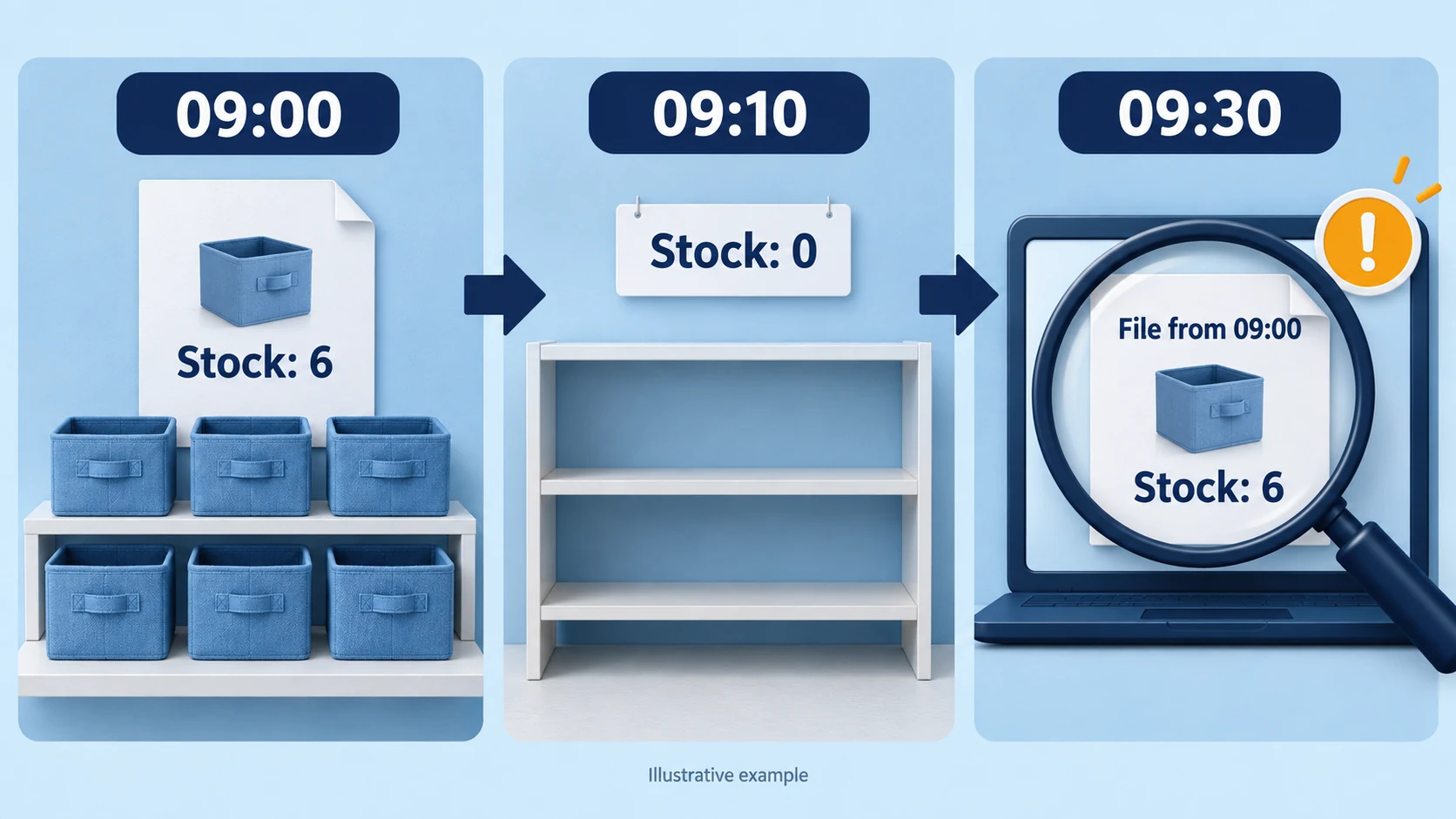
For a sample product, compare three timestamps: the supplier’s data update, the tool’s latest successful read and the marketplace’s accepted update. Also ask what the software does if the feed is unavailable. Retaining the last quantity, reducing it or pausing the offer have different consequences; do not assume a fail-safe behavior that has not been configured or demonstrated.
A stock buffer can reduce exposure to low quantities, but it does not repair an old feed. If the product sells faster than you can refresh its availability, reduce the offered quantity or reconsider that supplier–product combination. The inventory management guide develops the stock records behind this decision.
04
Set a price floor that includes the whole order
Repricing needs a complete cost model. A rule that adds 30% to the product price can still produce a loss once shipping, marketplace charges and returns are included.
Consider an illustrative order in USD. These are assumptions for demonstrating the calculation, not current eBay fees or a provider quote:
| Cost or target | Assumption |
|---|---|
| Product | $12.00 |
| Shipping and handling | $5.00 |
| Expected exception cost per original order | $1.00 |
| Allocated software cost | $0.50 |
| Assumed fixed transaction charge | $0.40 |
| Desired contribution after these costs | $5.00 |
| Assumed percentage selling charge | 14% of the selling price |
The non-percentage amount is $23.90. The required selling price is $23.90 ÷ 0.86 = $27.80, rounded upward to the next cent. That leaves approximately $5 under the stated assumptions, before any costs omitted from the model.
If shipping rises by $2, the same target requires $25.90 ÷ 0.86 = $30.12. A price optimizer that keeps chasing a $27 competitor price would undermine the target even though its updates were technically successful.
Use your actual eBay site, category and fee basis, including any charges on shipping or tax, plus advertising and currency costs where relevant. Configure the minimum price and what happens when the supplier cost makes the item unviable. Pausing an unprofitable offer is a useful result; endless automatic discounting is not.
05
Keep one system in charge of each update
Two tools can each be correct according to their own rules and still conflict. One restores the supplier’s quantity to ten while another reduces it to two. One applies a minimum price while the other overwrites it with a markup formula.
Assign responsibility for inventory, pricing, order submission and tracking before connecting another application. They may belong to one service or several, but each field needs a clear owner. Document manual edits too: if a connector overwrites listing quantities on its next run, a temporary manual correction will not last.
Preserve the link between the eBay variation and the supplier’s exact SKU. A parent product name such as “travel organizer” cannot distinguish a blue single unit from a black two-pack. Inspect the variant image, pack count and identifier together.
Access permissions deserve the same care. Review the account and application shown on the authorization screen, retain the connection details, and learn how to revoke access. Do not select a tool because it claims to make policy violations invisible; the supplier arrangement still needs to be acceptable.
06
Test failures before enabling automatic purchasing
A successful demonstration should show more than a product appearing on eBay. Ask the provider to demonstrate the relevant exception behavior with a test record or supported trial workflow before giving the software authority to purchase customer orders.
| Situation | Observable result to look for |
|---|---|
| One variant becomes unavailable | The corresponding variation stops selling; other variants remain correctly mapped |
| Shipping cost increases | The complete cost changes or the order is held for review |
| The supplier connection expires | A visible failure appears, with an owner assigned to restore it |
| An order is submitted twice | The existing supplier order is identified before another purchase is made |
| A parcel has a label but no carrier scan | Tracking is retained without presenting label creation as proof of physical dispatch |
These are acceptance questions, not claims that every shortlisted tool supports the same controls. An unsupported function may require a manual review or a different tool.
For a small catalog, start with manual approval of supplier purchases. Compare the customer’s item, address and quantity with the supplier order, and confirm the supplier reference after payment. Turn on more automation only when those records agree and you understand how to stop it.
Customer remedies also remain visible work. Software can fetch a return authorization, but the buyer should not have to wait beyond the applicable marketplace deadline because two vendors are discussing responsibility. Keep the customer response and supplier recovery as separate tasks.
07
Compare the complete software bill
The entry price is only useful when it includes the job you need. Record the billing period, listing allowance, supported store count, integrations, order allowance, paid add-ons and any transaction charges. Check what happens to listings and order history if you cancel.
As an illustration, a $60 monthly service costs $3 per order at twenty orders and $0.30 at two hundred. That calculation describes allocation, not whether the service is worthwhile. A tool might save enough work to justify the bill at low volume, or create more troubleshooting than it saves.
For a timed trial, record how long you spend preparing a listing, handling a normal order and correcting an exception. Include time spent checking the automation. Compare the observed saving with the full bill; avoid assigning financial value to hypothetical orders you have not received.
08
Move a small catalog before the rest
Export the current listing IDs, SKUs, supplier links, quantities and open-order references before migrating. Keep the old system from submitting new purchases once the replacement takes responsibility, while preserving access to the orders it already created.
Choose a small set that includes a multi-variant product and the shipping routes you actually use. Verify the live offers, then follow a legitimate customer order through supplier acceptance and tracking. A direct sample purchase can inspect the physical parcel without creating artificial marketplace sales or feedback.
Expand when the records agree. If a variation, fee or shipping promise changes unexpectedly, stop the affected rollout and correct that cause. Importing the rest of the catalog will multiply the discrepancy, not resolve it.
09
Software questions
Which tool is best for a beginner?
Start with the supplier model. Compare Wholesale2B or Avasam if you want a supplier network with an eBay workflow, CJ’s connection if using CJ, and AutoDS or Inventory Source when their particular monitoring or feed functions fit your approved suppliers. None removes the need to verify products, costs and delivery terms.
Can software make Amazon-to-eBay retail dropshipping acceptable?
No. An automated purchase after an eBay sale is still subject to eBay’s sourcing policy. A tool supporting a retail website does not change that transaction’s status.
Does real-time synchronization eliminate overselling?
No system can update from information the supplier has not yet made available. Inspect the whole update chain and the behavior when data is missing. Use a stock buffer or narrower assortment where the remaining delay is unacceptable.
Do I need automatic ordering from the first day?
Not necessarily. Listing and stock tools may solve the first bottleneck while you approve purchases manually. Automatic ordering becomes more useful when mapping, funding and exception handling have been demonstrated for the exact supplier connection.
