
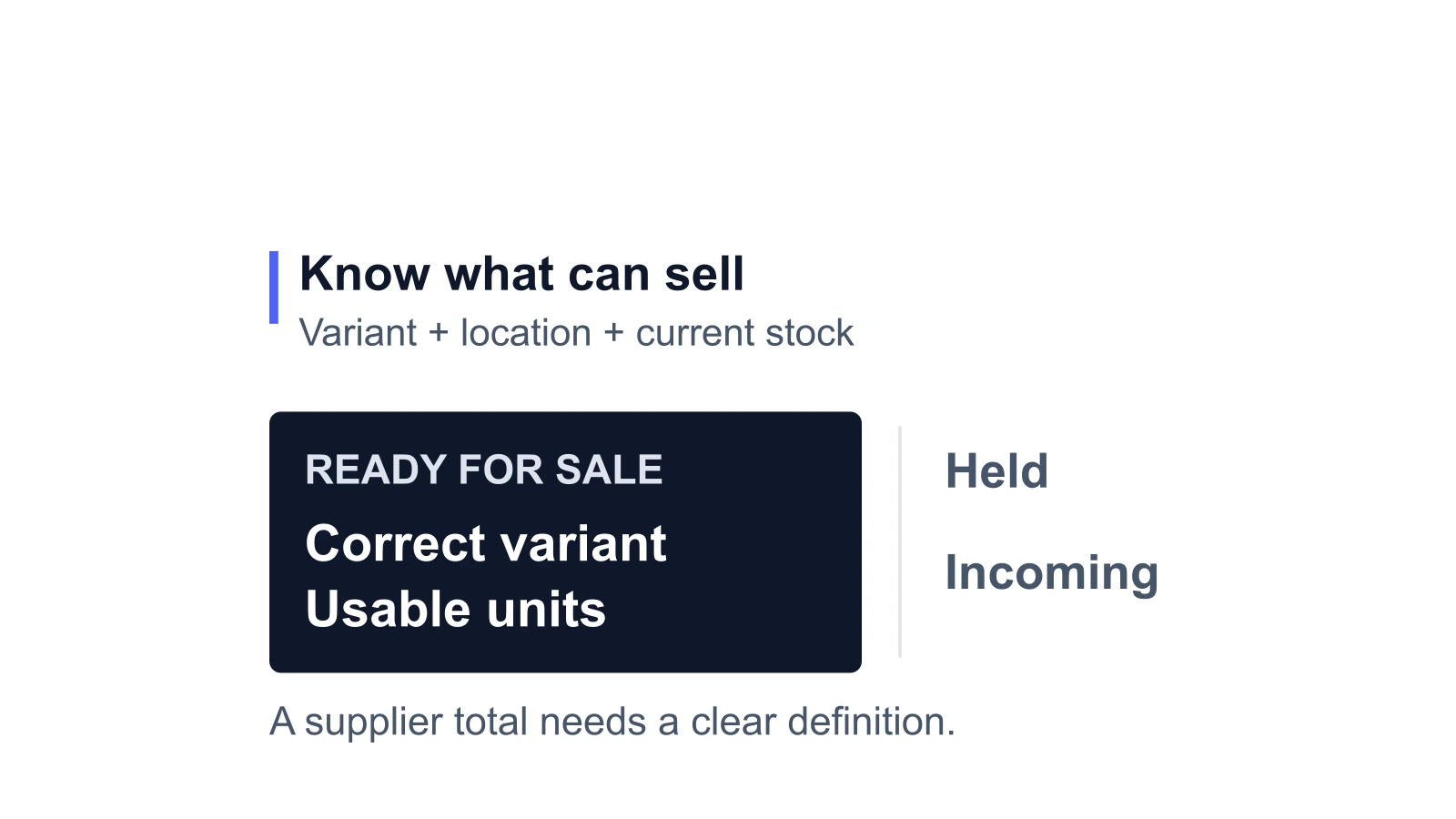
Dropshipping inventory management means controlling what your store can sell while a supplier holds the physical stock. Start with the exact variant and fulfillment location, establish what the supplier’s quantity includes, and reconcile new orders against that quantity. An automatic update helps only when it brings in usable, current information without restoring units that have already sold.
The practical aim is a defensible sellable quantity for each product. That requires more than displaying the latest number an app received.
01
Start with the supplier’s meaning of stock
Ask what the number represents before deciding how to import it. A supplier may report physical units in a warehouse, units available across a pool shared by many sellers, or an allocation reserved for your store. Those quantities support different selling decisions.
A shared pool of 100 units does not give your store a reservation for 100 orders. Other sellers may consume it between updates.
An exclusive allocation is more useful for a promotion, but confirm what reserves it, how orders consume it and when unused units return to the pool.
- For each variant, establish the supplier SKU, dispatch location, quantity definition and source timestamp.
- Also ask whether the count already excludes accepted orders, reserved units, damaged stock and your own recent purchases.
“Available” without that explanation can conceal several different calculations.
Record the mapping at variant level. A total for a T-shirt product cannot establish availability for a particular size and color, and stock in one warehouse may not serve the shipping option selected at checkout. These are useful questions when qualifying a dropshipping supplier, before an app turns its feed into storefront quantities.
02
Read Shopify quantities without importing the wrong assumptions
Shopify uses specific inventory states. The definitions below apply to Shopify; a supplier’s fields named “reserved” or “held” may follow different rules.
| Shopify state | Meaning for the store |
|---|---|
| On hand | Units at the location, including available, committed and unavailable stock |
| Available | Units that can currently be sold |
| Committed | Units set aside, including for unfulfilled orders and other supported commitments |
| Unavailable | Units excluded from sale, such as damaged stock, quality-control holds or safety stock |
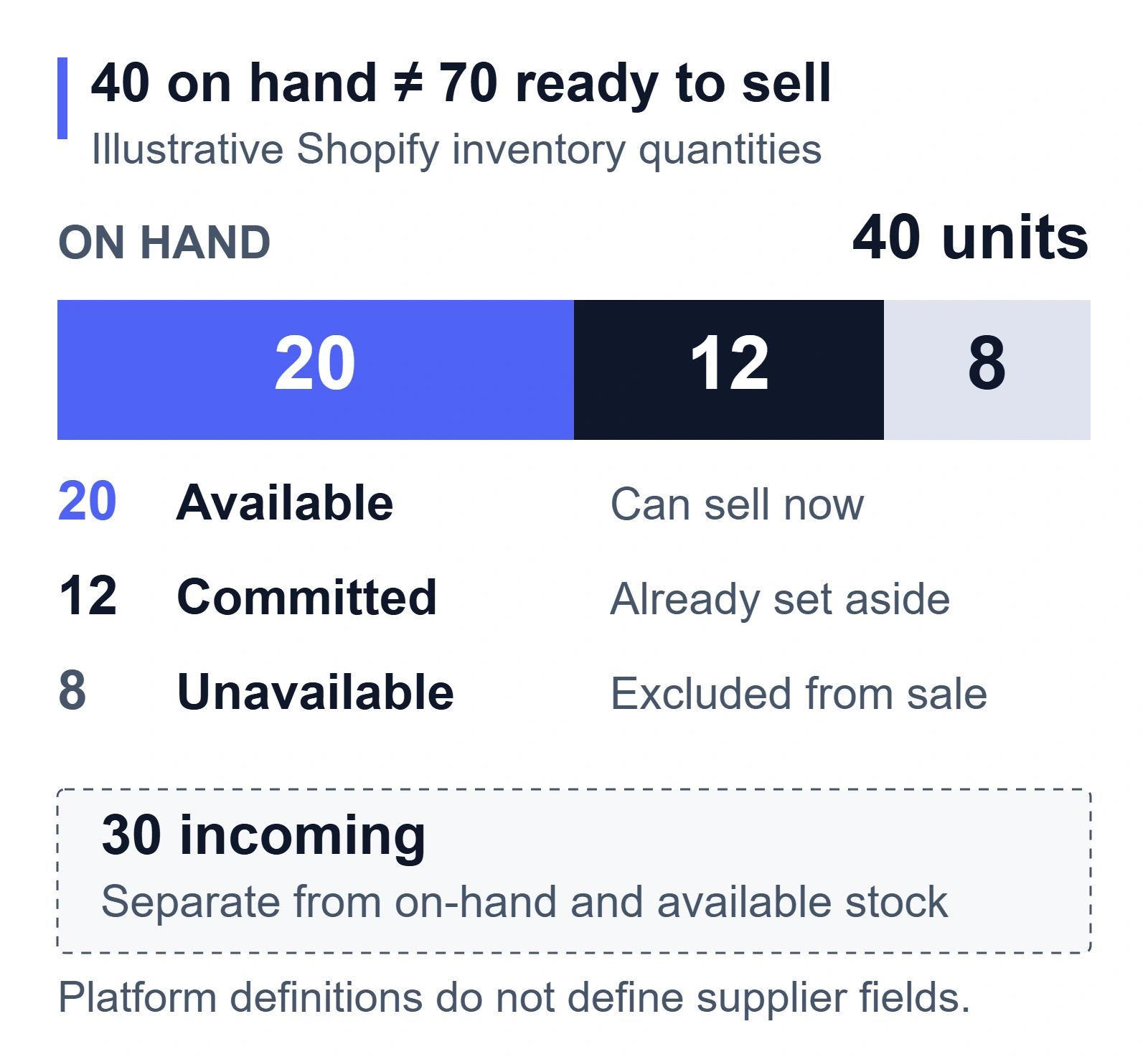
| Incoming | Units on their way; they are not available for sale before receipt |
In an illustrative Shopify location, 40 units on hand could consist of 20 available, 12 committed and 8 unavailable. Another 30 incoming units sit outside those 40. The storefront should not treat the whole 70 as ready to sell. These relationships follow Shopify’s inventory-state definitions; the quantities are illustrative.
Agree with the integration provider on which supplier field updates which Shopify state and location. Replacing a location’s on-hand quantity with a supplier’s global warehouse total can create a plausible-looking number with the wrong meaning. A Shopify app may manage inventory for its own fulfillment location, so inspect that arrangement before adding a second stock feed.
03
Count each sale once, even when updates arrive late
The difficult period is often the gap between a sale in your store and the supplier’s next acknowledgement. During that gap, the source feed may still contain units your customers have already bought.
Consider an illustrative allocation of 20 units reserved for your store.
- The supplier’s 9:00 a.m. available quantity already excludes its existing commitments.
- Since that snapshot, your store has sold six more units that the supplier has not yet included.
- You also choose a four-unit buffer for this example.
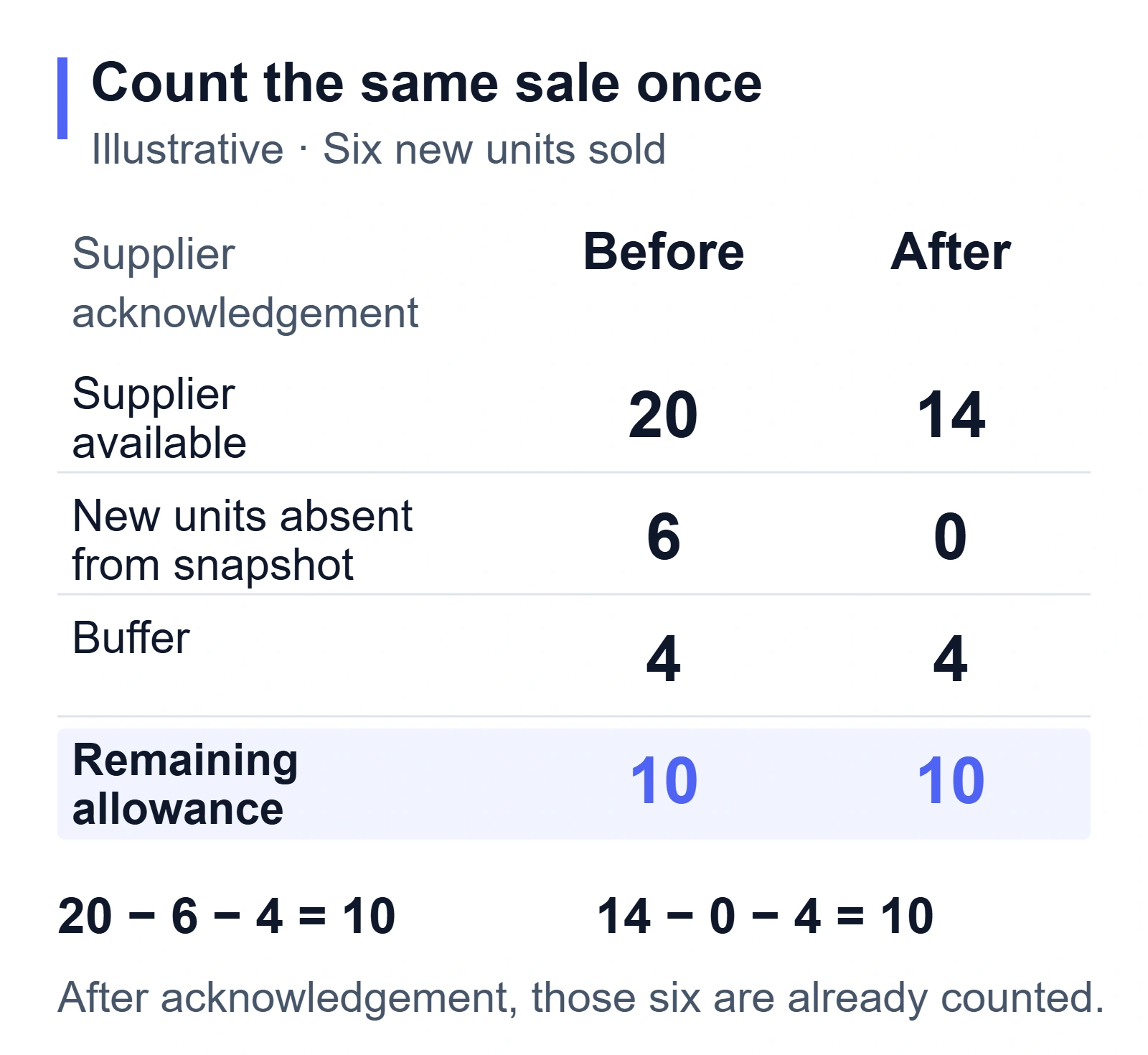
The remaining sellable allowance is 20 − 6 − 4 = 10 units. The six-unit deduction represents only new commitments absent from the supplier snapshot. The four-unit buffer is an assumption for this example, not a recommended setting for every store.
At 9:30 a.m., the supplier acknowledges those six units and reports 14 available. They are now included in the supplier’s reduction, so the pending deduction becomes zero. The allowance remains 14 − 0 − 4 = 10 units.
| Reconciliation point | Supplier available | New commitments absent from that snapshot | Buffer | Remaining allowance |
|---|---|---|---|---|
| Before acknowledgement | 20 | 6 | 4 | 10 |
| After acknowledgement | 14 | 0 | 4 | 10 |
Subtracting the six units again from the new 14 would reduce the allowance to four unnecessarily. Replaying the old 20 as fresh stock can cause the opposite problem: it can reopen units that have already sold.
This is a requirement to discuss with your connector provider, not an instruction to deduct six units again from Shopify’s Available quantity.
Shopify already accounts for local commitments. The integration needs to reconcile those commitments with the upstream snapshot so the same sale is counted once across the two systems.
The necessary evidence is which orders the source quantity includes.
- A newer timestamp is helpful, but it does not by itself prove that a particular order has been acknowledged.
- Ask how the connector matches order acknowledgements to quantity updates and how it handles updates that arrive out of order.
- If it cannot distinguish them, lower exposure and use supplier confirmation before increasing the selling limit.
04
Check what automatic updates actually do
“Automatic” describes who runs the update. It does not establish how fresh the underlying stock is, which variants are covered or what happens when the source stops responding.
For example, DSers’ current automatic inventory-update documentation describes daily checks with mapping requirements and conditions that determine when quantities update. That is a reason to inspect the settings and behavior of your actual connection rather than assume every automatic stock feed is instantaneous.
Check the source-generated time as well as the last successful import. A successful import at noon can still contain a quantity generated yesterday.
- Decide how old the source is allowed to become for the products involved and what the store should do after that point.
- A fast-selling shared item may need sales paused sooner than a slow item with a confirmed exclusive allocation.
Designate one system to write each variant’s quantity at each location.
A supplier app, a spreadsheet import and a second stock app should not take turns overwriting the same number without an agreed reconciliation process. Use an app’s supported settings or ask its provider to establish this control; avoid manual adjustments that the next scheduled update will silently undo.
For occasional manual updates, Shopify’s inventory CSV workflow offers a current on-hand value that can be checked against the store before a change is applied.
- Retain that safeguard and review rejected rows instead of clearing the current value just to force an import.
- It does not catch every availability change: a sale can move units from Available to Committed while total On hand stays the same.
When an update fails, keep the last valid source time visible and assign someone to resolve it. Restoring the connection should include checking the quantities and acknowledgement coverage before reopening stock, particularly if orders continued arriving during the outage.
05
Set the stock limit before the promotion starts
A promotion changes the consequences of stale information. Before increasing traffic, confirm how many units are actually allocated to your store, which recent sales are missing from the feed and how much availability remains after your chosen buffer.
Count physical units rather than just orders.
- A two-pack consumes two units, and a bundle may draw on several supplier SKUs.
- If a bundle contains a component with uncertain stock, its other components do not make the bundle available.
Size a buffer around the exposure you can explain: sales during the update gap, shared-channel demand and the reliability of the supplier’s allocation. Review it when those conditions change.
A buffer can reduce overselling risk; it cannot reserve a shared pool or guarantee that another seller will leave enough stock for you.
In Shopify’s online store, inventory tracking normally stops purchases when the available quantity reaches zero or below.
- The Continue selling when out of stock setting changes that behavior.
- Check it before a promotion and use it deliberately for an arrangement such as a clearly explained preorder.
- Do not enable it simply because stock exists at a location that is not configured to fulfill online orders.
Decide in advance who can pause the promotion or reduce the selling limit when the source becomes too old, a supplier withdraws an allocation or the observed count disagrees with the feed. That decision is easier before the campaign creates more commitments than the supplier can confirm.
If stock is already unavailable, follow the out-of-stock response process to stop further commitments, review affected orders and verify replenishment before reopening the variant.
06
Receive and return units without reopening unusable stock
Incoming inventory is useful for replenishment planning, but it does not make today’s orders fulfillable. Keep the expected receipt separate from stock that is already available at the relevant location.
Shopify’s standard receiving workflows can move received stock into Available.
- If your operation requires an inspection hold, arrange that hold before receiving and releasing the units.
- An inventory app may handle the states differently, so verify the actual receipt behavior against the official state documentation.
The receipt should establish which variant arrived, how many units passed inspection and how many remain held. The dropshipping quality-control guide explains what to verify before treating a received item as usable stock.
Handle cancellations and returns with the same attention to physical status.
A canceled customer order does not always mean an already-dispatched supplier unit is back on the shelf.
A refund does not make a damaged return sellable.
Agree on the event that restores availability, including who confirms that event.
If repeated replenishment gaps justify holding an allocation, compare the costs and delivery implications through warehousing and 3PL planning. Stock positioning can improve control, but the quantity records still need to distinguish usable, committed, held and incoming units under the system you actually use.
07
Test one variant through the failure cases
Choose a low-risk variant and record the source quantity, Shopify location and state quantities before testing. Shopify recommends using a test order when checking initial inventory setup; extend that check to the failures that matter for your connection.
- Place an order and confirm that the correct number of units becomes unavailable for another sale at the intended location.
- Let the supplier acknowledge the order, then confirm the next stock update neither restores the sold units nor deducts them twice.
- In a safe test arrangement supported by the provider, replay an older update or simulate a feed outage. Check whether the stale value is rejected or flagged and whether the agreed selling limit takes effect.
- Cancel an unshipped test order and check the configured restock behavior. Separately verify what happens after supplier dispatch; those cases may require different handling.
- Receive a test quantity that requires inspection. Confirm it stays excluded from sale until the required release, then check the final available count.
Record the expected and observed results, including which system made each adjustment. Shopify’s inventory adjustment history can help identify the app, staff member or channel behind a change. If a provider cannot demonstrate stale-update or acknowledgement handling, keep that limitation visible when deciding how much stock exposure to accept.
Availability controls decide what you can sell. Once the sale exists, order release, supplier acceptance and recovery from uncertain responses need their own checks; the automated dropshipping fulfillment guide covers that next stage.
08
Common inventory questions
Do I have to own inventory to manage it?
No. You still control listings, variant mappings, selling limits and customer commitments when the supplier owns the stock. An exclusive allocation may provide more certainty than a shared pool, but its terms need to be confirmed.
How much safety stock should I use?
There is no useful universal unit count. Consider sales during the update gap, other channels drawing from the same pool and supplier allocation reliability. The four-unit buffer in this article is illustrative. A buffer that worked before a promotion may be inadequate during it.
Can I operate without a live supplier feed?
Yes, with a process suited to that limitation: supplier confirmations, conservative listing quantities, scheduled checks and a clear stop-selling rule when availability is uncertain. The amount you can safely offer depends on the stock arrangement and demand, not on whether a spreadsheet or app carries the number.
