
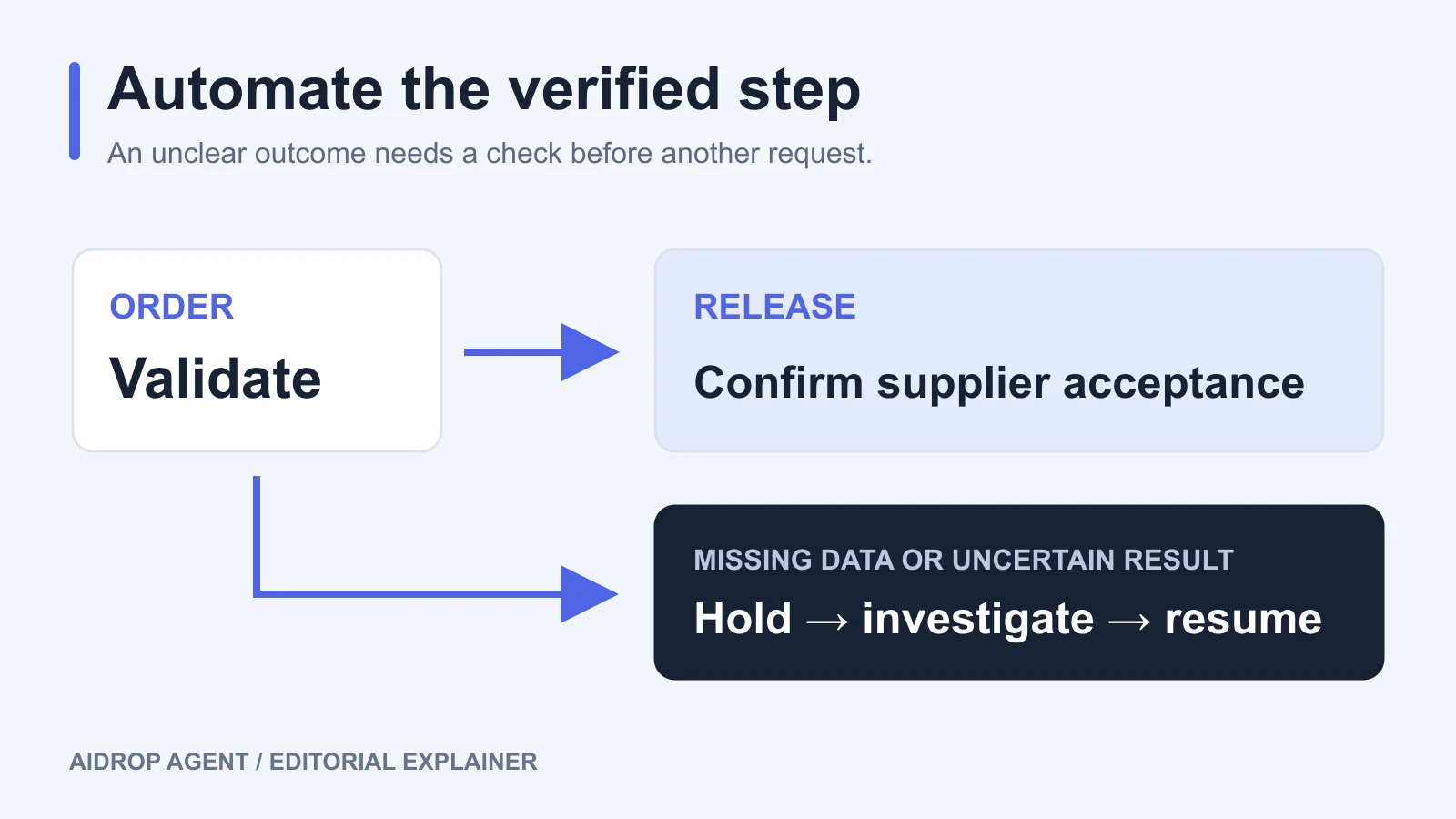
Automated dropshipping fulfillment sends eligible store orders to a supplier or fulfillment service and brings fulfillment and tracking information back to the store. To make it work, connect the two systems, map the products and order fields, define which orders may proceed, and test what happens when a request is rejected or its outcome is unclear.
The provider still has to obtain the correct product, prepare the parcel, and hand it to a carrier. Automation moves instructions and records between those activities. Your settings determine when the provider receives permission to act and when a person must review the order.
Review the full dropshipping fulfillment process before deciding which handoffs to automate.
01
Confirm what your connection actually does
Start by asking the provider how an order becomes a purchase or fulfillment request. Some integrations transfer the order automatically but require you to place or pay for it inside the provider’s app. Others submit eligible orders without that additional action. Shopify documents these differences between fulfillment apps, so enabling a store setting alone does not prove the complete purchase-to-dispatch process is automated. Shopify’s app-fulfillment documentation describes the supported workflows.
Choose one product variant for the initial setup. Match the store variant to the supplier’s exact product and variation, then confirm quantity, packing instructions, shipping service, destination fields, and any customer note that changes fulfillment. Give each field an agreed source. A warehouse should not have to guess whether a newer note overrides the packing instruction already attached to the order.
Keep the store order number, line-item quantities, and provider order reference together. For a bundle, document which supplier items make up one store unit. For a product with several sizes or colors, test the actual variant identifiers rather than assuming the product title will be enough.
Also confirm purchasing prerequisites: whether a funded account is required, who approves a changed product or freight cost, and which destinations or product types the connection cannot handle. These conditions differ by provider. An order can arrive correctly and still be unable to proceed.
For AIDrop, the Shopify integration page explains that the connection method is confirmed during onboarding and may use an app, API, CSV, or a managed manual workflow. Do not assume a native app or a supported field until the actual method has been agreed and tested.
02
Decide which orders can release before enabling automation
A paid order is one input to release. It does not tell you whether the variant is mapped, whether the address is usable, or whether a review is still pending.
Write the release conditions in terms your store and provider can both observe. A practical starting point is:
- The payment state meets the store’s approved payment policy.
- Any required risk review has finished and has an approved outcome.
- The ordered variant and quantity match the provider’s product record.
- Stock, packing instructions, destination, and shipping service meet the agreed rules.
- No unresolved hold, cancellation, or customer change prevents fulfillment.
Set explicit hold reasons for orders that fail these checks. “Missing apartment number” gives the support team something to request. “Automation failed” does not tell them what to fix.
Timing matters on Shopify. Its Order risk analyzed trigger runs after Shopify’s fraud analysis finishes, rather than immediately when an order is created, and it does not cover third-party risk assessments. If release depends on that analysis, a workflow that runs at order creation can act too early. Shopify’s trigger documentation establishes that timing and scope.
Some orders do not receive the same fraud recommendations as ordinary online card orders, and analysis availability depends on the store and payment setup. Treat “no recommendation” as a case requiring an explicit policy, not as an automatic low-risk result. Verify the conditions in Shopify’s fraud-analysis documentation against your store.
Before switching on automatic requests, confirm that a paid-order setting, a Flow workflow, and the supplier app cannot each release the same order independently. Use one agreed release path, or require the provider to demonstrate how overlapping triggers are handled. A review rule is useful only if another connection cannot send the order around it.
Shopify can place manual or automated fulfillment holds, and more than one hold can apply. Resolve the relevant issue and check whether other holds remain before release. For split orders, inspect the affected fulfillment rather than relying only on the order’s overall label. Shopify’s hold documentation explains those behaviors.
03
Check the provider’s acknowledgment
After sending a request, verify that the provider received and accepted it. In Shopify’s supported app workflow, the request can be accepted or declined; a decline returns the order to an unfulfilled state and can include an explanation in the timeline. Requested, accepted, and physically shipped are different milestones. Shopify’s fulfillment workflow shows where those responses appear.
Decide what your team will inspect when a response is missing. At minimum, keep the original request reference, its time, the affected items and quantities, and any provider order number. Agree how the provider confirms a purchase or release when the store has not received the update.
That confirmation is especially important when software displays a timeout. A timeout describes what the sending system failed to receive. It does not, by itself, establish whether the other system acted.
04
Recover an uncertain order without buying it twice
Consider this fictional example. Your store submits an order for one blue travel bag. The provider creates the purchase, but the response does not reach the store. The order still appears in a failed queue. Someone presses retry, and the provider receives another instruction for the same bag.
Whether that creates a duplicate depends on the connection’s safeguards. Before using retry in production, ask the provider to demonstrate what happens to a repeated request for the same order and items. The outcome should be visible in the records, not inferred from a success banner.
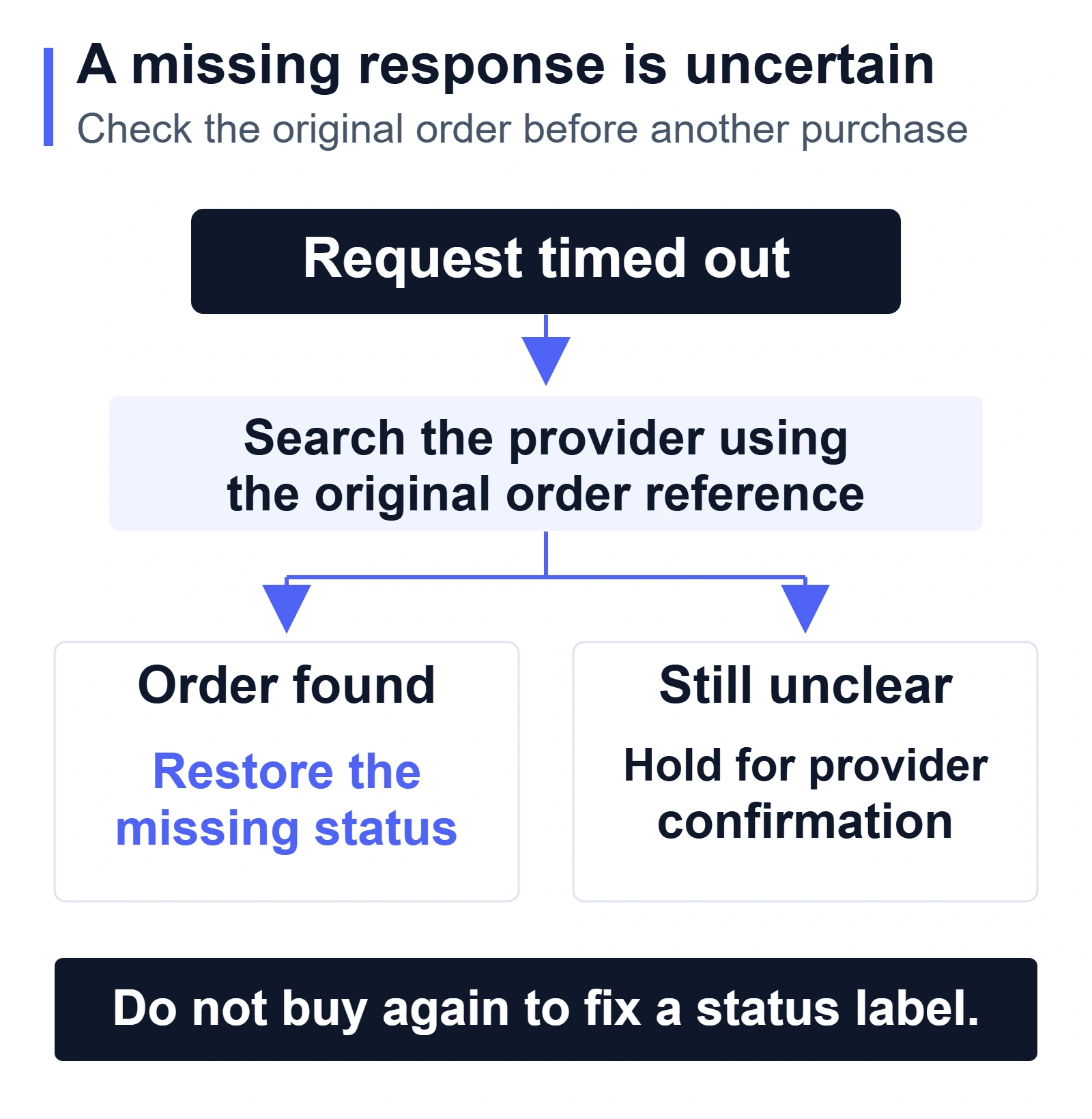
Handle the three common situations differently:
- The provider explicitly declined the request. Read the reason and correct it: a product mapping, missing destination field, unavailable item, or another confirmed blocker. Check for an existing provider order before resubmitting the original store order through the approved path.
- The request has no confirmed outcome. Search the provider’s records using the original reference. If the provider already has the order, restore the missing acknowledgment or status link. If neither system can establish what happened, keep the order under review until the provider confirms whether it can be submitted again.
- The provider accepted the request, but the store is behind. Repair the returned status. Do not create a second purchase to make the store’s label look correct.
For custom connections, this is also a development concern. Shopify warns that webhook events can arrive out of order and that delivery is not always guaranteed; it recommends periodically comparing records with Shopify. Duplicate handling and reconciliation therefore belong in the connection’s acceptance criteria. The exact implementation depends on the API and provider—do not assume every action automatically prevents duplicate purchases. Shopify’s webhook documentation explains these delivery limits.
05
Confirm cancellation after the provider has accepted
A customer’s change request becomes harder once the provider has begun work. Check the fulfillment state before promising that an address change, cancellation, or replacement can be applied.
For an accepted Shopify fulfillment request, cancellation requires a response from the assigned service. Some services cannot cancel work already in progress, and a cancellation request can be rejected. A submitted request is therefore not proof that the physical work has stopped. Shopify’s cancellation-request documentation describes that limitation.
Record the provider’s confirmation before releasing a replacement order or sending the same items to a different fulfillment location. If cancellation is rejected, explain the available next step to the customer based on the actual shipment state and your policy. Keep the customer refund decision separate from the question of whether the provider can stop the parcel.
Changing the store’s status is not a substitute for contacting the provider. Shopify also cautions that bulk cancellation actions do not automatically stop a third party from fulfilling an order already in progress. Shopify’s bulk-fulfillment guidance makes this distinction explicit.
06
Test the failure cases before expanding the order volume
Agree on a safe test method with the provider first. A storefront test order does not necessarily exercise real purchasing, carrier handoff, or the same risk analysis as a customer payment. Use a supported sandbox, simulation, or controlled order as appropriate, and document which parts were actually exercised.
| Test | Result you need to see | Stop expansion if… |
|---|---|---|
| Valid order | Correct variant and quantity reach the provider once; the acknowledgment and agreed shipment information return. | Items differ, duplicate orders appear, or the return record cannot be matched. |
| Missing field or unmapped variant | The order pauses with a specific reason and an assigned person. | It disappears into an error queue or is released anyway. |
| Uncertain response and retry | The team can find the original outcome; a repeated request does not produce an unintended second purchase. | The provider cannot distinguish the original order from the retry. |
| Cancellation after acceptance | The provider’s acceptance or rejection of cancellation is visible. | A store-side status change is treated as confirmation. |
| Split fulfillment | Each item retains its own quantity, hold, and shipment result. | One completed parcel makes an unresolved item look complete. |
| Missing status update | Comparing the records exposes the missing update and restores it without repeating physical fulfillment. | Recovery requires recreating the customer order or buying again. |
Keep the evidence from these tests: store order reference, provider reference, expected result, observed result, and the person who approved release. Fix the failed case and repeat the affected test before expanding. A clean order proves the connection can work; the failure cases show whether your team can operate it when it does not.
After launch, review unacknowledged requests, open holds, rejected cancellations, and shipments missing returned tracking. Compare the store and provider records regularly so a missed update can be found even when no alert arrives. Choose the review frequency around the order volume and the last point at which an intervention still helps the customer.
If you need to establish the wider responsibilities first, use the dropshipping supply-chain overview. For an implementation review with AIDrop, bring the field map, release conditions, and one failed or held order to the automated fulfillment service review. Those records make the connection and recovery requirements specific enough to evaluate.
07
Frequently asked questions
Does automatic fulfillment mean the order is shipped immediately?
No. The automation can submit or approve work, but product availability, preparation, packing, and carrier handoff still have to happen. Check which event your provider uses to return a fulfilled or shipped status.
Can I automate all orders from the start?
Enable the products, destinations, and conditions you have demonstrated. Keep unresolved mappings, special instructions, and uncertain request outcomes visible for review. Expand when the additional cases have passed their own checks.
What costs should I confirm before choosing a connection?
Ask about the software or connection fee, per-order charges, payment or account-funding requirements, fulfillment and freight charges, and any work billed for exceptions. Confirm who approves a changed cost before the provider places the purchase. There is no single fee structure shared by every automation service.
