
Map every store variant to the exact supplier item, version and pack the customer expects. Keep the store SKU, platform variant ID and supplier pick code separate. Test a neighboring size or color as well as the first one, then hold release whenever the physical match is uncertain.
This is a narrower job than choosing several suppliers. The multiple-suppliers guide explains routing and split delivery across sources. Here the question is simpler and more urgent: when an order line leaves your store, can your supplier identify precisely what to pick?
Explore the broader topic: Dropshipping Inventory Management: Keep Stock and Sales in Sync.
01
Treat the variant as the sellable unit
Suppose a shirt comes in blue and green, each in S, M and L. There are six sellable combinations. Shopify’s variant guidance describes each combination as a variant with its own settings, including possible price, stock, SKU and shipping data.
Its SKU guidance recommends unique SKUs for effective tracking and integrations, and warns that missing or duplicated SKUs can cause sync problems.
Separate the customer option from three identifiers
The customer sees names such as “Blue / M.” Your supplier may use TS-402-B-M, a barcode or a separate internal product ID. An integration may also use the store’s platform variant ID, which is not the same thing as the human-readable SKU. Keep these identifiers in separate columns. A color label can change for marketing; the physical item identity should not silently change with it.
| Store field | What it identifies | Example |
|---|---|---|
| Product title | Customer-facing family | Everyday cotton tee |
| Variant choice | Customer-selected option | Blue / M |
| Store SKU | Your internal sellable unit | TEE-BLU-M |
| Platform variant ID | That record in the commerce system | System-generated numeric ID |
| Supplier SKU | The exact pickable supplier unit | TS-402-B-M |
On a phone, swipe the table sideways to compare every column.
These values are illustrative. The requirement is one-to-one clarity, not this naming pattern. If the supplier sells a two-pack while your page offers one shirt, a matching color and size code still does not make the mapping correct. Pack size, model revision, material and included accessories belong in the check.
Save and reopen the Shopify variant identifiers
Use Shopify’s current SKU instructions and variant-ID instructions for the store side of the map.
Save the SKU
Open Products, select the product, open its intended variant, and edit Inventory → SKU. Save and reopen that same variant to check the text. Match case exactly and keep a separate code for a different physical size/color; adding a supplier code to the store does not configure an app mapping.
Capture the platform ID
For a product with options, the variant page URL includes /variants/ followed by its numeric ID. Record that number with the selected option and SKU, not the parent /products/ number. Even a no-options product has a default variant ID; Shopify documents the product JSON method for finding it.
Keep the actual identifier as text in the worksheet so a spreadsheet does not round a long number. Changing a human-readable SKU must not erase the earlier supplier code and version attached to an already accepted order.
02
Build a map that survives a supplier change
Make each sellable combination traceable
Create a row for every active store variant. Include store SKU and platform variant ID, supplier account and SKU, exact product description, pack quantity, unit cost, current stock source, destination restrictions and the date the row was checked. Add a status such as approved, hold or retired. A supplier feed may show “in stock,” but your store should not sell a row whose physical identity is unresolved.
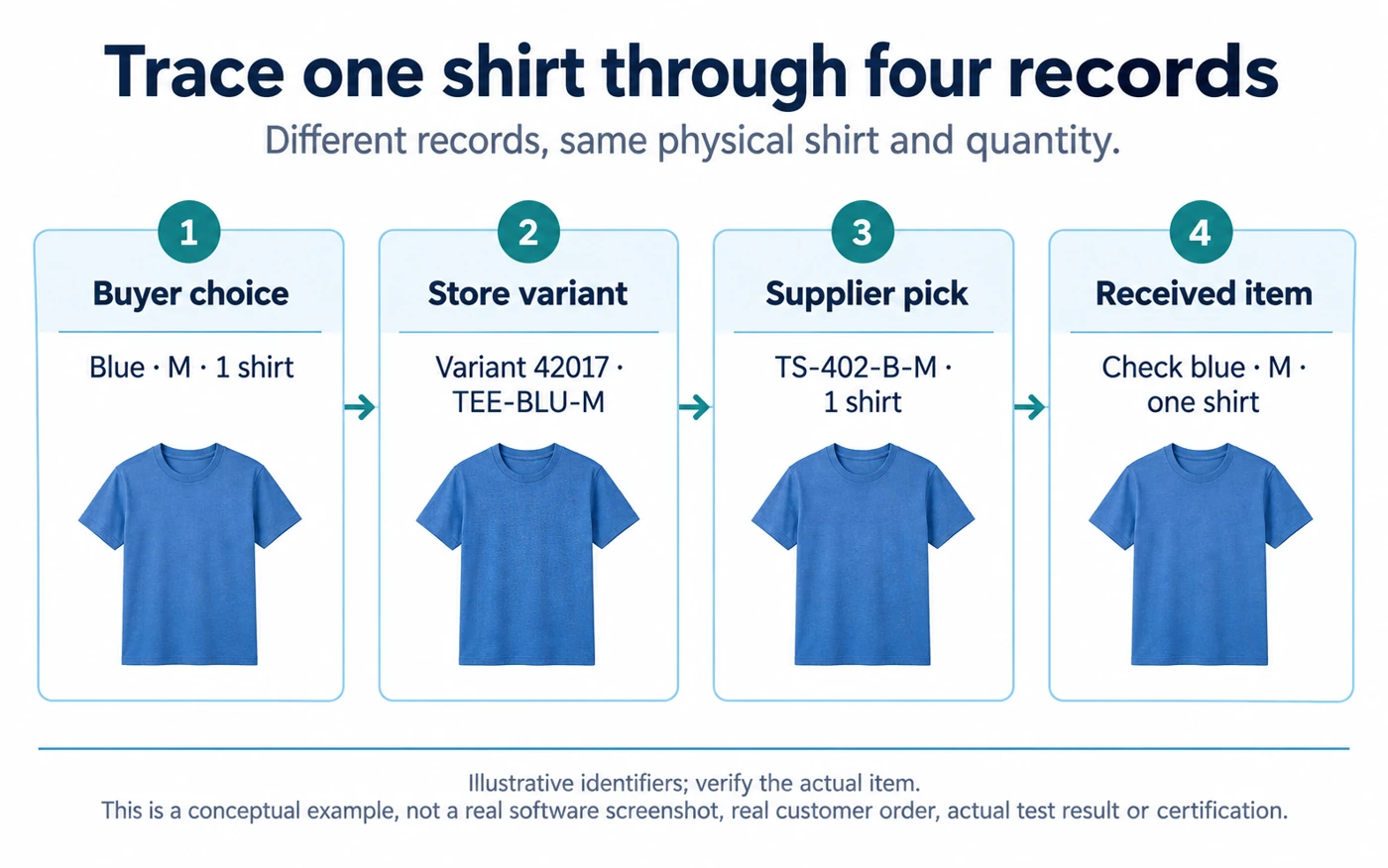
A usable record for the illustrative shirt might read:
- Store variant ID:
42017 - Store SKU:
TEE-BLU-M - Supplier account and SKU: Supplier A ·
TS-402-B-M - Physical item: blue cotton tee, medium, one unit
- Approval evidence: sample v3; example approval 7 October
- Example unit cost: $9.20
- Destination route: US
- Map status: approved
Keep the supplier’s own product URL or specification file beside the row, but do not use a changing product title as the unique key. The sample version and pack quantity make the row useful when someone asks why an order released on a particular day.
Set a simple rule for incomplete rows: if supplier SKU, physical version, pack quantity or destination is unknown, mark hold and prevent automatic order release. A row can be fully populated and still be wrong, so an approved status also needs the date and result of a controlled order. A practical release query is “one store variant maps to one approved supplier item on the current route”; it is not “the spreadsheet cell is nonempty.”
For the six shirts, list six rows. Do not map three sizes to one “blue shirt” parent code and hope the supplier reads a note. If the order API sends only the parent ID, the person packing may never see the size.
Check option mapping in DSers without trusting the import
DSers’ mapping guide distinguishes option-level matching from advanced individual-SKU mapping. This is a supported-app example, not a required integration for every store.
Open the affected mapping
Go to My Products → Mapping for the intended product. Compare store Size Medium with supplier M and store Color Blue with the actual approved supplier blue. Basic mapping combines those option matches. Use the applicable individual-SKU route when the supplier structure, country routing or bundle requires it; verify the feature in your current account.
Reopen and test the neighbor
Inspect the saved Blue/M match and Blue/S separately. They must resolve to the correct different physical sizes, not the same medium pick code copied twice. A new supplier’s navy option cannot silently become the photographed blue. Remapping directs orders; it does not update the storefront description or images.
Save the before/after mapping and effective time, then use the isolated test or agreed pilot to observe the transmitted and accepted supplier line. No DSers setting or order was changed for this example.
Shopify’s fulfillment-order data model distinguishes fulfillment line items and quantities; an app or supplier needs the actual line-item identity in its own workflow. Review your integration’s behavior rather than assuming every app sends the same fields.
Reapprove a changed physical promise
Maintain your own store SKU across supplier changes when it still represents the same customer promise, then update the supplier mapping deliberately. If the new supplier’s “Blue / M” shirt is a different fit, material or pack, do not treat it as the same item simply to preserve the URL. Sample and describe the new version, or create a new sellable unit. The sample guide covers that physical approval.
A two-source example that exposes the trap
A navy fallback does not fulfill blue
Your store sells TEE-BLU-M. Supplier A’s code is TS-402-B-M, and Supplier B’s code is CT-88-NV-M. The second item is navy, not the blue shown on your page. A routing rule that switches to B when A is out of stock could fulfill a different color while the order still says blue. Price and stock may be correct, but the product promise is wrong.
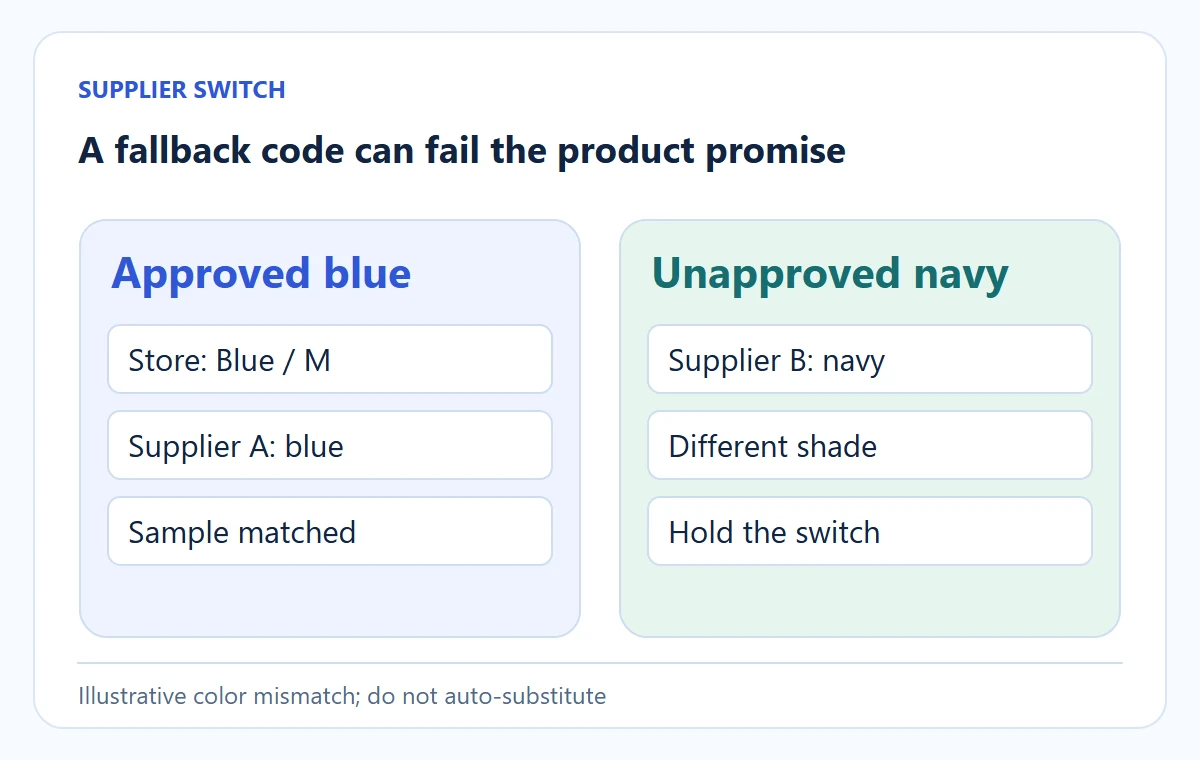
Mark Supplier B as not approved for this store SKU until you compare a sample and update the description with the customer’s consent where appropriate. If B’s item is acceptable but a different shade, create a separate variant or a clearly disclosed substitution choice. A fallback supplier is useful only when it can meet the same specification. This is why routing and item identity must be checked together.
03
Test the mapping in the order system, not only in a spreadsheet
Compare the accepted item with a neighboring option
Run a controlled order for the hardest variant. Capture the store order line as the buyer sees it, then the app or export payload, supplier portal item, quantity and cost. Verify that the supplier accepts that same physical item. Repeat for at least one neighboring variant, because mapping errors often sit between similar colors or adjacent sizes. The test should include a price or stock change if your integration is expected to sync either.
Keep checkout simulation separate from the supplier pilot
Shopify’s test-order instructions can validate checkout and notifications, but a simulated payment may not safely test live supplier automation. Disable or isolate automatic fulfillment during sandbox tests as the platform advises. Then use the supplier’s agreed pilot method to check the real pickable SKU. Keep test and live order IDs separate so neither is accidentally shipped twice.
Check the actual transmitted and accepted item
Pass criteria are observable: the store variant, transmitted identifier and supplier accepted SKU all describe one item; quantity and pack size match; the supplier’s current price is within the approved quote; and the resulting tracking can be attached to the same order line. “App connected” is not a pass criterion.
Check the neighboring variant and the old order
Save the test as a three-column trace: buyer choice → transmitted line → supplier accepted line. For TEE-BLU-M, the first column might show Blue / M, quantity 1; the middle column variant 42017, TEE-BLU-M, quantity 1; the last TS-402-B-M, one medium blue shirt.
A neighboring option catches copied mappings
Next test TEE-BLU-S or a neighboring shade. If both orders produce TS-402-B-M, stop the two affected store variants even if the app reports both orders as “successful.” This small adjacent-variant test catches a copied mapping that a single order cannot.
Keep the old order’s identity intact
When the supplier changes a code, compare a new test order with one open order created under the old map. Do not overwrite the historical supplier SKU in that earlier order’s record.
The question is whether the new mapping applies only to future releases or whether a pending accepted order can be changed safely. Document the supplier’s answer and the effective timestamp. Without that boundary, a bulk edit can make yesterday’s customer order appear to refer to today’s different physical item.
04
Recover a wrong mapping without duplicating the order
Locate the parcel stage before repairing
If a paid order reaches the wrong supplier SKU, first learn whether the supplier has accepted, packed or dispatched it. Put the affected store variant on hold so more orders cannot repeat the mistake. Find every open order created since the mapping last passed a test, not just the one a customer reported. Check physical supplier statuses before resending.
For an unaccepted order, correct the map and submit once through the supported route. For an accepted order, ask the supplier whether the pick can be changed and record the answer.
For a dispatched wrong item, follow the customer remedy and return path; editing a SKU in the store will not change a parcel already with the carrier. The damaged or wrong-item guide explains evidence and recovery when the received product differs from the promise.
Avoid the duplicate-order trap. If an app automatically retries when you change a mapping, a manual resend can create two supplier orders. Record the original supplier order ID and ask the app or supplier whether it has been cancelled before initiating another. The order-release checklist provides a broader hold-and-release sequence.
| Observed failure | Likely question | Safe next action |
|---|---|---|
| Correct variant in store, wrong item at supplier | Did the integration use the wrong supplier SKU or stale mapping? | Hold the row and compare the transmitted order to the current map |
| Supplier SKU correct, wrong parcel received | Was the pick/pack operation wrong or did the supplier alter the item? | Preserve package, label and product evidence; resolve with supplier and buyer |
| Variant vanishes from supplier feed | Is the item discontinued, temporarily out of stock or renamed? | Pause sale until a new exact item is approved |
| Same order appears twice upstream | Did retry plus manual resend create duplicates? | Reconcile supplier IDs before requesting a cancellation or new fulfillment |
On a phone, swipe the table sideways to compare every column.
05
Audit a catalog without checking only the easy rows
Once a store has hundreds of variants, a person cannot reread every product page after each feed update. Export the live variants and the supplier mapping into one audit table.
Inspect the fields a join cannot certify
Flag a store SKU that maps to no supplier item, two store variants that map to one physical supplier item without an approved bundle rule, a supplier item that changed pack size, and a price or weight that moved beyond a chosen tolerance. Review flagged rows before letting automation release orders.
This can be a spreadsheet at small scale. The important part is a join key you trust: store variant ID plus store SKU on one side, approved supplier account plus supplier SKU on the other. Product title is a weak join key because titles can be translated or rewritten.
Flag duplicate and incomplete map rows
Use this sample worksheet; these are your records, not supplier API fields. A = store variant ID, B = store SKU, C = supplier account, D = supplier SKU, E = destination route, F = units in the pack and G = approval status. The example sells one shirt per variant; adapt bundles deliberately.
Count one route’s rows
Put =COUNTIFS($A:$A, A2, $E:$E, E2) in I2. It must return 1 for one current approved choice on that variant/route. If you copy another active row for variant 42017 and route US, both counts become 2; reconcile the choice rather than releasing twice.
Flag a missing or incompatible choice
Use =IF(OR(A2="", B2="", C2="", D2="", E2="", F2<>1, G2<>"approved", I2<>1), "HOLD", "CHECK ITEM") in J2. A blank identifier, unapproved row or two-pack for this one-shirt offer must show HOLD. A complete unique one-unit row shows CHECK ITEM, not automatic approval.
Test the blank-code and copied-row cases, then restore the approved data. The formula cannot detect a navy shirt, changed fabric or stale sample under a correctly typed code. Compare the actual physical specification and the accepted order line before releasing. Keep alternate supplier candidates in a separate table rather than mixing them with the current release map.
A feed may reuse an item code after a product revision; add the supplier’s version or last-approved date when that risk exists. Shopify’s variant-ID guidance explains why that platform ID can help reconcile a migration or bulk update; it is not a replacement for identifying the physical item.
Recheck physical items in clean rows
Sample the audit’s “clean” rows too. A formula can confirm that codes match while the supplier’s photo or material changes under the same code. Choose a few high-volume and high-risk SKUs for physical recheck. If an important difference appears, hold the affected family and ask whether other versions changed. The supplier-change article covers that decision in more detail.
Find the affected orders by map version
Keep an audit log with the feed version, date, flagged rows, reviewer and release decision. If ten wrong-size orders are discovered later, the log tells you when the mismatch first appeared and which orders might be affected. Without it, the team may repair the listing but miss buyers whose parcels are already moving.
06
Make changes a controlled release
Give each map a date and owner. When a supplier revises an item code, price, version or warehouse, hold the affected rows, compare the new physical item and test one order before reopening. If the change is only a code rename for an identical item, record the supplier’s confirmation. If material, dimensions or performance changed, update the product page and possibly the SKU itself.
The finished output is not a perfect spreadsheet. It is a store where every live variant has an approved supplier item, an observed order path and a repair rule when the match breaks. AIDrop Agent can help verify China-side samples, supplier codes and pick/pack instructions for that path. Send the store variant list and supplier item information through the review form if the physical mapping or fulfillment handoff is unclear.
07
Frequently asked questions
Can two variants share one SKU?
If they are different physical items, sharing one SKU makes stock and fulfillment ambiguous. Shopify recommends unique SKUs for variants and warns about duplicates in integrations. A bundle or special workflow can be an exception only if the system and supplier are deliberately configured for it.
Is a store SKU the same as a supplier SKU?
No. Your store SKU identifies what you promise to sell; the supplier SKU identifies what the supplier can pick. Keep a verified mapping between them. They may happen to use the same text, but that alone does not prove the items match.
What if a supplier changes a code but not the product?
Record the old and new codes, obtain confirmation that the physical specification is unchanged, update the mapping and test a controlled order. Do not let an automatic feed rename silently reassign open orders.
Can a barcode replace my SKU map?
A barcode can help identify a physical item, but your store may sell bundles or variants under its own code, and a supplier can still change pack contents. Keep the approved relationship between the buyer’s option, store variant and supplier pickable unit. Use the barcode as additional evidence where available.
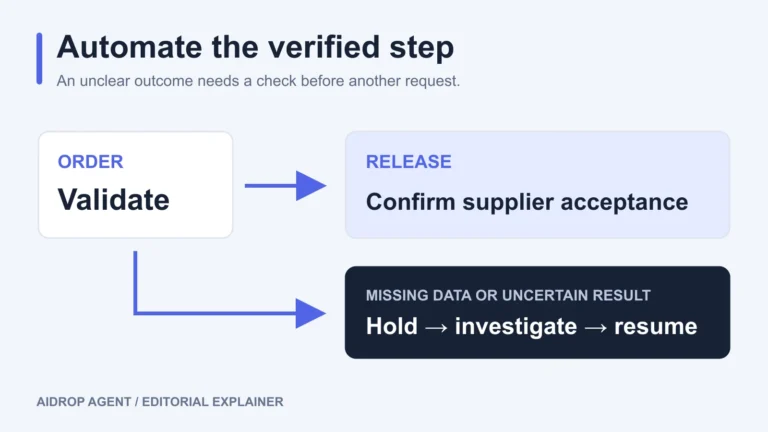
Automated Dropshipping Fulfillment: Setup, Holds, and Recovery
Set up automated dropshipping fulfillment with product mapping, release rules, supplier acknowledgments, holds and safe recovery after
Dropshipping Order Release Checklist: From Hold to Supplier Acceptance
Release a dropshipping order only after its payment terms, risk review, exact items, delivery details, stock, supplier
