

A dropshipping order is ready for release when its payment terms, risk review, exact items, delivery details, stock, supplier cost and shipping promise have been checked. You then send a uniquely identified instruction to the supplier and record whether it was accepted. Sending the order is not the same as the supplier accepting it, and acceptance is not proof of dispatch.
That distinction matters when a customer has paid but the supplier cannot find the variant, a connector times out, or an address correction arrives after packing starts. A release checklist gives the person handling the order a clear decision: send it, hold it for a named reason, or cancel it through the appropriate process.
Use this alongside your wider dropshipping fulfillment process. The fields below are a suggested operating record, not a claim that every supplier or app supports the same controls.
01
What must be true before you release an order
Begin with the order as the customer bought it. Compare the current order, not an earlier notification email, with the instructions you intend to send. A customer may have changed the quantity or canceled a line after the original notification.
| Check | Evidence to review | Hold the affected shipment when |
|---|---|---|
| Order identity | Store order number, line IDs and latest revision | Another instruction may already exist, or changes remain unresolved |
| Payment | Actual transaction status or an approved credit/COD arrangement | Payment is pending, expired or inconsistent with the agreed terms |
| Risk review | Relevant payment-provider assessment and resolved exceptions | Required review is incomplete or an unresolved warning needs investigation |
| Product | Supplier SKU, variant, quantity and any customization | Mapping is missing, ambiguous or different from the customer’s selection |
| Stock | Availability for the exact variant and intended dispatch location | Stock is unconfirmed, short or reserved for another order |
| Recipient | Customer-confirmed delivery details and route requirements | Essential address information is missing or the route cannot serve it |
| Cost and service | Current supplier total, selected route and handling commitment | A price change lacks approval or the customer promise is no longer supportable |
| Product and packing instructions | Approved product requirements and relevant packing specification | A required check, label or instruction is unresolved |
Not every order needs a person to recheck every field. Reliable, unchanged orders can pass agreed automated checks. Exceptions need a person with authority to resolve the particular problem. A rule that approves a missing apartment number cannot also decide whether a substitute product is acceptable.
Do not make “all cells filled in” the only standard. An old stock count is filled in but may be unusable. A payment marked paid manually may need reconciliation. A supplier’s “yes, available” reply may refer to the product family rather than the blue, large variant the customer selected.
02
Use one release record for the exact items
Keep the release record beside the order, in the system the operator actually uses. It should be possible to reconstruct what was approved without searching through several chats.
At minimum, record:
- Store order and shipment reference: the store, order number, line IDs and shipment group.
- Approved item details: supplier SKU, variant, quantity and customization text or file version.
- Delivery instruction: the verified address, shipping service and customer-facing promise.
- Commercial approval: supplier price, shipping and handling charges, currency and payment arrangement.
- Outstanding holds: reason, owner, evidence needed and next review time.
- Release decision: approver or automation rule, timestamp and instruction revision.
- Supplier result: acceptance, rejection or unknown outcome, with supplier order number when available.
Share only the customer information needed to fulfill the order. Payment card details and an entire fraud investigation do not belong in a warehouse instruction. Keep sensitive review evidence in the appropriate access-controlled system.
Here is a hypothetical completed entry after two problems have been resolved:
| Field | Example record |
|---|---|
| Store order | W1048, line 1, revision 2 |
| Item | Organizer ORG-BLUE-L, quantity 2 |
| Address change | Customer confirmed apartment 4B; revision 2 replaces revision 1 |
| Stock confirmation | Supplier confirmed two units at the selected dispatch location |
| Holds | Address resolved by support; stock resolved by purchasing |
| Release | Revision 2 approved and sent; supplier asked to disregard the earlier unaccepted instruction |
| Supplier acceptance | Supplier order S7781 accepts revision 2, quantity 2 and agreed handling date |
The supplier reference closes a specific gap: you can ask about S7781 if the order stops moving. A chat message saying “received” may merely acknowledge that someone has seen your message. Ask whether the supplier has accepted the actual items, quantity, cost and dispatch commitment.
03
Check payment and risk separately
Payment status answers whether the transaction meets your payment terms. Fraud review answers whether the available signals justify further investigation before you send goods. Neither answers whether the supplier has stock.
Shopify distinguishes pending, authorized and paid states. An authorization is a cue to capture within the provider’s authorization period; it is not the same state as captured payment. Shopify also notes that an order can be marked paid manually. Reconcile unusual cases with the actual provider or approved account terms instead of trusting the badge alone. See Shopify’s order-status definitions.
For an ordinary prepaid retail order, resolve a pending payment before releasing goods. For an agreed credit or cash-on-delivery arrangement, the approved terms may permit a different sequence. Write that exception into your rules so operators do not improvise it on individual orders.
A low-risk recommendation is not a promise that a payment cannot be disputed. Shopify’s fraud-analysis guidance describes indicators that help you investigate and recommends waiting if analysis is still pending. The issuing bank ultimately determines disputed card reversals. Some order types do not receive a recommendation, so a missing result needs an explicit rule rather than an automatic assumption of low risk.
An automation can otherwise race ahead of the assessment. Shopify’s Order risk analyzed trigger runs when Shopify’s assessment finishes, not immediately at order creation, and does not represent third-party assessments. If your supplier app imports orders earlier, verify where you can prevent purchasing or dispatch until the review is complete.
Test this with the actual integration before relying on it. A visible store hold does not prove that an external supplier has stopped an order it already accepted.
04
Resolve holds without clearing unrelated problems
Give each hold a reason someone can act on. “Order problem” is too vague. “Apartment number missing; support to obtain confirmation” tells the next operator what must happen.
Suppose W1048 has two problems: its apartment number is missing, and the supplier has not confirmed the requested blue variant. Support receives the apartment number at 10:15. The address hold can be cleared, but the stock hold remains. The order still cannot be released under the original promise.
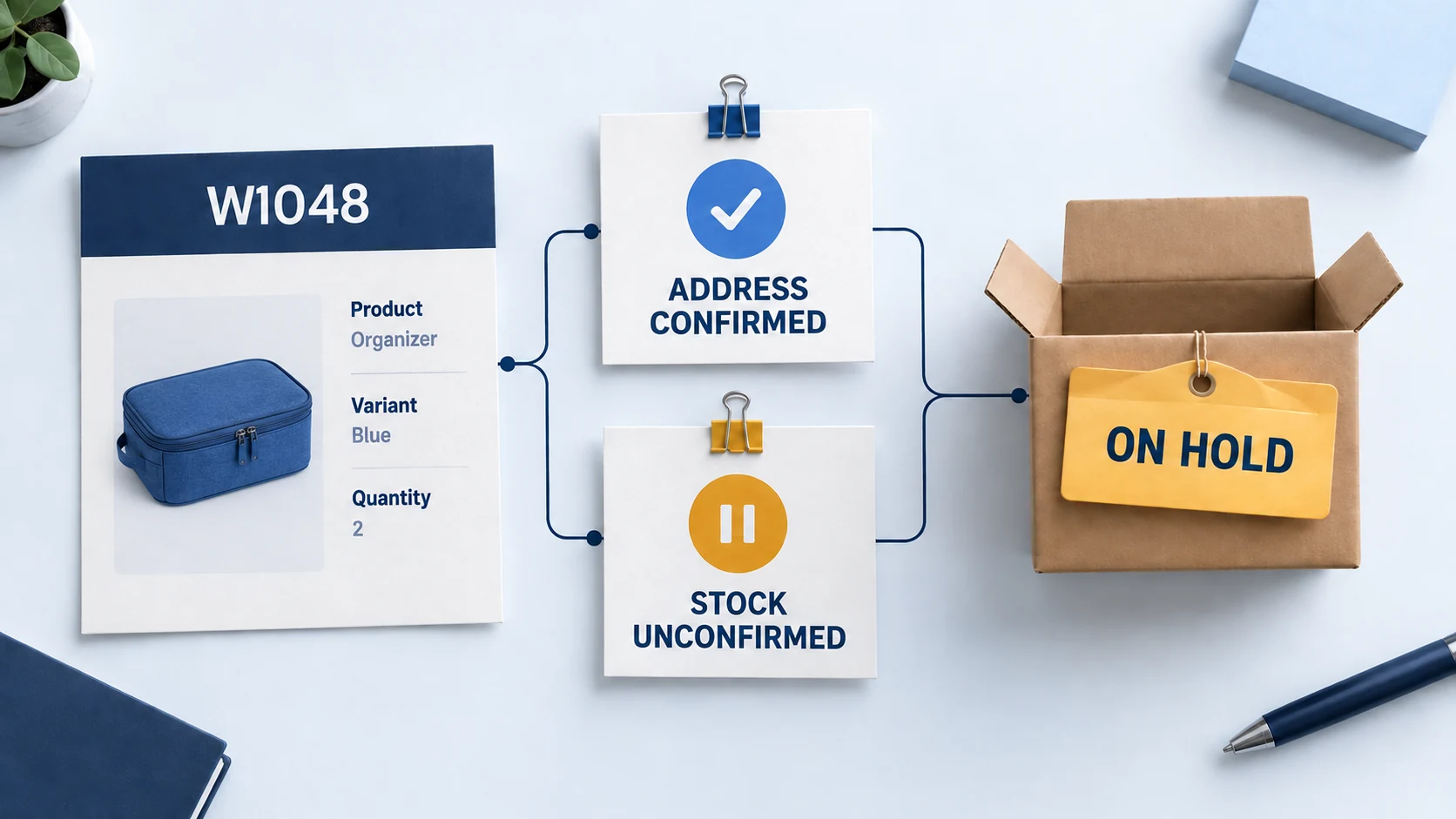
If the supplier offers a black variant, that is a proposed change, not a stock confirmation. Obtain any necessary customer approval and update the item mapping before proceeding. Do not silently substitute it because the photograph looks similar.
| Hold | Owner | Evidence needed to clear it |
|---|---|---|
| Address incomplete | Customer support | Customer confirmation recorded on the current order |
| Variant unavailable | Purchasing or supplier coordinator | Exact stock confirmation, or an approved alternative |
| Risk review pending | Authorized payments reviewer | Documented decision under the store’s review policy |
| Supplier cost changed | Person with pricing authority | Approved revised cost or a decision to cancel/requote |
| Product check unresolved | Quality or compliance owner | Required evidence and a recorded release decision |
| Submission result unknown | Integration operator | Existing supplier order found, or verified absence before retry |
Shopify’s fulfillment hold action can affect fulfillment orders by location; a workflow supplied with one fulfillment order can hold only that one. Check the scope when an order contains several shipments.
For custom integrations, Shopify also supports multiple holds and warns against releasing all holds when only one problem is resolved. Its multiple-hold documentation explains why releases should identify the intended hold. Ask your app provider how it handles this; the presence of a general “release” button is not enough evidence.
05
Send the instruction and obtain supplier acceptance
Before sending, compare the final instruction with the approved record. Confirm that the shipping service, item quantities and address match. If your supplier requires payment before accepting or processing the order, complete that step through the agreed channel and retain the payment reference.
Track these events separately:
| Event | What it establishes | What it does not establish |
|---|---|---|
| Approved for release | Your checks are complete for the specified instruction | The supplier has received it |
| Submitted | The message or request was sent | The supplier accepted the work |
| Accepted | The supplier confirmed the defined order | The parcel has left the warehouse |
| Dispatched | Shipment evidence supports handoff into the delivery process | The customer has received it |
Agree what counts as acceptance with the supplier. It could be an accepted status with a supplier order number or a written confirmation referencing the order. Include the items, dispatch location, price and handling commitment; otherwise two parties may be agreeing to different versions.
Set the follow-up time using the supplier’s actual working hours and cutoff. If orders must be accepted before a daily cutoff to meet handling time, an unresolved submission near that cutoff needs attention immediately. There is no universal “wait 24 hours” rule that fits every route.
06
Handle edits, split shipments and uncertain retries
An order change after submission requires a new decision. Pause further action where possible, ask the supplier whether the existing instruction can be changed, and obtain a clear response. Editing the address in the store does not necessarily change a label already printed elsewhere.
If the supplier has accepted the old instruction, get confirmation that it was amended or canceled before releasing a replacement. Where the parcel has already moved, investigate the available carrier correction or recovery process and explain the actual options to the customer.
When a connector times out
A timeout tells you that your system did not receive a timely response. The supplier may still have created the order. Search its dashboard or contact the supplier using the original store reference before submitting again.
Use a stable order reference across retries. If the integration supports duplicate prevention through an idempotency key or equivalent control, verify its behavior with the provider. Do not assume a newly generated reference will be recognized as a retry of the original purchase.
When only part of the order can ship
Record the released lines and quantities separately from those still held. Confirm the extra shipping cost and whether the customer’s promise allows separate deliveries. The supplier should receive an instruction for the released items only, and the customer should know what remains outstanding.
The unreleased balance needs its own next action. Marking the entire store order fulfilled because one parcel was sent makes it harder to spot the missing item. Accurate inventory management helps here, but it does not replace a clear shipment record.
07
Keep the customer promise while an order is held
A hold protects an order only if someone reviews it before the customer commitment is missed. Include the promised shipment date and the next internal review time in the record. Contact the customer with a useful explanation when the promised service cannot be met.
For US orders covered by the FTC’s merchandise rule, shipment promises need a reasonable basis. If the seller cannot ship on time, it must follow the applicable delay-notice, consent and refund requirements. The FTC’s prompt-delivery guidance explains the process. A supplier’s delay does not make the retailer’s promise disappear.
Distinguish dispatch from delivery in that message. “We expect to ship on Thursday” means something different from “it will arrive Thursday.” Do not send a shipping confirmation simply to quiet a support request when the parcel is still waiting for release.
Keep a copy of what you told the customer and their response. If you cancel, ensure the payment action, store order and supplier instruction agree. A refunded order can still be shipped accidentally if the supplier never receives or accepts the cancellation.
08
Check the handoff after release
At the end of a working period, review exceptions rather than just counting orders submitted. Look for approvals without submissions, submissions without acceptance, accepted orders past their handling commitment, and dispatch records without usable tracking.
For each exception, assign one owner and a next action. Five people viewing an unresolved order is not the same as one person being responsible for contacting the supplier.
A small reconciliation sample is also useful: take a store order and trace its released quantities to supplier acceptance, payment where required, shipment and remaining balance. Check a changed order and a split shipment as well as a straightforward one. Those are the cases most likely to expose a weak handoff in an automated fulfillment workflow.
The useful outcome is a record that lets another operator answer three questions: what was approved, what the supplier accepted, and what still needs attention.
09
Order release questions
Can I release every paid order automatically?
Only if your rules also handle the other relevant conditions, including risk review, exact item mapping, availability and unresolved changes. Paid status alone does not establish that the order can be fulfilled correctly.
Does a tracking number mean the supplier has shipped?
A number or label can be created before carrier handoff. Check the carrier events and the supplier’s dispatch evidence. Describe the status you can support rather than treating every label as an accepted parcel.
Should one held item block the whole order?
That depends on whether a split shipment is permitted and workable. Separate the lines, costs and customer communication, then release only the approved quantities. Do not let a partial release clear unrelated holds.
What should I do if I cannot tell whether the supplier received the order?
Keep the result marked unknown, search by the original order reference, and obtain confirmation before retrying. An uncertain response is a reason to reconcile, not evidence that the first submission failed.
