
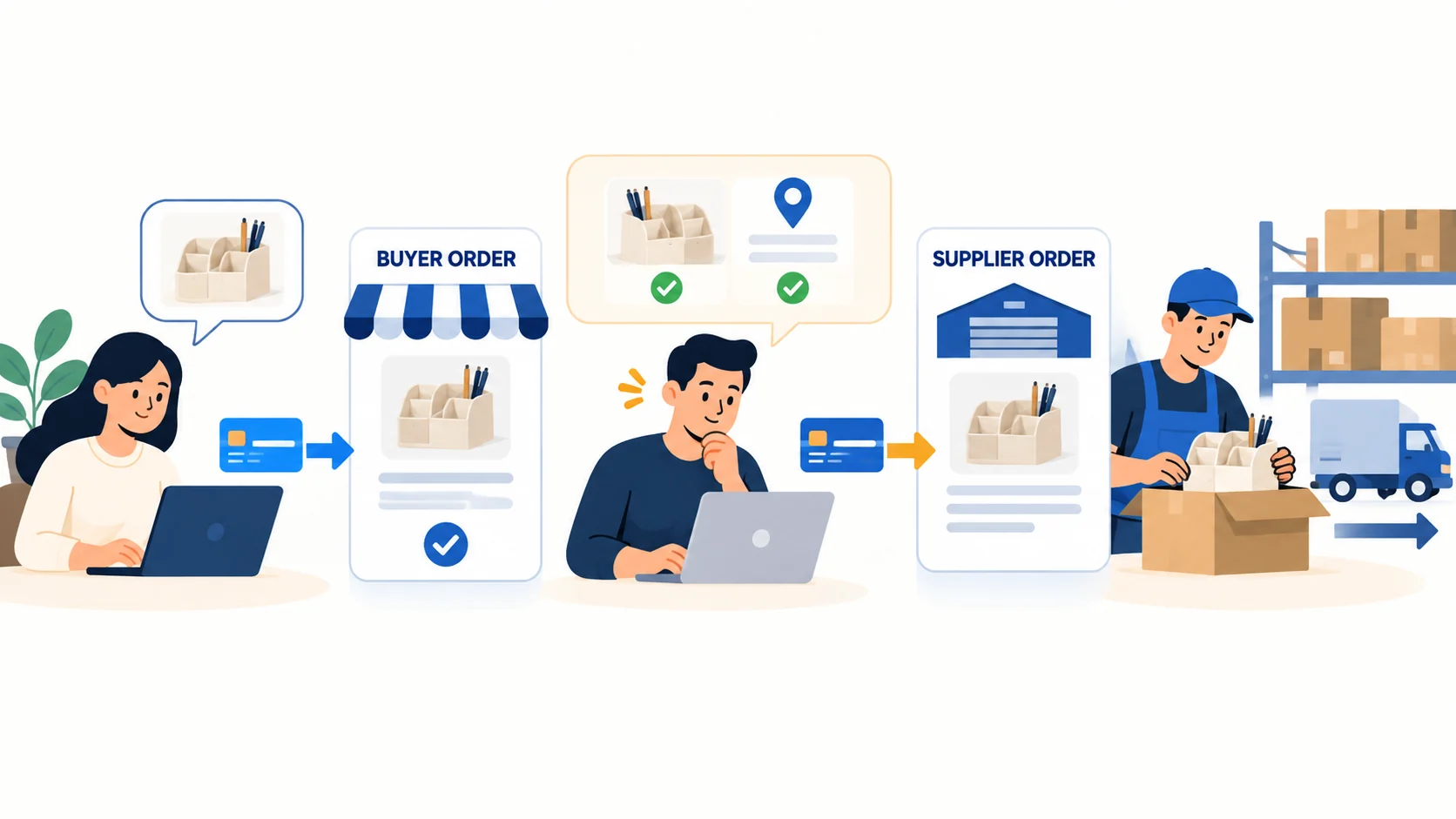
Yes, you can dropship through a Square Online store. Square lists Spocket as a connection for ready-made supplier products, and Printful can connect for items printed after a sale. The part that deserves your attention is what happens after a customer pays. A Spocket order can appear in your account without the supplier having been paid: you still review it, choose Checkout and place the supplier order. A Printful order follows a different billing path. In either case, your Square shipping charge is the amount the customer sees, not proof that it covers the provider’s bill. (Square’s Spocket listing; Spocket order help; Printful’s Square guide)
You do not need to build a huge catalog to find out whether this works. Put one ordinary product through the whole path: product page, customer checkout, supplier payment, actual shipment and customer update. That small test answers more than a screenshot saying an app is “connected.”
If you are still comparing storefronts, start with our dropshipping platform guide. This page stays with Square Online and the first order you would need to fulfill.
01
Choose the route before adding a product
Picture a simple desk organizer in two colors. You want a supplier to hold and ship it while your Square site takes the sale. Spocket is the ready-made-product route Square currently names. If the product is a notebook printed with your own design only after purchase, Printful is a better example of a print-on-demand route. If you already have a supplier outside either connector, you can use Square as the storefront and pass the order manually—but you must build that handoff yourself.
| Route | What connects | What still needs your attention |
|---|---|---|
| Spocket ready-made product | Products and store orders can sync with Square Online | Check the correct variant, inspect the supplier charge, press Place Order, pay the supplier and follow tracking |
| Printful custom print | Designed products and orders can flow to Printful | Add a valid Printful billing method, set Square shipping rates yourself, inspect the design and handle buyer issues |
| Outside supplier | No connector is assumed | Send the paid SKU/address securely, fund the supplier, obtain carrier proof and update the Square order |
On a phone, swipe the table sideways to compare every column.
Square’s Spocket app listing confirms that products can be pushed into Square Online with inventory updates; Spocket’s connection instructions describe installing the app and connecting the store. Those facts establish a supported route. They do not establish that every product, destination or supplier is suitable for your business.
The first decision: use Spocket for a ready-made item, Printful for a product made with your artwork, or a written manual process for an existing supplier. Do not mix their billing and shipping instructions into one imagined “Square automation.”
02
Make one item genuinely purchasable in Square
Before discussing suppliers, make sure the desk organizer can actually be bought. Importing or creating a Square item is only the first step. Square says an item must be assigned to the correct online sales channel to be purchasable on that website. It also offers a “direct link only” visibility mode, which means the product can exist without appearing in normal browsing or search. (Square item setup)
Inspect both actual color choices
For the test organizer, open both color variants and check the product page as a customer would. Does the correct color appear? Is the listing visible where you expect it? Can the buyer add it to a cart on the site you actually intend to use? If an app says “imported” but the product cannot be found, inspect the Square channel and visibility settings before blaming the supplier.
Shipment is different from pickup
Next, select Shipment as the item’s online fulfillment method. Square distinguishes carrier shipment from in-store pickup and local delivery. If you only enabled pickup, a buyer in another state has no working shipping path, however good the product page looks. (Square fulfillment methods)
The shipping profile is the other half of the checkout. Square lets you set countries and customer-facing rates at either order or item level. Those settings decide what a buyer in a particular destination sees and pays. They do not negotiate the supplier’s charge. Start with one destination you truly plan to serve. Complete checkout to the payment stage and record the displayed shipping charge before you publish the product widely. (Square shipping rate profiles)
Test the exact variant and destination
There is a reason to keep the first test narrow. A supplier might ship the blue organizer to California but not the cream one to Alaska; a provider may charge more for the second destination; a Square shipping profile may omit a country. A green “connected” badge cannot answer those questions. The checkout and provider quote can.
03
Follow the buyer order into Spocket
Inspect the original supplier order
After the cream organizer is paid in Square, open Spocket → Orders and match its original store order, variant and address. Click Checkout to inspect the product, destination shipping and transaction charges. Add any necessary supplier instructions.
Place and verify the purchase
Press Place Order only after the details and charge are acceptable. Keep the resulting confirmation and provider reference beside the paid Square order. Spocket’s published flow charges the retailer and alerts the supplier; unclear results need an order/charge check before retrying.
That creates two separate receipts:
Buyer receipt
The paid Square order records the cream organizer and checkout shipping charge. Match its variant, address and order reference.
Supplier receipt
Keep Spocket’s purchase confirmation and charge for the same order. An imported order alone does not show that the supplier was paid. Spocket order help.
One paid receipt does not pay the supplier
If the buyer paid but no supplier purchase is recorded, resolve any variant or address error, inspect the charge and fund the correct order. Spocket confirms that purchase first and provides tracking after processing and shipment. Until then, the parcel has not shipped.
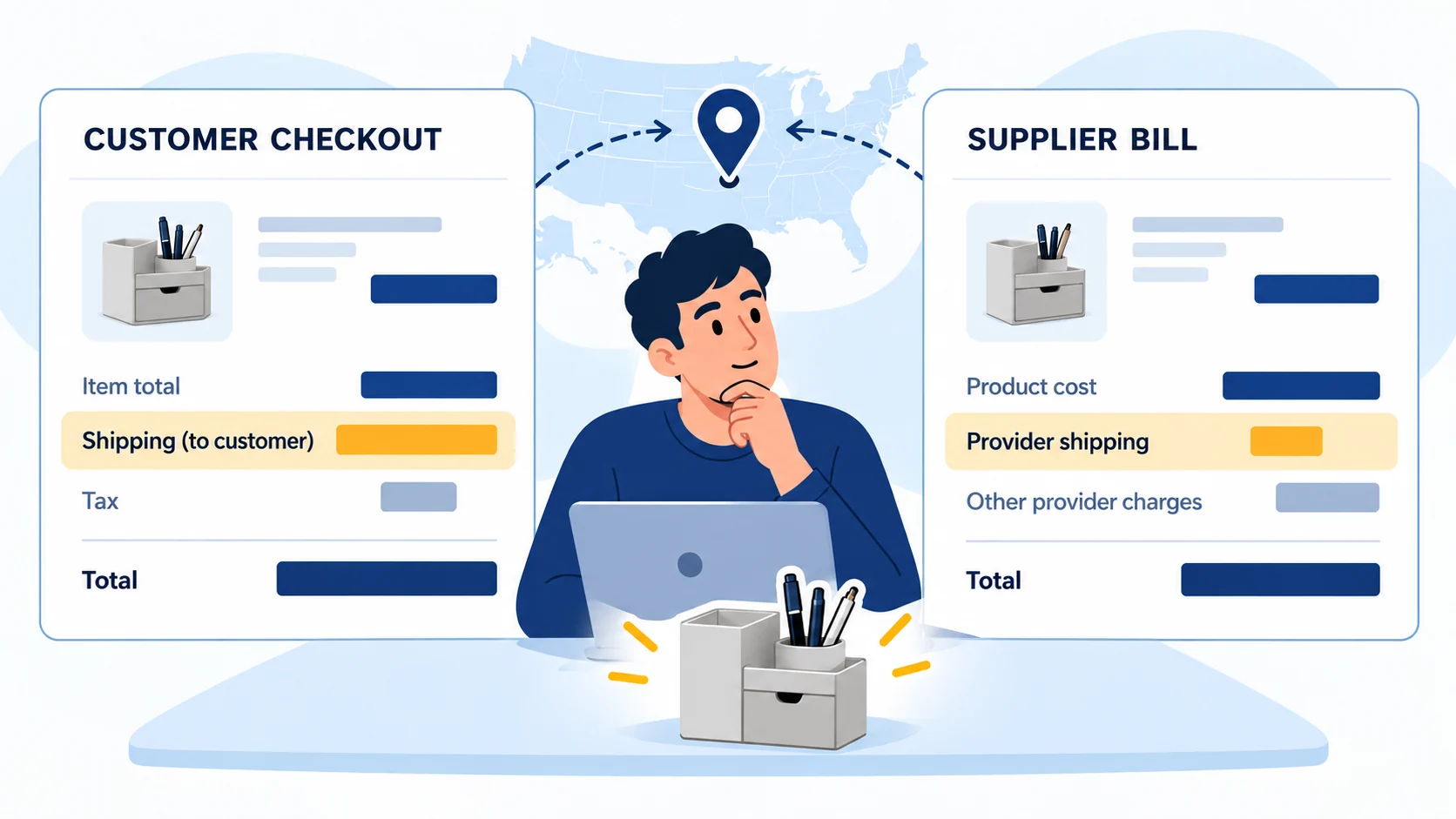
The buyer’s $5 does not cover $9 shipping
The two charges can also leave a cash gap. In an illustrative, not quoted, order, Square charges the buyer $5 for shipping while Spocket quotes $9 for that same destination. You must cover the $4 difference alongside the product cost and fees, and you may need to pay Spocket before Square’s proceeds reach your bank. If either the price or available card balance fails, hold the offer before buying traffic. Square’s own dropshipping guide separates customer payment from supplier charges.
Price the complete organizer order before deciding the $4 shipping gap is affordable. Keep the $5 customer shipping charge and $9 provider shipping charge from the earlier illustration; all other figures below are invented teaching amounts, not Square, Spocket or AIDrop prices.
One organizer sale · USD planning example
Customer and provider: $40 for the item plus $5 shipping gives a $45 customer receipt. A $22 supplier item plus $9 provider shipping requires $31 for the provider purchase.
Remaining amount: assume $1.60 payment processing, $6 advertising, $1 app allocation and $2 for expected remedies. Planned contribution is $45 − $31 − $1.60 − $6 − $1 − $2 = $3.40 before tax and unlisted overhead. These fees are assumptions, not published processor rates.
Cash before payout: ten $31 supplier bills need $310. Holding $45 for one full buyer refund makes $355 before advertising, app bills and tax. That held reserve is available cash, not another expense. Reconcile actual remedies against the allowance without counting the same loss twice.
Keep the Shopify warning out of the Square steps
The Spocket help page also contains a Shopify-specific warning about a “Request Fulfilment” control. That control is not a Square instruction. Use Square’s own shipment settings and your actual provider status when you close the order.
04
Printful is a different path, not another name for Spocket
A notebook with your artwork is not picked from a supplier shelf in the same way as the organizer. Printful’s Square connection lets you make the product in Printful and send the listing to Square Online. Its help also tells you to add a Printful billing method so that, when a synced Square order imports, Printful can charge you for production and shipping. (Printful Square connection)
Check imported visibility and the actual design
Check the item in Square after the push. Printful notes that a Square Sync setting may mark newly imported items unavailable online; the exact label may differ in your dashboard. Then inspect the design, size, color, retail price and shipping eligibility. A mockup is useful for a listing, but it does not prove that a finished print meets your standards. If print placement or paper feel matters, order a sample before promising it to buyers.
Set Square shipping yourself. Printful’s Square guide says those rates need manual configuration. It also notes that Square profiles do not reproduce Printful’s separate first-item and additional-item shipping charges. A flat rate that covers one notebook may be wrong when someone buys two. Test both carts and compare the checkout charge with Printful’s actual bill for the same destination. (Printful shipping setup for Square)
Save a notebook shipping profile, then compare two carts
Printful’s guide still shows an Online settings route. Square’s own current instructions, rechecked October 11, say general shipping settings have moved. Use the path shown for your account.
Set the item and rate
Open Settings → Account & Settings → Fulfillment methods → Shipment → Add new profile. Choose Item and add the actual notebook. Add the countries, then Add rate. Set the customer-facing name, shipping fee and Per order or Per item treatment, then Done and Save.
Check the saved checkout
Reopen the profile. At the same allowed destination, test one notebook and then two; compare the checkout total with Printful’s actual product/quantity estimate. Per-item charging and one flat charge give different totals. Fix the profile or offer when it fails to cover the real bill.
No universal rate is supplied here. The documented profile does not duplicate Printful’s separate first-item/additional-item pricing automatically; saving a rate is not a completed paid or shipped test.
Our print-on-demand guide covers when designing a product after purchase makes business sense. Here the Square-specific point is simpler: confirm the product is visible, the provider has a working billing method, and the customer’s Square shipping charge has been tested against the provider charge.
05
Keep one test record that exposes a broken handoff
Use a controlled order at a permitted destination before buying traffic. It can be your own paid test, following the providers’ current test-order options if offered in your account. Record the actual order, provider bill and carrier event; a workflow that merely looks automated has not passed the test.
| Check | Record from the real order | Stop and fix when… |
|---|---|---|
| Square listing | Site channel, cream SKU, visible product page, Shipment method | The imported item is hidden, the wrong color is offered or only pickup is available |
| Buyer checkout | Allowed destination, item price, customer shipping charge and paid Square order | There is no shipping option, a wrong rate, or a buyer-facing promise you cannot support |
| Provider handoff | The same SKU and address in Spocket Orders, or the matching Printful order | The provider has no order or shows a different variant/address |
| Provider funding | Actual supplier product and shipping charge, successful Spocket Place Order or Printful billing | The supplier has not been paid or the real charge breaks the order economics |
| Carrier event | Provider’s dispatch confirmation, carrier and tracking | The only “shipped” evidence is a Square status or an estimated date |
| Buyer update | Accurate tracking and a clear route for a problem or refund | The customer is told it shipped before a real parcel handoff |
On a phone, swipe the table sideways to compare every column.
The $5/$9 example shows why your customer shipping line must be checked against the provider bill. Square also offers real-time carrier rates for certain order profiles, but that does not make Spocket’s or Printful’s bill identical. Weight-based Square rates can even treat an item with no weight data as zero. Test the real cart, actual destination and provider bill rather than trusting the word “real-time.” (Square rate options)
A mixed cart can create two provider parcels
The same distinction matters in a mixed cart. Two products from different suppliers may become two parcels with two provider shipping charges, while the Square customer sees one checkout total. Do the two-item calculation before assuming a one-item test proves every basket is viable. If your selling price cannot cover product, provider delivery, payment processing, returns and acquisition costs at a competitive checkout total, change the product or offer before scaling ads. There is no universal Square dropshipping margin that replaces that calculation.
06
Do not send a “shipped” message ahead of the parcel
Wait for the actual parcel handoff before sending a “shipped” message. Square’s shipment instructions include In progress and Shipped statuses; Shipped notifies the buyer and locks shipment details. Check them before confirming.
Enter tracking before marking this order shipped
Use the current Square shipment instructions only after obtaining the provider’s real carrier and tracking information.
Find and inspect this shipment
Open Orders & payments → Orders → Shipments → To-do; an account may show Invoices & payments or Payments instead. Select the correct order, compare its variant and address, and add or check its carrier and tracking. Try the carrier result before sending the notification.
Mark only the dispatched shipment
Choose Actions → Mark as shipped, enter the correct tracking and carrier, and confirm. Reopen the shipment and check its buyer-facing link. Square sends an email and locks the carrier, tracking, address and shipped-on information at this stage; a supplier purchase confirmation alone is not dispatch.
For unsupported carriers, Square may link to a search rather than the carrier’s status page. Open that buyer-facing link yourself and supply a usable tracking route if needed. This walkthrough has not sent a customer email.
Resolve sold-out cream before paying again
If the cream organizer goes out of stock after a buyer pays, you—not the app—have to resolve it. Check whether a truthful alternate item or a later dispatch is acceptable to the buyer; do not silently change the color. If the order cannot be fulfilled as promised, Square documents cancellation before fulfillment and a separate refund action. Coordinate with the provider so you do not pay for an order you have already canceled, then tell the buyer what happened. (Square cancellation and refund help)
07
Is Square Online the right dropshipping storefront for you?
Square Online is a reasonable starting point if you already work in Square, want a modest catalog, and can prove that one connected product passes from buyer checkout to a funded, trackable provider order. Spocket supplies a documented ready-made connection; Printful supplies a documented POD connection. Those are useful options, not a promise that every supplier relationship or shipping policy runs itself.
Fix the broken handoff before expanding
Pause if the product cannot be bought for the intended destination, the provider never receives the order, you cannot fund the supplier purchase, or the promised delivery cannot be supported by actual tracking. Fix that one broken handoff before adding fifty more products. If an outside supplier is the better source, document a manual order relay and assign a person to pay, track and support each order.
For a China-side product that does not fit a ready-made connector, tell AIDrop Agent what you sell and where it must ship. We can discuss sourcing, quality checks, packaging and dispatch coordination. Ask about the specific product and route rather than assuming a native Square app or a universal rate.
08
Frequently asked questions
Does a Square customer payment automatically pay Spocket?
Not in the documented native Spocket order flow. Find the same variant and address in Spocket Orders, review Checkout, then Place Order to fund the supplier purchase. A paid Square receipt and an imported Spocket order do not prove supplier payment.
Will Printful set the Square shipping rates for me?
The reviewed Printful Square guide requires manual rate setup. Test one item, an additional item and any mixed cart against the actual provider bills. A Square rate or carrier estimate does not guarantee it reproduces Printful’s first-item and additional-item charges.
When should I mark the Square shipment Shipped?
After checking the provider’s real shipment information and the correct carrier and tracking. Square’s documented flow sends the buyer a notification and limits later changes to carrier, tracking and address once marked Shipped. An order waiting for supplier payment is not a shipment.

Etsy Dropshipping: What You Can Sell and How to Fulfill It
Check Etsy dropshipping rules, eligible supplies, production partners, listing details and the real costs of fulfilling an
Shopify vs WooCommerce for Dropshipping: Which Fits Your Team?
Compare Shopify and WooCommerce for dropshipping: hosting, maintenance, supplier integrations, operating costs, and the best fit for

Shopify vs Amazon for Dropshipping: Choose Your Selling Channel
Compare Shopify and Amazon for dropshipping by customer acquisition, fees, supplier requirements, brand control, and the selling
