

Choose Shopify when you want a hosted store and have limited capacity to maintain a website. Choose WooCommerce when WordPress is already important to your business and you have reliable help managing the store. Both can support dropshipping. Neither choice establishes that a supplier will ship the correct product or keep inventory accurate.
The practical difference is where the work sits. Shopify includes hosting within its platform. WooCommerce gives you an open-source store built on WordPress, with more decisions about hosting, extensions, and maintenance. Those decisions can be valuable when you need them; they can also consume time before you have a proven offer.
This comparison focuses on operating a supplier-fulfilled store. For alternatives beyond these two, start with our guide to the best dropshipping platforms.
01
Shopify and WooCommerce at a glance
| Decision | Shopify | WooCommerce |
|---|---|---|
| Hosting | Included with the platform | Choose and manage a hosting arrangement |
| Store maintenance | Shopify manages its hosted infrastructure; merchants still manage apps and store settings | Arrange WordPress, theme, and extension updates, backups, and testing |
| Customization | Work within Shopify’s features, themes, apps, and supported extension options | Greater access to the WordPress codebase and choice of extensions |
| Supplier connection | Capabilities depend on the app or integration | Capabilities depend on the extension or integration |
| Cost structure | Subscription, payment costs, apps, and any applicable additional fees | Hosting, payment costs, extensions, and maintenance or development |
| Finding customers | Build an acquisition plan for your store | Build an acquisition plan for your store |
Neither is a marketplace that promises buyers for your listings. Store software supports the sale; it does not create product demand. Advertising, useful content, partnerships, email, or an existing audience still need their own plan.
02
Choose the maintenance responsibility you can support
For a merchant starting without technical help, Shopify removes a significant infrastructure decision. Its pricing page states that hosting is included. You can spend more of the initial setup on your product pages, payment configuration, shipping rules, and supplier connection.
That does not make the store maintenance-free. An app can change, a supplier connection can fail, or a shipping setting can produce the wrong checkout offer. Someone still needs to notice and resolve those problems. The advantage is that managing a separate WordPress hosting environment is not part of the same workload.
WooCommerce gives you more responsibility and more choice. A managed host or agency can do much of the technical work, so choosing WooCommerce does not mean you personally need to write code. It means you need a named owner for that work and a budget for it.
WooCommerce’s update guidance recommends backups and testing updates on a staging site. Testing should include the parts that make a store usable: checkout, payment gateways, shipping, emails, themes, and extensions.
A cheap hosting quote that excludes this work is not directly comparable with a service that includes it. Before deciding, ask who restores the store after a failed update, how quickly they respond, and whether they test the supplier integration as well as the storefront.
03
Compare the supplier connection before the theme
A store can look finished while its order process remains incomplete. Both platforms have integration options, but “supports dropshipping” tells you very little about what an individual connection actually does.
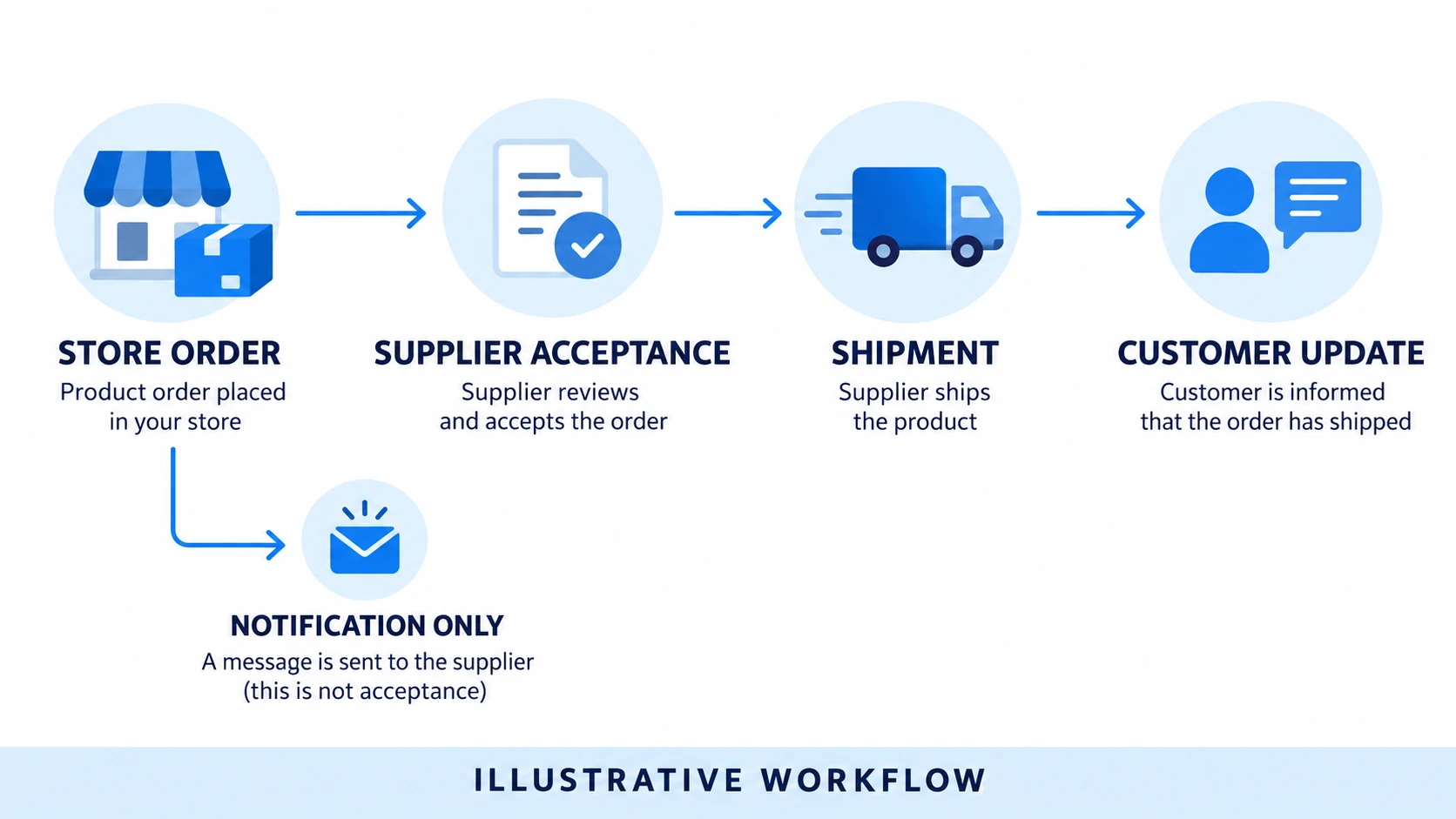
For example, the documented WooCommerce Dropshipping extension supports supplier order notifications and packing slips. That is useful functionality. It does not establish that every WooCommerce extension synchronizes live inventory, reprices products, or returns tracking automatically.
The same distinction matters when evaluating a Shopify app. Read its actual capabilities and confirm the supplier’s side of the arrangement. Treat each of these as a separate question:
- Product mapping: Does the store’s exact variant map to the supplier’s SKU?
- Availability: How does stock change reach the store, and what happens during a failed sync?
- Order acceptance: Can you distinguish an order sent from an order the supplier accepted?
- Shipment information: Does tracking return for the correct items, including split shipments?
- Exceptions: Who resolves cancellation, substitution, return, and refund requests?
Consider an order for a blue item in size medium. An email reaching a supplier confirms communication; it does not confirm that this variant is reserved. A tracking number appearing later does not prove every item in a multi-item order shipped together.
Before committing to either platform, run a controlled order through the proposed connection and reconcile the store, supplier record, and customer notification. Include a changed or unavailable variant. This is a proposed evaluation method, not a claim that we have tested your integration.
For a wider view of setting up the hosted option, see our Shopify dropshipping guide.
04
Compare total operating cost, not a subscription against zero
WooCommerce’s core software is free and open source, as its pricing guidance explains. Running a functioning store still involves hosting, payments, and potentially paid extensions or professional help. Shopify bundles hosting into a paid platform, while apps and other services can add separate charges.
The useful comparison starts with the same requirements on both sides. If one proposal includes backups, a returns tool, and developer support, include equivalent needs in the other proposal before comparing totals.
For Shopify, budget for: the selected plan, domain, paid apps, payment processing, any applicable additional transaction fees, and setup or ongoing specialist work.
For WooCommerce, budget for: hosting, domain, paid extensions or themes, payment processing, backups and security services where needed, and maintenance or development.
Shopify’s third-party transaction fee documentation explains that applicable Shopify fees can be additional to a provider’s processing charges. The treatment depends on the payment arrangement and plan; do not assume one universal rate.
Keep supplier product costs, delivery, refunds, and customer acquisition alongside this platform comparison. They remain real expenses even when the website itself is inexpensive. Our Shopify dropshipping costs guide explains how to separate setup spending, running expenses, and working cash.
Your own time belongs in the decision too. You do not need to invent an hourly accounting charge, but do estimate the work you can actually perform. A lower cash bill may be attractive for someone with WordPress experience and a poor fit for someone already struggling to answer customer inquiries.
A monthly comparison with the same requirements
Suppose a store expects 100 completed orders a month and needs a domain, its supplier connection, backups where required and someone to maintain the setup. The figures below are entirely hypothetical monthly allocations, not current platform prices or service quotes. Annual purchases are spread over twelve months; the table does not describe when those bills are paid.
| Monthly store expense | Hosted Shopify setup | Managed WooCommerce setup |
|---|---|---|
| Platform or hosting | $50 | $25 |
| Domain allocation | $2 | $2 |
| Required apps or extensions | $38 | $38 |
| Separate backup/security services | $0, assumed covered in this proposal | $20 |
| Routine technical help | $40 | $120 |
| Total | $130 | $205 |
The assumed proposals cover the same store requirements, though the work is bundled differently. Verify that equivalence with actual providers; a zero in one row must mean the required work is covered elsewhere, not forgotten.
If each order leaves $20 after product, delivery, payment, acquisition and expected exception costs, 100 orders contribute $2,000 before these store expenses. Deducting the table leaves $1,870 for Shopify or $1,795 for WooCommerce, before other overhead and income tax. Neither amount is net profit. Do not deduct payment fees or advertising again: they are already inside the assumed $20.
The result can reverse if an existing WordPress maintenance agreement already covers the additional store work without an increased bill. Removing the hypothetical $120 incremental support charge makes WooCommerce’s additional monthly cash cost $85, leaving $1,915 on the same orders. That scenario needs confirmation from the person maintaining the site. Their capacity is still being used, even when the cash invoice does not rise.
This is the useful question to take into a quote discussion: which required tasks create a new bill for this business? Keep sales and supplier costs equal while testing that question; then revisit them separately if an integration changes the work or cost of fulfillment.
05
Decide how much customization you actually need
WooCommerce is a strong candidate when an existing WordPress site, specialized content structure, or unusual business workflow is central to the store. Access to code and a broad extension ecosystem gives a developer room to change behavior. Each change still creates something to maintain.
Shopify is a strong candidate when supported themes and apps can satisfy your requirements without substantial custom development. Its constraints can reduce the number of infrastructure decisions you need to make. Check a must-have feature against the actual plan and app before assuming it is included.
Turn “we need flexibility” into a concrete requirement. For example: a particular supplier needs an order file in a specific format, or your product information requires fields that must flow into fulfillment. Ask a developer or integration provider to demonstrate that exact task on the proposed setup.
Neither platform gets an automatic SEO win. Useful pages, sensible navigation, performance, indexable content, and implementation quality matter on both. An established WordPress content library may be a reason to retain WooCommerce; a hypothetical future blog is not enough by itself to justify a maintenance burden you cannot support.
06
Which platform fits your situation?
A solo operator with no existing WordPress site: Start by evaluating Shopify. Hosted infrastructure can make the scope easier to manage while you test the product and supplier. Choose it only after confirming the required integration and payment setup.
An established WordPress business with technical support: Evaluate WooCommerce first. Reusing a functioning content site and an existing maintenance arrangement can be more practical than adding a separate store platform. Check whether the current hosting and support package are suitable for ecommerce.
A business with an unusual fulfillment or product workflow: Prototype the deciding feature on both. WooCommerce’s customization may help, but a working supported Shopify integration can be preferable to maintaining bespoke code. The demonstrated workflow should decide, not a general claim about flexibility.
A merchant who has not chosen a product or supplier: Keep platform spending modest. You need enough setup to test a credible offer and its fulfillment. Extensive design and customization will not repair weak demand or an unreliable supplier.
07
Questions before you commit
Is WooCommerce cheaper for dropshipping?
Its core is free, but the complete store may or may not cost less. Compare hosting, extensions, payment arrangements, maintenance, and equivalent support. Include the time you or a contractor must spend keeping the store functional.
Is Shopify easier for a beginner?
Usually it is the easier starting point for a beginner who wants hosted infrastructure and has no WordPress support. Product setup, supplier verification, marketing, customer service, and financial control still require work.
Can I move platforms later?
Migration is possible, but treat it as a project. Products, customer records, redirects, app behavior, supplier mappings, and order history need separate consideration. Avoid expensive customization until you understand which requirements genuinely influence sales and fulfillment.
What should I test before paying for a full build?
Test your required payment method and supplier connection with a representative order. Confirm variant mapping, supplier acceptance, shipping charges, tracking, and the refund process. Then compare the cost and ownership of maintaining that working setup.
