
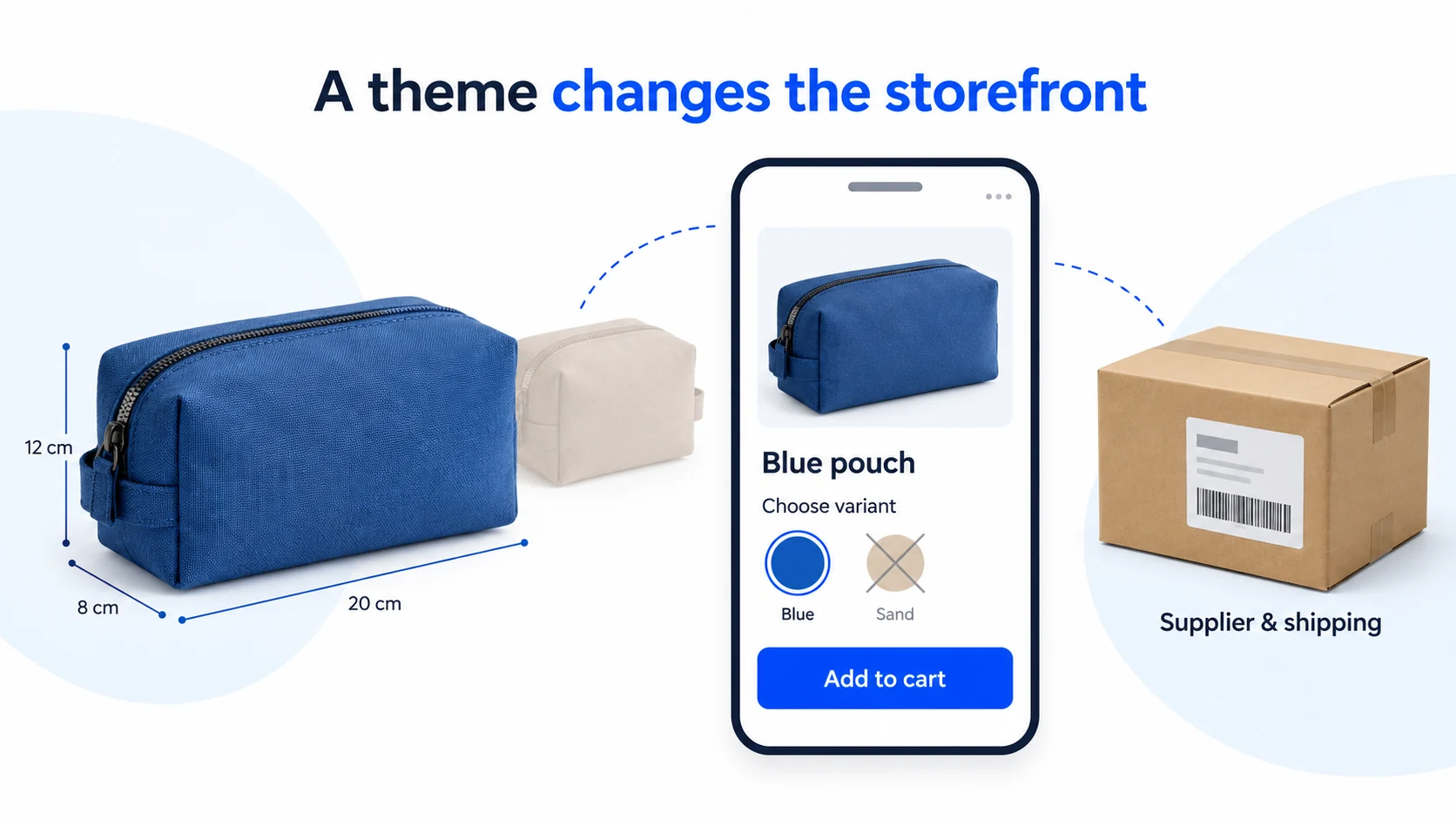
Solodrop is a paid Shopify theme, not a dropshipping supplier. Its public plans are $20 a month or $199 for lifetime access, each covering one store. It changes how your storefront looks and behaves; it does not buy stock, ship parcels or turn a weak offer into a profitable one.
Your store already pays for reviews, cart upsells and a shipping bar, but customers keep asking about sizes and checkout charges. Before paying for another theme, open one of those product pages on your phone and see what the customer can actually find.
First separate two problems: information customers cannot see and services that are not doing the right job. A better cart can help with the first. It cannot correct a supplier’s wrong SKU or make a checkout shipping rule agree with an unrelated banner. Work through one product before paying to rebuild the whole store.
Prices and vendor policies below were checked on October 30, 2026. This is a source-based evaluation and proposed testing method; we have not purchased a licence or measured Solodrop in a merchant store.
01
What Solodrop changes in a dropshipping store
Solodrop changes what shoppers see on product pages and how they use the cart. Its advertised features include a mini-cart, in-cart upsells, colour swatches, review displays, product-page sections and a free-shipping progress bar. Those can be useful when a customer needs a clearer choice or an easier route to checkout. See the official feature list .
Imagine a travel-pouch shop. The useful improvement might be showing the blue pouch’s dimensions beside its colour selector, then offering a matching cable organiser in the cart. That is a specific reason to compare themes. Adding every popup, ticker and promotional panel could make the same small shop harder to use.
Find the job behind the feature
A colour swatch shows a choice. The selected choice still needs to add the correct store variant, which must map to the correct supplier item. A review section displays evidence; it does not create genuine customer reviews. An instalment message needs an actual supported payment arrangement behind it.
The same distinction applies to delivery. Put a verified delivery statement on the page, rather than choosing a short arrival time because the design has a convenient badge for it. Attractive presentation can make an inaccurate promise more visible.
If you are choosing among several themes, our Shopify theme comparison starts with catalogue size and the information customers need. Solodrop deserves a closer look when its particular layout or built-in feature solves a problem your current theme leaves.
02
Compare the monthly and lifetime licence
The official pricing page lists these USD offers. Confirm the final price, tax and applicable terms before purchase.
| Plan | Advertised price | Store use | Support and commitment |
|---|---|---|---|
| Monthly | $20 each month | One store licence; store transfers advertised | Theme support included with the subscription |
| Lifetime | $199 once | One store licence; store transfers advertised | Free updates listed; one year of theme support |
Ten monthly payments total $200. The one-time price is $1 less at that point, but that arithmetic does not decide the purchase for you. You might stop using the theme earlier, or need help after the lifetime plan’s included support year. Ask what later support would cost if it matters to your store.
Store transfers do not mean simultaneous use on unlimited stores. Before moving a licence, ask Solodrop how to release the old store and activate the new one. Keep the purchase record tied to your own business; a downloaded ZIP alone does not establish your right to use it.
Cancellation and refunds have different rules
Solodrop’s refund policy treats the purchases separately:
- Subscription: cancel at any time; access continues for the remaining subscription duration. Subscription purchases are not eligible for refunds under this policy. Cancellation does not turn the fee into a refundable trial.
- Lifetime access, version 2.6.0 or above: the stated satisfaction-refund window is seven days from the original purchase. A refund deactivates the licence. Purchases before February 1, 2023 are separately listed as final and non-refundable.
Check which purchase and version your request concerns, and retain the order receipt and request date.
Solodrop is sold outside the Shopify Theme Store. Do not apply the Theme Store’s trial or transfer procedure to this purchase without checking the vendor’s own instructions.
03
Work out which app bills can actually disappear
The phrase “built-in apps” can make savings sound automatic. List what each current app does before removing it. Its visible widget may be only one part of the service you pay for.
| Current job | What a theme feature might replace | What still needs an answer |
|---|---|---|
| Showing reviews | The page layout or review block | Where reviews are stored, collected and imported |
| Offering an extra product | The cart presentation | Correct variant, price, discount and order handling |
| Capturing email addresses | The signup form | Consent records, email service and message sending |
| Showing a shipping target | The progress display | The actual destination, rate and discount rules |
Suppose your review service costs $29 monthly and a separate display app costs $10. These are invented figures for the calculation. Your old bill is $39. If Solodrop replaces only the $10 app while you retain the $29 review service, the new monthly total is $49: $29 plus $20.
Switching adds $10 a month in this example. Add the cost of moving your store to the new theme and list any other services you’ll still pay for.

Before cancelling an app, confirm how to export its data, whether the new theme can use that data and whether cancellation affects collection or access. Do not uninstall a working app across the live store merely to see how a draft theme looks without its widget.
04
Install a licensed copy as a draft
Keep the current storefront running while you prepare the replacement. Shopify’s theme duplication instructions explain how to preserve a copy of your existing theme. Record any custom code, app dependencies and important settings as well. A theme file is not a backup of your whole business or its external app data.
For a legitimately purchased external theme ZIP, Shopify’s current upload instructions use Online Store → Draft themes → Import theme → Upload zip file. Select the ZIP and upload it, then work on that draft before publishing. Follow the download and activation instructions supplied with your Solodrop purchase.
Start with one product you understand
Use a representative item with two meaningful variants. For our proposed test, the blue pouch is SKU POUCH-B and is available; the sand pouch is SKU POUCH-S and is unavailable. These are example labels, not supplied Solodrop settings.
- Prepare the product. Add its actual dimensions, included parts, selling price, delivery statement and return information. A placeholder description cannot show whether the layout explains your offer.
- Connect the required services. Follow each app’s integration instructions. Turn off duplicate presentation only through a supported theme-specific setting where available; a global app change can affect the live store too.
- Check existing content in the new layout. Shopify keeps products, collections, menus, pages and blog posts separately from the theme. Theme-specific sections, templates and customisations need attention. Open your existing menu and follow it to the intended collection; its presence in admin is not a storefront test.
05
Test the cart with a discount and a shipping threshold
A progress bar can look correct while describing the wrong total. Here is a worked test you can adapt to your own offer. It is not a bug we observed in Solodrop.
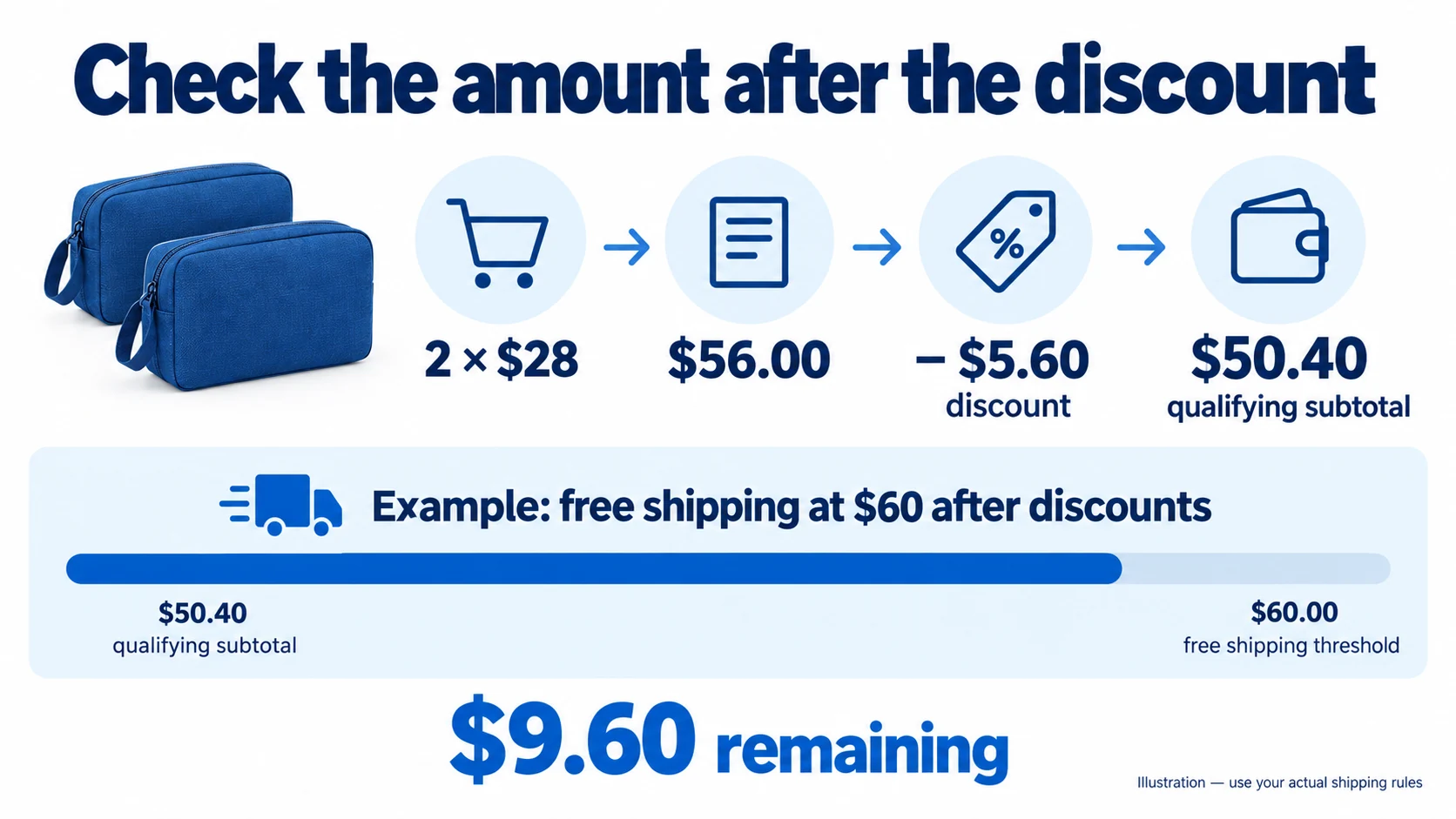
Assume your stated offer is free shipping when the eligible merchandise subtotal reaches $60 after discounts, for a supported destination. The condition is part of this example. Your actual store may use a different basis, so confirm its configured shipping and promotion rules first.
| Step | Calculation | Result |
|---|---|---|
| Add two $28 pouches | 2 × $28 | $56.00 before discount |
| Apply a valid 10% discount | $56 × 10% | $5.60 discount |
| Calculate the qualifying subtotal | $56 − $5.60 | $50.40 |
| Calculate the remaining qualifying spend | $60 − $50.40 | $9.60 remaining |
Looking only at the original $56 would suggest $4 remains. Under the expressly after-discount rule above, that message would be wrong. The customer could add something costing $4 and still encounter a shipping charge.
Run the example in your own configuration
- Write down the destination and the exact free-shipping condition. Check whether discounts, excluded products or another eligibility restriction change it.
- In the draft preview, add the two intended variants and quantities. Confirm the $56 pre-discount item total before applying the code.
- Apply the supported discount. Compare the resulting qualifying subtotal with the message shown by the bar. Then change the quantity and remove the code to check that the message recalculates.
- Continue through the permitted preview or supported test process to the actual delivery-rate result for that destination. A promise in the cart must agree with the applicable checkout rule.
If the numbers disagree, first identify which amount the bar reads and which amount the shipping rule uses. Correct the configuration if supported. Otherwise change or disable the message rather than promise free shipping on a basis the checkout does not honour.
Keep a short record: item total, code, discounted total, destination, bar message and delivery charge. That gives the theme or app developer a reproducible question instead of “the cart is broken.”
06
Check the product, apps and mobile page before publishing
The cart calculation is one check. The product choice and surrounding services must work too. Use the same pouch throughout, then test any additional product type that needs different options or apps.
Does the customer buy the intended variant?
Choose blue, add one pouch and inspect the cart line. It should show the blue version, quantity one and the intended price. Check the underlying variant or SKU in the supported test order record; a blue photograph alone is insufficient. Select the unavailable sand version next and confirm the store follows your intended out-of-stock selling policy.
If the cart is right but the supplier receives another variant, investigate the product mapping or order integration. Changing the swatch’s colour will not repair that handoff. The Shopify dropshipping guide covers the store and supplier responsibilities behind the page.
Are real information and services still present?
Open a product with known reviews and confirm the intended records appear. Send a permitted test signup and check that it reaches the intended email service with the required consent handling. Try the cart upsell and verify its variant, quantity and price rather than only its image.
Look for duplicate review blocks, two cart drawers or overlapping promotional messages where old and new features coexist. Resolve the specific overlap before removing an app that still performs another necessary job. Demo testimonials and promotional countdowns are examples of a layout, not evidence you can copy into your own business claims.
Can a phone shopper finish the journey?
On a phone, open the menu, choose the product, change its variant, open and close the cart, then reach checkout. Confirm that a sticky button or popup does not cover the choices or close control. Read the dimensions and delivery information at a normal text size.
Judge loading with your own product images, apps and content on representative devices and connections. Solodrop’s advertised performance figures do not measure that configured store. Compare the same pages and customer tasks before and after the change; a faster empty demo is not a useful substitute.
07
Publish with a way back, and plan for updates
Publish after the affected checks work and you have saved the previous configuration. Shopify allows one published theme at a time; publishing a replacement moves the previous published theme into drafts. Keep that working version available while you confirm the live product and cart journey.
Returning to the old theme can restore its presentation. It does not reverse orders already placed, restore a cancelled external service or undo a global shipping change. If a release exposes a wrong shipping promise, correct that rule or message and handle affected orders separately.
Get the next version from the vendor
For later updates, distinguish the vendor’s offer of free updates from Shopify’s update mechanism. Shopify’s update guidance says uploaded themes purchased outside its Theme Store require contacting the designer for updates. Ask Solodrop how to obtain the current licensed package and preserve customisations; test the replacement draft’s affected features again.
Sometimes the exercise reveals a product problem rather than a theme problem: the pouch dimensions are unknown, the included parts differ between variants, or the supplier cannot support the delivery statement. AIDrop can assess China-side sourcing and sample-check requirements. Send the product link, variants, destination and unanswered product question so the enquiry concerns something concrete. That is a sourcing discussion, not a promise of theme development or conversion results.
08
Solodrop questions before you pay
Is Solodrop a supplier or an order-fulfilment app?
No. It is a Shopify storefront theme. You still need products, payment arrangements and a working supplier or fulfilment setup. Its cart and page features do not establish stock availability or purchase goods for your customer.
Can I use one licence for several stores?
The advertised plans specify one store. Ask the vendor about a legitimate transfer if you are moving stores; the transfer feature is not permission to run the same licence on several stores at once.
Is the monthly plan a refundable way to try it?
The vendor’s published policy says subscription purchases are not refundable. Read the cancellation and remaining-access terms before subscribing. The separate seven-day lifetime refund provision has its own purchase and version conditions.
Will it replace my review app and all my marketing apps?
Only if the particular replacement also meets your data and service needs. A display block may leave review collection, storage, email sending or another job with the external service. Make an app-by-app decision before cancelling anything.
Should a beginner buy it immediately?
Start with the customer problem. If your current or free theme can explain the product, handle choices and support the required journey, there may be no immediate reason to buy. Compare Solodrop when you can identify a useful feature, account for the full cost and test the result with your actual store requirements.
Shopify Dropshipping: Build a Store That Can Take and Deliver Orders
Build a Shopify dropshipping store, connect suppliers, configure payments and shipping, and test checkout, order handoff and

How to Dropship on Shopify: A Practical End-to-End Workflow
Set up Shopify dropshipping from supplier selection to checkout, shipping, test orders and launch. Verify the complete
Shopify Dropshipping Apps: Choose the Automation You Need
Compare DSers, AutoDS, Syncee, CJ and Zendrop by imports, price updates, ordering and tracking. Check plan limits