
Bonanza has acknowledged sellers who fulfill through a dropshipper, but you remain responsible for the listing and the order. A supplier-held item can be a workable Bonanza listing only when the item and quantity are accurate, the handling and ship-from details reflect the real route, and you can get the exact item accepted, shipped, tracked and handled on return. That acknowledgement does not approve every product, supplier or seller account. Test one item and confirm your current booth settings before filling a catalog.
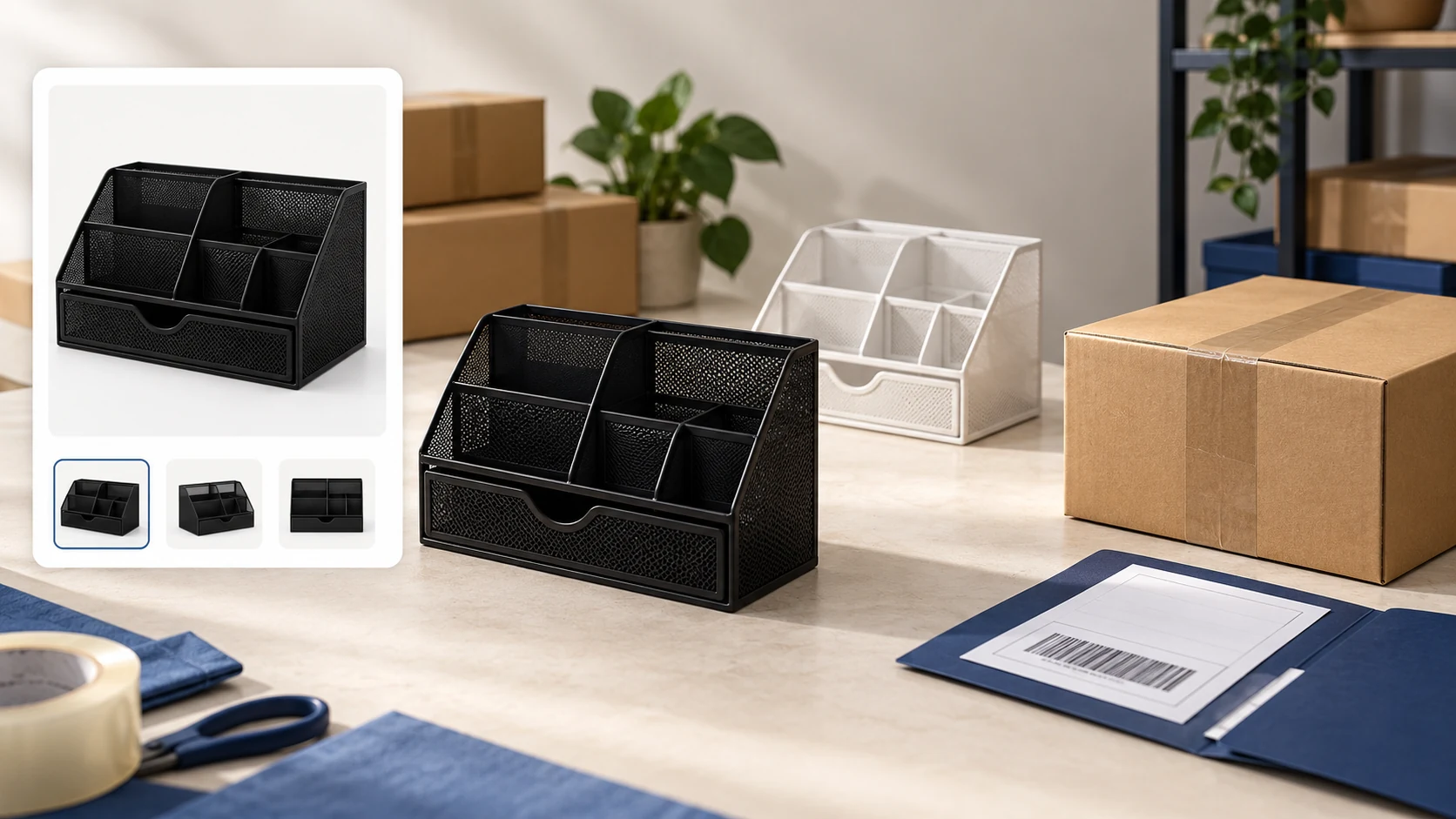
Take a black adjustable desk organizer. Your supplier also makes it in white. You want to list the black one to US buyers. At first glance, the task looks like uploading a photo and a price. The real decision is whether the box the supplier sends will match the listing: black model, stated condition, shipping origin, dispatch time and return route. If the supplier only has white today, a polished black listing is a promise you cannot keep.
Our dropshipping platforms comparison helps choose among marketplaces and stores. Here we stay with Bonanza’s own booth/listing obligations and one supplier-fulfilled order. The eBay and Amazon guides cover their separate seller rules; importing a listing from either does not carry those rules over to Bonanza.
01
What Bonanza actually says about third-party fulfillment
Historical recognition does not verify today’s booth
In a 2023 Shipping Program announcement, Bonanza named sellers who obtain and fulfill inventory through a dropshipper service among the categories exempt from that program. This is evidence that Bonanza recognized the fulfillment route at that time; it is not proof that the exemption or a particular booth option applies to your account in 2026. Check the live Shipping & returns settings and label treatment in your own seller dashboard, or ask Bonanza support if either is unclear. The account editor requires a seller login, so a sample booth URL cannot verify your current settings.
The item and handling promises remain yours
The more durable rule is in Bonanza’s User Agreement, updated May 2025. It treats Bonanza as a venue matching buyers and sellers, not the retailer shipping your item. The seller must accurately describe the item and sale terms, use a main image that represents the actual product, and fulfill an order within the handling time stated in the settings. Bonanza says units counted together as “in stock” in a listing must be identical; unique items need their own listings. The supplier can do the physical packing, but those promises still belong to the seller.
Identical stock cannot mix black and white
For the organizer, that means a black listing cannot quietly become white because the supplier changed stock. A photo of the black sample should represent the black unit buyers will receive. If the black and white models differ, give them accurate distinct listing/variation treatment rather than counting mixed items as interchangeable stock. Bonanza’s seller service guidance also warns against overlisting quantities or misleading images. A supplier spreadsheet is useful input, but it is not a reservation.
02
Build one listing from what the supplier can actually send
Before publishing, ask your supplier for one exact item record: current black SKU, the version/contents and condition, available quantity, dispatch location, handling time, parcel method, cost to your business, and return address/process. Compare those answers with your photos and listing. If the supplier cannot show a sample or current specification, hold the listing until you can verify it; a supplier catalog picture may hide a finish change or omitted part.
The easiest way to catch a mismatch is to write a short offer receipt next to the planned Bonanza listing:
Black organizer photo and description
Supplier-side proof to collect: Same black sample, dimensions, parts and condition
Stop condition: Only white or a different revision is available
Listed quantity
Supplier-side proof to collect: Current quantity of identical black units that can be allocated
Stop condition: Count is copied from another marketplace or old feed
“Ships within” time
Supplier-side proof to collect: Supplier’s actual time to hand a parcel to the carrier
Stop condition: It starts only after a slow procurement step
Ship-from and shipping charge
Supplier-side proof to collect: Actual dispatch origin, route and current freight cost
Stop condition: A convenient origin or rate masks where it really leaves
Return policy
Supplier-side proof to collect: Named receiving address and refund/replace agreement
Stop condition: Supplier will not accept the stated return
Bonanza can import listings from eBay, Amazon, Etsy or Shopify, but a copied quantity is not a reserved unit. Suppose the supplier has one black organizer, which sells on eBay at noon while the Bonanza listing still says one available. A Bonanza buyer pays at 12:03, before the next sync. Both storefronts recorded valid orders, but the supplier can accept only one.
That short interval is the exposure: check the physical quantity and sync behavior, keep low-stock offers below the supplier’s unreserved count, or pause the item. Bonanza’s inventory guidance recommends reviewing low-stock items even when channels sync. If the collision still happens, tell the Bonanza buyer promptly and follow the stated cancel/refund terms; a later feed correction does not fulfill the paid order.
Allocate the last black unit before two sites promise it
In the hypothetical noon/12:03 collision, there is only one physical black organizer. A new import cannot create the missing second unit.
Before another sale
With one unreserved unit, choose a supported allocation: for example, offer it on Bonanza and pause the eBay offer until replenishment, or use a genuinely verified shared reservation system. Merely copying quantity 1 to both sites is not such a system.
After an accepted order
Save the actual supplier reference and update other-channel availability promptly. If two buyers paid and only one unit was accepted, notify the affected buyer and use the supported remedy; do not silently send White or call an unconfirmed restock dispatched.
Reopen both listings after the change and compare their actual availability. This is a proposed allocation, not a stock-sync integration we tested or a promise about how quickly Bonanza imports update.
The first listing can be just one verified item. A small, dependable offer tests the operating path better than fifty imported products with unknown stock and return terms.
03
Set handling, origin and shipping to the real route
Bonanza’s handling-time help defines the ship-within time as business days from purchase until shipment. A booth default can be overridden for a particular item through batch editing or a shipping profile. Its shipping and returns guide explains where sellers set booth defaults and item-specific shipping options. Check the ship-from address and profile for this supplier route; a sample booth settings page is not your live account configuration.
Set the default and the black item separately
Use Bonanza’s linked handling-time help and the settings currently available in your booth. The value below is a rehearsal assumption, not a supplier promise.
- Open Selling → Booth settings → Shipping & returns. In Items ship within, enter the supported maximum business-day handling time and save the changes.
- Suppose the supplier commits to a maximum of two business days. In that illustrative case, enter 2; use the actual agreement for a live listing. This means shipment, not arrival in two days.
- Check the black organizer’s Shipping profile or the Batch Editor → Shipping setting. An item-specific value can override the booth default.
- Reopen the buyer’s item page. Compare its handling and origin with the supplier’s cutoff and physical dispatch record. A saved default is not enough if the old item profile still shows another promise.
Handling ends at shipment, transit follows
Separate two times when you ask the supplier for an estimate. The first is handling: when the parcel is actually handed to a carrier. The second is transit: how long the chosen route takes after that. A supplier saying “we usually dispatch quickly” does not justify a precise Bonanza handling promise until you know what happens after a paid order and how often that route is available. If the supplier ships from outside the US, do not enter a US origin merely because your business serves US buyers. Check the seller settings and item page as the buyer would see them.
Price the actual origin-to-buyer parcel
Shipping cost needs the same honesty. Bonanza offers different buyer-facing shipping methods and profiles, while the supplier or forwarder bills you for an actual parcel. Compare the displayed charge and full customer price with a current quote for the black organizer’s packed weight, destination and route. If the quote makes the offer uneconomic, change the price or route before listing. Do not add a surprise amount after a “Buy it now” payment to repair a bad estimate; Bonanza’s invoicing help distinguishes limited unpaid offer/invoice situations from already-paid purchases.
A useful pre-listing test: put the Bonanza black-item page beside the supplier’s pick/pack instruction. If color, contents, ship-from point, handling days or return address disagree, fix the public promise before accepting orders.
04
Follow the paid order into a real carrier scan
When the black organizer sells, Bonanza’s seller order help directs the seller to the order summary and shipping actions. First confirm the order is paid and the buyer’s chosen item/address is complete. Then transmit that exact black SKU to the supplier through your agreed method. Save the supplier’s acceptance or purchase reference and any rejection. “Message sent” is not the same as “supplier accepted black.” If the supplier declines, stop the promised dispatch clock from becoming a false shipped notice and resolve the buyer order promptly.
For a successful order, collect a small packet:
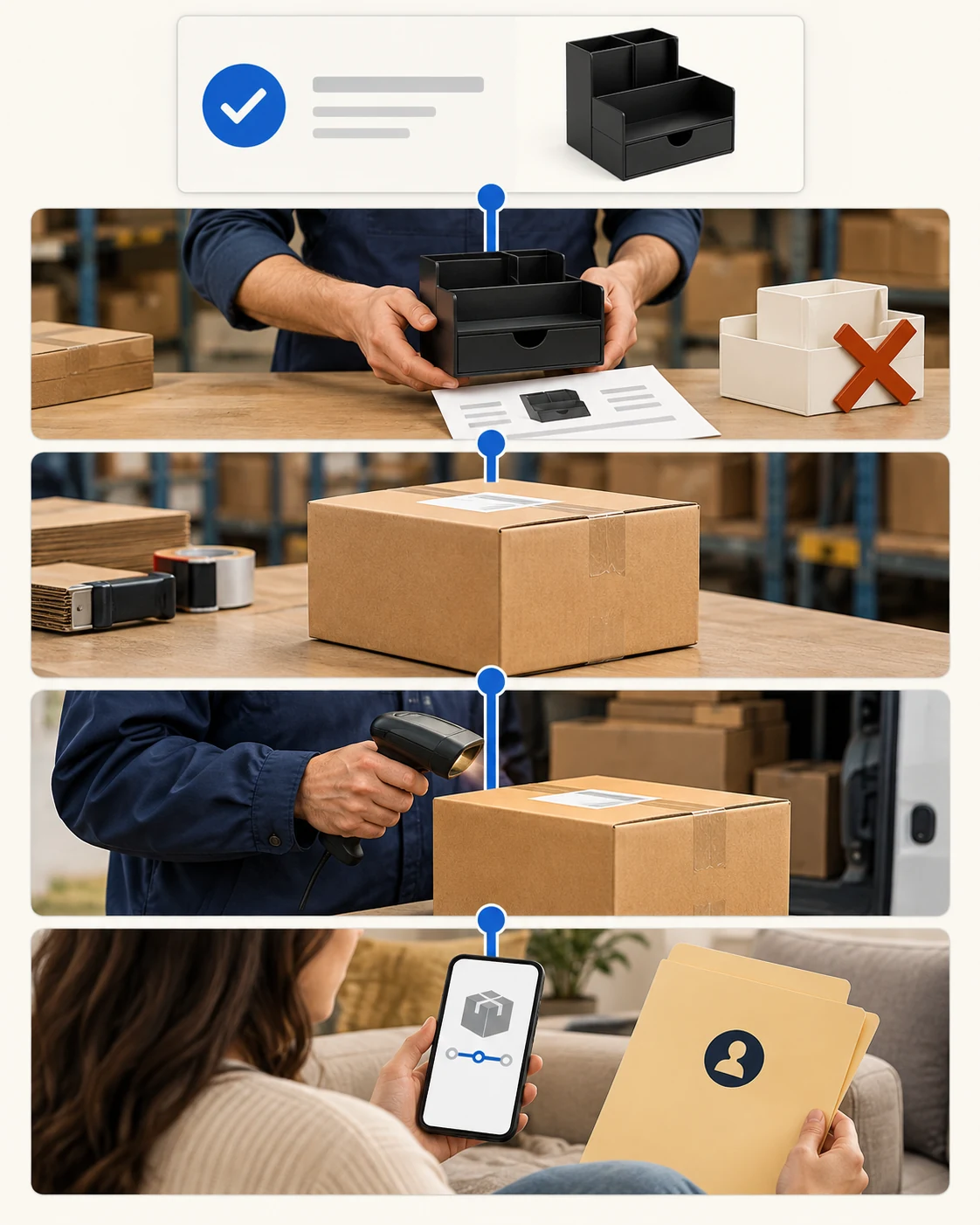
- Bonanza paid order and black listing/item detail.
- Supplier-side accepted black SKU, quantity, shipping address and charge/approved account terms.
- Actual packed parcel route and carrier tracking with a first scan.
- Bonanza shipped/tracking update tied to that parcel.
- Buyer-facing return/refund owner and address if the item arrives wrong or damaged.
Shipped notice and first carrier scan differ
Bonanza’s fulfillment instructions explain that a seller using outside postage can mark an order shipped and enter carrier/tracking details. Its buyer help says marking shipped triggers an email to the buyer, including tracking if supplied. For a supplier-fulfilled parcel, wait for real dispatch evidence rather than marking shipped when the supplier merely acknowledges the request. A tracking number can exist before a carrier has the box; record the first scan separately.
If the supplier packs late, inform the buyer through the appropriate Bonanza channel and fix the cause. This is why the ship-within setting belongs to the operating system, not just page copy. A buyer cannot see your supplier’s internal queue; they can see the promised date and the tracking you provide.
05
Decide returns and failed orders before the first complaint
A default return policy may not update old items
Bonanza says each seller sets its return/refund policy. Its booth settings allow a default return policy, with item-level overrides, and warn that changing the default does not necessarily rewrite existing item policies. Your supplier may have a different return window or may only accept goods at a specific address. Resolve those differences before writing a buyer-friendly promise. If the buyer receives the white organizer instead of black, who approves the return, where is it sent, who pays the label, and when does the buyer get the refund or correct item?
Bonanza’s cancellation help says that when a seller cannot complete a transaction, they must notify the buyer through Bonanza Bmail and refund through the original payment method, retaining proof. That is a practical recovery path if the supplier declines the black SKU after a sale. It is better to pause the black listing and correct stock before the next buyer encounters the same problem.
Separate the buyer refund from recovering platform fees
Bonanza’s current cancellation help requires notice through Bmail and the actual payment-method refund when you cannot fulfill. Check its instructions for the method used; gift-card and other payment cases can have their own procedure.
Resolve the buyer transaction
Actual order/item ___; Bmail explanation ___; original payment reference/method ___; refund amount and completed confirmation ___. A pending refund or supplier credit is not proof the buyer was repaid.
Then reconcile the selling fee
If seeking a final-value-fee refund, use the platform’s actual canceled-transaction procedure and completed buyer-refund proof. Keep that fee request separate from the customer remedy; an unpaid-order relisting must not reopen unavailable black stock.
Recheck the affected listing and retained refund evidence. This is a record to complete, not a refund we issued or a guarantee that Bonanza will grant a fee credit.
Made-to-order is not unavailable catalog stock
Do not treat “made to order” as a loophole for a supplier item you cannot source. Bonanza’s made-to-order policy distinguishes actual seller/affiliate production from prohibited pre-sale of commercially unavailable goods. For an ordinary supplier catalog item, describe the real item and real handling route.
06
The decision for a small Bonanza launch
Bonanza’s 2023 shipping-program announcement acknowledged dropshipper-fulfilled inventory, but your current booth settings and label treatment still need account-level confirmation. The decision to list the black organizer should rest on a truthful, fillable offer: sampled item matches image, identical black quantity is available, ship-from and handling are honest, current account shipping/label treatment is understood, supplier accepts a test order, and returns have an owner. Start with a narrow catalog and check the first orders by hand even if a feed or importer populates the booth. That will reveal whether the supplier’s real pace matches your listing.
Close the exact unsupported promise before another order
Hold the item if black stock is uncertain, the seller account’s fulfillment/label setting is unresolved, the parcel would originate somewhere other than the listing says, or the return destination is missing. Those gaps are cheaper to fix before a buyer pays than after a dispute. If you are still deciding whether Bonanza is the right channel, use the broader platform comparison.
If a supplier or forwarder in China will ship your Bonanza orders, send AIDrop Agent the exact item, sample photos, proposed US listing promise and ship-from/return questions. We can discuss sourcing checks, packaging, shipping and tracking handoffs so the operational route matches what you intend to sell. We cannot approve a Bonanza account or set platform policy on its behalf.
Questions about a supplier-fulfilled Bonanza listing
Does the 2023 announcement approve my booth today?
It shows Bonanza acknowledged that route at the time. Confirm your current account’s shipping/label treatment and actual product eligibility; the announcement does not verify this supplier or account.
Does a two-business-day setting mean delivery in two days?
It concerns the time from purchase to shipment. Transit follows. An item shipping profile or batch setting can override the booth default, so inspect the actual item page after saving.
Can I import one black unit onto every marketplace?
Only a verified allocation or reservation process can support multiple-channel availability safely. One physical unit can still be sold elsewhere before a delayed update. Imported quantity is not a second unit.
Is a platform fee refund the same as refunding my buyer?
No. Complete the actual payment-method buyer remedy and retain its proof. A supplier credit or final-value-fee request is a separate recovery record; do not delay the buyer response while seeking it.

Etsy Dropshipping: What You Can Sell and How to Fulfill It
Check Etsy dropshipping rules, eligible supplies, production partners, listing details and the real costs of fulfilling an
Shopify vs WooCommerce for Dropshipping: Which Fits Your Team?
Compare Shopify and WooCommerce for dropshipping: hosting, maintenance, supplier integrations, operating costs, and the best fit for

Shopify vs Amazon for Dropshipping: Choose Your Selling Channel
Compare Shopify and Amazon for dropshipping by customer acquisition, fees, supplier requirements, brand control, and the selling
