
Yes, you can dropship with Ecwid. Your customer buys from your store, and an agreed supplier makes or picks the product and sends it to that customer. You can sell ready-made supplier products, use print-on-demand for your own designs, or work with a supplier whose orders you send manually. Ecwid documents all three routes in its dropshipping guide.
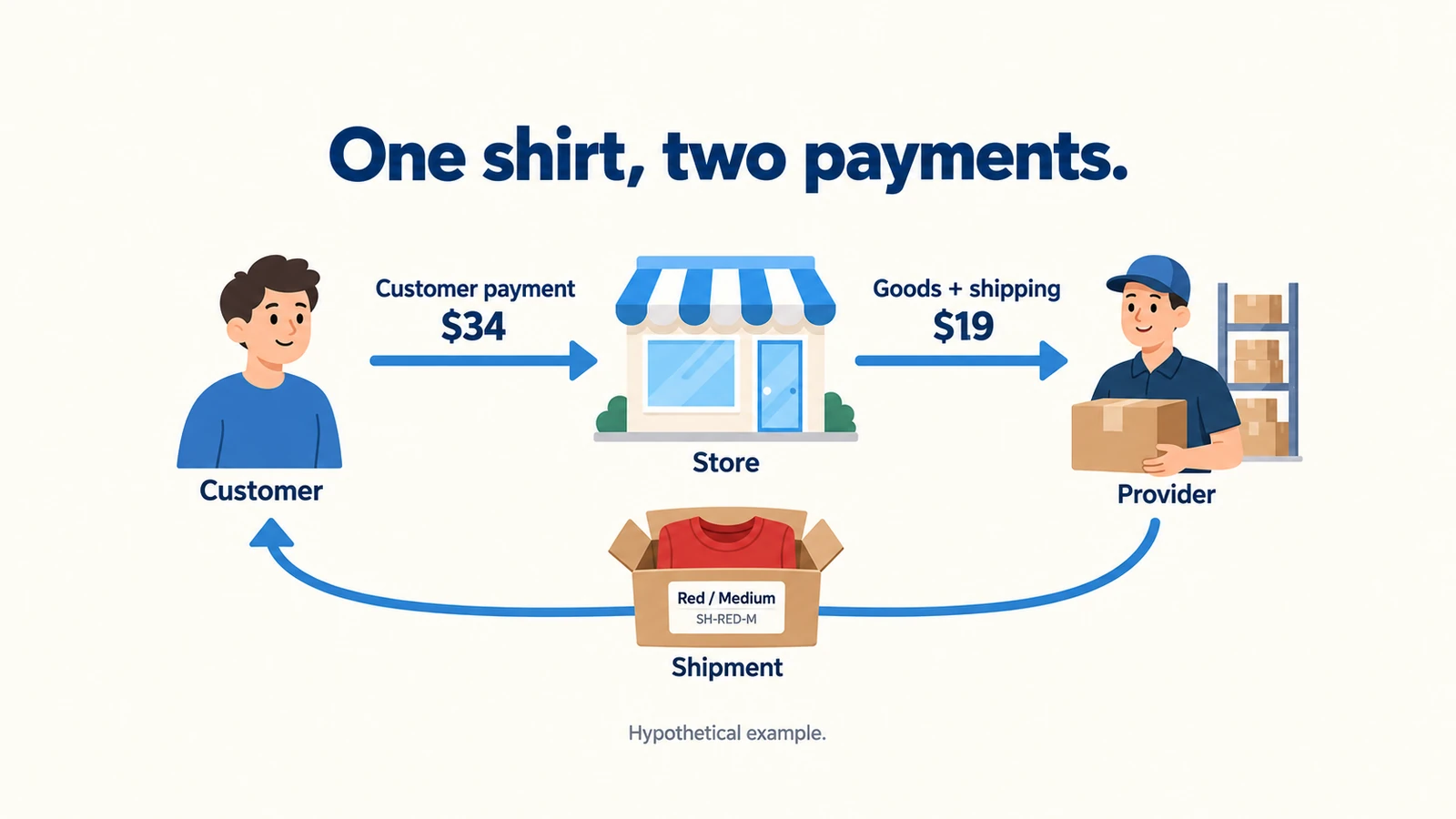
Suppose Riley already has a small website and wants to sell shirts. A shopper chooses a red shirt in medium and pays. The useful question is what happens next: does the correct shirt appear in the supplier’s account, who pays for it, and how does Riley know it shipped?
Start with one product and one supplier. Ecwid can provide the storefront, but Riley still needs a suitable plan, an accurate product connection, a delivery price and money to pay the supplier before the store payout arrives.
01
Choose the supplier route before the app
Choose a source for the shirt before choosing software. A ready-made shirt from a wholesaler and a shirt printed with Riley’s artwork need different suppliers, even though both can appear in the same Ecwid store.
| Route | What you can sell | What happens to the order |
|---|---|---|
| Wholesale2B | Products from its supplier catalogue, for US and Canadian customers | The app collects orders; you process and pay for the supplier order before shipment. |
| Syncee | Ready-made products from participating suppliers | Supplier-enabled auto-order brings the order into Syncee; supplier payment comes before forwarding it for fulfillment. |
| Printful | Products carrying your own permitted designs | A correctly synced, paid Ecwid order can import; Printful needs your billing method or wallet funds to fulfill it. |
| Printify through the documented connector | Products made by your selected print provider | A paid order appears in Printify, where you review and submit it. The connector is made by a third-party developer. |
| An agreed manual supplier | Products the supplier has agreed to send directly | You import or enter product information, send the exact order and address, pay under the agreed terms, and add tracking yourself. |
On a phone, swipe the table sideways to compare every column.
These are documented routes, not results from an account or delivery test. Ecwid’s supplier guide explains the different submission steps. A supplier still needs to accept your business, product and destination.
Compare the bill behind each connection
Wholesale2B is a useful shortlist when Riley wants ordinary catalogue goods for US or Canadian buyers. Its Ecwid app listing shows $37.99 a month, daily product updates and an allowance of 10,000 account products. The store’s own product limit may be lower. Daily updates also leave time for supplier stock to change between updates.
Syncee offers a broader supplier choice, with each supplier’s shipping and return terms to consider. Its public pricing page displays monthly Basic at $39.99 for 100 imported products from one supplier, Pro at $59.99 for 250 products and unlimited suppliers, and Business at $99.99 for 10,000 products and additional supplier access. Confirm the selected account’s currency and eligibility. The $0 exploration option lets you browse; it should not be treated as a paid import allowance. Supplier goods and shipping are extra.
For a shirt with your own design
For an original shirt design, compare Printful with the actual print providers available through Printify. Ecwid documents a separate $8.49 monthly Printify connector. That fee pays for the connection, not the shirt or postage. Print-on-demand means the item is made after the order; it still needs an accurate production estimate and a funded provider order.
A manual route still needs acceptance and payment
A manual supplier can be sensible for a small range. Agree exactly how orders are accepted, paid, cancelled and tracked. An email notification is useful, but it does not buy the shirt or obtain a tracking number. Ask for a quote for the actual item and customer destination before importing hundreds of products.
02
Buy the plan your product needs
Riley’s red-medium shirt needs more than a color menu. If red-medium and blue-large have different stock quantities, prices or item codes, they need separate product variations. A variation is one exact combination the supplier can send. Ecwid’s variation guide places this feature on Business and Unlimited.
Ecwid lists Starter for 10 catalogue products, Venture for 100, Business for 2,500 and Unlimited without a product limit. Variations do not count as additional catalogue products. The Business plan can therefore matter for a four-choice shirt even when the store has only one product.
The following are Ecwid’s published USD prices after March 2, 2026, excluding tax. Billing-country currencies and mobile-app purchases can differ. Compare them with your account’s current offer before paying; the dated Ecwid price table supplies these amounts.
| Plan | Pay monthly | Pay once for a year | Annual cost expressed per month |
|---|---|---|---|
| Venture | $35 | $348 | $29 |
| Business | $65 | $588 | $49 |
| Unlimited | $149 | $1,428 | $119 |
On a phone, swipe the table sideways to compare every column.
An annual equivalent is an upfront annual bill
The $49 Business figure means paying $588 for the year. It is not a $49 bill you can cancel each month. Subscriptions renew unless cancelled, so review the actual currency, tax, renewal date and selected app’s separate subscription before paying.
Check the plan before buying the connector
There is a real Starter-plan ambiguity. Ecwid’s plans guide describes App Market access, while its pricing page introduces that access under Venture. Its Printful guide also discusses limited Starter use, but Printful’s own integration page points users toward Venture or higher; another connection help page could not be read. Starter’s exact current price was not established either. Confirm the chosen connector in your account rather than buying Starter on the promise that every app works.
For Riley’s independently tracked sizes and colors, Business is the documented starting point. On monthly billing, Business plus Wholesale2B totals $65 + $37.99 = $102.99 before goods, shipping, payment fees or tax. Business plus the third-party Printify connector totals $73.49. Choose the product and connection you need; a larger product allowance does not solve supplier approval or delivery problems.
03
Connect one product and make every choice real
Ecwid can supply its own storefront or sit inside an existing website. For the second route, use Ecwid’s website integration, sign in to the correct store and publish the site changes. A custom website can use the store’s supplied embed code and actual store ID. Adding Ecwid to a website creates the shopping area; the supplier connection is a separate job.
For one shirt, work through this small setup:
- Create the supplier or print-provider account and establish that it can supply the selected shirt to your customer countries. For a printed design, make sure you have the right to use the artwork.
- Install the documented Ecwid app for that route and connect the correct provider account. Read the permission and billing prompts, including any separate connector charge.
- Create or select the product through the provider’s documented publishing flow. For a manual supplier, enter it yourself or adapt the supplier spreadsheet to Ecwid’s CSV format.
- Map each sellable choice to the supplier’s exact code. Set the matching price, photo, measurements and stock quantity. Remove choices that the supplier does not offer.
- Set up an eligible customer payment method in Ecwid and a separate payment method or funded wallet at the provider. Review the shipping requirement and delivery rates before making the product public.
Riley’s item notes might say: “Red / Medium → supplier code SH-RED-M; size measurements from the selected shirt; one shirt per customer quantity.” That code is a hypothetical SKU, meaning an item identifier. Blue / Large needs its own identifier if it is a different stock item. The customer’s selected color and size should survive the trip from product page to provider order.
Ecwid variations initially inherit parent-product details until you assign their own values. Its variant-stock guide shows where to enter a unique SKU and quantity. A stock reduction in Ecwid does not prove that the supplier’s inventory changed at the same instant. Know how often your chosen app updates stock, and pause an unavailable choice rather than silently substituting another size.
Save red-medium as its own variation
Ecwid’s variation instructions, rechecked October 11, describe the desktop steps below on Business and Unlimited. SH-RED-M is Riley’s invented example identifier; use the supplier’s real matching code in your own record.
Build and save the combination
In Catalog → Products, open the shirt. Under Options, add the offered colors and sizes using supported option types. In Variations, select + New Variation, choose Red and Medium, then set that combination’s SKU, price and other relevant values. Use Stock Control for its actual stock and out-of-stock behavior. Select OK, then Save.
Check what was saved
Reopen the shirt’s Variations tab and confirm Red / Medium retains the intended identifier and values. On the product page, select that choice and check the image, price and availability. Compare the selected line with the provider order before release; a store-side quantity is not proof the supplier reserved the shirt.
Repeat only for combinations the provider genuinely offers. This is a proposed setup and verification, not an Ecwid or supplier account test. A color dropdown alone does not establish a separately tracked stock item.
Check the physical shirt
Order a sample before promoting an unfamiliar shirt so you can assess print, fabric, fit and packaging. Printful’s sample discount is conditional: eligible connected-store accounts can receive 20% off, generally starting the following month, with account limits. Its current sample rules do not promise every account a discount or free worldwide shipping. We have not ordered a sample or tested these connections.
04
Charge for the parcel that will actually travel
Use the supplier’s dispatch location and the packed item’s weight and dimensions when choosing a rate. Riley’s home address is the wrong shipping origin if the shirt leaves a different warehouse. Ecwid’s shipping-origin settings allow an address other than the store’s company address.
For Printful, the documented choices include live rates on Venture, Business and Unlimited, or manually maintained product rates. Live rates calculate available shipment choices for the item and destination. A flat rate is simpler, but Riley must keep it aligned with the provider’s actual charge. Printful’s Ecwid shipping guide also explains that non-Printful goods need separate shipping rates.
Test the cart, not just the shirt page
Be careful with the difference between adding and replacing a charge. Ecwid’s own flat-rate example adds $1 for each of two items to a $5 store-wide rate: $1 + $1 + $5 = $7 at checkout. A product’s replacement rate behaves differently. Setting a product-specific rate to zero can make it appear to ship free, even when a global rate exists. The flat-rate guide explains both settings.
Check what the whole cart charges
Try the destination and cart combinations you intend to sell: one shirt, two shirts, and a shirt with an item from another supplier. Compare the displayed shipping charge with the actual provider quotation for each parcel. Conflicting product-specific methods can leave no delivery method that covers the whole cart; Ecwid may then ask the shopper to split the order.
“Free shipping” means the customer sees no separate shipping charge. The provider still charges Riley. Include that amount in the item price or promotion budget, and publish only destinations that the selected supplier can actually serve. A shipping rate makes checkout possible; it does not send the order to the supplier.
05
Keep supplier cash ready before your payout
The customer pays Riley’s store. The supplier charges Riley separately. Ecwid does not take a sales transaction fee, but the payment provider can charge processing fees, and the app, product and shipment still cost money.
Here is a hypothetical shirt order in USD. These product, shipping, processing and advertising amounts are assumptions, not a supplier quote or a published payment rate.
- Customer pays $29 for the shirt plus $5 shipping: $34.00 in
- Supplier charges for the shirt: $14.00 out
- Supplier charges for shipment: $5.00 out
- Assumed payment-processing fee: $1.30 out
- Assumed advertising cost for this sale: $4.00 out
- Left before subscriptions, tax and refunds: $9.70
The calculation is $34 − $14 − $5 − $1.30 − $4 = $9.70. If Riley sells 20 such orders in a month, allocating the $65 Business subscription adds $3.25 per order, leaving $6.45 under these assumptions. A paid supplier app reduces that further. This is a cost illustration, not a forecast of sales or profit.
Now consider the money available before payout. Ten orders require $19 × 10 = $190 to pay for goods and shipping even if the customer’s payments have not reached Riley’s bank. Keeping another $34 available for one full customer refund gives $224 in this simple funding example. Ads, subscriptions, taxes and a larger refund reserve need their own allowance.

Ten paid checkouts may leave ten unpaid supplier orders
Ask the chosen processor when money becomes available and what happens to fees on a refund. Then replace every assumed line with the actual provider checkout and payment terms. A store showing ten paid orders can still have ten unpaid supplier orders if its owner has no usable card or wallet balance.
06
Follow the first paid order in both accounts
After the shopper buys red-medium, open the order in Ecwid and the corresponding order at the provider. Match the customer address, quantity and exact shirt choice. Keep the Ecwid order number, provider order number and tracking number together so you can answer a delivery question without guessing.
For Printful, Ecwid documents the combination Paid + Awaiting Processing for import. The product must be synced and the order needs a shipping address and unique number. An unpaid, refunded or cancelled order will not import as a normal paid order. A pickup order without a shipping address cannot become a posted parcel. Printful’s import requirements explain these conditions.
A synced order still needs supplier payment
Next, look at provider billing. Ecwid’s Printful guide says an empty wallet with no connected card or PayPal can leave the order Failed. Correct the billing problem and inspect the order before confirming it. With the documented Printify connector, review and submit the imported order. With Wholesale2B, process and pay through its order flow.
Syncee’s order-management guide describes supplier-enabled auto-order: the store order syncs to Syncee, you pay, and the order is forwarded to the supplier. The available payment method depends on that supplier. The guide names Ecwid for order-status and tracking updates, but you should still inspect the chosen supplier’s actual order and billing settings rather than assume every supplier behaves alike.
| What Riley sees | Where to look next |
|---|---|
| Ecwid says Paid, but no provider order exists | Confirm the connection, synced variant, address and required fulfillment status; allow for the documented sync delay. |
| Provider order exists but is Failed or awaiting payment | Resolve the provider card, wallet or order-payment problem before expecting shipment. |
| Product exists but red-medium is wrong | Correct that exact product mapping; obtain buyer consent before changing the ordered item. |
| A shipment label exists but delivery has not started | Look for an actual carrier acceptance scan and the supplier’s dispatch confirmation. |
On a phone, swipe the table sideways to compare every column.
Find the original order before paying twice
Avoid creating a second manual order simply because the first import is slow. Find whether the provider already has the original order and follow its duplicate-prevention instructions. Once the correct parcel ships, make sure its tracking reaches Ecwid and the customer. A store status or stock counter is useful information; it is not proof that the carrier has the shirt.
07
Give the customer a real refund or replacement
If the buyer cancels before the shirt is made, inspect both orders promptly. Cancel the Ecwid order and ask the provider to stop its work if that is still possible. Production or shipment may already have begun, so a store cancellation cannot recall the parcel by itself.
Make the actual refund
Cancelled and Refunded are not the same as money returned. Ecwid’s cancellation guide says cancellation does not trigger a refund. Its refund guide also says manually marking an order Refunded does not reverse the payment. Use the supported refund action for your payment method, then make sure the store reflects the result. Some supported gateways let you issue the actual refund from Ecwid; others require the processor account.
Check the money and the stock separately
Ecwid’s refund-status guide, rechecked October 11, distinguishes marking an order from issuing the real payment refund.
Verify the payment
Use the actual gateway’s supported refund action, then retain its result and amount with the correct transaction. An email saying the store status changed does not establish that money was reversed.
Verify the store record
In My Sales → Orders, open that order and check the payment status. Marking a full refund automatically restores the Ecwid stock count; a partial-refund mark does not. That software count does not restore the supplier’s physical stock or stop its production job.
Some supported gateway actions update the status automatically. Check the result before manually changing it, and resolve the separate supplier cancellation or claim through that provider.
For a wrong color, damage or missing parcel, give the customer a clear replacement or refund answer and explain any agreed return arrangements. Send the provider the relevant order, exact item and photos or tracking so it can assess its separate remedy. Do not make the customer’s refund depend on the supplier first reimbursing you. A supplier’s change-of-mind rule, manufacturing claim and your customer promise can differ.
Payment costs can remain after a refund. For example, Ecwid’s PayPal Checkout guide describes a 180-day refund window and says original seller fees are not returned. Apply the actual gateway and regional terms to your account. If a bank dispute arrives, match its transaction ID to the Ecwid order and provide genuine order and delivery information; the issuer decides the result.
Who should use this setup?
Ecwid is a practical option for someone adding a shop to an existing site or starting with a small, well-understood range. It is less suitable for a plan that depends on every listed app working on the cheapest subscription, instant supplier stock, or customer payments funding production immediately. Compare broader storefront choices in our dropshipping platform guide, or use the automation software guide when the next problem is handling more orders.
When the product needs a different supplier
If Riley later wants an unbranded shirt or another product sourced in China, AIDrop’s product-sourcing service can help discuss supplier options, specifications, quality checks and packaging needs. Send us the product link, destination country, expected order count and the sourcing or delivery problem. We can review those needs with you; an Ecwid connection, exact price and shipping arrangement still need to be confirmed for the proposed work.
Start by completing one product page, one supported delivery route and one funded provider-order walkthrough. When red-medium reaches the right customer and the store shows the right tracking, you have a useful basis for adding the next product.
Questions before using Ecwid for dropshipping
Can I add the store to my existing website?
Ecwid supports an embedded store as well as its own storefront. Publish the correct store integration on your site, then configure the supplier separately. Adding a shopping area does not connect or fund fulfillment.
Is a color-and-size menu enough to track each shirt?
Not if combinations need separate stock, prices or item codes. Use actual variations on an eligible plan and confirm each offered combination maps to a real supplier item. Remove combinations the supplier does not offer.
Does the Printify connector fee pay for products?
No. The documented monthly connector charge is separate from the shirt, printing and delivery bill. Review and submit the imported provider order through the supported flow and keep funds available for it.
Does Ecwid Paid mean the supplier has been paid?
No. It describes the customer payment to your store. Inspect the matching provider order, its billing and acceptance. A failed provider payment can stop production even when the customer checkout succeeded.
Does marking Refunded return the buyer’s money?
Not by itself. Issue the real refund through the payment method’s supported action and check its result. Keep the store record consistent afterward, and contact the supplier separately about stopping or remedying its order.

Etsy Dropshipping: What You Can Sell and How to Fulfill It
Check Etsy dropshipping rules, eligible supplies, production partners, listing details and the real costs of fulfilling an
Shopify vs WooCommerce for Dropshipping: Which Fits Your Team?
Compare Shopify and WooCommerce for dropshipping: hosting, maintenance, supplier integrations, operating costs, and the best fit for

Shopify vs Amazon for Dropshipping: Choose Your Selling Channel
Compare Shopify and Amazon for dropshipping by customer acquisition, fees, supplier requirements, brand control, and the selling
