
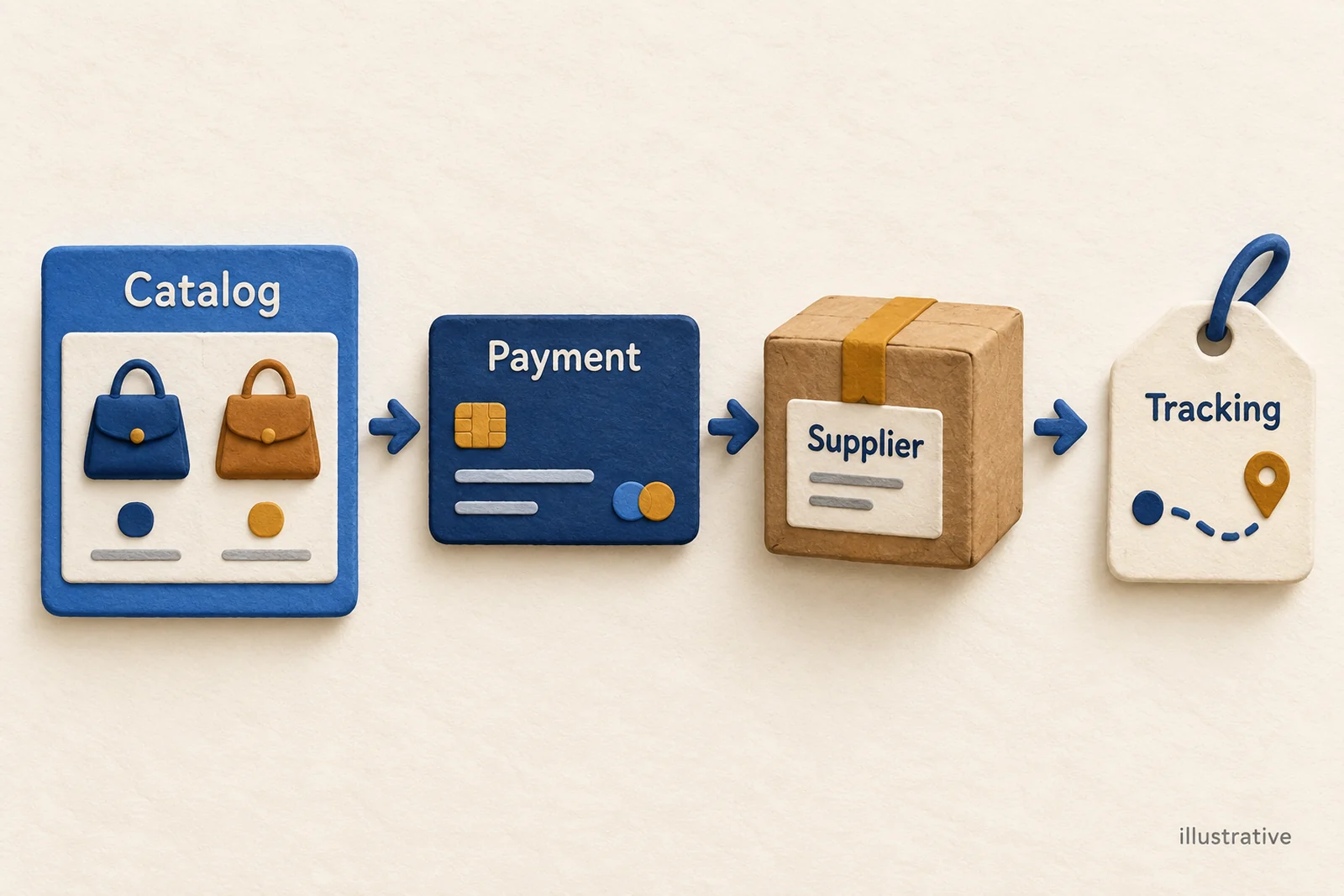
A BigCommerce dropshipping app connects your store to the business supplying the product. When someone buys a black bag, the connection should send the right color and delivery details to that supplier, then bring tracking back to your store.
Start with what you want to sell. If you need a ready-made supplier catalog, look at Syncee or Wholesale2B. If you want shirts or bags carrying your own designs, look at Printful.
If you already have an approved wholesale supplier, Inventory Source can connect that relationship. If several suppliers or a warehouse need to share your orders, Flxpoint helps choose where each order goes.
Your customer paying you is still only the beginning. The supplier may need your payment and must accept the order before sending the bag. Choose an app that covers the work you need between the sale and the shipment.
That is the connection worth understanding before you import a large catalog. If you are still choosing the store platform, our BigCommerce dropshipping guide explains that earlier decision.
01
Compare BigCommerce dropshipping apps by supplier setup
These options do different jobs. The comparison below uses vendor guides checked on September 28, 2026; we have not installed paid accounts or placed test orders with them.
| Connection | A good starting point when… | What it helps move between businesses | What you still need to arrange |
|---|---|---|---|
| Syncee | You want to find products from marketplace suppliers | Store orders, supplier payment, paid-order forwarding and tracking | The supplier’s shipping and return terms, plus payment for each order |
| Wholesale2B | You want a catalog and a service handling supplier orders | Product import, stock updates, store orders and tracking | Funding the wholesale order and making catalog edits in the right place |
| Printful | You want to sell products carrying your own designs | Your connected products and orders going to Printful for production and shipping | The design, product variants, production charge and shipping cost |
| Inventory Source | You have, or plan to open, an approved wholesale account | Supplier product and stock data; orders and tracking with Full Automation | Supplier access and a service that supports the order work you need |
| Flxpoint | You have several suppliers or warehouse stock | Products, stock, prices, orders and shipment information | Rules for choosing a supplier and matching product and shipping details |
On a phone, swipe the table sideways to compare every column.
Syncee: find suppliers, then pay for the orders
Syncee makes sense when you are still choosing products and suppliers. Its order guide describes a simple sequence: a BigCommerce order appears in Syncee, you pay for it there, and the paid order goes to the supplier. The supplier sends the goods and provides tracking, which Syncee returns to your store. Syncee order management.
For the black bag, this means the customer’s payment to your store and your payment to the supplier are two separate events. An order sitting in Syncee can still be waiting for you to fund it. Look at the supplier’s currency, shipping quote and return terms while choosing the product, so those costs do not arrive as a surprise after the sale.
Wholesale2B: a catalog with supplier-order handling
Wholesale2B combines product import, stock updates, order collection and tracking in its BigCommerce plan. You pay the wholesale order through Wholesale2B, which handles the supplier side. This can suit someone who wants that service instead of managing a separate account with every supplier. Wholesale2B’s BigCommerce plan.
Choose where product edits are maintained
There is a practical detail to learn early: the plan warns that edits to titles, descriptions or prices inside BigCommerce can be overwritten by the next update. Make those changes in Wholesale2B where its plan requires it. Otherwise, you could spend an afternoon improving product pages and find the old copy back the next day.
Printful: sell your designs without holding the products
Printful is for print-on-demand products, such as a shirt carrying your artwork. When an order is ready, Printful makes and ships the item. That work is often called fulfillment: preparing the customer’s goods and getting them sent out.
Its current guide supports all BigCommerce plans. You need an account on each platform, then start in Printful’s Stores area, choose BigCommerce, install the marketplace app and finish connecting the accounts. Connected orders can then flow to Printful for fulfillment. Printful’s BigCommerce setup guide.
A shirt being visible in your store is not enough. Printful needs the right product, design file and print placement for each variant, such as its size or color. Start with one design and variant that are properly connected, and compare production and shipping costs with the delivery promise you want to offer. Printful product sync explained.
Inventory Source: work with a wholesale supplier
Inventory Source is a different starting point: the wholesale supplier relationship comes first. For its direct supplier integrations, you need the supplier account and required access. Paying for the software does not get your business approved as a reseller. Supplier-account prerequisites.
The service has two important levels. Inventory Automation moves product information, stock and prices into the store. Full Automation adds supplier orders and shipment tracking. If your main problem is sending orders to the supplier, the inventory-only service leaves that job for you. Inventory Source’s service explanation.
Stock automation and order automation differ
Ask whether your exact supplier supports the order service, too. A supplier can provide a stock file without having a way to receive automated orders. The software needs both sides of the conversation to work.
Flxpoint: decide which supplier gets each order
Flxpoint becomes more useful when several suppliers or a warehouse can fulfill your products. Order routing simply means choosing which source should receive the order. For example, your rules might prefer one supplier and use another when the first cannot supply the bag.
Its BigCommerce guide covers products, stock, prices, orders and shipment updates. OAuth is the recommended connection method: you authorize the app through the store’s login and permission flow. An API-account connection is another way for the systems to exchange information, but it needs the required permissions. Flxpoint’s BigCommerce connection guide.
The extra choice brings extra setup. You need to choose your sources and explain how the store’s shipping options match the supplier’s services. Connecting three suppliers does not tell the software which one should receive tonight’s order.
02
Connect your store before the first sale
Start by asking the supplier the questions that affect a real order: which products can you sell, where can they ship, how do you submit and pay for an order, how soon can they dispatch it, and who handles a return? Those answers help you choose the connection rather than discovering its limits after checkout.
Next, connect the store you actually intend to sell from. A staging store is a practice copy; it has different products and orders from the live store. Flxpoint’s guide distinguishes the two, and Syncee’s installation flow asks you to select the store and confirm the app’s access. Syncee installation.
An installed app may still need further setup. Inventory Source’s onboarding includes verification before activation, for example. Work through the vendor’s current instructions before assuming the service is ready to take orders. Inventory Source onboarding.
Give each field one agreed source
Decide who changes each piece of information. The supplier’s update might set the available quantity; your pricing rule might set the selling price; you might write the product description. If two apps keep changing the same price, one can undo the other’s work. Keep your copy where the connection preserves it, especially with Wholesale2B’s catalog rules.
A SKU is a product code you use to tell items apart. Give the black bag and blue bag different codes, and connect each to the correct supplier item. The codes do not have to look alike across every system, but the connection must point to the same color and product. Otherwise, a perfectly delivered blue bag is still the wrong order for someone who bought black.
Set up shipping and supplier payment before letting orders go out automatically. Flxpoint says an unmatched BigCommerce shipping-method name puts an order on hold. If you add “Free Shipping” to the store, it needs its own match even when “Standard Shipping” already works. Shipping-method setup.
Keep your first product range small enough to look through. It is much easier to correct ten product connections than to untangle thousands while customers are already buying.
03
Follow one bag from checkout to delivery
Use one product in two colors to learn the process. This is an illustrative example, not an order we placed: your customer chooses a black bag, while the blue bag is another separate variant in the store.
| Part of the order | What should be clear | What needs fixing |
|---|---|---|
| Product | Black and blue have separate codes linked to the correct supplier items | Both colors send an order for the same bag |
| Stock | Each color has its own quantity and a recent supplier update | The main product looks available, but black has no stock |
| Price | The intended selling price stays in place | Another app puts an older price back |
| Customer order | Correct color, quantity, address and shipping service reach the app | A variant is missing or the shipping service is not matched |
| Supplier order | Payment, submission and acceptance are clear | The app has the order, but the supplier is unpaid or has rejected it |
| Shipment | The supplier’s carrier and tracking return to BigCommerce | The bag is shipped, but the store order has no tracking update |
On a phone, swipe the table sideways to compare every column.
The stock feed tells your store how many bags the supplier reports. A feed is the file or stream of product information the supplier sends. It can say there are three black bags without reserving one for your customer. Another store might buy them before your supplier receives your order.
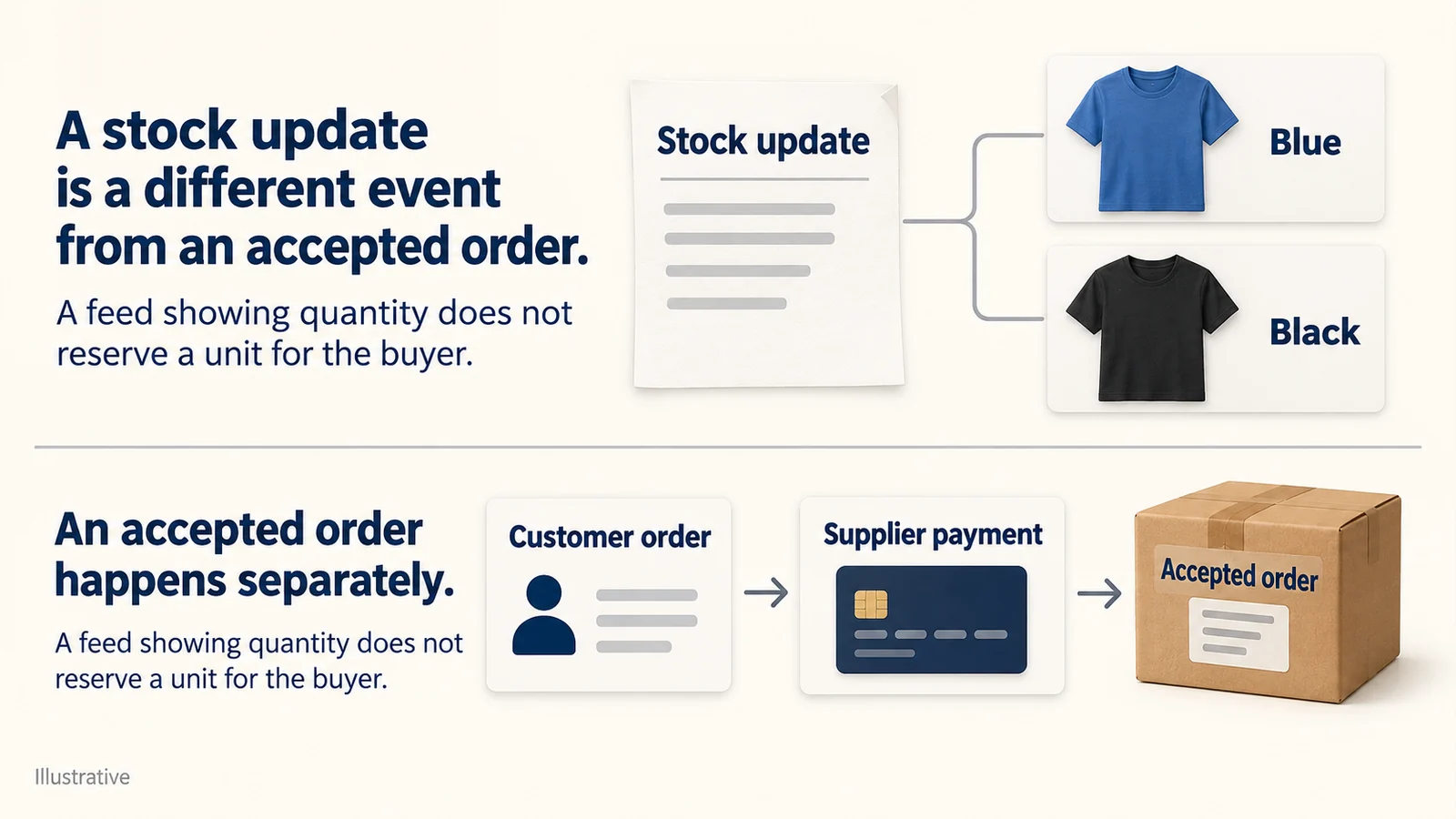
How often the app reads that information is only half the story. Inventory Source explains that it cannot produce fresher stock information than the supplier provides. Reading the same unchanged file more often does not add new stock news. Our inventory-management guide explains the wider problem. Inventory Source’s stock-update explanation.
A successful update can still leave variant stock wrong
Flxpoint documents a specific BigCommerce problem here. If a product uses product-level inventory tracking, or no inventory tracking, BigCommerce can discard the quantity sent for each variant even though the update appears successful. Open the actual black and blue variants in BigCommerce and look at their quantities; for this variant setup, the tracking setting needs to be variant. Variant stock requirements.
Set up the quantities and the shipping method separately
Continue the fictional bag in black and blue. Suppose the current permitted source reports three black and zero blue. These chosen quantities illustrate the check; they do not establish availability or reserve a unit.
Quantity belongs to the variant
Set Inventory Tracking to variant in BigCommerce Admin. Run Sync & Link Listings in Flxpoint. Check each exact variant’s code and quantity in Admin: black three; blue zero in this fictional example.
Then select each color on the storefront. Does purchase availability follow your intended stock and backorder rules? The theme may hide numeric quantities. A successful sync message alone cannot answer this check.
Every shipping name needs a route
In Flxpoint, go to Sales Channels → BigCommerce → Shipping/Carrier Mappings. Map each actual BigCommerce method name, such as “Standard Shipping” and “Free Shipping,” separately to a supported Flxpoint shipping policy. The guide says pattern matching is not supported. Free buyer shipping does not mean the supplier service costs nothing.
Use a held order to check the boundary
Verify that an unmapped method remains On Hold. Resolve the method and supported source before releasing it, then check the accepted order’s SKU, quantity, destination and service. Do not send a blue order as black or select a faster unsupported service just to clear the hold.
These steps come from Flxpoint’s BigCommerce channel guide, checked on October 11. They describe that integration, not every BigCommerce app. No live account, stock sync or sample order was performed for this example.
For a permitted sample order, follow the bag all the way through supplier acceptance and the shipment returning to your store. Keep the supplier’s order reference as well as the BigCommerce order number.
If the submission times out, use that reference to find out whether the supplier already received it before sending it again. That small pause can prevent paying for two bags when your customer ordered one.
Check shipment write-back without inventing a carrier event
A shipment record needs real shipment data
If a real supplier shipment exists but BigCommerce does not show it, check Templates → Sync Orders → Field Mapping. Flxpoint requires the actual tracking number. Its guide also describes invalid carrier values and normalization on retry; follow its supported carrier mapping. A successful write-back still needs the correct order and parcel. Do not create tracking or a shipment date to make a stuck order appear sent.
04
When the order gets stuck
If the supplier runs out of black bags after the sale, pause that variant while you find out what is possible. Would the customer accept another suitable option, or do you need to explain a delay or cancellation? Do not quietly send blue, another brand or a different service instead.
Customer payment does not fix supplier payment
If payment to the supplier fails, the customer’s payment to you does not solve it. Hold the order until the payment goes through and the supplier confirms acceptance. This is why “order imported” and “order being shipped” mean different things.
An edit in your store may not reach a paid supplier order
An address change needs attention on both sides. Syncee says you cannot edit a paid order already forwarded to the supplier inside Syncee. Contact the supplier and find out whether dispatch can still be stopped. Editing only BigCommerce could leave the parcel going to the old address. Syncee’s paid-order limit.
A cart with items from two vendors may also become two shipments, with two tracking numbers and shipping charges. Find out how that will appear in your customer messages. People should understand why one parcel has arrived while another is still on the way.
05
What the connection will cost you
The app subscription is one cost of running the store. Goods, supplier shipping, your BigCommerce plan, payment charges and returns sit beside it. The published prices below were rechecked on October 11, 2026. The earlier feature comparison retains its stated September 28 research scope.
| Service | Published charge | What to include in your choice |
|---|---|---|
| Wholesale2B Store Integrations | $49.99 monthly, or $449.91 annually | Listed 2,500-product cap, upgradable; wholesale orders still need payment |
| Inventory Source Inventory Starter | $199 monthly | Two integrations and 250,000 SKUs; inventory work |
| Inventory Source Full Starter | $299 monthly | Two integrations and 500 monthly orders; extra orders $0.30 each |
| Flxpoint Business | $799 monthly, or $699 monthly equivalent with $8,388 paid annually | Eight supplier/source and two sales-channel connections; 3,000 monthly orders |
On a phone, swipe the table sideways to compare every column.
Sources: Wholesale2B pricing, Inventory Source pricing and Flxpoint pricing.
An integration is a connection between systems; one store with several suppliers can need more than one. Count your actual setup against the plan’s limits. For Syncee and Printful, compare the selected plan or product and destination quote rather than borrowing another store’s cost estimate.
Inventory Source’s older sales page still shows lower starting prices. Use its current pricing page and the checkout quote when budgeting. Flxpoint’s $699 monthly equivalent also requires annual payment; it is not the same commitment as paying month by month.
Spread the subscription over actual order volume
Here is a simple illustration of subscription cost. A $299 plan spread over 100 monthly orders costs $2.99 per order. Over 500 orders, it is about $0.60. That is not profit or a claim of savings: you still need to pay for the goods, shipping, returns and support.
Choose the smaller service that does the work you need. Syncee or Wholesale2B suits their marketplace supply arrangement; Printful suits your designs; Inventory Source suits a supported wholesale account. Flxpoint’s broader setup is easier to justify when you often need to decide which supplier gets an order.
If you know what you want to sell but still need a supplier, AIDrop Agent’s sourcing service can help compare suppliers in China and plan samples, quality checks, packaging and shipping. Send a product link, destination countries and expected monthly orders, and we can help you work out what to ask suppliers and what to test first. You would still need to agree how BigCommerce orders reach the supplier.
06
Common questions
Do I have to use a dropshipping app?
No. A small store can use a supplier’s own feed or API connection, or a manual order process. Choose something you can manage at your expected volume: someone still needs to keep products and stock current, send supplier orders and bring tracking back.
Can an app guarantee that the item is in stock?
No. Ask when the supplier updates quantities and when an order actually reserves a unit. Frequent updates help only when the source information is current, and a rejected order still needs a response from you.
Is importing Amazon products the same as having a wholesale supplier?
No. An importer can move product information into your store without providing a wholesale agreement, dependable supply or permission for your selling platform. Settle the actual sourcing arrangement before building sales around that import button.
BigCommerce Dropshipping: Store Fit and Order Workflow
BigCommerce can run a dropshipping store, but it does not supply or ship the product by itself.
CJdropshipping Review: Costs, Warehouses, Quality and Fulfillment Fit
CJdropshipping is a practical option for sellers who want sourcing, store connections, packaging and fulfillment in one

CJdropshipping vs DSers: Who Sources, Pays and Ships the Order?
CJdropshipping can source and physically fulfill an order; DSers maps a store product to supported external suppliers
