

Blanka lets you sell eligible beauty products with your branding and have customer orders fulfilled from its catalog. The app connects products to a store; you pay for products, membership where required and shipping. Select the formula first, approve its branded sample and check the order and payment flow before advertising it.
A bottle with your logo can make the brand feel ready very quickly. The harder questions are inside and behind that bottle: what the formula contains, what you can say about it, which plan supports the order, and whether the supplier receives payment and ships the correct branded item.
This guide follows public Blanka and FDA documents checked on October 14, 2026. The example logo, product configuration, costs and tests are illustrative or proposed. We did not install the app or physically test a Blanka product. The beauty products guide covers the wider range and market questions.
01
Choose the formula before putting your name on it
The catalog route starts with an existing product. Your branding changes its presentation; it does not create a new formula or substantiate a health claim. Custom formulation is a separate service with its own scope, fees and quantities.
For a first offer, select one ordinary product whose intended use you can explain. Obtain the current ingredients, net contents, label information, use and storage instructions, and any relevant warnings. Confirm that the product and branding are eligible for your destination.
| Proposed change | What you need to establish |
|---|---|
| Add your logo to a catalog product | Supported branding area and approved file |
| Change the label’s product claims | Evidence and applicable regulatory review |
| Change fragrance or ingredients | Whether custom formulation is actually available and on what terms |
| Sell in another country | Product, label and import eligibility for that market |
Begin with a product and market, rather than automatically publishing the whole catalog. An ordinary body-care item, a makeup shade and a product marketed as an acne treatment need different information and review.
The private-label guide explains the distinction between branding an available product and commissioning a changed product. Use that distinction when discussing anything beyond the catalog’s supported options.
02
Work out what free access and paid plans include
Blanka’s pricing FAQ separates app-based dropshipping from wholesale purchasing. Free access allows exploration and branding previews; automated fulfillment and the chosen selling features depend on the current membership terms.
The public memberships checked for this guide were:
| Plan | Monthly billing | Annual charge | Monthly equivalent of annual charge |
|---|---|---|---|
| Essentials | $39 | $312 | $26 |
| Signature | $79 | $588 | $49 |
| VIP | $149 | $888 | $74 |
The annual equivalent is not the amount charged each month. An annual Essentials purchase means the stated $312 commitment, subject to the actual checkout terms. Product and delivery charges remain separate.
The Shopify app listing describes plan features, including Essentials’ limit of up to 25 published products. Check the specific features your first offer needs, rather than buying a larger tier simply because it sounds more professional. Existing grandfathered accounts can have different terms.
Sample and inventory shipping are also different from ordinary customer-order shipping. Get the quote for the order type you will actually place. A sample’s delivery total cannot automatically become the shipping rate for future customer orders.
Wholesale purchasing without an app membership is another route. It involves buying and managing the agreed inventory rather than assuming a subscription-free version of every automated app feature.
03
Prepare a logo that will actually print
Use a file that meets Blanka’s printing requirements, then inspect it on the chosen product. A decorative logo rendered beautifully on a large screen can become unreadable on a small container.
The logo guidance specifies a transparent PNG with RGB or RGBA channels, solid colors, dimensions within its stated range and a file below 2 MB. It warns against gradients, thin lines and unnecessary padding.
An illustrative starting file is a 1,000 × 1,000 pixel RGBA PNG, with transparent background, solid lettering and no large empty border. That fits the documented general constraints; it does not establish that the logo remains legible on every product.
Check the exported file before uploading:
- Open it against light and dark backgrounds to find unwanted white boxes or leftover pixels.
- Check the actual pixel dimensions and file size.
- Verify RGB/RGBA rather than grayscale or an unsupported channel format.
- Read the lettering at the likely physical branding size.
- Upload it through the current brand setup and review the product preview.
For dark packaging, use a supported contrasting version. Blanka’s dark-packaging guidance says metallic and gradient designs are not supported by that printing process. A gold-colored file should not be advertised as metallic gold decoration.

Order the actual branded sample before approving the appearance. The preview cannot settle small lettering, physical placement or the container’s received finish.
04
Connect Shopify and publish one product
Use Blanka’s connection and publishing route so the supplier product and your branding stay linked to the correct store.
The Shopify installation guide describes two options: installing through Shopify’s App Store, or using Connect Store from the Blanka dashboard and authorizing the intended Shopify store.
After the connection and required plan are ready, the publishing instructions describe:
- Browse Product Catalog and choose the eligible product.
- Select Add to My Products.
- Open My Products.
- Use the product’s Publish control to add it to the connected store.
Inspect the result in Shopify. Confirm the correct product, your approved brand version, images, description, price and sales channel. A connected account alone does not establish that the product is visible and purchasable on the intended storefront.
Save the product identifiers before troubleshooting. Blanka warns that unpublishing can permanently remove associated information; export and preserve the relevant store data before following any destructive correction. Repeated unpublish/recreate attempts can also make existing order references harder to understand.
Public instructions can evolve with the interface. Use them to follow the supported process, then verify the actual result rather than assuming the same button location or default in every account.
05
Check inventory, location and shipping at checkout
Open the product as a buyer. A correct-looking page can still show unavailable stock or fail to offer shipping because its location or profile is wrong.
Blanka’s inventory and shipping troubleshooting page says stock updates can take up to five minutes after publishing. It also describes checking the Blanka location, shipping profiles and the Online Store sales channel.
If a product remains unavailable, work through the cause:
| Symptom | Check before changing it |
|---|---|
| Published but invisible | Correct store and assigned sales channel |
| Zero or untracked inventory | Current supplier availability, mapping and assigned location |
| No shipping at checkout | Product profile, origin/location, destination zone and rate |
| Unexpected shipping charge | Actual product/order route and configured checkout service |
The help page includes a manual quantity workaround. Typing “1,000” does not establish 1,000 physical units. Confirm availability and the intended connection behavior with support before changing counts in a way that can accept orders you cannot fulfill.
Test the actual postal code and quantity you plan to support. A domestic one-product checkout does not prove a two-product international order or another shipping profile.
Keep the supplier’s fulfillment location separate from your own business address. The current documented Blanka warehouse is the provider’s location, not an AIDrop warehouse or a location you can promise for unrelated products.
06
Follow the customer order through supplier payment
The customer payment belongs to your store sale. The supplier order still needs its own fulfillment route and payment. Do not treat a paid Shopify status as proof that Blanka has started making or shipping the item.
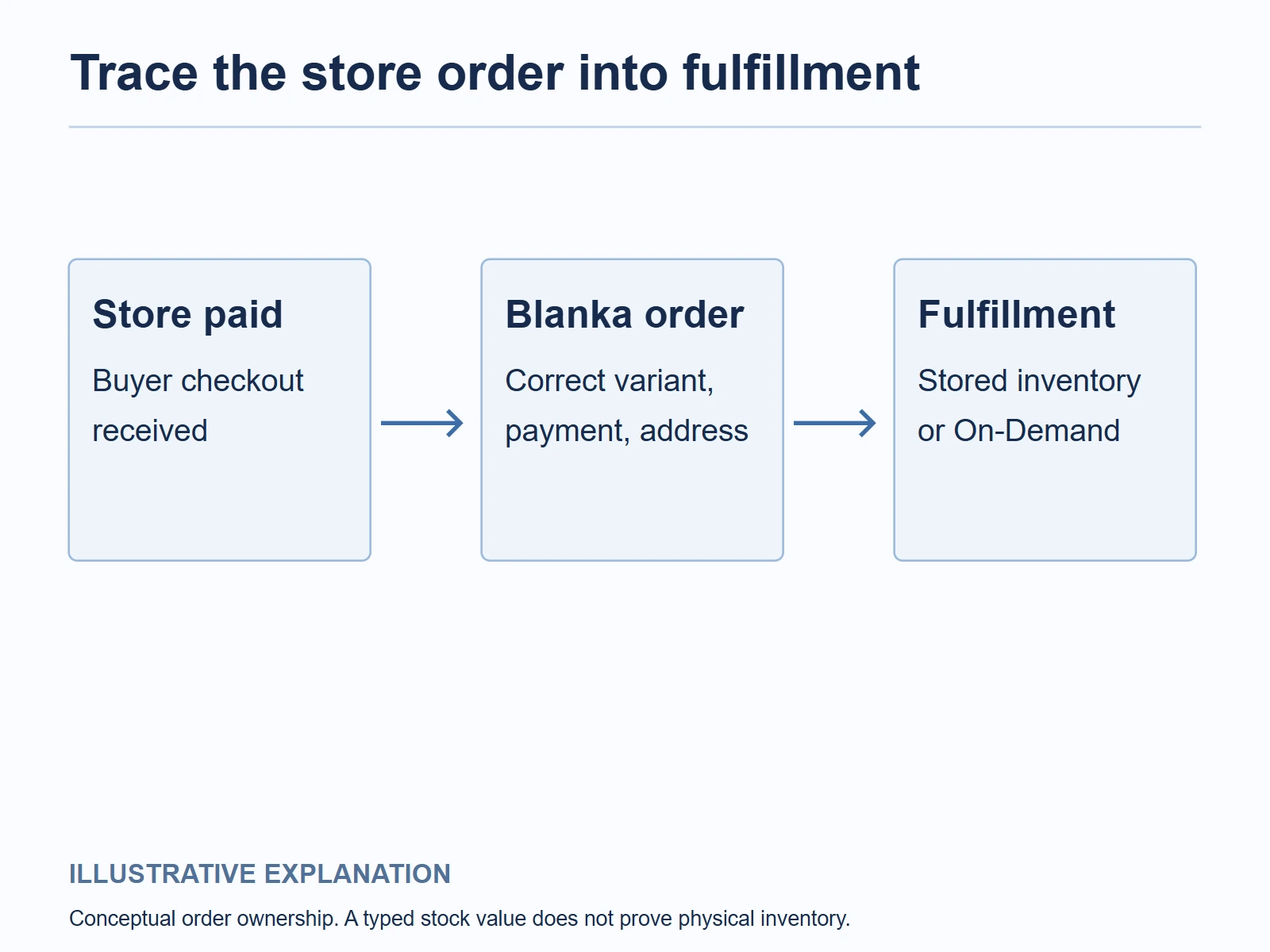
The customer-order instructions describe opening Orders, selecting the order and choosing fulfillment from stored inventory or On Demand. Automatic payments can support processing, but check the settings and actual charge in your account.
The inventory route can mean the goods were purchased earlier, with shipping charged at release. That is not a free product cost: the stock payment still belongs in the economics. On-demand orders need their applicable production/product charge.
Run one controlled paid storefront order with your own details. Match these records:
- Store order number and Blanka order number.
- Catalog product and variation, where applicable.
- Approved brand or label version.
- Quantity, delivery name and address.
- Fulfillment route and supplier invoice.
- Payment, production or dispatch state and tracking.
Check the received item against the listing and approved sample. If the order is missing, unpaid or held, resolve the actual state before manually creating another one. A second entry can produce a second charge while the original remains active.
Keep cash available for supplier orders. The store payout reaching your bank is a separate event from the payment required to fulfill a sale.
07
Calculate the first ten orders, then the next fifty
Membership creates a fixed cost that is more noticeable in a small launch. Product and shipping charges remain per-order costs; do not combine them into a vague “markup” percentage.
Here is a hypothetical $32 product sale in USD using a $39 monthly membership:
| Item | Ten completed orders in the month | Fifty completed orders in the month |
|---|---|---|
| Customer revenue per order | $32.00 | $32.00 |
| Product | −$9.00 | −$9.00 |
| Supplier shipping | −$6.00 | −$6.00 |
| Store/payment charges | −$1.25 | −$1.25 |
| Customer acquisition | −$7.00 | −$7.00 |
| Remedy allowance | −$1.00 | −$1.00 |
| Membership allocated per order | −$3.90 | −$0.78 |
| Left before other fixed costs and tax | $3.85 | $6.97 |
The calculation shows the fixed membership spread over more completed orders. It does not predict that selling fifty orders produces those costs or outcomes. The product, shipping, acquisition and remedy inputs are illustrative and need replacement with your own actual figures.
At the ten-order assumptions, spending another $4 to acquire each customer would turn the example negative. That is why a product’s attractive branding or retail markup does not establish an affordable advertising budget.
Keep sample, design, packaging changes and any other actual service charges in the launch budget. If comparing a different supplier such as Supliful, use its actual product, plan and delivered quote rather than substituting Blanka’s assumptions.
08
Read the sample as a labeled beauty product
Inspect more than the logo. Compare the bottle or pack, net contents, ingredients, instructions, warnings and any lot or traceability information against the product data you received. Verify that the final branding has not made important information unreadable.
Record the exact product and brand revision. A replacement formula or container can need a new review even when your logo has not changed. Keep the approved public description with that record.
For US cosmetic products, FDA’s MoCRA overview explains responsibilities including safety substantiation and adverse-event obligations, with scope and exemptions that need to be assessed. Identify who is responsible for the actual branded product rather than assuming the supplier’s catalog removes your role.
A sample’s scent or texture does not certify safety, effectiveness or a “hypoallergenic” claim. A supplier mentioning FDA compliance or registration also does not establish that the product is FDA-approved.
If the formula, claims, label or responsibility is unclear, resolve that before publishing. A simple supported product description is more useful to a buyer than a dramatic treatment promise that the product cannot substantiate.
09
Manage a defect without sending every return to Blanka
Blanka’s current returns guidance describes case-by-case remedies for damaged products or branding errors, with damage/defect reports within seven calendar days of the tracking delivery date. It asks for evidence and says it does not process direct customer returns.
Set your store’s return contact and route before accepting sales. An unsolicited return sent to the Blanka warehouse is not an ordinary free return service. The policy describes arranging onward shipping at the merchant’s cost and a 72-hour response requirement before destruction may occur. Incorrect-address or failed-delivery returns are not automatically refunded.
For a defect, collect the order IDs, delivered date, relevant photographs and the product or brand version. Photograph outer packaging before opening when damage is visible. Distinguish a broken container, incorrect logo and product dissatisfaction; they may have different remedies and evidence.
Tell the customer what you will do, while pursuing the supplier claim. The provider’s reporting window and return policy do not automatically settle all consumer rights or your shop’s promises. Keep customer refunds, replacement orders and supplier recovery as separate records.
Use the complaint to repair the offer. Change an unreadable logo file, clarify a shipping promise or pause an affected product when a credible quality concern needs investigation. A blanket “contact the supplier” reply leaves the buyer without a useful next step.
10
Blanka dropshipping questions
Does uploading my logo create my own formula?
It brands an eligible catalog product. A changed formula or custom formulation needs a separate agreement, supporting information and its own commercial terms.
Should I set stock to 1,000 when a product shows zero?
Not without confirming availability and the connection behavior. A manually entered count can make a product purchasable without establishing supplier stock.
Can I copy every supplier claim into my product page?
Use the exact formula, intended use and evidence for the market. Avoid unsupported treatment, approval or safety claims, and identify your role in the branded product.
Where can AIDrop help if I want another supply route?
Send the product, formula or specifications, label, packaging and destination for a separate China-side sourcing and fulfillment review. Blanka account, app and provider-order issues should go to Blanka support; AIDrop does not imply a partnership or control of that account.
CJdropshipping Review: Costs, Warehouses, Quality and Fulfillment Fit
CJdropshipping is a practical option for sellers who want sourcing, store connections, packaging and fulfillment in one

CJdropshipping vs DSers: Who Sources, Pays and Ships the Order?
CJdropshipping can source and physically fulfill an order; DSers maps a store product to supported external suppliers

AutoDS Review: Evaluate the Automation You Would Actually Use
AutoDS can reduce listing and order work, but its value depends on your sales channel, tier, add-ons
