

ShineOn is a print-on-demand supplier for jewelry and other personalized gifts. You create a supported product in its dashboard, connect it to your storefront and pay ShineOn to produce and ship customer orders. For message-card jewelry, the pendant, printed card, box and any personalization must stay matched through checkout.
The buyer may be choosing a gift for Maya, rather than simply buying a necklace. The message and presentation are part of what they paid for. A correct pendant with the wrong name or an unexpected box can make the whole gift unsuitable, even when the order technically shipped.
This guide follows public ShineOn documents checked on October 14, 2026. Its configuration, calculations and test instructions are illustrative or proposed, not a report of an account or product we tested. For the wider product and supplier questions, use the jewelry dropshipping guide.
01
What you can sell with ShineOn
The current Shopify app listing describes personalized jewelry and other POD gifts. Start with the exact catalog product, rather than assuming every item supports the same engraving, name field, box or production origin.
For message-card jewelry, identify the pieces of the offer separately:

| Part of the gift | Detail to verify |
|---|---|
| Jewelry | Exact design, material description, finish, chain and dimensions |
| Message card | Printed wording, artwork and revision |
| Box | Included box and any paid upgrade |
| Personalization | What the buyer can change, on which product and plan |
| Delivery | Supported destination, current production and shipping estimate |
A fixed card designed by your store differs from a card that receives a different name on each order. The fixed design can use one approved file; the personalized version also needs the customer’s input to reach production correctly.
Keep material claims tied to the chosen product. A gold-colored image does not establish solid gold, and a catalog badge cannot prove that every buyer will avoid a skin reaction. Obtain the specific product information before writing those claims.
Begin with one gift configuration. Adding a name, engraving and premium box together creates several things to verify; it is easier to discover a mismatch when the first offer is small and explicit.
02
Read the plan price and order bill separately
The current app listing offers free installation, with product and shipping charges for orders. It also lists paid plans, including Starter at $27 monthly or $260 annually, and Side-Hustle at $77 monthly or $740 annually. Account terms can change, so confirm the selected plan before subscribing.
Paid features can include personalization, upsells, support or eligible product discounts. A feature being advertised does not establish that every product supports it or that you need it for the first fixed-design gift.
Consider the discount on its own. Starter advertises up to $1 off per unit. At a full $1 saving, 27 eligible units would offset a $27 monthly subscription. If your chosen item saves $0.50, it would take 54 eligible units. This is a simple break-even calculation; the value of essential personalization or other features is a separate decision.
An annual charge is also a cash commitment, rather than twelve small monthly charges. Do not choose it by comparing only the displayed monthly equivalent while overlooking the amount charged upfront.
Before buying a plan, answer three questions: does the exact product need a paid feature, what saving actually applies to it, and what does the subscription cost and allow you to cancel? Keep production and delivery charges outside that subscription comparison.
03
Connect Shopify and create the product in ShineOn
Create the product through ShineOn’s supported route. A manually duplicated Shopify listing can look correct while losing the connection that tells the supplier what to make.
The connection guide describes app installation, account setup, a supplier payment method and product-page features. It was updated in September 2026. Check that you have linked the intended Shopify store before creating products.
The public product creation instructions describe this route:
- Use Create New+ in the ShineOn dashboard and select the catalog product.
- Upload its artwork and configure supported personalization where available.
- Set the title and description.
- Enable the intended variations and their prices.
- Choose the images that match those variations.
- Configure eligible upsells if you are using them, then publish.
Public instructions and account screens can differ as the app changes. The observable result should still be a supplier-created product linked to the intended storefront variants. Record both product identifiers and inspect the live customer page.
The documentation also notes that some newly linked accounts can have mockup-rendering issues. If you encounter one, keep the affected offer out of customer traffic and follow current support guidance. Do not delete and recreate products casually when they already have paid orders.
04
Make the message card and checkout agree
For our illustrative gift, choose a supported necklace, a standard box and message-card artwork version 3. If the offer lets the buyer enter “Maya,” confirm exactly where that name appears and which feature carries it to production.
A name field visible in a theme is not proof that the supplier receives it. Check the customer inputs and resulting order on the actual supported product, plan and page setup.
Test the important states before paid release:
| Customer action | Expected result to check |
|---|---|
| Leaves a required name empty | Cannot unknowingly buy a gift missing the required name |
| Enters the intended name | The cart and order retain the correct text |
| Uses a long or accented name | The supported input rule and final layout are clear |
| Changes the box | Selected price, photograph and order variation agree |
| Changes product finish | The jewelry image and supplied variation change correctly |
Do not invent a universal character limit. Set the offer within the product’s actual supported limits. If personalization is not available, sell the fixed approved card and remove any suggestion that the buyer can change it.
Order the finished configuration as a sample. Read the card at its actual size, inspect the pendant and chain, and compare the box with the listing. Large text on a screen can become difficult to read beside the jewelry.
For a gift, approval is about the whole presentation. The correct name on the wrong card, or a premium-box photograph paired with the standard-box order, still fails the promise.
05
Know what the supplier charges before production
The customer pays your store. You then fund the supplier order. Those are separate payments, and the store’s bank payout can arrive later than the production bill.
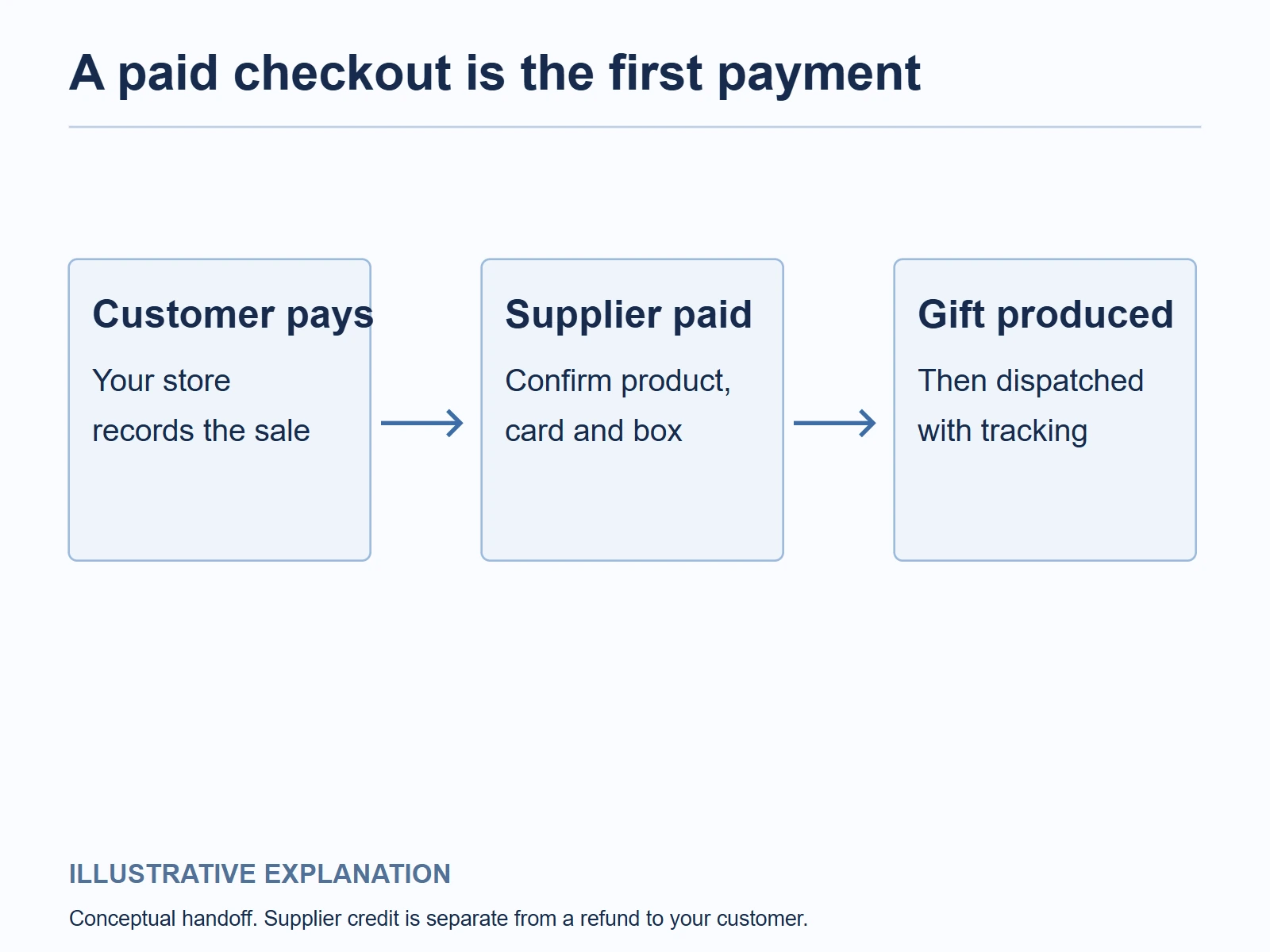
ShineOn’s order-life-cycle guide describes order review, possible holds, supplier payment, production and dispatch. A missing address or personalization detail can interrupt that sequence. A paid Shopify order alone does not establish that ShineOn has accepted payment and begun production.
The connection document states a 3% surcharge for orders paid to ShineOn by credit card. Check its application on your actual invoice; do not add it automatically to every payment route.
Here is an illustrative $59 gift calculation in USD:
| Cost or revenue | Amount |
|---|---|
| Customer pays | $59.00 |
| Product and supplier shipping | −$24.00 |
| Assumed applicable 3% supplier card charge | −$0.72 |
| Store/payment charges | −$2.00 |
| Customer acquisition | −$14.00 |
| Remedy allowance | −$2.00 |
| $27 plan allocated across ten completed orders | −$2.70 |
| Left before other fixed costs and tax | $13.58 |
These inputs are not current product or shipping quotations. Replace them with the exact product, box, destination and payment charges. A plan allocation helps you assess the small store’s economics; it does not mean every supplier order receives a $2.70 subscription charge.
If the paid plan saves less than expected or the upgraded box costs more, update the calculation before accepting the upsell. A higher checkout total is useful only when the added revenue exceeds its added costs and remedies.
Keep enough production cash available for the orders you accept. Automatic processing can simplify payment, but it also means you need to understand when approved orders become production commitments.
06
Inspect one paid order from card file to gift box
Use your own details for a controlled storefront order. It should test the offer your buyer sees, not merely a manual supplier sample.
Save a compact record:
Store product and variation IDs; supplier product and order IDs; card version 3; approved name “Maya” where supported; jewelry finish; standard box; quantity one; delivery address; customer total; supplier invoice.
Then check the order in sequence. The customer order should retain the selected configuration. The supplier record should contain the same product and personal inputs. Supplier payment should clear before the order moves into its production process. Dispatch should provide usable tracking, and arrival should match the original promise.
If an order is held, inspect its actual reason before overriding it. Missing text, an uncertain address and a payment issue are different problems. Recreating the order without resolving them can cause a duplicate or send an incorrect gift.
At delivery, read the card, compare the selected finish and box, and inspect the jewelry against the product description. Record the packing condition and any discrepancy. A small test establishes information about that configuration; it does not substantiate a vendor-wide quality or delivery guarantee.
Use the results to limit the first range. If a box upgrade or name layout cannot be verified, keep it out of the launch rather than relying on a future customer to discover the mismatch.
07
Change artwork without leaving an old variant behind
ShineOn’s product editing document says an existing product’s artwork cannot be re-uploaded; changed artwork requires creating a new product. Other details, such as prices, images and description, have their own editing options.
For an illustrative change from card version 3 to version 4, record both supplier products and the storefront variations that refer to them. The new card is a new production reference, even if the necklace itself is unchanged.
Handle the change deliberately:
- Save the old card and order references for existing purchases.
- Create and proof the new supplier product with version 4.
- Check its storefront variations, images, price and supported inputs.
- Verify a controlled order against the new product.
- Replace the future customer offer only after that check.
Do not erase or silently alter the records of paid version-3 orders. Ask current support how to handle any pending purchase that actually needs correction. A new storefront description cannot change what a customer already approved.
This also protects the customer’s path. Check any existing product link and available variants after the change so an advertisement does not lead to a missing or wrong gift page.
08
Deal with returns, credit and delivery problems
Read the supplier remedy before writing your store policy. The ShineOn returns policy describes no routine returns, consideration of fault-related remakes, and limited refunds in ShineCash. It also recognizes that sellers can have customer or marketplace obligations beyond its own policy.
Supplier credit is not cash returned to your customer. If you refund a buyer $59 and receive credit for a future production invoice, the two transactions affect available cash differently. Record the customer refund and supplier recovery separately.
Use the complaint to gather the right evidence:
- Wrong name or card: approved customer text, saved artwork, both order IDs and a photograph of the received gift.
- Wrong finish or box: selected storefront variation, supplier order and received-item photographs.
- Damaged jewelry: the affected part, packaging and order record.
- Delivery issue: tracking events, address and the supplier’s shipment reference.
The delivery help document uses the SHINE ID for investigation and describes conditions and timing for different delivery problems. Follow the current applicable deadline; a label created without carrier movement does not establish delivery.
Give the buyer a clear remedy and next update, then pursue the supplier claim. A remake arriving after the gift occasion may need a different customer response from a remake that can still arrive in time.
For ShineOn account or order controls, use ShineOn support. If you are comparing a separate China-side jewelry, packaging or fulfillment offer, send AIDrop the product specifications, box, personalization and destination. That is a sourcing comparison; we do not imply that AIDrop operates your ShineOn account.
09
ShineOn questions before launch
Is ShineOn free?
Installation can be free, but product and shipping charges still apply. Paid features and eligible discounts depend on the selected plan and product. Check the actual subscription and order bill separately.
Can I design a completely new piece of jewelry?
The documented route uses supported catalog products and their customization options. A new jewelry construction, material or mold is a different manufacturing request. Do not assume uploading message-card artwork creates it.
Do I need to offer buyer personalization?
No. A fixed approved design is a valid starting offer where the selected product supports it. Add customer inputs only when the product, plan and checkout-to-production path are verified.
Why is a paid store order not producing yet?
Check whether it synced, whether required information is complete, whether there is a hold, and whether the supplier payment cleared. Those states are separate from the customer’s payment to your store.
Can I copy the supplier’s no-refund policy?
Write the policy for your real customer, market and selling channel. Supplier terms do not automatically settle your retail obligations, and a credit or remake may not satisfy every customer situation.
CJdropshipping Review: Costs, Warehouses, Quality and Fulfillment Fit
CJdropshipping is a practical option for sellers who want sourcing, store connections, packaging and fulfillment in one

CJdropshipping vs DSers: Who Sources, Pays and Ships the Order?
CJdropshipping can source and physically fulfill an order; DSers maps a store product to supported external suppliers

AutoDS Review: Evaluate the Automation You Would Actually Use
AutoDS can reduce listing and order work, but its value depends on your sales channel, tier, add-ons
