
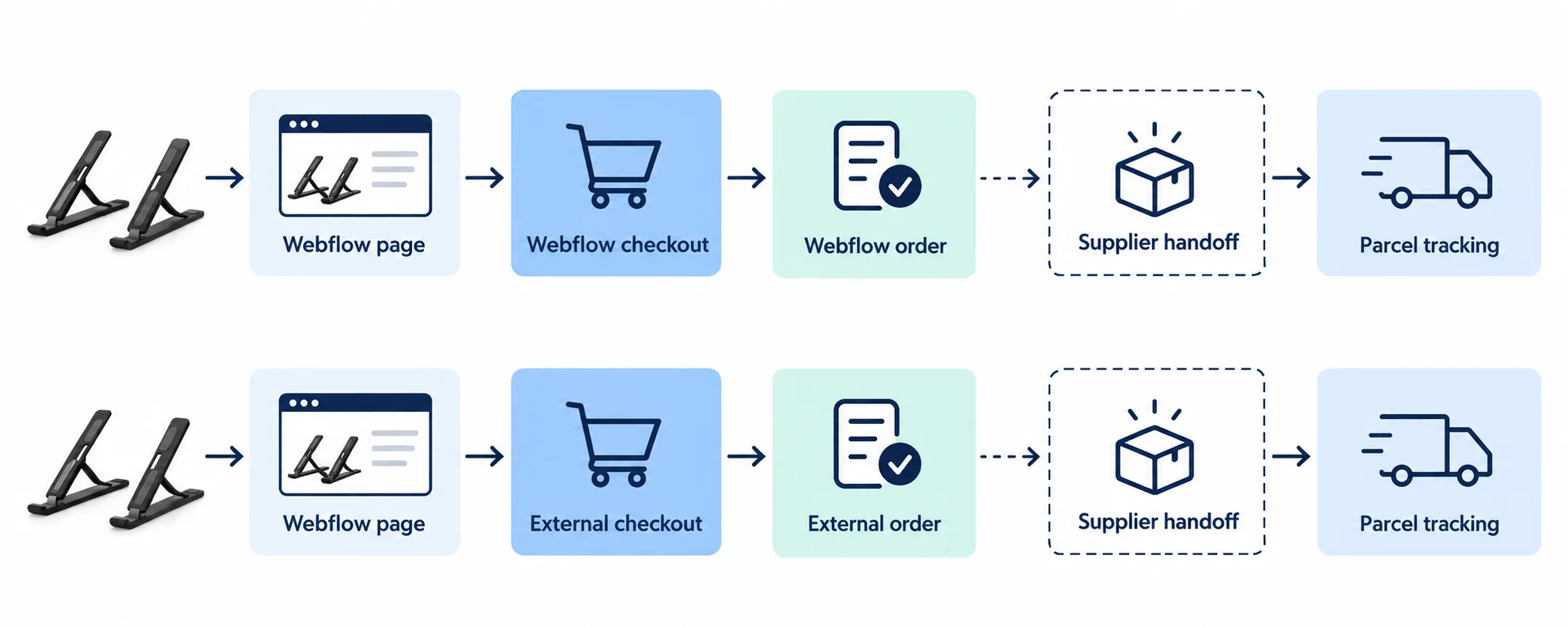
Yes, you can use Webflow for dropshipping. Choose native Webflow Ecommerce checkout or a Webflow-designed storefront with an external commerce backend. In either route, you still need a supported way to purchase the correct item from the supplier and return tracking to the buyer.
That boundary is easy to miss because a good Webflow product page can look finished long before the order operation is. Imagine someone pays for a black folding laptop stand. Webflow sends an order notification. If no one relays that black SKU to the supplier, or the supplier receives silver, the customer is still waiting on your store. A confirmation email from checkout is proof of a store order, not proof of an external purchase.
If you are still comparing store platforms, our dropshipping platform guide covers the larger choice. This article stays with Webflow: native Ecommerce, a tested routing connection, or a Webflow-designed frontend using a separate commerce backend.
01
Choose where the transaction actually happens
Start with the system that owns payment and the order record. In a native Webflow Ecommerce store, the buyer uses Webflow cart and checkout; the paid order appears in Webflow’s Orders area. In a Webflow-designed storefront backed by Shopify through a connector, the page can look like Webflow while checkout and orders belong to Shopify. These are different operating systems, even if the customer sees a similar design.
| Architecture | Buyer pays and order lives in | How the supplier may receive work | Test before choosing |
|---|---|---|---|
| Webflow Ecommerce + manual relay | Webflow checkout and Orders | A person sends accepted paid order details to the supplier and pays it | Can your team catch every order and return tracking reliably? |
| Webflow Ecommerce + routing integration | Webflow checkout and Orders, copied into a connected service | A configured vendor workflow passes order data onward | Does this connector support your exact supplier, variants, status and tracking path? |
| Webflow design + external commerce backend | External backend such as Shopify checkout and Orders | That backend’s own supplier app or your manual process | Does the Webflow page/cart map to the right backend SKU and checkout? |
On a phone, swipe the table sideways to compare every column.
Webflow’s Ecommerce setup help confirms a native store requires business details, a payment provider, shipping and tax configuration, an Ecommerce plan and enabled checkout. Its integration directory lists third-party tools, including Shopify-backed storefront connectors and order-routing services. A directory listing is a route to investigate, not proof that a particular supplier will accept a purchase or that every app still supports your plan.
A Shopify-backed page has a different checkout owner
For example, Webflow’s Storesynk listing describes Webflow as the design layer while Shopify manages inventory, orders and payments and hosts checkout. The listing is vendor-provided product information. If you use such a connector, test the exact app version and checkout flow you buy. Do not also expect the paid order to appear as a native Webflow Ecommerce order unless your chosen integration explicitly does that.
Write the chosen checkout owner at the top of your order sheet. Native Webflow and a Shopify-backed Webflow storefront should not be treated as the same order system; supplier purchase remains a separate step in either route.
02
Set up native checkout before thinking about supplier automation
If you choose Webflow Ecommerce, make a real test product before designing ten product cards. Webflow’s payment-provider help documents Stripe and PayPal for native Ecommerce, with country/provider availability to check for your business. Connecting a payment provider is not enough on its own: the relevant Ecommerce plan and checkout have to be enabled. Avoid copying an old tutorial’s fee or country list into a business decision; read your current plan and provider terms.
Match the shipping zone to the supported destination
Next, configure a shipping zone for a destination your supplier can actually serve. Webflow’s shipping-zone guide describes flat, price-, quantity- and weight-based checkout rates. Those are what the buyer sees and pays. They are not the supplier’s shipping invoice. If the supplier quotes a different amount for the black stand going to California, the difference is your store’s cost decision, not something Webflow automatically reconciles.
Open the published checkout with an address in the allowed zone, then with one outside it. Does the correct method appear? Does the buyer see a believable delivery statement based on supplier handling plus transit? Webflow’s cart and checkout help explains the customer information, shipping method, payment and order summary fields. It warns that hiding required elements while customizing can break checkout. A polished form that cannot collect a shippable address is not finished.
Check the payment path you actually enable
For the native route, use Settings → Ecommerce for business and store settings. Confirm the supported payment provider, shipping/tax setup and Ecommerce plan, enable checkout, save and publish, as Webflow’s setup guide describes.
Stripe and PayPal are different buyer paths
The checkout guide says Buy now is Stripe-only. With PayPal enabled, design the separate Checkout (PayPal) utility page and check the buyer’s return from PayPal to completion. A successful Stripe check does not inspect that PayPal page.
Verify the physical order
Use an allowed test address, then an unsupported one. Record the available shipping methods and selected black SKU through the completed-order record. Keep required address fields visible; deleting them can break checkout. Use the controlled test procedure permitted by your provider.
These are proposed configuration and validation steps. No store checkout, payment or supplier purchase was performed for this article.
Physical-item check: A stand needs a shipping address and method. Webflow also supports products configured as not requiring shipping, but that is the wrong setting for an ordinary supplier-shipped physical item. (Webflow non-shipping order help)
03
Make black and silver two real stock decisions
The black and silver stands may share a product page, but they are separate supplier references. Record Webflow’s variant/SKU, the supplier’s exact SKU, product photo, available quantity source and last verified stock time for each. Webflow’s variant help says option combinations become variants with their own fields. Its default variant can supply product-level image and price in lists, so check which color a new buyer sees first.
Finite supplier stock needs inventory tracking
The stock default matters even more. Webflow inventory help says inventory tracking starts off, with effectively unlimited quantity, until you enable and set it. A store that leaves that default on a finite supplier item can keep accepting orders after the source runs out. Webflow can track variant quantity and show out-of-stock state; that still requires a reliable way to update quantities from the actual supplier. A number entered into Webflow is not a reservation at the supplier warehouse.
Rehearse tracked stock for the black stand
Open the product’s variant details and enable Track inventory for the finite variant. Enter only the quantity the supplier currently supports.
- For a fictional rehearsal, use black quantity 3 and silver quantity 0. These are test values, not an instruction to invent supplier stock.
- On the published black variant, try quantity 4: the quantity-not-available state should prevent that cart.
- Select silver: its zero quantity should show the out-of-stock state. Check the default variant on product lists too.
- In a controlled paid-order test, verify the sold variant’s quantity decreases. Record who refreshes the actual supplier quantity; Webflow’s store decrement does not buy or reserve upstream stock.
Keep the results from that rehearsal: selected color, page image/price, cart SKU, stock error and collected-payment decrement. Ask who refreshes quantities from the supplier. If backorders are allowed, show their confirmed timing rather than leaving an unlimited setting to disguise missing stock.
An imported listing is not an accepted purchase
CSV import is useful for creating listings, not for proving fulfillment. Webflow’s product import help can bring in products and variants, but imported references and prices still need the same exact supplier mapping and order test.
04
Decide how a paid order reaches the supplier
Now follow one paid black-stand order. Webflow’s order-processing help says the customer and store manager receive order emails, and the merchant can open purchase details in the Orders area. That gives you an order to act on. It does not say Webflow automatically purchases from an arbitrary supplier.
Give the manual relay a named owner
For a small catalog, manual relay can be honest and workable: after confirming payment, a named person sends the supplier the exact black SKU, quantity, customer shipping address and chosen service; checks supplier stock and final item/shipping price; funds the purchase; records the supplier’s acceptance and order reference; later brings tracking back. The person should know what to do on weekends, failed payment, wrong address or supplier refusal. If that sounds too fragile for the expected volume, a routed integration may be justified.
Test the exact supplier connection
Webflow lists Order Desk as an integration and describes importing Webflow orders for routing and supplier-specific export. That is a vendor-described option, not evidence that every supplier can receive your order, that its stock sync is instant or that one click funds the purchase. Ask the vendor to show your exact supplier format, status trigger, split-order behavior, tracking return and failure notification. Test them with one order. A custom integration using Webflow’s Ecommerce API and webhooks is possible, but you then own authentication, retries, duplicates and exception handling.
A marketing feed does not buy supplier stock
Be wary of a misleading name in the official help center: “Inventory and order sync integrations” currently explains a Webflow product feed to Facebook/Google. It is not a universal supplier purchase engine. A product appearing in a marketing catalog is not the same as a supplier accepting a paid order.
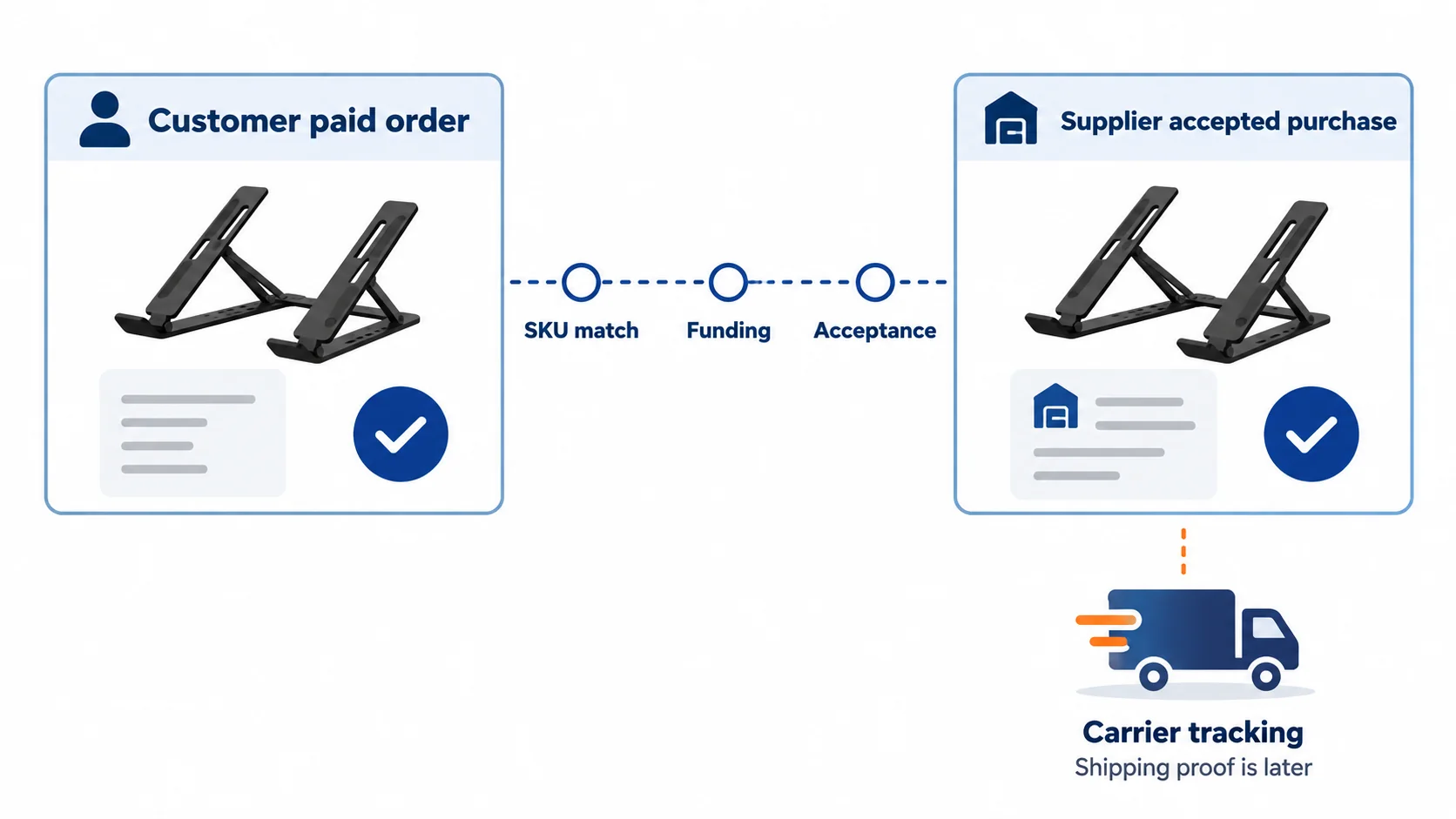
The exact gap is between the customer’s paid Webflow order and the supplier’s accepted, funded purchase. No design widget or fulfillment status can skip that gap.
05
Return real tracking, and own the exception
Suppose a paid black-stand order is sent to the supplier, but the connection times out before returning a response. A timeout means you do not yet know the result. It does not tell you whether the supplier accepted the purchase.
Check the supplier’s order history or contact it using the original store-order and line reference before retrying. If the first request succeeded, a fresh purchase could buy two stands. If it never arrived, treating it as accepted leaves the customer with none.
Keep the reference stable through a retry
Use this illustrative worksheet for order W104, line 1, black stand. These labels are invented and are not a Webflow API schema.
After the timeout
Store reference W104; line 1; exact supplier SKU ___; quantity 1; payment confirmed ___; request reference W104-line1; supplier response unknown. Keep the order in investigation rather than marking it shipped.
If the supplier already accepted it
Record its actual purchase reference, funded amount and promised dispatch. Do not create another purchase for W104-line1. If funding is still due, resolve that recorded purchase rather than opening a second one.
If the supplier confirms no purchase exists
Use the documented retry procedure with the same reference. Inspect the next acceptance and funding result, then later the carrier handoff. For an automated connector, require a genuine deduplication/idempotency method; a worksheet alone does not implement it.
Keep the original black refusal linked to W104 if the customer later approves a silver substitute. Update both the customer order and supplier mapping as described below.
Ask before replacing black with silver
If the supplier declines black but offers silver, keep the paid order open as an exception. Ask the buyer whether to accept the different variant or receive the appropriate refund under your store terms; do not silently change the supplier SKU or mark the black item fulfilled. This is the practical test of whether a manual handoff or integration can be trusted, and it works whichever system owns checkout.
Webflow’s order management lets a merchant mark an order fulfilled, add a carrier and tracking number, and send the customer a shipped email. Do this after a real supplier dispatch, not when a routing email is merely sent. If you mark it fulfilled early, the buyer can receive a shipping claim with no parcel behind it.
Save tracking without creating another purchase
After genuine dispatch, open the relevant order details from Orders or the order email. Use Fulfill and enter the actual shipping provider and tracking number before confirming, following Webflow’s order help.
Check the customer output
Confirm the saved tracking matches W104’s actual parcel and the buyer’s shipped email opens the correct carrier link. A saved provider/name without the right parcel is still wrong.
If you undo fulfillment
Webflow says the first shipped email has already gone out. Fulfilling again sends another shipped email; it does not buy or create a second supplier parcel. Resolve the status or message mistake separately from supplier purchasing.
Use the real carrier handoff and dispatch facts. An accepted supplier request or a generated label is not a parcel collected by the carrier.
Customer shipping charge and supplier freight differ
The checkout shipping amount and tracking update are separate facts. A $0 or flat checkout rate is your customer charge; the supplier may still bill for shipping. The carrier shown at checkout may not be the carrier that actually scans the parcel. Keep the customer promise accurate and update the order with the real tracking link when you have it.
For a damaged arrival, name who authorizes the refund, who asks the supplier for a replacement and where the buyer sends the stand. A payment-system refund does not automatically cancel the external supplier order.
06
Keep a one-order receipt before you scale the catalog
Run an approved controlled order for black to a destination you intend to serve. The point is to collect observed records, not to mark “test passed” when a page looks good. No order ID or result below is claimed to exist for AIDrop.
Product
Evidence to keep: Webflow or external backend order lists black; supplier reference maps to black
If it is missing: Fix variant mapping and page default
Payment
Evidence to keep: Payment is valid under the chosen provider before supplier work
If it is missing: Do not buy goods on an unconfirmed payment trigger
Supplier acceptance
Evidence to keep: Supplier acknowledges correct item, quantity/address and final cost; purchase funded
If it is missing: Investigate relay/connector; do not call email delivery acceptance
Shipping
Evidence to keep: Supplier dispatches and sends usable carrier/tracking data
If it is missing: Do not mark Webflow order fulfilled early
Customer message
Evidence to keep: Buyer receives accurate parcel and timing information
If it is missing: Correct shipped email and support response
After-sale
Evidence to keep: Refund/return owner and supplier recovery path are documented
If it is missing: Hold launch until the merchant can resolve exceptions
Test failed-payment and duplicate-request behavior
Run the same test for a failed or cancelled order if your system can do so safely. A connector that triggers on “new order” before capture can buy a stand the customer never actually paid for. A webhook that retries may duplicate the supplier order unless the integration is idempotent. Those are engineering questions for the integration you choose, not proof that Webflow itself is unsuitable.
Choose a route whose handoffs you can verify
Choose native Ecommerce with manual relay when a named operator can handle the small catalog reliably. Choose a routing integration after verifying the supplier, status and tracking handoffs. Choose an external backend when that system should own commerce and Webflow should own the design.
Keep the one-order record and failure-case results for the route you choose. A smooth demo cannot tell you whether your actual supplier receives, accepts and ships the right stand.
If your supplier side is in China and you need a clear process for sourcing, product checks, packing, order acceptance and tracking handoff, share the SKU and proposed destination with AIDrop Agent. We can discuss those China-side operating steps. We are not claiming a native Webflow module or a universal integration with your supplier.
07
Frequently asked questions
Does Webflow have Ecommerce checkout?
Yes, native Webflow Ecommerce supports products, cart, checkout and order management once you configure a payment provider, shipping/tax settings, an Ecommerce plan and enable checkout. Country/provider eligibility should be checked for your business. (Webflow setup; payment providers)
Does Webflow automatically send dropshipping orders to suppliers?
A Webflow order record or customer confirmation email is not a supplier purchase. Use a manual process, test a routing integration for your specific supplier, or place commerce in another backend. Webflow’s product-feed sync page concerns marketing catalogs, not universal supplier order automation. (Webflow order processing; sync help)
Can Webflow display a Shopify store?
A third-party integration can use Webflow for the designed frontend while Shopify owns product/cart/checkout and orders, as Webflow’s Storesynk listing describes. Check the current app features and test the SKU and checkout path; this is not native Webflow Ecommerce checkout.
Will Webflow track supplier stock?
It can track store inventory per variant, but tracking is off by default. That number only reflects the supplier if you maintain a reliable update process. (Webflow inventory help)
When should I mark an order fulfilled?
After the supplier has actually dispatched the parcel and you have real carrier/tracking information to share. Webflow’s fulfillment action can send a shipped email to the buyer. (Webflow order management)

Etsy Dropshipping: What You Can Sell and How to Fulfill It
Check Etsy dropshipping rules, eligible supplies, production partners, listing details and the real costs of fulfilling an
Shopify vs WooCommerce for Dropshipping: Which Fits Your Team?
Compare Shopify and WooCommerce for dropshipping: hosting, maintenance, supplier integrations, operating costs, and the best fit for

Shopify vs Amazon for Dropshipping: Choose Your Selling Channel
Compare Shopify and Amazon for dropshipping by customer acquisition, fees, supplier requirements, brand control, and the selling
