
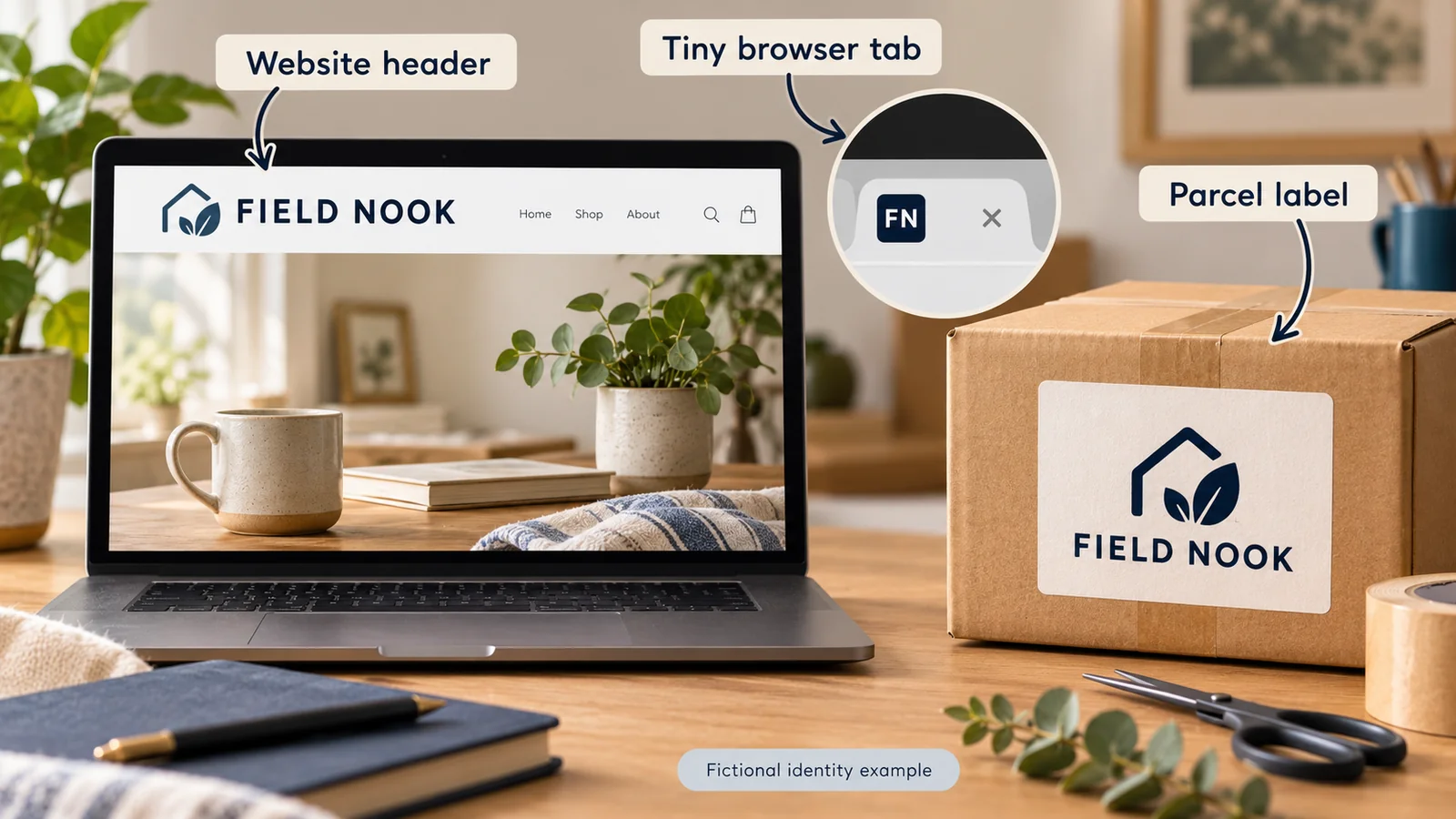
A dropshipping logo should help customers recognize your store on a website, in a tiny browser tab and on the parcel they receive. Start with a readable name and a simple mark, then prepare versions for those different uses. One detailed image rarely works well at every size.
You do not need to advertise the fulfillment method in the logo. Customers are buying the products and experience your store offers. A name and mark that suit that offer will usually give you a clearer starting point than a shopping cart surrounded by shipping arrows.
The working name “Field Nook” below is a fictional design example for a small desk-products store. It has not been checked for availability or rights and is not a proposed ready-to-use brand. The business-name guide covers choosing and checking the name itself.
01
Start with a name your customer can read
Before opening a logo generator or briefing a designer, write down three things: who the store serves, what it sells first and where the mark must appear.
For the fictional Field Nook store, the first range is small desk organizers for home workspaces. The first uses are a mobile header and a label on a plain parcel. That brief gives the design a job. It does not need to represent every possible product the business might sell one day.
A short creative brief could be:
Create a readable wordmark for a small home-workspace store. It should work in a narrow mobile header and in one color on a parcel label. Provide a simpler companion mark for a browser tab. Avoid a long slogan and fine decorative lines.
You can begin with a wordmark—your name arranged in a suitable typeface—rather than inventing a complicated symbol. If you use a separate symbol, it should support recognition, not force the customer to solve a puzzle.
Make a first version with an actual tool
One free starting route is Shopify Logo Maker. Open the tool, enter your business name, choose the relevant industry and a visual style, then edit the wording, font, color and available layout options. Finalize the design and download the ZIP package. Shopify’s current instructions describe PNG exports, including horizontal and transparent-background versions; the tool does not import your own artwork.
Use that first export to run the size checks below. If it cannot produce the simple mark or production files you need, take the brief to a designer rather than repeatedly enlarging an unsuitable image. Generating a logo does not establish exclusive rights or trademark clearance.
Consider how the name sounds and looks. If people cannot distinguish the letters when the design is reduced, adding more decorative detail will not help. Keep the commercial rights to any fonts or graphic elements in mind from the start.
02
Simplify the mark at the size people will see
A design that looks impressive across a laptop screen can become unreadable in a phone header. Look at it at the intended size, with the surrounding navigation, rather than judging only the large design canvas.
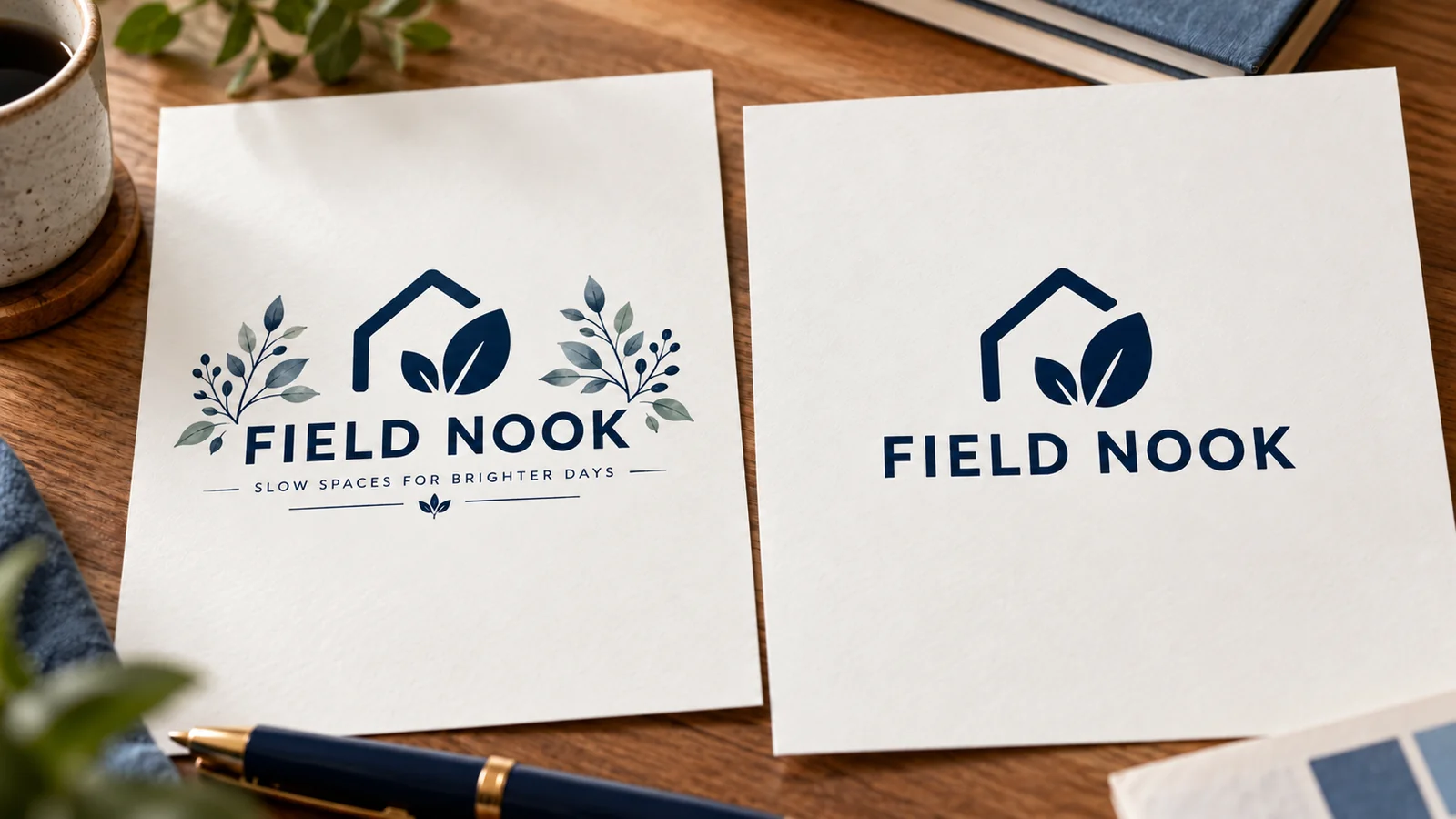
For the fictional example, the full Field Nook wordmark could identify the store in the header. A simple “FN” companion could serve the browser tab. A one-color version could work on a parcel label. These versions share a visual identity while doing different jobs.
| Where it appears | What to inspect | Common reason to simplify |
|---|---|---|
| Mobile header | Name, space around it and navigation visibility | Fine lettering or a long slogan becomes too small |
| Browser tab | Recognition at a tiny size | The full store name turns into an unreadable line |
| Parcel label | Contrast and readable printed detail | Thin pale marks disappear on the material |
| Dark background | Edges and contrast | A version designed only for white loses its shape |
Print the mark on ordinary paper at the proposed label size. This does not prove production quality, but it quickly reveals an overlong slogan or tiny lettering. Also inspect it in black and white. If the identity disappears when color is removed, prepare a clearer production version.
Do not rely on a checkerboard shown inside design software as part of the artwork. It should indicate transparency, not be exported as a patterned background. Check the actual file against both a light and a dark surface.
03
Save the right file for each use
Ask for an editable master and practical exports. The master lets a designer adjust the work later; an exported image is what you upload or send for a particular use.
| File or version | Purpose | What to confirm |
|---|---|---|
| Editable master | Future changes and new output sizes | Fonts, linked assets and editing rights are documented |
| Transparent web image | Header or other supported store use | Sharp edges, sensible dimensions and no unwanted background |
| Small companion image | Favicon | Readable at the tiny browser-tab size |
| One-color production artwork | Label or other agreed printing | The printer’s required format, size and color instructions |
Vector artwork is useful for scaling, but a printer or platform may request a specific export. Do not assume an SVG or PDF will be accepted everywhere merely because it is scalable. Keep the master and export what the receiving service actually supports.
Pixel count and print size must agree
Suppose a raster logo is 600 pixels wide. At a printed width of two inches, that is 300 pixels per inch. At four inches, the same file provides 150 pixels per inch. Changing a “DPI” field without adding useful image detail does not turn a small file into sharper artwork.
The required resolution depends on the material and printing method. For example, Printful’s print-file guidance distinguishes PNG and JPEG uses, recommends sRGB for its uploads and directs users to product-specific dimensions and requirements. Those are that provider’s instructions, not a universal rule for every parcel printer.
For a printed label, ask the actual supplier for its artwork template and minimum detail requirements. For embroidery, request the embroidery requirements separately. A file prepared for a website is not automatically production-ready for every physical process.
Use clear filenames and versions. field-nook-label-one-color-v2 tells the recipient more than final-final-new. Keep the approved export with the proof so a later reorder does not accidentally use an earlier version.
04
Add the logo and favicon in Shopify
Use the current theme’s editor to find its header and logo controls. Upload the web version, adjust the displayed size and preview both desktop and mobile. Themes can expose different controls, so avoid forcing an image into a section intended for a different role.
Check more than the homepage. On a product page, the logo should still identify the store, the navigation should remain usable and the image should not push the mobile menu out of view. If the logo links to the homepage, verify that link after publishing.
Set a separate favicon
Shopify’s current favicon instructions describe the small image shown beside a browser tab. Its suggested image size is 16 × 16 or 32 × 32 pixels.
For an eligible store and theme:
- Open Online Store and edit the theme you intend to use.
- Open Theme settings, then its Logo or Favicon control.
- Select or upload the favicon image and save.
- Open the actual storefront in a browser tab to inspect the result.
Do not judge this only inside the theme editor. Shopify notes that the editor does not reflect the live storefront’s favicon, and checkout or customer-account behavior has additional plan-specific limits. A favicon also is not guaranteed to appear in Google results simply because you uploaded it.
If the logo looks blurry or too small
Check the uploaded file and the theme’s display size separately. A sharp file displayed very narrowly may be perfectly clear but unreadable. An enlarged low-resolution file may look large and blurry. Reduce unnecessary whitespace in the artwork only when that is the actual cause; do not stretch the mark out of proportion.
After replacing a file, reopen the live page and check that the published theme uses it. If you edited an unpublished theme, the store may still show the previous version. Verify the source of the mismatch before repeatedly uploading new files.
05
Approve a print proof before using it on parcels
A parcel logo needs a defined location, size and material. “Make it about this big” leaves too much room for interpretation.
For the fictional store, a request might say:
Please quote a one-color Field Nook label with a proposed 40 mm artwork width. Confirm whether that size and its smallest details suit your process. Show the position on the actual label material and provide a proof before production. Do not cover shipping information, product identification or required labeling.
The 40 mm width is a proposed design dimension, not a printer’s stated minimum or an approved production result. The supplier must confirm that the artwork and process work together.
A digital mockup helps settle layout. A physical proof or sample helps assess the printed result on the actual material. Inspect the name, spacing, color contrast, placement and whether any letters fill in or disappear.

For a dark label, check the appropriate version rather than expecting a dark mark to remain visible. For a curved surface, inspect it in position. A flat artwork file does not show the effect of a seam, fold or curve.
Then identify the approved version and where it is used. If one supplier packs several products, link the correct label instruction to the relevant range. The private-label packaging workflow explains how artwork approval connects to repeat packing.
If you need a China-side packing quote, send AIDrop Agent the product, proposed placement, artwork and order quantity. Ask about the actual method, setup charges and any minimum. Branding a parcel should remain compatible with protecting and identifying its contents.
06
Check ownership before the logo becomes expensive to change
An original-looking logo is not automatically clear to use. Check similar names and marks in the markets and product areas that matter to the business. For US research, the USPTO trademark search is an official starting point. A database search alone is not a guarantee of clearance.
Ask the designer or generator what rights you receive. Check fonts, stock symbols and other third-party elements as well as the overall image. A paid subscription does not automatically grant every commercial use or exclusive ownership of shared assets.
Keep the source files and relevant permissions. If you hire a designer, have the agreed deliverables and rights recorded. If there is a material conflict or uncertainty, resolve it before committing to printed stock and a public launch.
Do not borrow platform or supplier logos to imply authorization. Shopify publishes rules for its own brand assets; those assets identify Shopify, not your shop. The wider branded dropshipping guide connects your store identity to the actual product experience.
07
Logo questions
Should the logo include the word dropshipping?
Usually the store name should describe or suit the customer offer, rather than the fulfillment method. Use accurate business and shipping information elsewhere; a logo does not replace those disclosures.
Can I start with a free logo generator?
You can use one to explore ideas, but inspect the exported quality, permitted commercial uses and any shared graphic elements. Keep editable artwork or a practical way to create later versions.
Is SVG always better than PNG?
They serve different purposes. Vector files can scale, while PNG supports raster imagery and transparency. Use the format the actual platform or production service supports, and keep an appropriate master.
Why does the printed logo look different from the screen?
Screen light, ink, material and production settings differ. Check the supplier’s file and color requirements, then inspect a relevant proof. A bright screen preview is not a print guarantee.
Do I need a slogan under the logo?
Only if it adds useful meaning and remains readable where used. A slogan that turns into tiny text on a phone or parcel is better placed elsewhere or left out of that version.
What should I do before ordering custom packaging?
Confirm the artwork rights, intended size, process, placement and physical proof. Then compare the complete packing commitment, including minimums and storage, using the custom packaging guide.
Dropshipping Packaging: Protect the Product Without Oversizing the Parcel
Choose dropshipping packaging for protection and branding, compare packed dimensions and costs, and approve a filled sample
Private Label Dropshipping: From Product Idea to Repeat Orders
Private label dropshipping combines selling under your own brand with a supplier or fulfillment partner shipping customer
Private Label Dropshipping Suppliers: Six Options and Their Limits
Apliiq and Printful suit branded apparel or merchandise; Selfnamed and Blanka offer ready-to-brand beauty products with separate
