

When a dropshipping supplier changes prices, separate paid orders from future sales. Confirm which accepted purchases retain the old quote. Recalculate the affected variant’s full cost before reopening it; editing the listing does not change what an earlier buyer paid.
Keep quote time and acceptance time
Use two clocks in your records. One is the supplier quote’s effective time. The other is the time each customer order was accepted. If you keep only a “current supplier cost” column, you lose the evidence needed to explain why one order cost $18 and the next cost $23. The supplier quote comparison helps choose between initial offers; this guide is for a change after an offer is live.
Explore the broader topic: How to Find Dropshipping Suppliers You Can Actually Work With.
01
See the price change on one complete order
Calculate the old full-order contribution
Suppose you sell a stackable kitchen organizer for $49. In this purely illustrative order, the original supplier item costs $18, supplier shipping and packing cost $8, payment costs $2, and you reserve $3 for expected exceptions. The amount left before your other operating costs is $18: $49 − $18 − $8 − $2 − $3.
Include a changed parcel cost
At 11:00 the supplier changes the item price to $23. Nothing else changes, so that same paid order now leaves $13. A five-dollar product increase has reduced the $18 contribution by five dollars, not by some smaller percentage that can be hidden in the shipping line. If the supplier also changes the parcel price from $8 to $11, the contribution falls to $10. These figures are examples; the actual decision uses the specific SKU, destination, currency, packing and service quote.
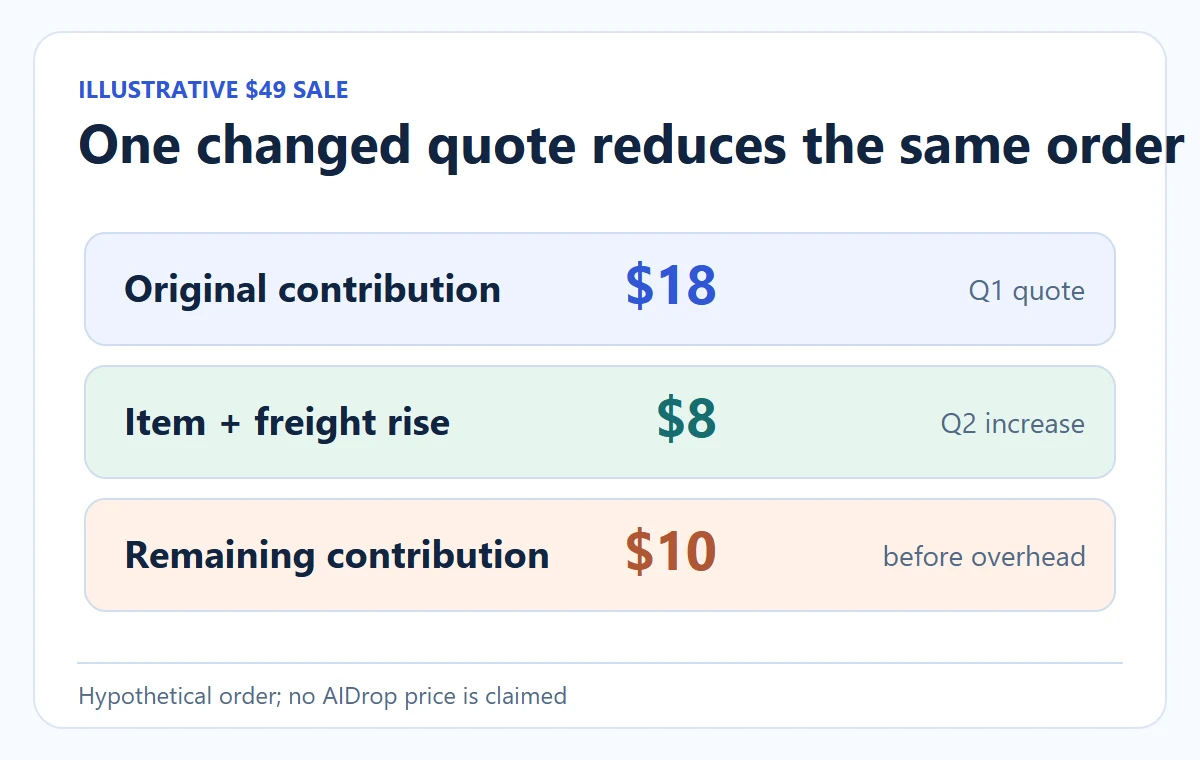
| Line on one paid order | Original quote | Changed quote |
|---|---|---|
| Customer payment, excluding any separately accounted tax | $49 | $49 |
| Supplier item | $18 | $23 |
| Supplier shipping and packing | $8 | $11 |
| Payment and expected exception reserve | $5 | $5 |
| Contribution before other operating costs | $18 | $10 |
Decide this paid order before supplier spend
The order might still be worth fulfilling at $10, or it might fail your store’s minimum. That decision is commercial; the key is to see it before the supplier takes payment. If the organizer is advertised with a dispatch promise the supplier can no longer meet, price is only one reason to hold it. The unit-economics guide shows the wider cost stack; here the changed upstream quote is the trigger.
Calculate a future price that survives the fee and discount
Keep the $49 paid organizer order separate. For a future sale, the changed item is $23, shipping/packing $11 and exception allowance $3. The target contribution is a hypothetical $12 before ads, fixed bills and tax.
If payment costs stay at $2
The minimum collected price is $23 + $11 + $3 + $2 + $12 = $51. At $51 the example leaves $12. A 10% discount collects $45.90 and leaves only $6.90 with those same costs. A price floor must apply to the actual checkout amount, not just the product-page price.
If fees are percentage-based
For a separate hypothetical fee of 3% plus $0.30, use (23 + 11 + 3 + 12 + 0.30) ÷ (1 − 0.03). That is $50.8247, rounded upward to $50.83. At $49.99, the contribution is $11.1903, below $12. Substitute your actual fees; do not also subtract the earlier $2 model.
This follows the fee structure described in Shopify’s pricing guidance, using our own hypothetical inputs. Separate any buyer shipping revenue, tax, currency conversion and other costs that change the calculation. A mathematically sufficient price still needs a market and customer-value check.
02
Separate new catalog sales from customers who already paid
Handle earlier buyers separately
An unbought listing is under your control. You can update its price, switch off a destination, limit quantity or pause the SKU while checking the new quote. Do not apply the new storefront price as an after-the-fact charge to the customer who already checked out. For the paid order, first check what the supplier accepted and what the customer was promised. Your store’s customer terms and applicable rules govern how you handle an unavailable or uneconomic order; a supplier increase alone does not give you a universal right to demand more money.
Create a simple order exposure view at the moment the feed changes:
| Bucket | Test | Immediate action |
|---|---|---|
| Not yet purchased | Listing has the old price but no paid order | Pause or reprice after validating the new item and delivery quote |
| Paid, not sent upstream | Store holds buyer payment; no accepted supplier order | Recalculate; release only after a named decision |
| Sent, not accepted | Supplier request exists but terms are unconfirmed | Ask supplier for final quote and stop/acceptance state; avoid duplicate submission |
| Accepted or packed | Supplier charge or physical work may already be committed | Record actual cost, parcel stage and buyer remedy options separately |
Match the exact changed supplier item
One feed update can affect dozens of variants. Filter by the supplier’s exact item ID and version, not a broad product title. A price rise for a three-tier organizer does not necessarily apply to the two-tier organizer, and a replacement supplier may not have the same packaging or route. The SKU-mapping article explains how to keep the store variant tied to the correct upstream item.
03
Build the supplier change record before editing prices
Ask which accepted orders keep Q1
Ask for a dated quote that states item cost, currency, quantity breaks, destination or shipping line, packing, taxes or duties if included, payment point, and which accepted orders are protected under the previous price. Without an effective date and order scope, you cannot tell whether the increase is a new-catalog issue or a retroactive dispute. A supplier email saying “prices changed” is not enough for automatic repricing.
Keep the actual quote version beside the order
For the organizer, record supplier SKU ORG-3T-01, supplier quote version Q2, received 11:00, effective 12:00, item $23, packing and US route $11, one paid order #1042 at 10:42, supplier request not yet accepted. The owner then decides whether order #1042 can use the old quote, whether to fulfill it at the new quote, and what to do with future listings. Save the supplier’s reply beside that decision. You do not need a sophisticated system to make this traceable; a versioned table can work at small volume.
A feed change is not proof that every cost changed
Verify the complete payable quote
A catalog feed may publish a new item price without updating the shipping rate. It may also show a currency different from the one your store uses, or a sale price that ends at a specific time. Recalculate from the supplier’s complete payable quote for your route. Do not copy one cell from a feed into a margin calculator and assume the rest stayed fixed. Shopify’s product pricing documentation describes storefront price fields; those fields do not establish what your outside supplier will invoice.
If your integration updates storefront prices automatically, test the order in which it changes product cost, compare-at price, sell price and stock. A stale cost plus a new selling price can make margin reports look healthy even though a paid purchase order is losing money. Conversely, an automated selling-price increase may create a misleading discount or break a market-specific price. Hold the affected feed rows until the store and supplier records agree.
Change the future variant price, then reopen checkout
For an approved change to ORG-3T-01, use the exact Shopify variant mapped to that supplier item. Save its prior price and Q1/Q2 record before editing.
Edit the intended variant
Open Products → the organizer → Variants → the exact three-tier variant → edit pricing → Save, following the variant instructions. Expanding a grouped variant matters: editing the top-level group can change every variant in it.
Keep recorded cost separate
For several approved variants, select them in the product’s Variants section and open its bulk editor. Use Columns to show Price and Cost per item as available. The editor’s field definitions distinguish them. Record cost consistently; changing it alone does not establish a supplier price lock or automatically change the buyer price.
Reopen the exact variant in the intended market, apply the active discount and read the final checkout amount. Check the next supplier-feed cycle has not overwritten the edit. The old paid order should still show $49; the new test cart should show the approved future price and contribution.
04
Set a response that can be tested, not a vague margin alert
Pause future sales below the agreed floor
For a new, unpaid order, decide three boundaries before a supplier increase occurs: the highest allowable upstream cost for a SKU, the minimum contribution after normal costs, and who can override the hold. In the organizer example, suppose the store requires at least $12 contribution. The original quote leaves $18; the $23 item plus $11 freight leaves $10. That SKU should pause for future sales under this hypothetical rule. The owner might negotiate, change the next selling price, change the route or retire the listing. The rule should not silently cancel paid orders.
Test the exact event path with one SKU:
- Save the current supplier quote and one controlled checkout total.
- Simulate a product-cost increase in a nonpublic feed or staging connection.
- Verify which variants pause and whether the store’s visible price changes as intended.
- Check one already-paid but unreleased order. The alert should preserve its original buyer amount and show the new supplier amount before release.
- Restore the approved quote or approve the new one, then verify the supplier receives that order only once.
Reject missing cost or currency data
If the supplier pushes a blank cost or a malformed currency, the safe behavior is to reject that feed row and alert an owner, not set the sale price to zero or to a wildly inflated number. Shopify’s inventory CSV guidance uses current and new fields to reduce accidental overwrites; the same comparison principle helps with price changes, although your price integration needs its own implementation.
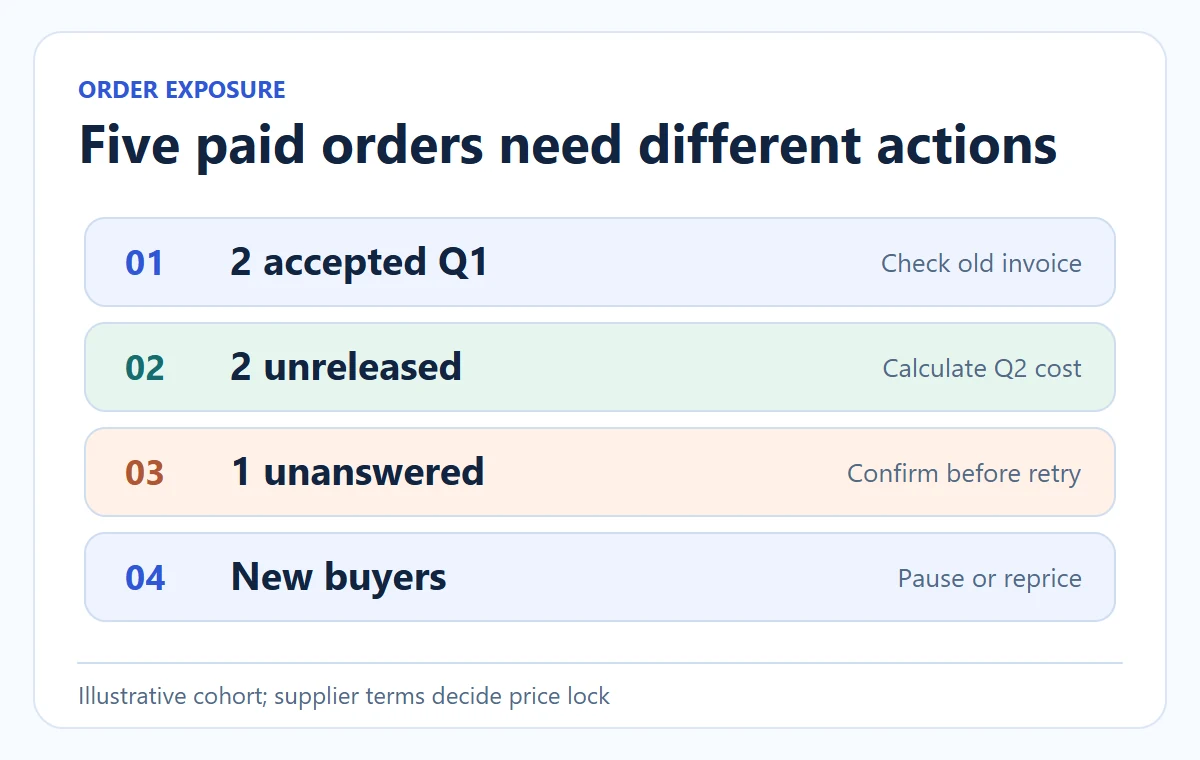
Do a small impact query before touching the storefront: list every open order with store SKU, paid timestamp, old supplier quote ID, supplier acceptance state and promised dispatch date. Then list the currently sellable variants mapped to the changed upstream item. The first list determines buyer commitments; the second determines future exposure. If five paid orders exist and the supplier protects only requests accepted before noon, find out which of those five actually crossed that line. Order creation time alone may not be the supplier’s price-lock event.
Reconcile the five paid orders individually
For the hypothetical $49 organizer, suppose two of five orders were accepted under Q1, two are paid but unreleased, and one was submitted but has no acceptance reply. Reconcile the two accepted orders against the confirmed Q1 invoice. The two unreleased orders need an owner decision using the Q2 cost stack. The fifth needs a supplier answer before it is submitted again; retrying it blindly could create a second purchase. That split is more useful than a bulk instruction to “reprice five orders.”
05
Resolve the paid order without losing the customer record
Give the buyer a deliverable outcome
The paid buyer needs a clear outcome, not an account of the supplier’s negotiation. If you can fulfill the promised item and timing while absorbing the change, do so and log the margin variance. If the supplier cannot honor the item or the price makes fulfillment impossible under the arrangement, identify the supplier’s actual acceptance state and your store’s customer obligations. Offer only options you can deliver: a supported delay, an approved alternative when appropriate, or a refund/cancellation. Do not ship a different model without the buyer’s agreement merely to restore margin.
Record one-time absorption for this buyer
For the illustrative order #1042, a concise internal record might say: “Buyer paid $49 at 10:42. Supplier Q2 received 11:00. Supplier confirms Q1 not accepted and Q2 available for original item. New contribution $10, below $12 floor. Owner approved one-time absorption for this paid order because the $10 still covers direct cost; new orders paused until the storefront price and delivery quote are updated.” The customer does not need that internal margin discussion. They do need an accurate dispatch promise. If the supplier cannot fulfill, use the order-cancellation procedure and confirm the buyer refund separately from any supplier credit.
Measure exposed orders and extra spend
Review the change afterward. Count how many paid orders were exposed, total additional supplier cost, whether any customer promise changed, and whether the feed pause worked. If supplier changes are frequent or arrive after accepted orders, treat it as a sourcing reliability problem, not a never-ending exercise in storefront repricing. The supplier agreement guide is where to set notice and price-validity terms before the next cycle.
For future prevention, ask the supplier to state quote-validity period, whether an accepted order is price-locked, how it announces changes, which SKU versions are affected, and who absorbs a change announced after acceptance. Those terms do not force an old price unless agreed, but they make the next incident less ambiguous. Review the first new paid order after a price change: checkout charge, supplier accepted quote, parcel cost and actual contribution should match the approved rule. A dashboard margin calculated from the latest catalog price can still misstate that individual order.
If AIDrop Agent would handle your China-side sourcing and order flow, send the product variant, proposed destination, current supplier quote and desired release rule through the review form. We can help map where the store should pause a changed quote and what the supplier must confirm before a paid order is released. We cannot present a generic example price as your actual AIDrop or carrier rate.
06
Frequently asked questions
Should I raise the price as soon as a supplier feed increases?
Not automatically. First verify the exact item, currency, effective time, freight and existing paid-order exposure. A price update for future buyers can follow that check; it does not alter an earlier buyer’s agreed payment.
Can I ask the supplier to honor the old price?
You can ask whether accepted or time-stamped orders are protected under the earlier quote. The answer depends on your actual agreement and the supplier’s acceptance record. Save the reply and choose a customer outcome you can fulfill even if the supplier declines.
What if a supplier decreases the cost instead?
Recheck the item and service scope before assuming margin improved. A lower item price with a new packing or shipping charge may not reduce the full order cost. Keep the quote version so later refunds and accounting can trace which supplier charge applied.
Dropshipping Suppliers: Compare Channels, Costs, and Fit
Compare dropshipping supplier channels, including Shopify Collective, directories, marketplaces and print on demand, with costs and practical

How to Find Dropshipping Suppliers You Can Actually Work With
Find dropshipping suppliers through directories, marketplaces and manufacturers, then verify quotes, samples and the delivery process before
Dropshipping Supplier Red Flags: What to Verify Before You Pay
Pause a supplier payment when the payee, product, stock location or order terms cannot be reconciled with
