

Zendrop charges you for the subscription and for the products and shipping you order. New accounts using its product-count billing have monthly tiers of $29, $49 and $79, with a limited $0 option. Older accounts billed directly through Zendrop can instead pay a fixed $49 or $79 per month, or $399 or $549 per year.
Think of two bills. The first pays for using Zendrop with your store. The second pays to send a customer’s chosen item to them. Linking a product to your shop can affect the first bill before anyone buys it. When a customer does buy, you still pay for the item and delivery.
The subscription tiers, billing model, multi-unit discount and EU order-fee pages were checked again on October 11, 2026. Prices below are in USD; your account’s billing arrangement, trial and promotion determine the invoice. We have not connected a store, inspected a bill or obtained an item quote. Other product-policy references retain their stated scope.
Explore the broader topic: Zendrop Review: Pricing, Shipping, Branding and the Limits That Matter.
01
Which price applies to your account?
Start with where Zendrop charges you. Its current Flex Plan, also called Usage-Based Billing or UBB, charges through Shopify or Wix according to product use in the billing period. Legacy Standard plans are fixed subscriptions billed directly through Zendrop.
The store platform alone does not settle this. A Shopify or Wix store can have either arrangement, depending on how and when the owner signed up. Open the profile menu in Zendrop, choose Billing and look for Current Plan. Then check whether the subscription invoice comes from Zendrop or your store platform. Find your current plan and billing-model overview.
| Billing arrangement | Published subscription | What sets the amount |
|---|---|---|
| UBB Free | $0 for an eligible cycle | No linked-product use and no minimum paid tier; stopping future charges also needs the cancellation steps below |
| UBB Beginner | $29/month | 1–20 linked products at the cycle’s highest count, or a selected minimum tier |
| UBB Pro | $49/month | 21–100 linked products at the cycle’s highest count, or a selected minimum tier |
| UBB Plus | $79/month | 101 or more linked products; the published subscription cap is $79 |
| Standard Pro | $49/month or $399/year | A fixed subscription billed directly through Zendrop |
| Standard Plus | $79/month or $549/year | A fixed subscription with its additional features |
On a phone, swipe the table sideways to compare every column.
The $399 and $549 annual payments belong to Standard plans. UBB currently has no annual subscription option. Standard Plus may have a $39 first-month offer, but the normal monthly renewal is $79 unless your offer says otherwise. A discount for joining does not establish every later bill. Plan features and prices and annual and promotional terms.
The current Wix listing presents different product limits, including 20 linked products on its Free card, and includes a BRL currency note. Those details do not match Zendrop’s dedicated USD UBB guide. If you use Wix, confirm the limit and currency shown in your own billing approval; do not combine the listing’s limits with the USD table above. Wix listing.
02
Why removing products may not lower this month's bill
A linked product is an item Zendrop has connected to your account or store. Its count guide says products in an import list can count too. Simply deleting a Shopify listing is not the same as selecting Unlink inside Zendrop. Browse and shortlist carefully before connecting a large collection just to see how it looks.
For UBB, the highest linked-product count during the billing period sets the tier, along with any minimum tier you chose. “Highest” means removing products later does not erase the number already reached. Linked-product count guide and current UBB rules.
Suppose you start a billing cycle with 19 linked products, add two, then remove those two. This is an illustrative example using the published tier limits:
| What happens in the cycle | Products linked now | Highest count reached | Tier for that cycle |
|---|---|---|---|
| You start with a small collection | 19 | 19 | $29 Beginner, unless a higher minimum applies |
| You add two products to try | 21 | 21 | $49 Pro |
| You unlink those two products | 19 | 21 | Still $49 Pro |
On a phone, swipe the table sideways to compare every column.
The count has returned to 19, but the cycle still reached 21. Unlinking can help the following cycle; it does not turn this one back into the $29 tier. This matches Zendrop’s explanation of a 21-product peak followed by a lower count. Why peak usage still counts.
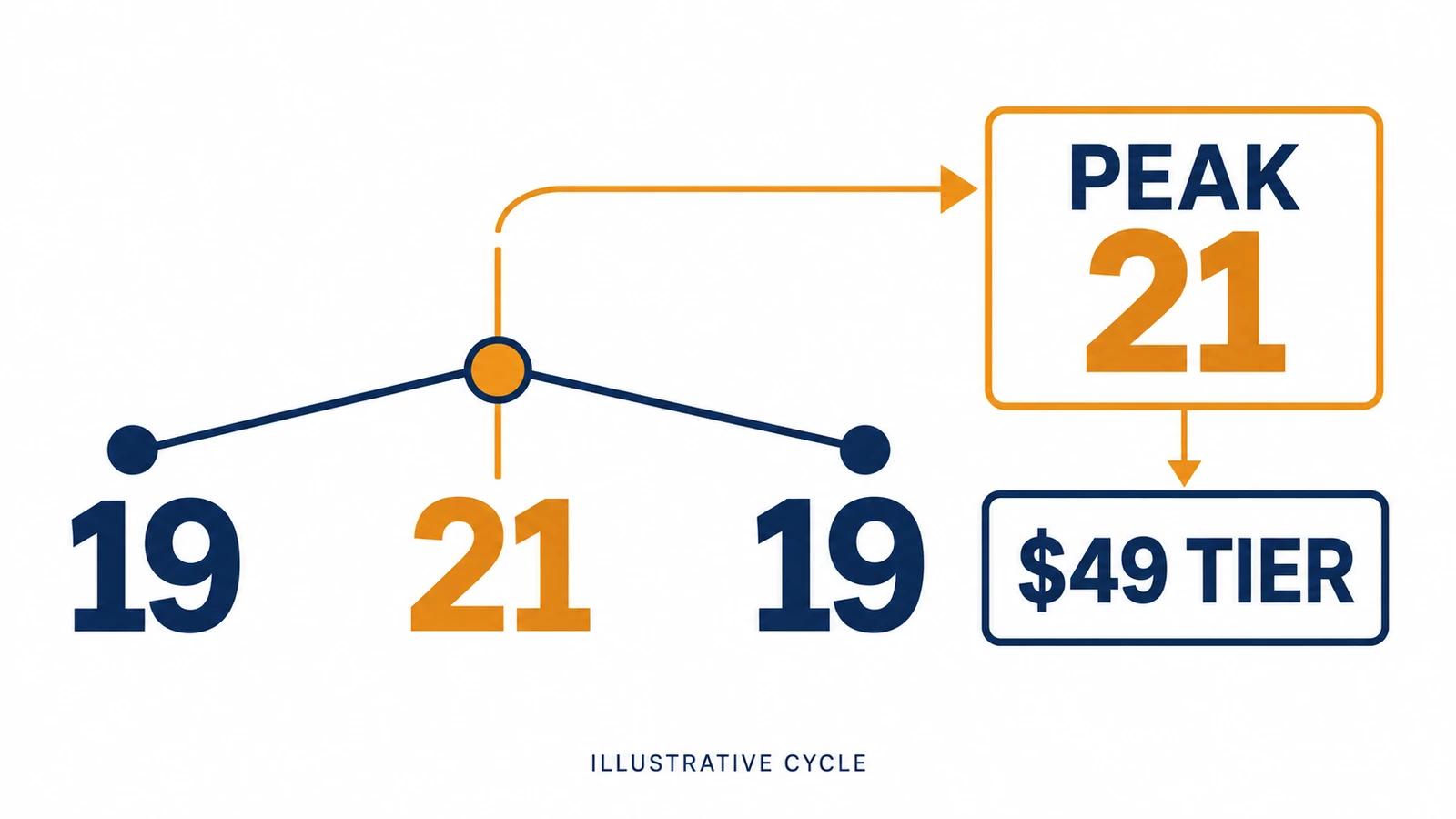
Product 21 can add $20 before it sells
The same decision appears at the boundary of 20 products. Adding a twenty-first product can add $20 to the cycle’s subscription, from $29 to $49, before the new product sells a single unit. It may still be a useful addition, but decide whether you want it before linking it.
A minimum commitment can override the count
A minimum tier changes that example. If you already chose a $49 minimum, adding product 21 would not create that $20 increase because the subscription was already at least $49. Standard plans do not have this product-count increase at all. A Standard Pro account still pays its fixed subscription if it sells nothing.
Zendrop’s older count guide mixes start-of-cycle wording with the peak rule. The newer dedicated UBB pages clearly use the cycle’s highest count. If your applied bill differs, ask support about the cycle dates, highest count and minimum tier shown in your account. The number of products visible today cannot explain the entire past bill.
03
What you pay when a customer orders
Now picture a customer buying a lamp from your store. They pay your retail price. You then pay Zendrop for that lamp and its shipping; those charges sit on top of the subscription. Zendrop’s product and shipping payment terms.
Price the variant and destination
To price the exact item, open its Zendrop product page and choose All SKUs. SKU means the product code for a particular choice, such as the black rather than white lamp. Select the shipping country and read that variant’s product cost, shipping fee and total. The displayed charges are in USD. Finding shipping costs.
If the customer buys two different products, include shipping for each. One customer address or one eventual box does not mean one supplier shipping fee. Your order worksheet can look like this:
| Cost to include | Where to get it | Why it matters |
|---|---|---|
| Item A and its shipping | Exact variant and country in All SKUs | A cheap product-card price may omit delivery |
| Item B and its shipping | Its own variant and country quote | A second different product adds its own shipping charge |
| Any eligible shipping discount | Actual Order Summary | Do not subtract a discount that is not offered on the order |
| Small-order or destination charges | Actual Order Summary | A product quote may not show every order-level addition |
| Any applicable POD extras and tax | That product’s final order details | Printed or embroidered products can have extra charges |
On a phone, swipe the table sideways to compare every column.
Add those lines to get the bill for the order. We leave the item amounts for your actual quotes because no catalog item was quoted for this review. Then compare that bill with the customer’s payment after payment fees, advertising, returns and your share of the subscription. Order costs and pricing.
Same-product discount needs an eligible order
For two or more units of the same product ID, some products from Zendrop’s fulfillment supplier qualify for a shipping discount. The actual amount appears before fulfillment; not every product qualifies. Two different products are not automatically that same-product offer. Multi-unit discount rules.
A fee may apply below $10. Prices can also change between your first quote and payment, and conversion can make a non-USD display look different. Review the final amount before paying. Shopify customer shipping rates do not automatically copy Zendrop’s rates, so set your shop’s delivery charges to cover the products you plan to sell.
If you offer free shipping to the customer, its cost still belongs in your retail price. If you offer one flat shipping charge for a two-item basket, compare it with both item-level charges. Also consider whether separate parcels will mean separate tracking and customer questions.
Work through a two-product order bill
Here is an invented two-product order to an EU destination: 70 USD received from the buyer, with no promotional credit or shipping discount assumed. The figures for goods and freight are teaching inputs, not Zendrop catalog prices.
Two different product IDs
Item A: $12 goods + $7 shipping = $19. Item B: $8 goods + $5 shipping = $13. Two different products do not automatically receive the same-product multi-unit discount.
Supplier-order preview
$19 + $13 + the once-per-order $3.80 EU charge = $35.80. That excludes any further applicable tax or extras; use the actual Order Summary and invoice.
Other sale costs
Example payment fees $2.40, expected customer-problem cost $2.50 and advertising $10. Allocate a $49 subscription across 20 fulfilled orders: $2.45 per order.
Contribution before other costs
$70 − $35.80 − $2.40 − $2.50 − $10 − $2.45 = $16.85 before tax and other overhead. Twenty fulfilled orders is a planning input, not twenty linked products or a sales forecast.
In Orders, open the fulfillment preview for that exact destination and check both product/shipping lines and one $3.80 fee before authorizing payment. Compare the paid invoice with the preview afterwards. A missing or different line needs an explanation; do not force these invented numbers onto a real order. The EU fee remains a possible loss if the order is refunded.
04
Extra charges for destinations and printed products
Destination matters beyond the ordinary shipping quote. Zendrop says U.S. tariffs on China-origin orders are included in its displayed shipping charge. For other international destinations, it does not promise that every local duty or tax is paid in advance. Tell customers what may be due at delivery and confirm the arrangements for your target country. Zendrop’s tariff and customs explanation.
One EU fee per order
For orders to an EU member state, Zendrop adds a separate $3.80 EU Customs Duty once per order. Two products in that order do not make this fee $7.60. Its policy says the $3.80 is not returned when an order is refunded, so include that possible loss when considering your returns costs. This is Zendrop’s published charge, not a calculation of all your tax obligations. EU order fee.
Print-on-demand, or POD, means the product is printed or decorated after an order. Zendrop’s POD guide describes destination-based product-price differences, tax or VAT, and a possible one-time digitization fee for a new embroidered product variant. Digitization is the work of turning your design into instructions an embroidery machine can use.
A new embroidery variant can add a setup cost
The fee is charged on the first order of a new variant and is not refunded if that order is canceled. Its amount depends on the design placement and type of print. Keep these costs with the relevant printed product; a plain catalog lamp does not need an embroidery charge. POD cost guide.
Order credits are not a cash refund of the subscription
An offer may include order credits, but you should not subtract their full face value from the subscription and call Zendrop free. Promotional credits have eligibility limits and cannot pay for the subscription or sample orders. The current help limits their use toward an unfulfilled order to up to 10%; your Order Summary shows what is actually applied.
Purchased credits are money already paid
Credits you purchase yourself are different: you have already paid money into the account. Check the offer and remaining payment before using either kind. A $100 promotional balance is not a $100 cash rebate available for every purchase. Credit restrictions and paying orders with credits.
05
When does paying for Zendrop make sense?
A small collection of products with workable item and delivery costs is a useful starting point. On UBB, adding products can change the subscription, so price them before spreading your trial across a large catalog. On Standard, compare the features you will use, such as sourcing, branding or Plus training and other extras, with the fixed payment.
Standard Pro includes sourcing, automated fulfillment, branding and U.S. products. Plus adds coaching, Academy courses, POD, chargeback tools, private product listings and the trending-product finder.
Paid UBB tiers provide the full feature set; their price difference follows product count and any minimum tier. An annual Standard plan means paying $399 or $549 up front, so decide whether you expect to keep using those features before committing. Published feature comparison.
Share the bill across realistic fulfilled orders
The subscription’s cost per order also changes with sales volume. A $49 subscription shared across 10 fulfilled orders is $4.90 per order. Shared across 100, it is $0.49. These are arithmetic examples, not Zendrop’s product prices or a forecast that your store will get 100 orders.
Use a cautious order estimate when deciding whether a product can carry its share of that bill. Add its actual product and shipping charges, payment fees, advertising and an allowance for customer problems. A price that works only if sales suddenly increase may leave you short of money for the first supplier payments.
If you are comparing tools for different sourcing and order tasks, our dropshipping automation software guide covers that broader choice. For this pricing decision, the useful result is simpler: your actual subscription arrangement, a few exact destination quotes and the final order charge.
06
Trials, cancellation and refund requests
Trials and promotions vary, so use the date in your Zendrop Billing page. During a UBB trial you can adjust the linked products. When it ends, the count can lock in for the first billed cycle. If you do not want to continue, deal with linked products and any minimum paid tier before that date. A Standard trial is offer-dependent; it is not automatically included for every account. After a UBB trial ends.
Cancel the billing model you actually have
For UBB, Zendrop’s complete-stop instructions call for no linked products, no minimum tier commitment and uninstalling the app before the next cycle. If you plan to keep browsing on a free account instead, confirm its terms with support: some help pages describe keeping it with zero links, while the general billing guide adds the uninstall condition.
Uninstalling does not erase a Shopify invoice already generated or undo the current cycle’s higher count. To lower future usage, use Unlink in Zendrop’s product menu and clear any minimum tier setting. To stop altogether, follow the platform uninstall steps for your account. UBB cancellation guide.
For Standard, go to Zendrop Billing Settings and choose Downgrade to Free Plan. Uninstalling the Shopify app or unlinking products does not cancel a directly billed Standard subscription. Its guide says the plan remains active through the paid cycle and then stops renewing. Standard billing and cancellation.
Request a subscription refund separately
Cancellation and refund are separate actions
A refund is a separate request. Zendrop’s general guide requires contact within five days starting on the charge date; its Standard guide says the window begins the following day. Use the earlier stated deadline and contact support promptly with your account email, charge date and amount. All unpaid invoices must be cleared, and using order credits can make the subscription ineligible. A timely request is reviewed, not automatically approved.
Approved refunds generally take 5–10 business days to reach the original payment method. That subscription policy is separate from a damaged-product claim or the refund you owe your customer. Subscription refund rules.
Need an actual China-product quote rather than another app tier? AIDrop’s sourcing service can help compare suppliers, samples, packaging and shipping options.
Send the product links and variants, destinations, monthly orders and quote or packing question. We can discuss physical sourcing and fulfillment; the store connection needs separate agreement.
07
Common questions
Is Zendrop free?
Limited browsing is available. A $0 UBB cycle needs no linked-product usage and no minimum paid tier, with the cancellation conditions explained above. Goods and delivery still cost money when you fulfill an order.
Does Zendrop charge shipping once per order?
The published rule is per product. An eligible same-product multi-unit discount may reduce the amount shown in the Order Summary, but two different products do not automatically share one shipping fee.
Will removing products refund this month’s subscription?
Removing products after a higher UBB count has been reached does not erase that cycle’s tier. It can change future usage. Standard plans have a fixed bill, and a subscription refund requires its own eligible request.
Dropshipping Automation Software: Compare Tools, Costs and Workflows
Compare dropshipping software by supplier fit, pricing, stock updates and order handling. Build a workable setup with
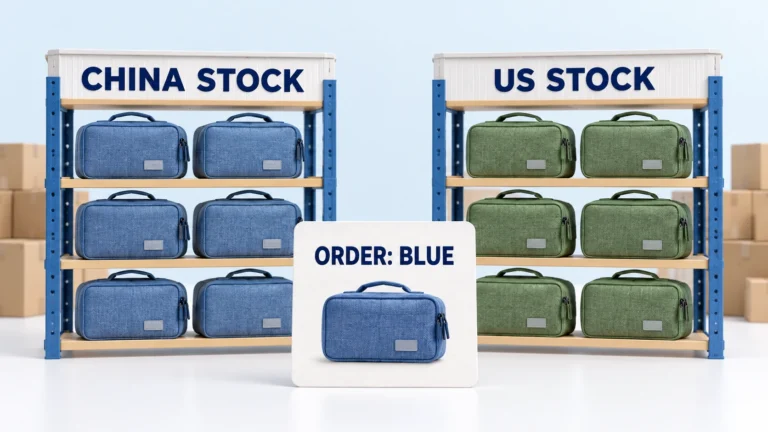
CJdropshipping Review: Costs, Warehouses, Quality and Fulfillment Fit
CJdropshipping is a practical option for sellers who want sourcing, store connections, packaging and fulfillment in one

CJdropshipping vs DSers: Who Sources, Pays and Ships the Order?
CJdropshipping can source and physically fulfill an order; DSers maps a store product to supported external suppliers
