

Estimate dropshipping time from the work your store needs: setup, recurring orders and support, and the work that brings future customers. A single “hours per day” figure cannot tell you whether all three fit your schedule.
For a concrete starting example, 90 minutes on each weekday plus 60 minutes on each weekend day gives you 9.5 hours of weekly capacity. That is an illustrative calendar, not a claim that 9.5 hours is enough. In the worked day below, 80 minutes of planned work becomes 108 when two extra problems arrive.
If you finish your day job intending to create a product video, then spend the evening chasing a parcel instead, you may recognize the problem. Your calendar included the marketing work, but left too little room for what customers and suppliers might need that day.
01
Separate launch work from work that comes back
Building a store and operating it are different time commitments. A page you finish today may stay usable for months. A new buyer’s cancellation request needs its own response and action.
Keep three lists when estimating the work:
- Setup: learning the platform, choosing the initial products, confirming suppliers and costs, preparing pages and policies, and testing the intended buying and fulfillment path.
- Recurring operations: reviewing orders, checking outstanding actions, answering buyers, following up with suppliers, handling exceptions and keeping useful records.
- Improvement and growth: researching a specific customer need, preparing content or ads, reviewing results, improving an offer and maintaining the systems behind it.
Some jobs recur weekly or monthly rather than daily, such as reconciling records or reviewing a supplier and software bill. They still consume time. Put them in the relevant period instead of leaving them outside the estimate.
Why published hour ranges differ
A maintenance estimate may assume someone else handles daily operations. A beginner estimate may include learning a platform and preparing the first offer.
For example, Drop Ship Lifestyle’s time guide explicitly separates management from setup and discusses delegation. SourceLow’s guide divides time by business stage. Those are different scopes, not interchangeable measurements of your store. Neither gives you an observed average for your particular product, skill level and order pattern.
Before borrowing anyone’s number, ask what work it includes, what has been delegated and whether the figure is an estimate or a measured result. “The store is live” also says little about whether the supplier, delivery promise and customer-support process are ready.
The main dropshipping guide follows those responsibilities if you need to identify a missing task before building your schedule.
02
Count active work and keep waiting jobs visible
Use a simple time log for a starting week. A spreadsheet or notebook is enough. Record the work in terms you can recognize later:
| Field | What to record |
|---|---|
| Activity and item count | For example, review five straightforward orders or answer two product questions |
| Active minutes | Time actually spent doing the work, including rechecking it |
| Waiting on | Supplier, customer, carrier information or another dependency |
| Next action and owner | Who will do what when the information arrives |
| Due or review point | The time by which a commitment needs action, or when you will follow up |
| Work deferred | What you intended to do but did not complete |
A four-hour wait is different from four hours of work
Suppose you spend five minutes asking a supplier about an order, then wait four hours for its reply. Your active work was five minutes so far. The request is still open, and reading the answer, deciding what it means and updating the buyer will require more active time.
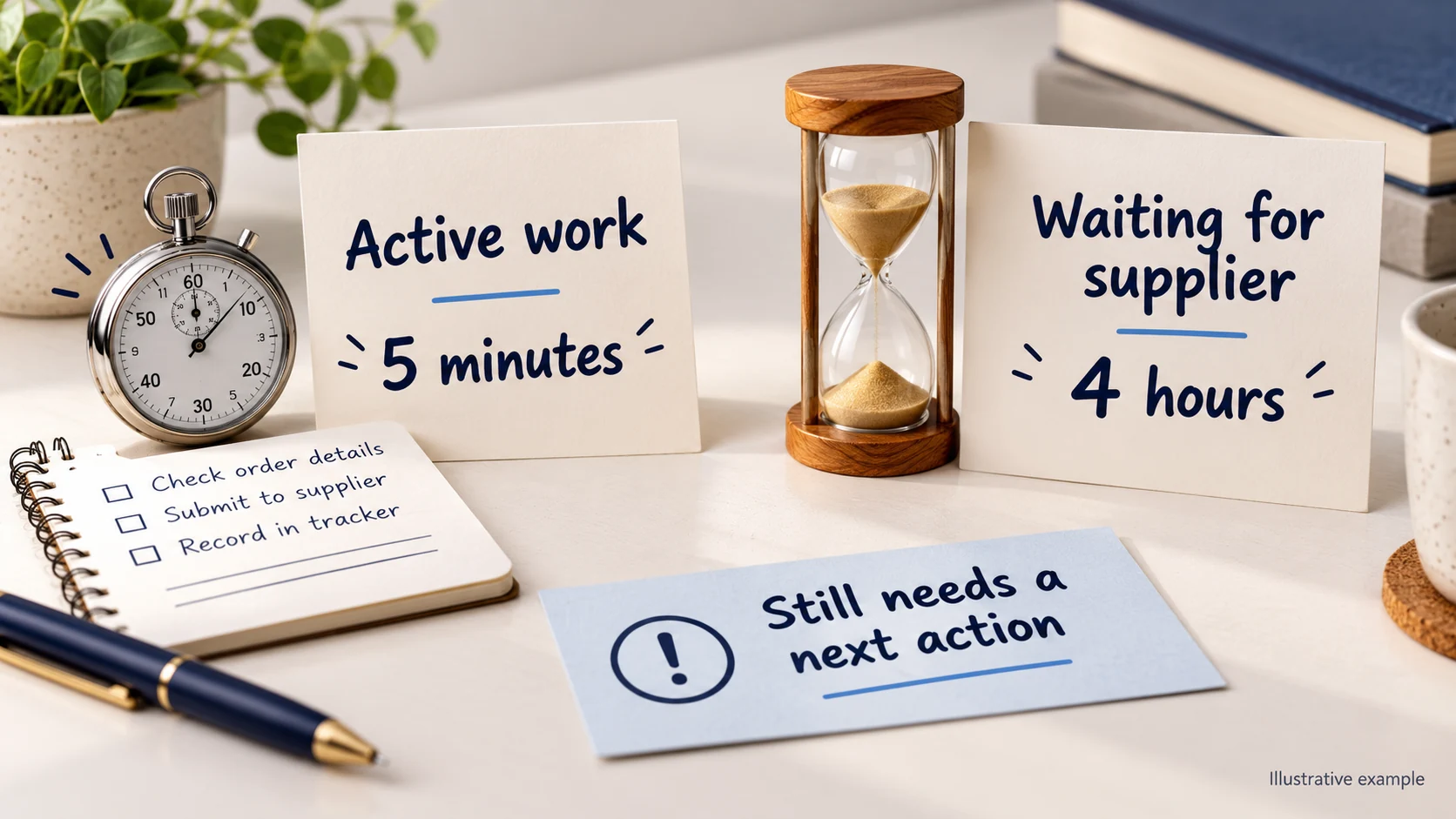
Counting the whole wait as labor exaggerates the work. Counting only the first five minutes and forgetting the follow-up hides it. Keep the active minutes and the open commitment in separate fields.
Do not count the same minutes twice because an inbox was open while you were editing a page. Record what you were actively doing. If you repeatedly switch between tasks, note that too: restarting an unfinished page can consume time that never appears in a tidy task estimate.
Count work that never got done
A day can feel efficient because you answered every message, while the planned content, product research or record review moved to tomorrow again. Record that deferred work. Otherwise, the log can make an overloaded schedule look comfortable simply because it omits the tasks squeezed out.
Use the first week to find missing categories and rough task times. Continue measuring as the workload changes; a quiet week does not establish the time needed during a busy period or a supplier disruption.
03
Work through a 90-minute weekday
Here is a deliberately small teaching example. The order counts and minutes are invented inputs so you can see the calculation. They are not observations from a store or suggested processing standards.
Assume the owner has 90 available minutes that day. These activities are separate: the initial check prioritizes work; the order reviews and replies are the work performed afterward.
| Activity | Minutes in this illustration |
|---|---|
| Scan alerts and plan outstanding actions | 15 |
| Review five straightforward orders at 3 minutes each | 15 |
| Answer two straightforward questions at 8 minutes each | 16 |
| Investigate one exception; 14 active minutes | 14 |
| Work on the planned marketing task | 20 |
| Total planned active work | 80 |
| Unallocated time within the 90-minute window | 10 |
The calculation is 15 + 15 + 16 + 14 + 20 = 80 minutes. Against 90 available minutes, that leaves 10. This is only the sample day’s task list; add any other work your actual store requires.
Two more problems use more than the spare time
Suppose there are three exceptions that day instead of one, each taking the same illustrative 14 active minutes. The two additional cases add 28 minutes. Total work becomes 108 minutes—18 more than the available 90.
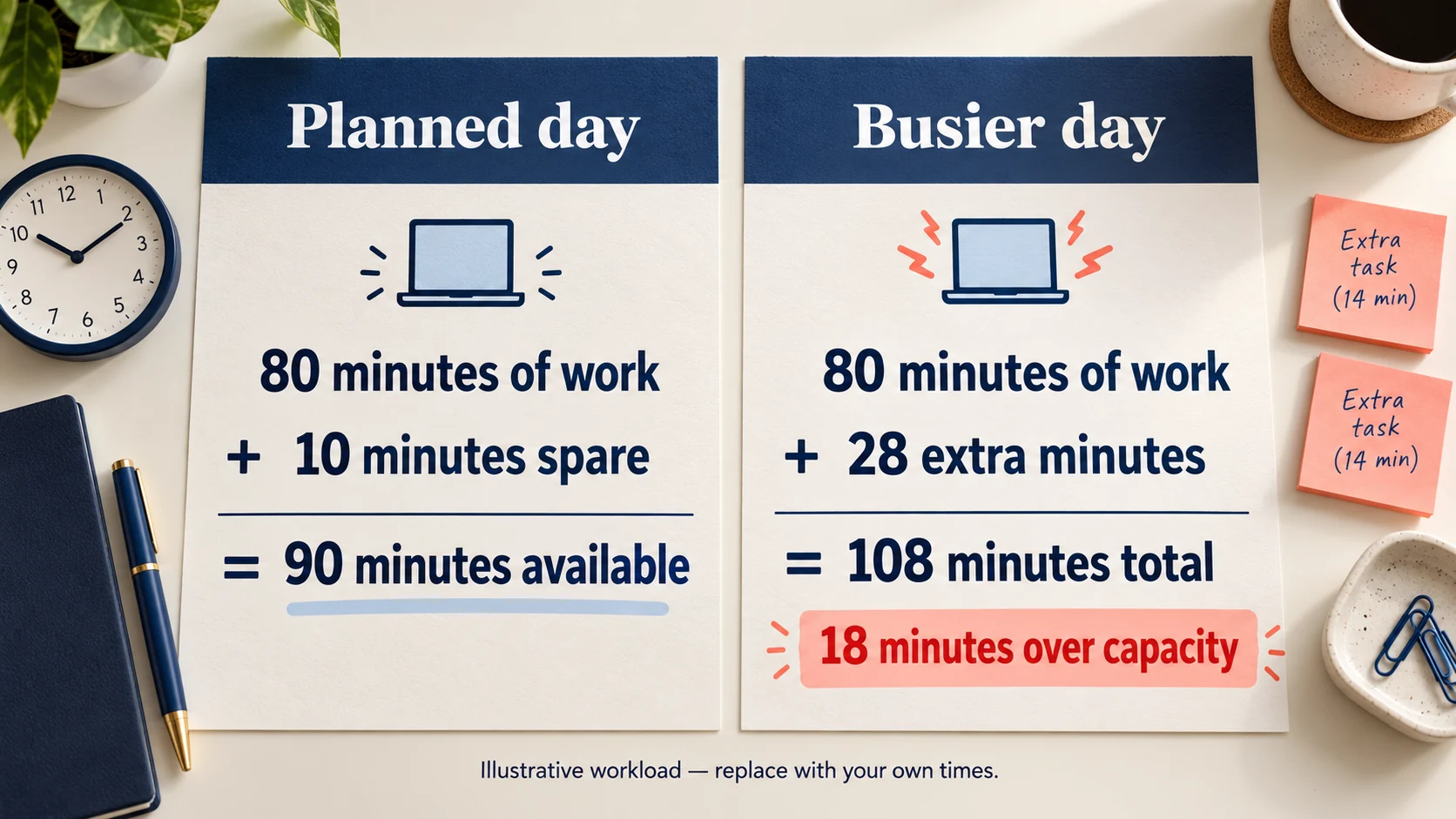
The owner now has a real choice: obtain extra help or time, move a task that can responsibly wait, or reconsider how much new work the store accepts. If the 20-minute marketing task is postponed, the immediate work falls to 88 minutes, but the marketing task is still unfinished.
That explains why “I manage the store in 90 minutes” can be misleading. The owner may be fitting the urgent operations into the evening by repeatedly removing the improvement work from it.
Spare minutes have a job
Leaving time unallocated helps absorb variation. It is not a guarantee that every disruption will fit. A damaged order needing several conversations can exceed a quiet day’s routine; another day may have no such case.
Replace each sample count and duration with your own observations. Look at a busier day as well as an ordinary one. If nearly every available minute is already spoken for, the plan needs a way to handle additional work before you rely on it.
04
Put the work on a calendar you can keep
Weekly hours are useful, but their placement matters. Five spare hours on Sunday cannot necessarily handle an order change that needs attention before a supplier dispatches on Tuesday.
In the illustrative schedule from the opening:
- Five weekdays × 90 minutes = 450 minutes.
- Two weekend days × 60 minutes = 120 minutes.
- Total available capacity = 570 minutes, or 9.5 hours.
That calculation describes availability, not the amount of work your business will generate. A week with new-product setup or several difficult orders may need more; a different arrangement may use less.

Give recurring checks and focused work different places
You could split a weekday window into a short order-and-message review and a later focused block, if that fits your life and the commitments your store makes. Put follow-ups that depend on supplier working hours where they can actually happen.
For the focused block, name an output: finish one product demonstration, compare the relevant costs for one offer, or reconcile a defined group of orders. “Work on the business” is difficult to finish and difficult to measure.
Do not fill a calendar with sessions you routinely cannot attend. Include your day job, travel, caregiving and other commitments honestly. The practical question is which windows you can keep when the store is inconvenient, not just when you feel motivated.
Decide how absences are covered
Set customer response expectations and supplier working arrangements that you can actually support. If a message or cancellation needs action while you are unavailable, identify a suitable backup or a supported way to hold the relevant work. Do not promise that an unconfirmed request has already stopped a shipment.
Weekends, holidays and time zones belong in that arrangement. There is no universal promise that every store must answer every message immediately. There is also no reason to assume a shop can accept orders indefinitely while nobody monitors the commitments behind them.
Our customer-service guide develops ownership, response targets and escalation. Use it for the process; use your calendar to decide whether that process has coverage.
05
Reduce the cause before adding another tool
Sort the tasks that repeatedly consume time. Three different problems need different responses:
| Where the minutes go | Investigate the actual change |
|---|---|
| Repeating a known copy or lookup step | A supported integration or clear routine may remove manual work |
| Repeatedly asking for missing stock or shipment information | Improve the source of facts and the supplier handoff |
| Repeatedly making a judgment about an unclear customer problem | Clarify the decision, evidence and escalation; automation alone may move the uncertainty elsewhere |
If every product question requires opening a supplier chat, a useful product-fact record may save more work than another inbox. If every tracking reply requires asking whether a parcel was collected, the problem may be missing shipment evidence rather than slow typing.
Measure the time after automation, including review
A tool can remove a task and introduce monitoring, maintenance or exceptions. Compare the work you actually stop doing with the work you still need to perform.
Shopify’s Flow monitoring documentation describes reviewing workflow runs, actions and errors. The practical implication is that a configured workflow still needs a way to spot an incorrect or failed result. A completed software step also needs to be interpreted in the context of the action; it does not itself prove that a carrier has delivered a parcel.
The automation-software comparison examines specific tools and their work. Use a controlled check to confirm the intended result before treating the task as removed from your schedule.
Delegate a defined job, then count the coordination
Someone else may handle repeatable order or support work. You still need time to explain it, supply reliable information and handle the decisions that remain yours. The virtual-assistant guide develops the role, trial and escalation details.
If the repeated delay is on the physical supply side, ask AIDrop Agent to review the sourcing or fulfillment handoff. Share the product references, destinations and the specific point where information or execution stops. That lets us discuss a concrete requirement rather than promise that a new service will make the business passive.
06
Check whether the plan survived the week
Compare the calendar with the work completed. Keep the review small enough that you will actually do it:
- Total the active minutes by task type, using exclusive time rather than counting simultaneous open tabs twice.
- Compare routine days and busier days. Identify the cases that consumed the spare time.
- List work still waiting, who owns the next action and whether a commitment is at risk.
- List the growth or maintenance work that was deferred, even if buyers were served on time.
- Change the cause, scope, coverage or available capacity, then measure again.
For the teaching example, recording an 88-minute day after dropping marketing does not demonstrate that the original 80-minute plan worked. It demonstrates that the owner made room for extra exceptions by postponing another task.
Check the output as well as the clock
After a change, ask whether the intended work still happened correctly. Are accepted orders matched to supplier actions? Are important buyer issues moving toward resolution? Are fewer matters overdue? Did the planned improvement block actually produce its output?
A faster session that leaves more unrecognized orders or unresolved buyers is not a successful reduction in workload. Likewise, a clearer supplier answer can improve the work even when the first review takes longer.
One week’s log is a starting point. Revisit the estimate when you add products, change suppliers, increase promotion, use another platform or approach a busy period. Your workload depends on those changes, not on a permanent label such as “beginner” or “automated.”
07
Questions about the time dropshipping takes
Can I run a store in one hour a day?
Some arrangements may fit that window; others will not. List the work you are responsible for, include exceptions and review time, and compare it with actual availability. A quoted hour means little if it excludes marketing, setup or work done by someone else.
Can I do it only on weekends?
You can place some research, content and review work there. Accepted orders and customer issues may need attention between those blocks. Decide how weekday commitments will be covered before assuming that all the work can wait until Saturday.
How long does setting up the store take?
It depends on what is already ready and what you need to learn or obtain. Separate editing the site from confirming the product, supplier, costs, delivery and buying process. Time the actual tasks rather than treating a published homepage as a completed launch.
Do more hours mean I will make sales sooner?
Hours create capacity to perform useful work; they do not establish demand or guarantee sales and profit. Review what the work produced and whether it addressed a real buyer or operating problem. More time spent on the wrong product or an unsupported promise can create a larger problem.
Does automation make the work passive?
It can remove supported repeatable steps. You still need an arrangement for monitoring, exceptions, changing information and customer outcomes. Count the net work left after the tool is operating, rather than assuming the entire original task disappears.
Does print on demand always need less time?
No. It changes the tasks: you may spend time on artwork, files, proofs and production questions instead of selecting a ready-made item. Measure the work your particular offer needs, including customer service and the delivery process.

What Is Dropshipping? How to Build and Run the Business
Learn how dropshipping works, earns money and handles risk, from product research and supplier checks to shipping,

How to Start a Dropshipping Business: From Offer to First Delivery
Start a dropshipping business with a clear offer, verified supplier, workable pricing, tested checkout, and a plan
Dropshipping for Beginners: Learn the Model and Test Your First Order
Learn dropshipping basics, choose a focused offer, budget for supplier payments and rehearse checkout, shipping and support
