

Useful dropshipping analytics starts with four records, not one dashboard: what shoppers did on the site, which orders actually got paid, which of those orders the supplier accepted and shipped, and what happened after delivery. Ad reports add a fifth view: which channel gets credit for the sale. That credit helps you decide where to investigate, but it is not another order and it does not prove profit.
A buyer pays for a charcoal cable pouch. GA4 records a purchase and an ad account claims a conversion. Next morning, the supplier rejects charcoal as out of stock. The sale and event are real, but neither tells you that a parcel is coming.
This guide covers analytics for your store’s orders, campaigns and fulfillment. If you meant the product-research service named Dropshipping Analytics, this is not a review of that tool. For the merchant task, start by finding the actual order behind each number.
If you need to improve the percentage of visits that buy, use our dropshipping conversion-rate guide. Here the job is different: deciding what each number actually measures and finding the order behind it.
Explore the broader topic: Dropshipping Marketing: A Plan from First Visit to Repeat Order.
01
Give each question one source of truth
A store can have excellent event tracking and still have poor fulfillment. It can also ship orders successfully while missing some browser events. The first question is therefore not “Which dashboard is best?” It is “What am I trying to prove?”
Question: Did people view, add or begin checkout for the pouch?
Start with: GA4 ecommerce events or your store’s behavior reports
What it cannot prove by itself: Payment, supplier acceptance or shipment
Question: Did the customer place and pay for an order?
Start with: Store order and payment status
What it cannot prove by itself: The supplier bought, packed or shipped it
Question: Did the supplier accept the exact pouch and dispatch it?
Start with: Supplier order reference and carrier tracking
What it cannot prove by itself: Which ad caused demand
Question: Was money returned or a replacement needed?
Start with: Store refund/return record and supplier recovery record
What it cannot prove by itself: That the original purchase event disappeared
Question: Which campaign is credited?
Start with: One ad or marketing report with a stated attribution model
What it cannot prove by itself: A unique extra sale, incremental demand or margin
This division is not academic. Shopify’s order-status help, for example, treats order, payment, fulfillment and return statuses separately. An order can be paid and still unfulfilled; later it can be partially refunded. GA4’s ecommerce report describes product views, adds and purchases as event-derived metrics. Those events tell you what was recorded on the site, not whether a supplier accepted a purchase order.
Three kinds of evidence answer different questions
The practical dashboard has three layers: behavior (visits and ecommerce events), commerce (paid orders and refunds), and operations (supplier acceptance, dispatch, tracking and exceptions). Campaign credit sits beside them. When someone says “sales were up,” ask which layer they mean before changing ad spend or ordering more stock.
For a small store, a spreadsheet can be enough. Do not buy an analytics app before you can answer those five questions with records you already have. A dashboard that merges unverified supplier costs or double-counted purchase events only makes a bad answer faster.
02
Check the event path before reading the funnel
GA4 can show a useful path from view_item to add_to_cart, begin_checkout and purchase; refund can be sent when money is returned. Google says ecommerce events need to be added to the site or tag setup, although some are collected through the Shopify Pixel when a Shopify store is configured. Do not assume every event exists merely because GA4 is installed.
Use a controlled test and check that the pouch appears at each relevant step. On the product page, does a view_item contain the correct pouch item? After adding charcoal to cart, does the item ID still point to charcoal rather than a generic “pouch” parent? At checkout, does the event include the value you expect? After a test purchase, does the GA4 purchase carry a unique transaction_id that can be matched to the store order?
A DebugView event is not a complete item report
Google’s ecommerce purchases report draws Items viewed, Items added to cart and Items purchased from those different event item arrays. It also says missing required parameters can keep an event out of that report. This is why “I can see a purchase in DebugView” and “my item report is complete” are separate checks. Google’s setup guide notes that regular reports can take time to populate and points to DebugView for realtime verification.
Google’s transaction-ID guidance applies deduplication to web streams, not app streams. Send a unique order ID, with no customer name or email, for each purchase. An empty ID can collapse unrelated purchases; reusing one for different orders can undercount.
Two raw purchase submissions with the same ID may be correctly deduplicated. If the reported count still looks wrong, inspect the sender, triggers and IDs against real store orders before changing the dashboard. Do not give a refresh or second tag a new transaction ID for the same sale.
Quick test: Take one real or authorized test order, record its store order number, then find the related GA4
purchasetransaction ID. If the ID cannot be joined, fix the measurement path first. Do not “solve” the mismatch by adding the ad-platform number to the store order count.
The funnel becomes useful after this check. A fall from item view to add-to-cart may point toward the product offer or page. A fall from checkout to purchase may be payment, shipping cost or tracking setup. Our conversion-rate article handles those page and offer diagnoses. Here, first make sure the events are firing with the same SKU and the reporting window you think they are.
Try the event check on one controlled order
Follow Google’s DebugView instructions on your own test device. This checks measurement; it does not place a supplier purchase or certify your consent setup.
- Enable your own device: open the site through Google Tag Assistant or its preview mode. Use the intended analytics property; do not enable a site-wide debug setting just for this check.
- Open the event view: in GA4, open Admin → Data display → DebugView and select your debug device. Visit the pouch, add the intended color and complete a permitted controlled purchase.
- Compare one order: click its
purchaseevent. Matchtransaction_idto the store order and check currency, value and exact item/variant in the collection payload. Use the store receipt to verify the item amount and separately recorded shipping/tax, following Google’s ecommerce event format. - Diagnose the result: no event means inspect the tag and consent path; a wrong variant means inspect item mapping. Repeated deliveries mean inspect triggers and transaction IDs. DebugView can lack events under privacy controls or ungranted analytics consent; that does not mean the customer failed to pay.
Pass this measurement check when the controlled order’s ID, selected item and money fields can be explained from the actual receipt. Supplier acceptance and carrier movement still require their own records.
03
Read paid orders separately from shipped orders
For the cable pouch, the store order tells you whether payment is pending, authorized, paid or refunded. The supplier record tells you whether the exact charcoal pouch was accepted at the actual product and shipping cost. The carrier record tells you whether there is a parcel, and whether it moved. A store confirmation page cannot stand in for either supplier record.
This matters even when you use a dropshipping app. Shopify’s fulfillment-app help says some dropshipping apps mark items fulfilled when they ship, while others require you to order the customer’s items inside the app. A fulfillment request can also be accepted or declined. Read the status of your particular order, not the marketing promise of an app.
Keep the unavailable color attached to its order
If a buyer paid for charcoal but the supplier has only navy, record the exception against that order ID. Mark the supplier step not accepted until the buyer approves a substitution or you find the promised item. Do not count the order as “ready to ship” because the payment is good. If the supplier later dispatches, add its reference and the real carrier/tracking number. Split shipments need line-level attention; a one-order label can hide two different parcel states.
Refunds need their own row. Suppose the pouch arrives with a broken zipper and the store issues a partial refund. That does not erase the earlier store order, GA4 purchase or ad attribution. In Shopify, sales reports and order exports can differ after custom refunds and order changes; returns and refunds also appear in different report views. In GA4, Google documents a separate refund event tied to the transaction ID. If that event was never sent, GA4 may still show the original purchase without the later refund adjustment.
Keep a partial refund attached to the original order
The pouch’s original example remains $40 item value + $5 shipping = $45 paid. Suppose the store refunds $10 of the item price for a broken zipper, while the buyer keeps the pouch. These figures and IDs are hypothetical.
Store and analytics
Keep the original order EX-POUCH-01 and record the actual $10 refund. Where your implementation sends a refund event, use the same transaction_id, currency USD, refund value 10 and the matching CABLE-CHAR item. Do not send another purchase or claim that one returned physical unit exists.
What the merchant keeps
$45 paid − $10 refunded = $35 retained cash in this example. With the known $31 supplier item/route cost and no recovered supplier credit, $4 remains before payment fees, ads, tax, overhead and other costs. The old $45 revenue headline does not show that outcome.
Google’s ecommerce event guide documents separate purchase and refund events. Match item-level fields to your implementation and verify the refund record; a store refund does not prove an analytics event was sent or that the supplier reimbursed you.
For daily operating decisions, start with the order and payment record, then add the supplier and refund facts. For exact unit economics, collect product, freight, payment, packing, ad and remedy costs and use the dropshipping profit-margin guide. Revenue or GA4 purchase value is not the amount you get to keep.
04
Treat campaign sales as credit, then reconcile to orders
An ad platform can show a purchase because a user clicked or viewed an ad inside its reporting window. Shopify marketing reports can assign the same store order to a channel under different models. GA4 can use different traffic-source scopes and an event attribution model. These are ways to allocate credit across touchpoints; they do not create separate physical orders.
Shopify’s marketing-report documentation lists last click, last non-direct click, first click, any click and linear approaches. Under any click, several channels can each receive credit for one order, so adding their attributed counts can exceed the store’s underlying orders. Google’s traffic-source documentation explains that user/session dimensions and event-scoped dimensions can use different attribution rules. Keep the chosen model visible when you compare channel performance.
Align dates, time zones and definitions
When numbers disagree, compare like with like before blaming your pixel. Use the same calendar window and time zone. Check whether a report is counting orders placed, payments captured or returns processed that day. Check whether one view includes test, pending or unpaid orders. Shopify’s sales-report definitions include pending, unpaid and canceled orders in sales reports while excluding test orders; its sales-discrepancy help explains why current order exports can disagree with reported sales after adjustments.
Missing observation does not erase a paid order
Browser behavior and privacy settings matter too. Shopify’s discrepancy guide cites blockers, disabled cookies/JavaScript, session definitions and reporting time zones as possible causes of differences from Google Analytics. Google’s consent-mode help describes how tags respond to a visitor’s consent choice. The goal is not to force GA4 and Shopify into the same total by changing definitions; it is to understand which orders or sessions each report can observe.
Shopify’s September 21–23, 2026 session update changed session counting and bot filtering. A sessions or conversion-rate shift across that rollout can therefore be a measurement change even when orders, sales and customer counts remain unchanged.
Compare those commerce totals alongside sessions. Use the same human/bot filter where available, but do not assume that makes pre-update and post-update sessions directly comparable. Shopify recommends post-update data as the new baseline for session metrics.
05
Reconcile one order before trusting a weekly total
Attribution and additional demand differ
There is a second question after you reconcile the records: did the ad create a sale you would otherwise have missed? Attribution assigns credit to a touchpoint; it does not answer that causal question. Imagine, as a hypothetical test, 100 paid pouch orders in a week, of which an ad platform claims 40. If 30 of those buyers would have ordered through an email or direct visit anyway, counting all 40 as new ad-driven orders overstates the channel’s value. Your store order IDs prevent double counting, but they cannot reveal those buyers’ counterfactual behavior by themselves.
Label causality as untested unless you tested it
For a scale decision, compare a deliberately bounded period or audience with a comparable untreated one where the platform permits it, and look at incremental contribution after ad spend, refunds and supplier costs, not the platform’s claimed revenue alone. The 30-buyer figure above is an illustration, not a measured result. If you cannot run a credible comparison, label the outcome “attributed sales” and keep the spending decision provisional.
Here is the smallest useful worksheet. The pouch example is hypothetical; the blanks are facts to collect from your actual systems. Put the store order ID at the left and use it to join other records. Do not place customer personal information in an analytics transaction ID.
Here is what a filled line might look like. All identifiers, amounts and statuses below are invented examples; no real buyer or store is described.
Pouch order EX-POUCH-01 · sample reconciliation
Store and event: one charcoal pouch is $40 plus $5 customer shipping, with no tax in this example: $45 paid. The sample
purchaseusestransaction_id=EX-POUCH-01,currency=USD,value=40,shipping=5and one itemitem_id=CABLE-CHAR, price 40, quantity 1. The item value is not the $45 receipt total.Supplier and parcel: your own worksheet records supplier reference EX-SUP-01, accepted charcoal variant and $31 product-plus-route charge. Carrier acceptance is still blank. This is a paid, supplier-accepted order awaiting a verified handoff, not an extra sale or proof of shipment.
Credit and action: two ad reports claiming this order still describe one store order. Keep their model/window beside each claim. Chase the missing parcel event; do not reorder the pouch merely to make the dashboard look complete. Later refunds require an actual store refund record and, where implemented, the matching analytics refund event.
Record for one order: Store order/payment
What to enter: Order ID, date and time zone, paid amount and payment state
If the field is blank: Start here; do not call an ad event a paid order
Record for one order: Behavior event
What to enter: GA4 purchase transaction ID, value/currency and exact item ID
If the field is blank: Test the tag, item mapping, required parameters and consent path
Record for one order: Marketing credit
What to enter: Source/campaign and attribution model/window used
If the field is blank: Keep “unknown” rather than assigning last-click credit by guess
Record for one order: Supplier work
What to enter: Exact SKU, supplier reference, final quoted/paid cost, acceptance time
If the field is blank: Hold release or investigate; a sent email is not acceptance
Record for one order: Parcel and after-sale
What to enter: Carrier/tracking/dispatch date, return or partial refund
If the field is blank: Do not mark shipped or profitable from the checkout event
Use the empty field to choose the fix. Paid order, no GA4 purchase: inspect the event and consent path; the customer still paid. Supplier reference missing: confirm the actual purchase before worrying about campaign credit.
Two raw GA4 submissions for the same order: inspect transaction IDs and deduplication, not just the raw count. Two channels claiming that order: compare attribution models and windows. Neither case creates a second paid customer order.
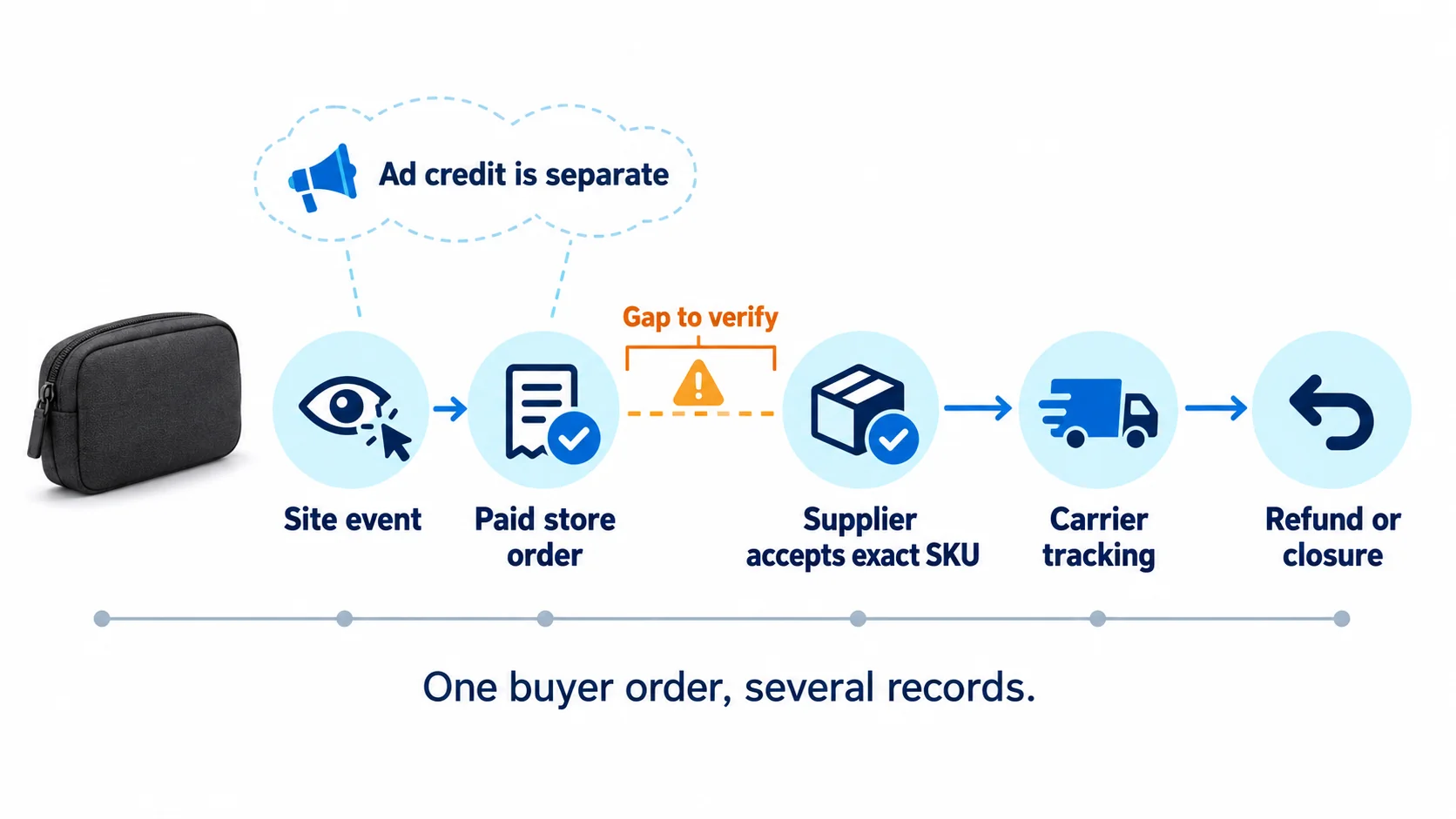
The most revealing picture is one line of time: shopper event → paid order → supplier accepts exact SKU → parcel starts moving → refund or closure. A missing step should be visible, not buried inside a green revenue tile.
Build the weekly view from clean order rows
Once a few orders have clean rows, build a small weekly view. Count paid orders from the store, accepted supplier orders from supplier records and shipped parcels from tracking/fulfillment records. Show refunds separately, with the date and amount. Review GA4 funnel stages by item to spot an acquisition or page problem, and compare campaigns inside a single attribution model. Add actual product, shipping and remedy costs before claiming a result is profitable.
Do not turn this into an endless dashboard project. Every weekly meeting should end with a named action: fix the missing event, correct the charcoal SKU mapping, chase supplier acceptance, update a misleading shipping promise, or test a product-page change. A number that cannot point to an order or a next action does not belong on the first screen.
If you sell through a China-side supplier and lack reliable product checks, order acceptance, packing and tracking records, tell AIDrop Agent the SKU and destination you need to support. We can discuss how those operational records are produced and handed back. That is a service conversation, not a claim that AIDrop can see inside your GA4 or ad account.
06
Frequently asked questions
Why can a paid store order be missing from GA4?
Event collection, required parameters, item mapping or consent can prevent the report from observing the purchase. Verify the store payment first, then inspect the measurement path. A missing analytics event does not undo a real paid order.
Should I add purchases claimed by two ad platforms?
No. Reconcile their claims to unique store orders before totaling sales. Different windows and attribution models can give multiple channels credit for one order. Credit is not another customer payment or proof of incremental demand.
Does a high ROAS prove the dropshipping order is profitable?
No. Revenue credit does not subtract product, provider shipping, processing, ads, remedies and other costs. It also does not prove the supplier accepted or delivered the correct variant. Join the records, calculate contribution and investigate missing handoffs before scaling.
Dropshipping Marketing: A Plan from First Visit to Repeat Order
Plan dropshipping acquisition, product-page conversion and repeat sales around realistic margins. Compare channels and measure costs and

Dropshipping SEO: Build Search Pages Customers Can Trust
A practical SEO plan for dropshipping stores: map searches to the right pages, verify supplier claims, link

Dropshipping Customer Retention: Earn the Next Order After the First Delivery
A practical retention plan for dropshipping stores: meet the first-order promise, choose a relevant follow-up, and measure
