
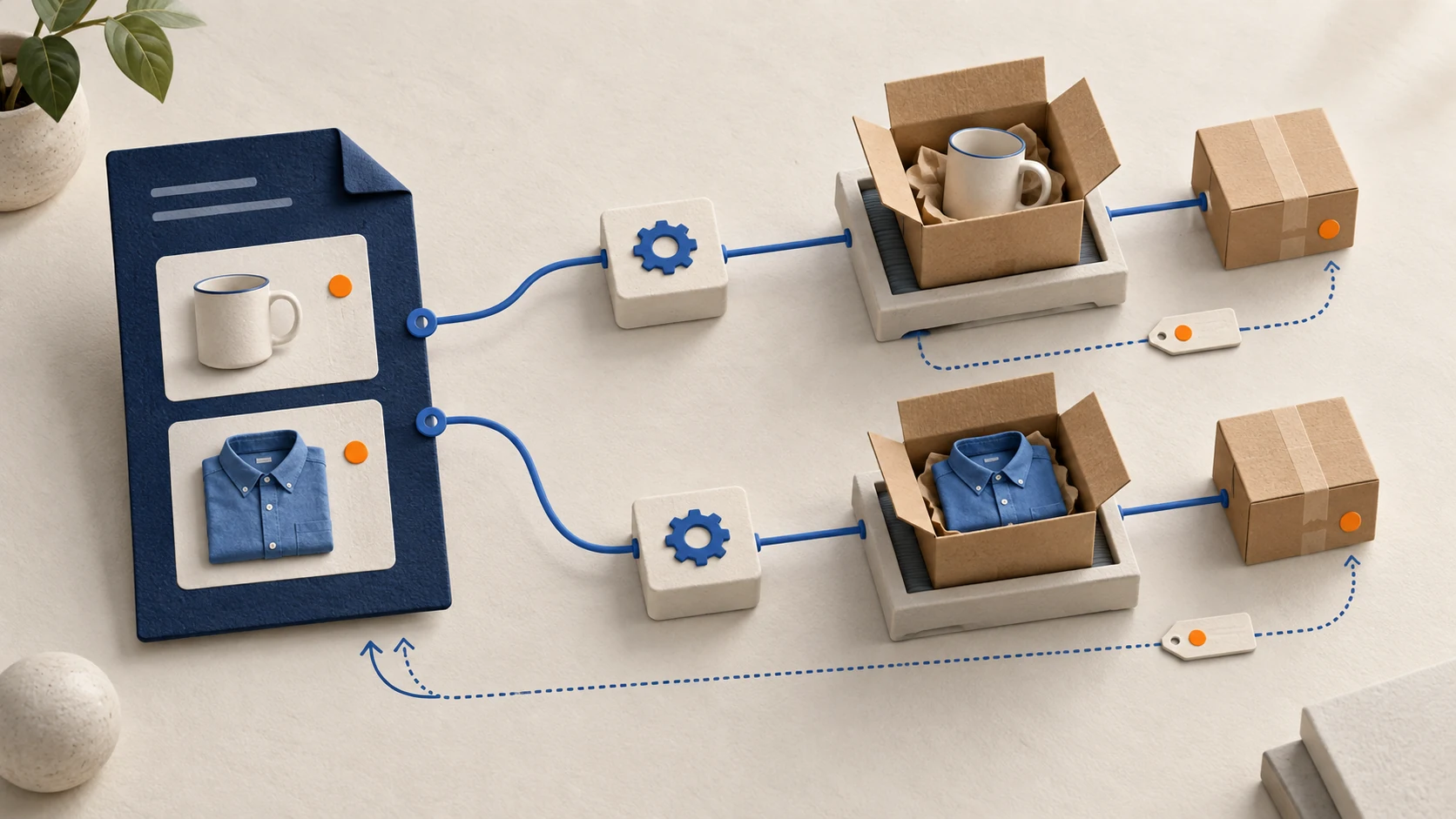
A Shopify dropshipping integration connects product and inventory records to a supplier, sends the correct items for fulfillment, and returns shipment information to Shopify. Build new integrations around the GraphQL Admin API and fulfillment orders. Use webhooks to trigger work, with persistent order references and reconciliation to recover when either system fails.
The difficult part is usually not sending the first order. It is knowing whether a supplier accepted an order after a timeout, preserving the right quantities during a partial shipment, and stopping a second purchase when the same event arrives again.
This guide is for merchants commissioning an integration and developers designing it. The examples describe an implementation approach, not tested production code. Shopify references were checked against the current documentation in September 2026; validate the chosen operations against the API version your app actually uses. The broader Shopify dropshipping guide covers the commercial setup that the integration must support.
01
Decide whether you need a custom integration
Use an existing connector when it supports your supplier, variants, locations and exception handling. A custom API connection is useful when the supplier has a documented API but the available app cannot support your order or stock requirements.
Before development, obtain the supplier’s API documentation, authentication method, test environment and support contact. Confirm that it can return a persistent order ID, report acceptance or rejection, retrieve an order by a client reference, and return shipment quantities and tracking. Those capabilities determine how safely you can recover from uncertainty.
If the supplier cannot retrieve an order after an ambiguous response, automatic retry is dangerous. Agree on a manual lookup process or another method of preventing duplicate purchases before enabling unattended ordering.
You also need a commercial agreement outside the API: which products may be substituted, when payment is required, whether cancellation is still possible after release, and who pays for exceptions. A successful HTTP request does not settle those terms.
02
Choose the Shopify app role and permissions
Shopify distinguishes order-management apps from fulfillment-service apps. An order-management app coordinates work across permitted locations. A fulfillment-service app represents a service that prepares and ships goods and has an associated location. Shopify’s fulfillment-service overview explains the distinction.
Do not register a fulfillment service merely because your application forwards a purchase request. Decide who actually manages the location and performs fulfillment. That determines the appropriate workflow and permissions.
Request the scopes required for your role and operations. Assigned fulfillment-order permissions relate to locations managed by the fulfillment-service app; merchant-managed and third-party fulfillment-order permissions serve different access needs. Check the current mutation requirements and the fulfillment order’s supported actions instead of assuming that order access grants permission to fulfill every item.
Customer addresses and related order information also involve protected customer data requirements. Access depends on app type and approval. Confirm that the necessary fields are available before forwarding an order, and handle missing or redacted data as an exception. Do not manufacture an address or expose complete customer payloads in routine logs.
Use a supported stable API version explicitly. As of this review, 2026-07 is the latest stable release and 2026-10 is a release candidate. A versioned Admin GraphQL request uses /admin/api/2026-07/graphql.json on the shop’s domain. Shopify’s versioning policy describes quarterly releases and support periods. Keep an upgrade owner and test changes before the selected version becomes inaccessible.
03
Map identifiers at variant and location level
Store names and product titles are poor integration keys. They can change, and two suppliers can use the same SKU text for different items. Use persistent identifiers on both sides and record the agreed mapping.
| Shopify record | Supplier or integration record | Why it is needed |
|---|---|---|
| Product variant ID | Supplier variant ID | Select the exact size, color or configuration |
| Inventory item ID plus location ID | Supplier item and warehouse | Update stock for the correct place |
| Order ID | Merchant order reference | Group the customer’s transaction |
| Fulfillment order ID | Assigned fulfillment work | Respect Shopify routing and current quantities |
| Fulfillment order line item ID | Supplier order-line reference | Send and confirm the correct partial quantity |
| Fulfillment ID | Supplier shipment ID | Reconcile the shipment and its tracking |
Shopify’s inventory-level model ties an inventory item to a location and distinguishes quantity states. A supplier’s total warehouse stock may not equal stock available to your store. Define whether its feed contains physical stock, sellable stock, reserved units or an allocation specifically for you; the inventory management guide explains the operating distinction.
For example, if a supplier reports 30 sellable units shared among merchants, your store has not necessarily reserved all 30. Decide whether to expose a smaller quantity, use a safety buffer or reserve inventory through the supplier. A buffer reduces exposure; it cannot make a stale feed accurate.
When a supplier replaces a variant, review the product before changing the mapping. Reusing a familiar SKU should not silently authorize a different material, size or specification.
04
Release fulfillment work after checking its current state
An order can contain several fulfillment orders, locations or delivery methods. Do not forward the complete order to every supplier that appears in it.
Shopify’s fulfillment solution guide describes retrieving fulfillment orders, assigned locations, line items and supported actions. Use those records to decide what work belongs to the integration.
A practical release sequence is:
- Receive the relevant event and retrieve the current order and fulfillment orders.
- Confirm the merchant’s payment, fraud-review and hold conditions for release.
- Select the assigned location, line items and quantities the app is allowed to process.
- Validate supplier mapping, delivery details, destination and current purchasing conditions.
- Create or find the durable supplier-request record before calling the supplier.
- Save the supplier’s order ID and acceptance result, or place an unresolved request into review.
For a third-party fulfillment service, submitting a fulfillment request and the service accepting it are distinct steps. A rejected request needs a reason the merchant can act on, such as unavailable stock or an unsupported destination.
If the order changes before release, reload the relevant records. Once a purchase has been accepted, follow the supplier’s amendment or cancellation process instead of sending the amended order as a new purchase.
05
Make webhook handling durable and safe to repeat
For HTTPS webhooks, Shopify’s delivery guidance requires verification against the raw request body using the HMAC signature. Verify before trusting the payload. Then persist the event and acknowledge it promptly, leaving slower supplier work to a queue.
Use X-Shopify-Webhook-Id to detect duplicate deliveries. Keep that check in persistent storage, not only in one server’s memory. Two workers should not both acquire the same event and create supplier purchases.
Webhook deduplication and purchase deduplication solve different problems. Several legitimate events can refer to the same fulfillment work. Keep a business reference for the supplier purchase as well, with a unique constraint or equivalent transactional control.
Shopify does not guarantee webhook ordering or delivery in every circumstance. Its webhook overview recommends reconciliation. Reload current state when an old event could overwrite a newer decision, and run a periodic job to find changed orders or shipments that your handler missed.
The queue should retain its status, attempt count, last error and next retry time. Give operators a way to inspect and resume a failed job without manually recreating the order.
06
Update inventory without overwriting another change
Decide which system is authoritative for the quantity being written. An absolute stock update from a supplier feed differs from a quantity adjustment caused by a warehouse event.
Shopify’s inventorySetQuantities documentation is particularly relevant to integrations that publish an authoritative absolute quantity. It recommends using compareQuantity to check the previous value rather than routinely bypassing that check. The documentation also requires an @idempotent key from API version 2026-04 onward.
Consider an illustrative race: your integration reads an available quantity of 10, but another process changes it to 9 before the integration writes its update. An unchecked absolute write based on the older state can erase that intervening change. A comparison failure should trigger a fresh read and reconciliation of the intended quantity.
Keep the same idempotency key for a retry of the same supported operation, following that operation’s documentation. Do not assume every Shopify mutation or supplier endpoint supports the same mechanism. Where native support is absent, your own durable records must prevent repeated side effects.
Record the supplier feed’s timestamp and the last successful synchronization. If the feed becomes too old for your stock risk, reduce availability or pause the affected items according to a policy you have agreed with the merchant. Do not continue advertising yesterday’s quantity simply because the sync job remains scheduled.
07
Return partial shipments and cancellations accurately
When the supplier ships part of an order, create the fulfillment for that quantity and the correct fulfillment-order line items. Shopify’s fulfillmentCreate reference permits specified line items and quantities; omitting them fulfills all items in the relevant fulfillment order. Multiple fulfillment orders combined in one fulfillment must belong to the same order and location.
For a two-item order where only one item ships, record one shipped item and preserve the remaining work. Attach the tracking to the actual shipment. Do not mark everything fulfilled because the supplier returned its first tracking number.
Separate a supplier’s label creation from carrier acceptance when presenting delivery progress. A tracking reference is useful, but it should not be turned into an unsupported claim that the parcel is already moving.
A cancellation request also needs a result. A supplier may already be picking or shipping the order. Keep “requested,” “accepted” and “rejected” distinguishable, and escalate a rejected cancellation to the merchant’s customer-service process. Canceling fulfillment work, refunding a customer and recovering money from a supplier are separate actions.
08
Recover an order after a timeout
Suppose the integration sends supplier purchase reference STORE-1042-1. The supplier accepts it, but the response is lost. The integration sees a timeout.
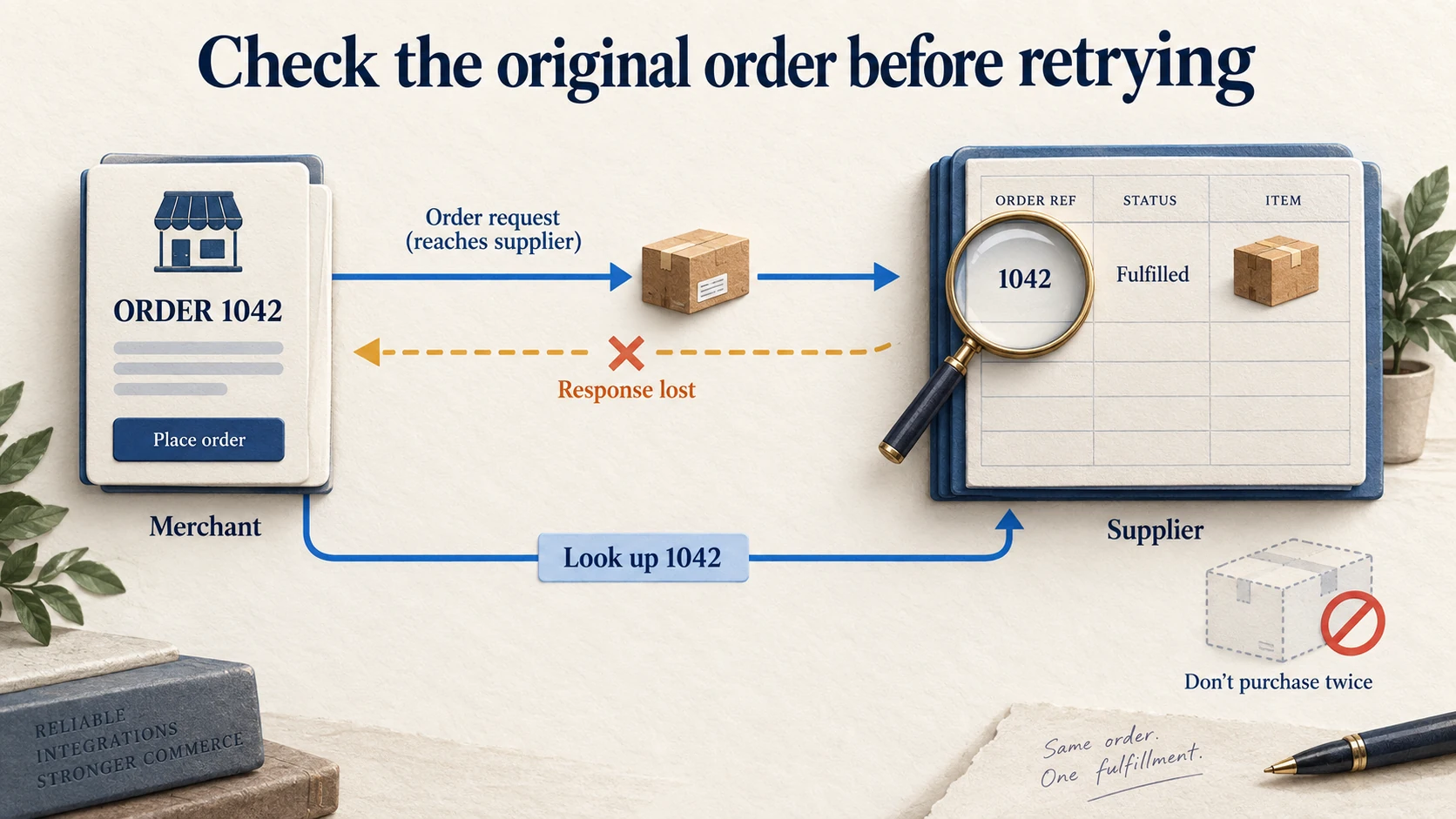
An immediate new purchase with a new reference can create a duplicate. Instead, keep the original request in an uncertain state and look it up at the supplier using the same reference. If found, save the supplier ID and continue from the actual status. If absent, retry according to the supplier’s documented idempotency or lookup guarantees. If the supplier cannot establish the result, route it to review before purchasing again.
| Failure | Safe next action | Completion evidence |
|---|---|---|
| Supplier request times out | Look up the original reference before retrying | One supplier order linked to one intended purchase |
| Stock update conflicts | Reload and reconcile the current quantity | Accepted update with the intended resulting quantity |
| Shopify mutation returns an error | Inspect GraphQL errors and operation-level errors | Successful result saved, not just HTTP 200 |
| API throttles requests | Delay queued work and respect current limits | Queue resumes without duplicate side effects |
| Tracking is missing | Retrieve shipment details or ask the supplier | Valid tracking linked to shipped items |
Shopify’s API limits vary by API and plan. Use response metadata, queues and controlled backoff rather than a fixed burst of retries. A permanently invalid address needs correction; repeating it more slowly does not resolve it.
09
Require a recovery test before full release
Use development-store data and the supplier’s sandbox where available. Keep test and production credentials separate. When a supplier has no sandbox, agree on a limited legitimate test and ensure it cannot accidentally generate repeated paid purchases.
The acceptance test should cover a correct single-item order, multiple variants, partial shipment, out-of-stock rejection, address correction, canceled work, duplicate webhook, supplier timeout and temporary API failure. Inspect both systems after each test.
The expected result is specific: no duplicate purchase, correct item and quantity, a retrievable supplier reference, matching shipment information, and a visible exception when automatic completion is impossible. A test that only checks whether an API returned success misses the customer outcome.
After launch, monitor orders waiting for acceptance, unusually old queue jobs, stock-feed age and shipments missing tracking. Give each alert an owner and a supported recovery action, as part of the wider automated fulfillment process. That is what makes the integration manageable when the first unusual order arrives.
10
Frequently asked questions
Can I build a new integration with the REST Admin API?
Shopify identifies REST Admin as a legacy API, and new public apps must use GraphQL. For a new project, use current GraphQL and fulfillment-order documentation rather than copying an old order-fulfillment tutorial.
Is an orders/create webhook enough?
It can signal that an order exists, but release also depends on current routing, payment and hold conditions. Retrieve the relevant fulfillment work and process later changes. A single creation event is not a complete fulfillment lifecycle.
Can one Shopify order go to multiple suppliers?
Yes. Preserve the assigned work, item quantities and supplier references separately, then return each shipment to the correct items. Do not assume one customer order means one supplier purchase or one parcel.
Does AIDrop need the customer’s full record?
A fulfillment partner needs the information required for the agreed service, such as the relevant items and delivery details. Define that data exchange for the actual integration. Do not send unrelated customer history simply because an app can access it.
