

Inventory Source connects supplier product and order data to a selling channel; it does not normally approve you to sell a supplier’s products. Get that supplier relationship and confirm where you are allowed to list before paying for an integration.
Then decide whether you need product/stock updates alone or an order workflow too. Automation can move information quickly, but it cannot make a supplier accept a merchant, reserve the last unit or turn a poor product record into a good one.
If you have found a supplier in the directory, the first question is not “How many listings can I import?” It is “Will this supplier accept my store and this sales channel?” Inventory Source’s own getting-started guidance says a dropship supplier, a sales channel and an integration plan are three separate pieces. Treat each as a gate.
01
Secure the supplier and channel first
Inventory Source says it is the technology link between a supplier and your store or marketplace, not the supplier middleman for most integrations. Its first-integration guidance is unusually direct: merchants have signed up for an integration before a supplier approved them, leaving the plan running while access is unresolved. Ask the supplier to approve your reseller account and to confirm the products and channels you may use.
| Before paying for an integration | Evidence to obtain | Why a screenshot of a directory listing is insufficient |
|---|---|---|
| Supplier permission | Approved account, product/category rights and allowed marketplaces | A supplier can be in the directory without approving your business |
| Order terms | Unit price, dropship/handling fee, shipping destinations, payment and returns | The connector does not set the supplier’s commercial terms |
| Channel readiness | Live store or approved marketplace account and required product attributes | A feed cannot make a restricted listing acceptable |
| Data sample | Actual variant IDs, descriptions, images, stock quantities and update fields | A sample catalog may omit the details your listing or customer promise needs |
On a phone, swipe the table sideways to compare every column.
US Direct has separate eligibility
There is an exception to evaluate separately: the provider describes a US Direct route that does not require a separate approved reseller account with each supplier. Its older help article says this option needs a Full Automation plan and serves the lower 48 US states. Do not assume that condition applies to every supplier in the directory or every destination. Confirm current terms for US Direct before choosing it.
Supplier funding is separate from checkout
Your customer payments and supplier payments also sit outside the data integration. A shopper may pay your store today while the supplier expects you to fund the order immediately or under separately agreed terms. Inventory Source’s setup guide flags that separation. The dropshipping cash-flow guide explains why a paid buyer order can still be waiting for the merchant’s supplier payment.
Have the supplier name the account identifier and feed it will give your business. Then check whether the integration can read the same products and variants that the supplier has actually approved you to sell.
Check the approved account’s actual feed
A directory entry, a sample catalog and your approved account feed can differ. If the approved feed omits the color you planned to advertise, stop there. Buying automation for a product you cannot access only moves the problem into a monthly software bill.
02
Choose the automation that matches the work
Compare the current Starter allowances
Inventory Source’s current pricing page, rechecked October 11, 2026, lists a free supplier directory, Starter Inventory Automation at $199 a month and Starter Full Automation at $299. Both displayed Starter plans include two integrations; Full Automation includes 500 orders a month, then $0.30 for each additional order. The page lists an additional integration at $50.
Those displayed prices and allowances are date-specific page data, not a quote for your account; verify the checkout and exact plan before activating. Supplier fees, channel fees and product shipping are separate.
Stock updates and order transfer solve different work
The useful distinction is the task each plan removes. Inventory automation publishes or updates supplier product data, price, quantity and status under its configured rules. Full automation adds order-transfer workflow and tracking updates. The provider’s older getting-started documentation describes those categories, but its help pages were last updated in 2024. Confirm today’s exact plan features and order-submission behavior in the account interface rather than assuming every order submits itself without review.
| You need to solve | What to test |
|---|---|
| Listings show an old supplier price or quantity | Does an inventory plan map the correct supplier SKU and update the fields your channel actually uses? |
| Staff rekey customer orders into a supplier account | Does the chosen order plan transmit the exact address, variant, payment and shipping selection? |
| Buyer says tracking is missing | When does a real tracking event return to your store, and who checks an order that stalls? |
| Product descriptions are incomplete | Who rewrites claims, measurements and images? Inventory Source says it does not generally improve supplier data for you. |
On a phone, swipe the table sideways to compare every column.
Automation does not repair missing product data
Buying a higher plan does not solve a missing supplier relationship or weak listing data. In its first-integration guidance, Inventory Source says it does not control supplier product quality, price or speed of processing, and that Full Automation does not itself monitor and follow up every processed order. That is a useful responsibility boundary: someone at your store still owns an exception queue.
Compare the fee at 20 and 100 actual orders
The displayed $199 and $299 monthly prices also need a volume test. At 20 fulfilled orders, those amounts allocate roughly $10 and $15 per order respectively before any supplier product or shipping charge. At 100 orders, they allocate about $2 and $3. These are simple allocations from the October 11 recheck, not effective prices or a forecast; plan limits and your actual billing can differ.
If the more expensive order plan saves five minutes on each of 20 orders but creates an unresolved exception queue, the decision cannot be made from subscription price alone. Measure the manual steps it truly removes on your channel.
03
A synced last unit is not a reserved unit
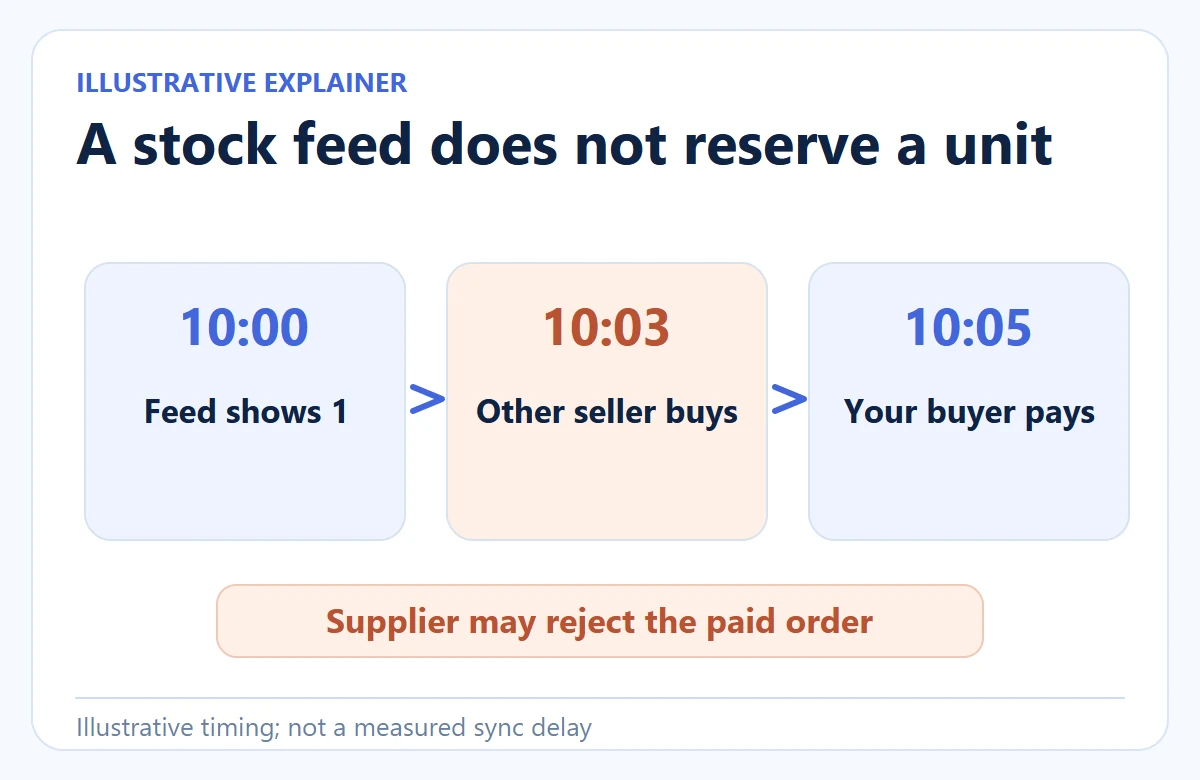
Imagine one blue basket in shared supplier stock:
10:00
the feed shows one; your store displays one.
10:03
another retailer buys that unit.
10:05
your buyer pays, but the supplier may reject the order.
These times illustrate a race, not an observed Inventory Source delay. A feed update does not reserve stock. Supplier acceptance happens later, and a rejection leaves your store with a paid buyer to contact.
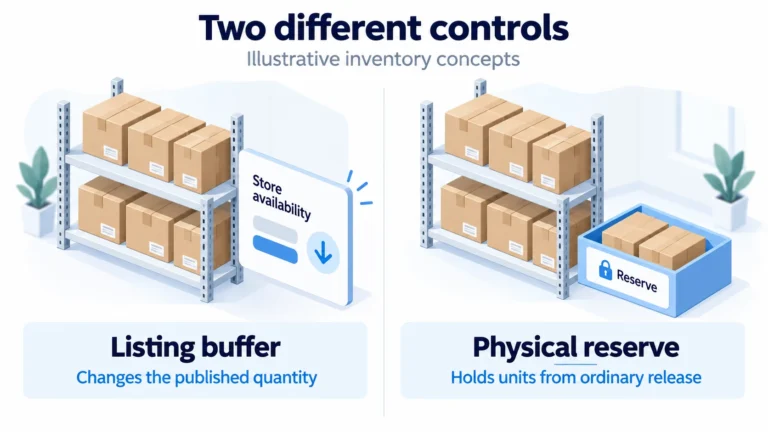
The provider’s pre-integration guidance says automation cannot guarantee availability. A stock buffer can reduce exposure at low quantities, but it is still a listing rule, not a supplier reservation.
Test the opposite error too. If a supplier changes its basket SKU but your listing still points to the old one, a fresh quantity can appear beside the wrong product. A healthy sync log can coexist with a bad buyer order.
Keep store SKU and approved supplier SKU side by side for each variant. After a feed change, compare the page, submitted supplier line and received sample. If they disagree, pause that listing and repair the mapping before accepting more orders.
Write the stock rule before turning on sync
Use a small example to decide what your store may advertise. The approved feed reports six blue baskets. Your chosen safety buffer is two, so the most you display is four. If the feed falls to two, display zero; if it rises to 20, display no more than 18, subject to any cap you set.
A buffer changes advertising, not ownership
This is your store policy, not a stock reservation or an Inventory Source default. Confirm that your integration and channel can implement it. Record how often the feed updates and what your store does if updates stop.
Match the exact basket and displayed quantity
Keep a mapping row such as store SKU BASKET-BLU → approved supplier SKU B-750 → feed quantity → buffer 2 → displayed quantity. The illustration below makes the variant problem visible: two similar baskets still need distinct supplier IDs. It is an example, not an Inventory Source screen or a real supplier count.

Reopen the listing after the low-stock update
Force a low-stock update with a supplier-provided sample feed or controlled product. Pass when the correct variant becomes unavailable at the chosen threshold. Fail if a neighboring variant changes, the listing stays buyable at zero or the buffer resets. A last-unit rule reduces exposure; it cannot reserve another retailer’s stock.
Follow that order through the states a buyer would care about:
The store accepted payment.
Verify the exact basket variant and customer address.
The integration sent or made the order available to the supplier.
Check whether a person still must click, approve or fund a step on your chosen plan.
The supplier accepted or rejected it.
If rejected, stop the delivery promise and offer the buyer the remedy you can support.
The supplier dispatched it.
Confirm a real parcel event, not only a created tracking number.
The buyer received the correct item.
Inspect the first sample and log complaints; a successfully transferred data record is not product approval.
The inventory-management guide covers broader stock-buffer and overselling choices. Here the point is narrower: an integration can connect records while the product and order remain under the supplier’s control.
04
Decide what to automate and what still needs an owner
Choose the plan from the work you can show it removes. A store that spends an hour each day correcting supplier quantities has a data problem. A store that manually copies 30 paid orders into a supplier portal has an order-transfer problem. A store with frequent wrong variants has a product-approval problem; faster synchronization may spread that error rather than solve it.
Buy automation for work you can measure
Log one week of real work before subscribing: task, minutes, error, person who fixed it, and whether a feed or order connection could have prevented it.
Compare saved time with the actual subscription
Then make a narrow purchase decision. For example, if a two-integration inventory plan removes 20 hours of reliable manual updates each month, compare the current checkout price with the value of that saved work and the cost of the remaining exception queue.
If order transfer is the main bottleneck, test Full Automation on an approved supplier and channel before adding its fee. The directory, the supplier account, the selling channel and the automation subscription remain four separate obligations.
Review one order before enabling automatic processing
The official Order Manager guide, last updated July 23, 2024, documents the following controls. Compare them with the actual installed account; no supplier order was submitted for this article.
Not Processed: inspect first
Open the actual Order Manager record. Match the paid store order, approved supplier, exact basket SKU/variant, quantity and address. If the red Resolve action appears, inspect and fix the missing information before selecting the green Process action.
Processed: look for supplier acceptance
Process sends the order to the supplier. Reopen the record and compare any returned supplier confirmation with the exact purchase. A Processed status is not proof that the supplier accepted the last basket or that a carrier collected it. Keep acceptance and tracking as separate evidence.
Choose automatic processing deliberately
The documented optional path is Order Manager → Channels → store gear → Orders → Auto Order Processing → Update. Leave verification in place until the permitted order and rejection tests work. If you choose automation, reopen the saved setting and repeat those tests; the switch cannot correct bad mappings or reserve supplier stock.
For two suppliers, keep the separate purchase references and the correct item-to-tracking match. Canceling in the interface does not stop dispatch: contact the actual supplier, and handle the buyer’s refund through the selling channel as its FAQ describes.
Give the remaining exception work a person
The output is a one-line owner map: supplier approves and fulfills → integration moves selected fields/orders → store approves claims, prices and buyer remedies. Put a name beside every step. That is how you distinguish useful automation from an unowned order that moved successfully between screens.
05
Run a one-supplier, one-channel acceptance test
After written supplier approval, inspect a representative product feed. Pick an item with variants and a realistic shipping destination. Confirm the supplier’s product identifier, approved images, current unit cost, parcel charge and return process. Configure a small set of listings, then place one controlled paid order. Record the store order ID, supplier order ID, payment, acceptance, tracking and delivered item. Repeat only after any failure has an owner and a fix.
Separate the feed test from the order test
The product-data and order-data tests should be separate:
- Change or observe an approved supplier cost, stock quantity and variant image. Check which fields the storefront updates and which need human review; save before/after values and the feed timestamp.
- On the order plan you intend to buy, place a controlled order to a served address. Compare the store line, transmitted supplier SKU, shipping selection and buyer address.
- Look for supplier acceptance and a real tracking event. If the plan stops at exporting an order for manual approval, record that manual step instead of marking the integration “fully automatic.”
Rehearse the rejection path: the supplier declines the last blue basket after your buyer pays.
- Freeze the affected listing and tell the buyer what is known.
- Name who can authorize a substitute, replacement or refund.
- Record the time spent resolving the exception alongside minutes saved on routine orders.
That result helps you choose inventory automation, order automation or a different supplier relationship.
Different failures need different fixes
The test also tells you which plan solves your problem. If listings and stock are the bottleneck while staff handle a few orders accurately, an inventory plan may be enough. If paid-order transfer is the bottleneck, request an order automation demonstration on your channel and note what stays manual.
The displayed $199 and $299 Starter levels matter only in relation to that work. Supplier costs remain outside either plan.
Choose a different route if you cannot get supplier approval, your channel disallows the product, the source feed lacks essential variant data or the supplier cannot meet the buyer promise. Supplier red flags offers a broader prepayment check. Our dropshipping guide shows where supplier, seller and fulfillment responsibilities fit together.
Need product checks and packing rather than a connector?
If you instead need a China-side partner to source a defined item, check samples, manage packing or dispatch it under an agreed scope, AIDrop Agent’s product sourcing service can be evaluated separately. Send the SKU, destination, expected volume and the exact handoff you need through the inquiry page. A real quote and workflow review are required; AIDrop does not claim to replace Inventory Source’s supplier directory or automation software.
06
Frequently asked questions
Does an Inventory Source subscription give me a supplier account?
For most directory integrations, no. Obtain approval and product/channel permission from the supplier, then pay for the connection that moves the data you need. The provider describes a separate US Direct route with different conditions; confirm its current eligibility before assuming it applies to the supplier you found.
Can I connect a supplier that is not in the directory?
Inventory Source’s FAQ discusses custom integrations, but compatibility depends on the supplier’s data and the offered service. Ask for a sample feed, order method and written scope. Do not buy a plan on the assumption that an arbitrary PDF price list will become a live stock-and-order connection.
Can I cancel or refund an order inside Inventory Source?
Its FAQ says refunds happen in the selling channel, returns and exchanges are handled with the supplier, and cancellations must be communicated to the supplier directly. Marking an order “canceled” in Order Manager does not cancel it with that supplier. Check whether the supplier already accepted or dispatched the parcel, then coordinate the buyer remedy in your store.

Dropshipping Inventory Management: Keep Stock and Sales in Sync
Define supplier quantities, reconcile commitments once, and verify what automatic updates really do. Practical controls for promotions,
Dropshipping Inventory Buffer: Account for Update Delays Without Double Deduction
Set a dropshipping inventory buffer using source quantities and update delays. Avoid double deductions, shared-stock assumptions and

Dropshipping Inventory Forecasting: Know When Supplier Stock Will Run Out
A supplier’s shared stock feed is not your allocation. Forecast against accessible units and real lead time.
