
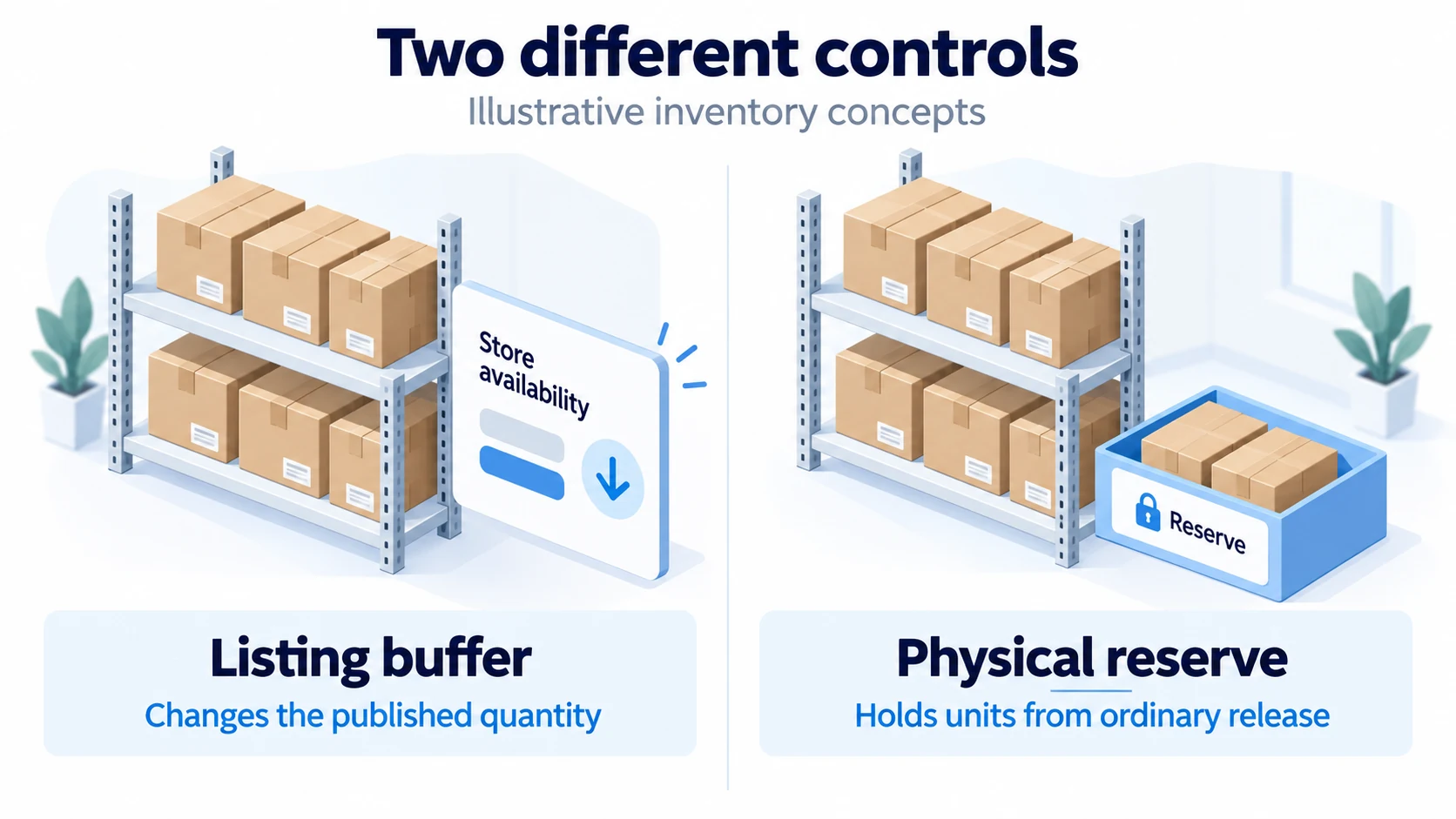
An inventory buffer withholds part of confirmed sellable stock from a sales channel to allow for update delays and uncertainty. Before applying it, establish what the source quantity already deducts. Then subtract only the additional allowance once and prevent the published quantity from falling below zero.
A buffer reduces exposure; it cannot reserve a shared supplier pool or repair a broken sync. A stale feed may still advertise units that another merchant has already bought. Your rules need a response to missing information as well as a number to subtract from healthy updates.
Use this alongside the broader dropshipping inventory management process. The aim here is to make the quantity you publish traceable, including what happens when a reservation, cancellation or incoming shipment changes the records.
01
Distinguish a listing buffer from physical safety stock
A listing buffer reduces the quantity offered to a channel. It may leave the warehouse’s physical count unchanged. Physical safety stock is inventory held to help cover demand or replenishment uncertainty. Some systems represent that physical reserve as unavailable stock; others apply an additional rule while exporting quantities.
The terms are not consistent across integrations. A setting called “reserve,” “buffer” or “safety stock” can change an internal inventory state, the exported number or both. Read the specific behavior rather than assuming every similarly named field works the same way.
Shopify’s safety-stock explanation discusses holding extra inventory for uncertainty. That purchasing decision differs from withholding units from a channel during a short synchronization gap. You may need both controls, but record what each is meant to cover so the same reserve is not deducted twice.
An illustrative comparison uses a shelf of physical stock and a separate store availability card. A listing buffer changes the number on the card; a physical reserve identifies units held from ordinary release. The control needs to say which of those actions it performs before you change its value.
A buffer can cost sales as well as prevent overselling
If a source has eight genuinely available units and you withhold all eight, the channel will stop offering the item. That may be a reasonable temporary response to unreliable information. It may also unnecessarily hide a slow seller whose inventory feed is dependable.
Choose buffers by the uncertainty of the product and route. A blanket percentage across every variant can reserve too much of a high-stock slow mover while doing little for a fast seller during an outage. Track both rejected orders and stock that was withheld when it could have been sold.
02
Establish exactly what the source number means
Ask what the feed reports:
- Physical on-hand stock or net available stock.
- A supplier’s general estimate or an allocation reserved for your store.
Record the location, variant, unit of measure, timestamp and update method. “Stock: 100” is incomplete without that context.
Make a list of deductions already included:
- Existing order commitments.
- Damaged units and quality holds.
- Other reservations and any provider buffer.
Incoming purchases and transfers also need a stated treatment. Do not infer these from field names alone.
Shopify’s inventory-state definitions separate on-hand, available, committed, unavailable and incoming inventory. Available stock excludes commitments and unavailable units; incoming stock is not available until receipt and the relevant state change. A value already reported as available therefore has a different starting point from a physical count.
Ask for one reconciled example
Have the supplier or app explain a real test SKU from its source record through the store output. You should be able to account for every deduction and identify when each update occurred. If the provider cannot explain the number, using a larger buffer does not make it reliable.
Check whether quantities are units, packs or cartons. A feed showing 20 packs of five is not the same as 20 individual items. Keep the conversion attached to the correct variant and test orders that consume more than one unit.
03
Calculate once from a defined starting quantity
For a source that reports net available units, a simple listing rule is: published quantity equals the greater of zero and net available units minus the additional channel buffer. “Additional” matters: the rule should not repeat deductions already included upstream.
If you start from physical on-hand units instead, first remove the relevant commitments and unavailable quantities to obtain net available units. Then apply the additional publication allowance. These are two ways of reaching the same result when the underlying records are consistent.
Consider a hypothetical SKU with 100 units on hand, 12 already committed and eight unavailable. Its net available quantity is 80. If an additional five-unit listing buffer has not yet been applied anywhere, the store should publish 75. Starting from 80 and subtracting the 12 commitments and eight unavailable units again would produce an incorrect 55 after the same buffer.
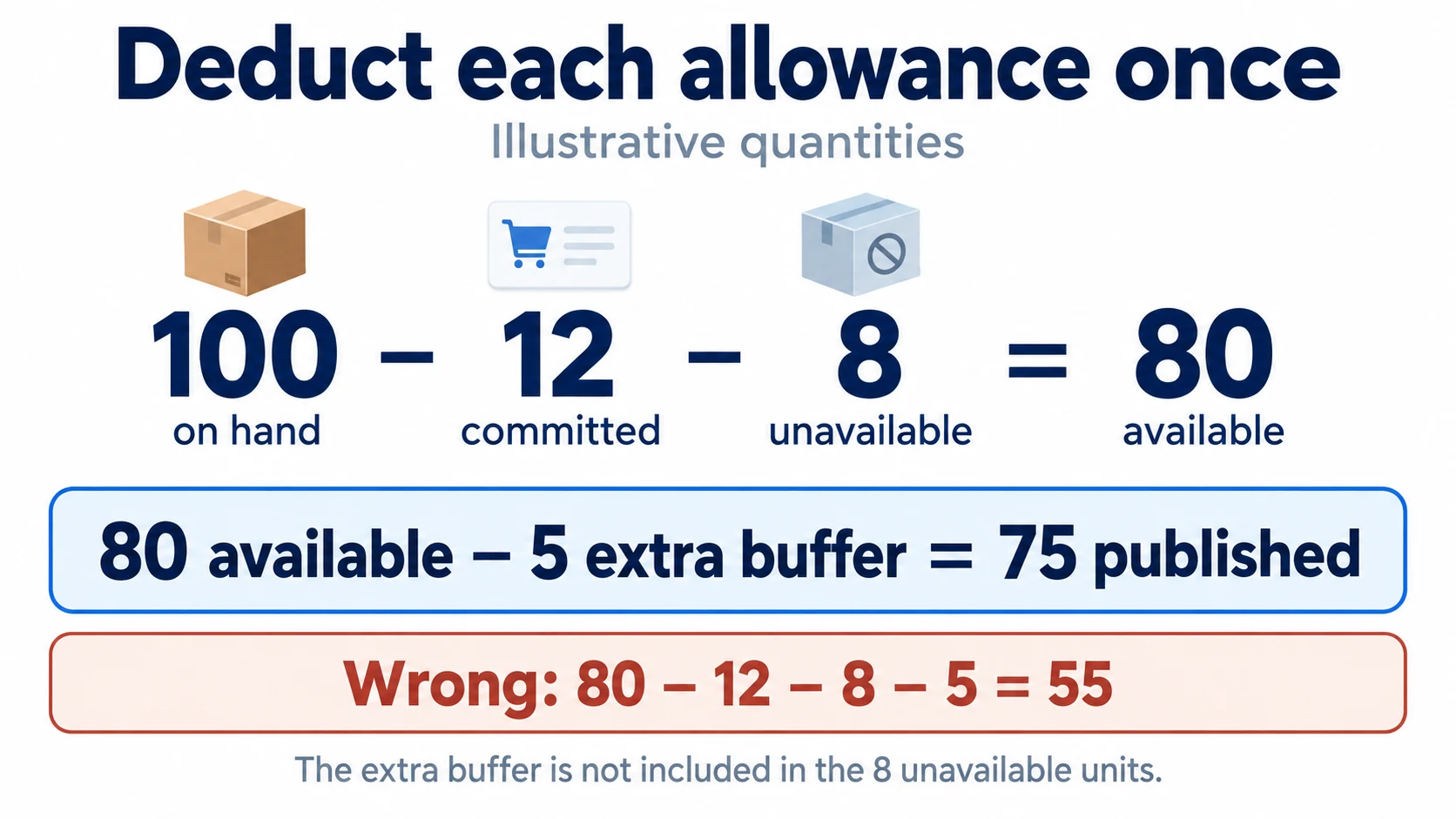
Correct from on hand: 100 − 12 − 8 − 5 = 75. Correct from available: 80 − 5 = 75. The five units in this example are an extra listing allowance, not part of the eight unavailable units. If those eight already included the intended buffer, the additional deduction would need to change.
Follow the integration’s documented order
Warehance’s buffer documentation describes an export calculation that starts with available inventory and can apply both a product-level marketplace buffer and a per-store buffer. Those two settings stack in that product; they are not alternative names for the same deduction. The documentation also distinguishes the exported quantity from the underlying stock counts.
Other systems can behave differently. Draw the path your data actually follows: warehouse record, middleware calculation, platform state and marketplace output. Assign one place to each intended allowance. Test the final published result after all components have processed it.
Do not fix a duplicated deduction by increasing the physical inventory count. That conceals the error and can create excess availability elsewhere. Correct the rule or mapping that subtracts the quantity twice, then reconcile the records again.
Distinguish subtraction, a stop threshold and a visibility cap
These settings can all be called buffers:
Subtraction: withholds units on each update.
Stop threshold: stops the listing when stock crosses a boundary.
Maximum visible: caps the quantity shown without reserving that number of units.
SellerActive’s documentation distinguishes its maximum-visible quantity from a minimum threshold that removes the listing when stock falls below the threshold.
Under a simple subtraction rule, ten available units minus five publishes five. A stop-below-five rule can leave all ten available for sale until the boundary is crossed; it does not subtract five from every update. Test quantities above, exactly at and below the threshold, because the boundary condition and interaction with other settings belong to the specific integration. A five-unit visibility cap also does not establish a five-unit exclusive allocation.
04
Size a provisional buffer around the exposure window
The relevant delay runs from the source quantity becoming outdated to the channel receiving a usable correction. Include source export timing, polling, processing and failed-update recovery. A setting that polls every five minutes does not prove that every inventory change reaches the store within five minutes.
Use observed timestamps where available. Review busy periods and failures as well as ordinary updates. If you have only a few records, treat the initial allowance as provisional and monitor it closely rather than assigning an unsupported confidence level.
A simple example for a controlled pool
Assume a hypothetical controlled stock pool can lose about two units per hour through relevant consumption that is not yet reflected in the published number. Assume a tested exposure window of 1.5 hours and an additional allowance of two units for observed count uncertainty. A provisional buffer is three units for the gap plus two for uncertainty, giving five units.
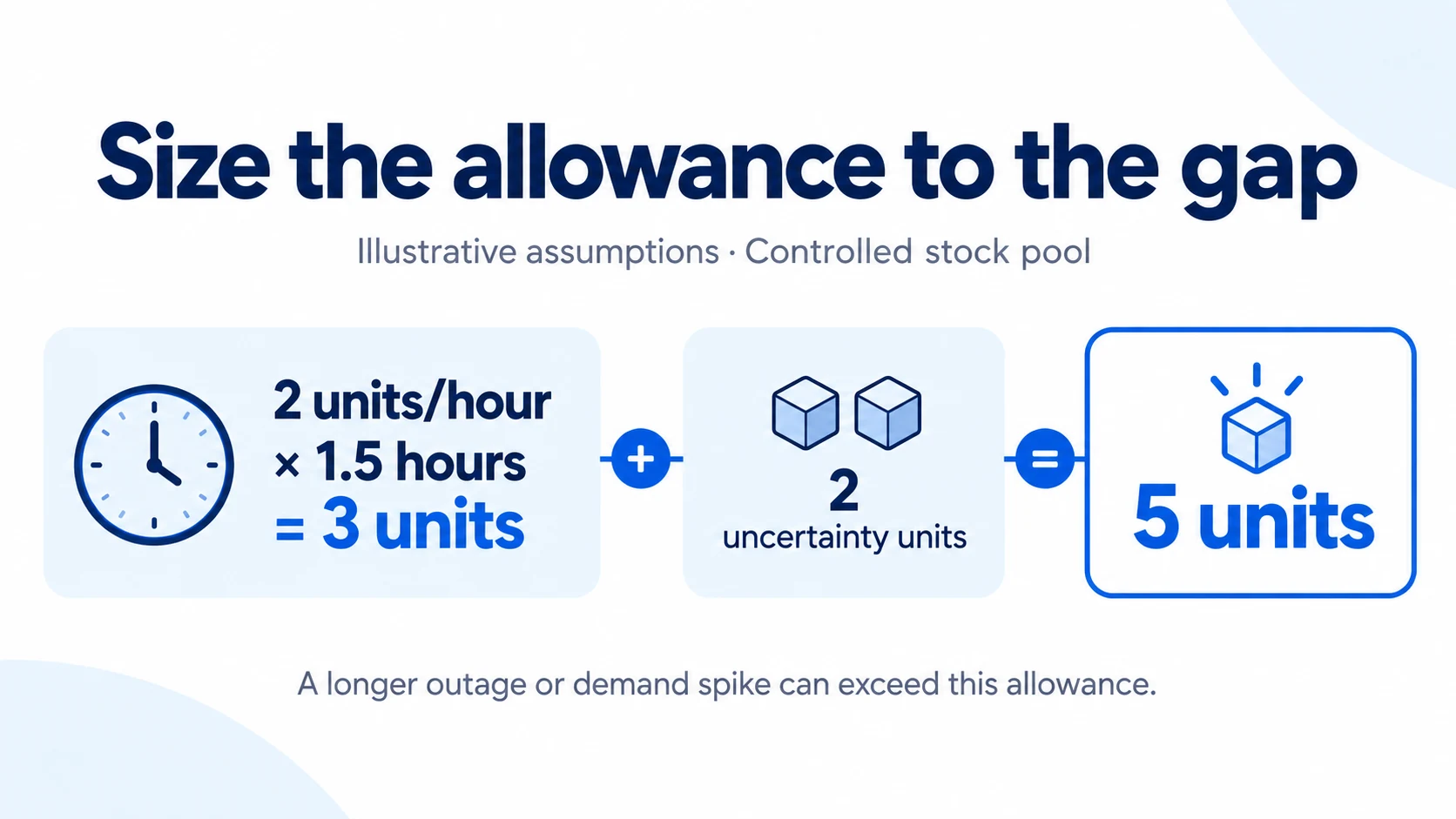
This is a planning example, not a statistical guarantee. The two-unit hourly assumption must represent the relevant unreflected consumption, not merely your store’s average sales if other channels share the pool. A promotion, bulk order or outage longer than the tested window can exceed the allowance.
If the observed gap grows to four hours under the same assumptions, the calculation becomes eight plus two, or ten units. Before increasing the setting, investigate why updates slowed. A growing buffer can hide a deteriorating feed while progressively reducing sales.
Keep replenishment safety stock separate
A buffer for a 90-minute update gap does not cover a supplier that needs weeks to replenish. The latter requires demand and lead-time planning, purchase timing and actual access to stock. Do not use a short-lag calculation to justify a long customer delivery commitment.
Similarly, holding a large physical reserve does not ensure that the channel knows which units remain available. The stock may exist while the integration still double-books it. Physical planning and publication rules need to agree, but each addresses a different source of failure.
05
Treat shared supplier stock as unreserved until confirmed
Your own sales history cannot bound other merchants’ purchases from the same supplier. A general feed may show 200 units, yet a wholesale buyer could consume most of them before the next update. Subtracting five units does not reserve the remaining 195 for your store.
Ask the supplier:
- Whether it offers a store-specific allocation.
- How orders reserve that allocation and when acceptance is confirmed.
- Whether the feed includes pending purchases from other merchants.
If the supplier exposes only a broad stock indicator, avoid presenting it internally as an exact quantity you control.
For uncertain products, combine conservative publication with an order-acceptance check and an explicit response when confirmation fails. Restrict promotion or pause availability when the source becomes unreliable. The out-of-stock response guide covers handling an order after a supply problem is known.
If you purchase a reserved batch, verify that its allocation appears separately and cannot be consumed by unrelated orders. A payment confirmation alone does not establish the behavior of the inventory system. Test a reservation, fulfillment and release with the provider.
06
Do not allocate the same units independently to every channel
Publishing a conservative quantity on two channels does not create two separate pools. If 20 units are available and each channel sees 15, simultaneous orders can still exceed the 20 physical units when reservations do not synchronize quickly enough.
You can address this with a shared reservation process or explicit channel allocations, depending on the system. A shared process needs timely, reliable commitments across channels. Explicit allocations reduce competition for the same units but may leave one channel short while another has unused stock.
Understand the effect of channel-specific buffers
A larger buffer on one marketplace can make it stop selling sooner than another. It does not necessarily create an exclusive physical reservation for the preferred channel. Verify whether the software simply exports different numbers or actually assigns inventory rights.
Test two near-simultaneous orders against low stock. Observe the source allocation and both channel quantities. If the second channel continues selling against an old value, document the delay and the prevention mechanism. An apparently correct spreadsheet calculation cannot compensate for missing order events.
07
Test quantity changes before applying the rule widely
Use a test SKU or a tightly controlled product group. Record starting states, the active buffer settings and the expected output. Change one condition at a time so you can tell which part of the system altered the quantity.
- Normal availability: net available 20 and additional buffer five should publish 15 under the stated rule.
- Low stock: net available three and buffer five should publish zero, not a negative quantity.
- New commitment: confirm that the order reduces availability once through the intended reservation path.
- Cancellation: verify when the commitment is released and prevent a repeated release from inflating stock.
- Incoming receipt: ensure units become sellable only after the agreed receiving and release conditions.
- Failed or repeated update: confirm retries do not apply a delta twice or overwrite newer information with an older quantity.
For bundles, test the component requirement. A kit needing two units of a component consumes two, even if the sales channel records one kit. Shared components can constrain several products at once; do not assign each bundle an independent quantity that ignores the others.
Inspect the store and marketplace result after the integration acknowledges the update. A successful request at one step does not prove that the final channel accepted the new quantity. Keep the rejected-update reason and a retry or manual-resolution path.
Test checkout as well as the displayed count. Shopify permits continued online sales at zero when the variant’s Continue selling when out of stock setting is enabled, as its out-of-stock selling documentation explains. If your rule is meant to stop ordinary in-stock sales, confirm that the product’s selling settings actually enforce that result. Keep any intentional preorder arrangement separate and clearly described to customers.
The automated fulfillment guide explains the wider need for acknowledgments and recoverable failures. Inventory publication should be part of that same controlled flow, rather than an isolated scheduled export.
08
Set a rule for stale or missing inventory
Decide how old a source update may become before a product stops relying on it. Use the product’s sales behavior, source reliability and ability to confirm orders to choose that limit. There is no universal safe timestamp threshold for all suppliers and products.
When the limit is exceeded, reduce or pause the affected availability through the channel’s actual controls and alert the responsible person. Simply disabling synchronization may leave the last positive stock number on the marketplace. Verify that the intended stop-selling state really reached the channel.
After the feed recovers, reconcile open orders, reservations and the fresh source quantity before restoring normal publication. Avoid replaying old updates over the new state. Keep a record of what sold during the gap so the supplier’s commitments and store records can be compared.
If the provider cannot confirm a usable quantity, leave the affected offer paused or use an explicitly supported alternative selling arrangement. Repeatedly increasing the buffer against unknown stock is not a dependable recovery process.
09
Review the buffer using actual exceptions
Track the exceptions that explain buffer performance:
- Supplier rejections and oversold orders.
- Stale-update periods.
- Stock withheld while available.
Review by SKU and source, because an aggregate success rate can hide one unreliable feed. Check whether incidents happened inside or beyond the exposure window used in the calculation.
Reduce an excessive buffer only after the underlying evidence supports the change. Increase or pause availability when the risk changes, but investigate the reason at the same time. A lower buffer after faster reliable updates is a different decision from reducing it merely to make more units appear for sale.
Recheck settings after adding an app, changing a supplier feed or migrating a location. A new component may already subtract reservations or introduce its own default buffer. Keep the current calculation documented in ordinary terms so the next operator can reproduce the published number.
The useful result is a quantity whose origin and limits you can explain. It should be clear what is available, what is held back, which events will change it and what happens when those events stop arriving.
10
Frequently asked questions
What is a good dropshipping inventory buffer?
There is no single suitable number. Start with the source quantity definition, the relevant unreflected consumption during measured update delays and count uncertainty. Test a provisional allowance and revise it using exceptions and unnecessarily withheld stock.
Can an inventory buffer prevent every stockout?
No. It can reduce exposure to some delays, but cannot create inventory or guarantee access to a supplier’s shared pool. Replenishment, reservations, order acceptance and stale-feed handling still matter.
Should I subtract committed orders from available inventory?
Only if the source’s definition has not already excluded them. In Shopify’s documented state model, available inventory already excludes committed inventory. Repeating the deduction would understate the quantity.
Is a percentage buffer better than a fixed quantity?
Choose according to the risk being covered and the software’s behavior. A fixed quantity can reflect a measured short update gap; a percentage changes with stock size and may not track that gap. Verify rounding, minimums and low-stock output before deployment.
Can I publish incoming stock as available?
Do not count incoming goods as ordinary ready stock merely because a purchase order exists. If you intentionally offer a preorder or another future-delivery arrangement, use supported controls and appropriate customer information. Keep it distinct from received, released inventory.
