

SaleHoo can be worth paying for if finding and contacting suitable suppliers is holding up your store. It gives you a searchable supplier directory, product research tools and help adding supported products to Shopify. The useful question is whether it helps you find someone who can supply the item your customer actually wants.
Imagine you want to sell a small table lamp. Finding ten companies that sell lamps is a start. You still need one that will send a single lamp to your customer’s country, charge a workable price and explain what happens if it arrives broken. SaleHoo helps with the search and introductions; those answers come from the supplier.
Its direct product and order connection is for Shopify. If your store uses WooCommerce, eBay or another platform, the directory can still help you find suppliers, but the way you add their products and send them orders depends on that supplier. That difference matters more than a long feature list.
This review uses SaleHoo’s public pricing and help pages checked on September 28, 2026. We have not opened a paid account, contacted its suppliers or tested a parcel. The examples below show how to make a choice; they are not reported test results.
01
Two jobs SaleHoo can help you do
The first job is finding a supplier. In the Directory, you search by product or supplier and narrow the results by details such as shipping destination and minimum purchase. You can open a profile, read its terms and contact the company. SaleHoo also includes product research and training in its current plans.
The second job is adding compatible products to Shopify and passing order details to their supplier. SaleHoo Dropship provides that direct Shopify connection, with product imports and updates when the supplier changes prices or stock. It does not give every company in the Directory the same connection. SaleHoo integration guide.
Your immediate need: Find a company selling your chosen product
Relevant part of SaleHoo: Supplier Directory and its search filters
What you still need to arrange: Exact item, delivery country, price, payment and returns with the supplier
Your immediate need: Add supported products to Shopify
Relevant part of SaleHoo: SaleHoo Dropship and its import list
What you still need to arrange: Product details, variants, retail price and a suitable shipping method
Your immediate need: Use a Directory supplier with WooCommerce or another store
Relevant part of SaleHoo: That supplier’s files, plugin or manual process
What you still need to arrange: How products, stock changes and customer orders reach the right place
Your immediate need: Send a supported Shopify order for shipment
Relevant part of SaleHoo: The order page and supplier payment process
What you still need to arrange: Pay the supplier’s bill and follow the parcel and customer request
A product file can stop before ordering
Some Directory suppliers provide a CSV file, which is a spreadsheet-style product list. Others provide a regularly updated file, often called a feed, or a plugin that connects to a store. A product file can help you add listings without also placing orders. Ask what it actually does: does it update stock, send an order, or only give you descriptions and photos?
Directory access is not Shopify automation
For WooCommerce, SaleHoo’s own guide describes finding suppliers, discussing terms and manually uploading agreed product details. Do not buy a membership expecting the Shopify order buttons to appear in a different platform. SaleHoo’s WooCommerce guide.
02
What a membership actually costs
The pricing page currently offers Starter at $9 per month billed annually and Pro at $49 per month billed annually. That means an annual subscription bill of $108 or $588 before any applicable tax, rather than a choice to pay $9 or $49 each month. Lifetime prices are separate one-time payments.
Plan: Starter
Annual subscription: $108 a year, shown as $9/month
One-time lifetime price: $299
Shopify stores: 1
Product imports: 200 per month
Supplier contacts: Up to 100 per month
Plan: Pro
Annual subscription: $588 a year, shown as $49/month
One-time lifetime price: $1,699
Shopify stores: Up to 3
Product imports: 600 per month
Supplier contacts: Unlimited
The main pricing page was checked again on October 11, 2026, and still showed these USD annual/lifetime payments and capacities. Pro adds supplier research help and team features. Enterprise asks you to contact SaleHoo, while its comparison shows $499/month billed annually on a one-year term. Obtain the actual Enterprise offer before budgeting around it. Current SaleHoo pricing.
Suppose you have one Shopify shop, want to import 20 products and plan to message six suppliers this month. Those quantities fit Starter’s published limits. Pro’s extra capacity would not solve a supplier who cannot ship your lamp. Three Shopify stores or a larger monthly import need could give you a concrete reason to consider Pro.
Compare the full upfront payment
Lifetime access may appeal if you expect to use SaleHoo for years. It also puts more money into this tool before you know whether its suppliers suit your shop. Compare the whole payment with the work you expect it to save. A directory you stop using is still an expense, even if it has no later renewal bill.
The membership does not pay for lamps, freight, supplier handling charges, your storefront, advertising, payment processing or customer refunds. Some suppliers also ask for business documents or set a minimum purchase. These requirements belong to the supplier, not simply to your SaleHoo tier. Supplier requirements.
Price one lamp after paying for directory access
Suppose a lamp sells for $45. Your invented supplier inputs are $15 for the lamp and $9 freight; payment fees are $1.60 and expected customer-problem cost is $2. These are teaching figures, not quotes from a SaleHoo supplier.
Supplier bill
Goods $15 + freight $9 = $24. Confirm the exact lamp, destination and any supplier handling or tax before replacing these inputs.
Share of Starter
If you fulfill 60 orders over the year, the $108 annual fee allocates $1.80 to each. You still pay the whole $108 up front; this does not turn it into per-order billing.
Amount left
The example leaves $45 − $24 − $1.60 − $2 − $1.80 = $15.60 before advertising, tax and other overhead. Deduct the actual remaining costs before calling it profit.
If sales are lower
At only 20 fulfilled orders a year, the same subscription allocates $5.40 per order and the example leaves $12 before those other costs. Sixty orders was a planning assumption, not a forecast.
This is why a supplier’s delivered quote and a realistic order estimate matter more than getting access to more listings. A higher plan does not repair freight that makes the lamp unprofitable.
Refunds, trials and renewal dates
SaleHoo advertises a full membership refund when you contact its support team within 60 days of signup. That is a refund of the SaleHoo subscription, not a promise to refund a supplier’s goods or recover money from a customer return.
The trial offer still needs its own checkout check
The Directory page showed a $1 seven-day trial on September 28. Its Pro block then showed a $9 annual-billing rollover label, conflicting with the normal $49 Pro price. We have not confirmed that acquisition block in checkout. The separate trial pricing page, read on October 11, lists $9 Starter and $49 Pro, both billed annually. Confirm the plan, first payment and renewal in the offer you actually buy.
To cancel, SaleHoo directs you to support by email, chat or phone. The pricing page asks for 48 hours’ notice before renewal, so put the renewal date in your calendar and contact them early enough. Keep the cancellation confirmation. Older $67/year or $127 offers found on campaign pages are not the default prices used in this review. Cancellation instructions.
03
Three matches can still leave you without a supplier
SaleHoo says it lists more than 8,000 vetted suppliers. That can make the initial search more useful than sorting through unknown companies yourself. It does not tell you that each company has your exact lamp, accepts single-item orders or offers the return arrangement you need.
Open a promising profile and look for location, shipping methods, minimum purchase and any business-document requirements. A minimum order quantity, or MOQ, is the smallest purchase the supplier will accept. If you want it to ship one item after each customer order, a supplier requiring a large bulk purchase may suit a different business. Reading supplier profiles.
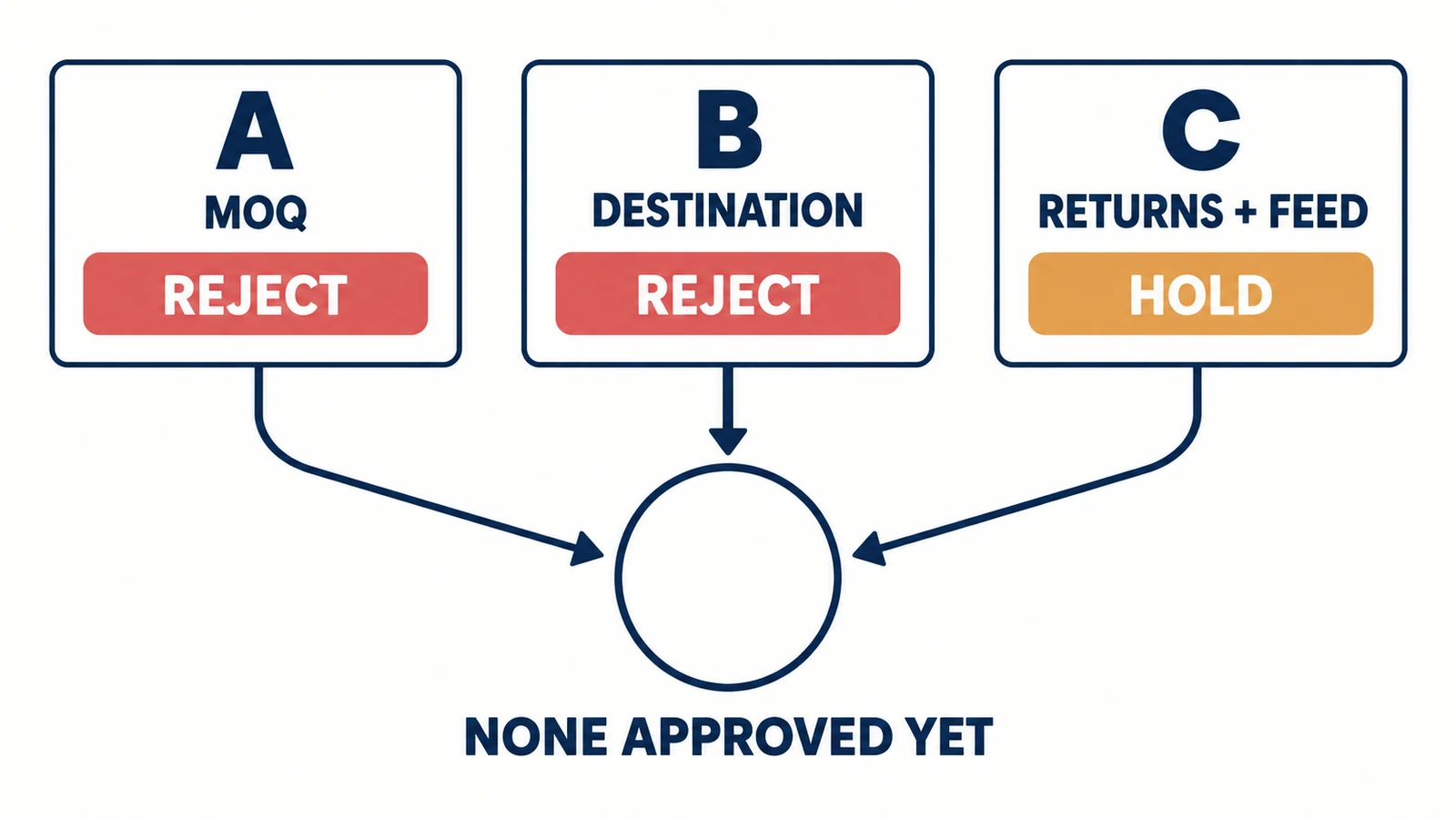
Here is an illustrative home-goods shop using WooCommerce. It finds three candidates for the same product, but the replies leave it with these choices:
Candidate: A
What the shop learns: The product is available, but the minimum purchase is too large for one-at-a-time orders
Decision: Reject for this shop
Useful next step: Look for a supplier that accepts the order size you need
Candidate: B
What the shop learns: Single-item orders are possible, but the supplier does not ship to the target country
Decision: Reject for this destination
Useful next step: Search using that country, rather than relying on the supplier’s location
Candidate: C
What the shop learns: Product and destination appear suitable; the return address and stock-update method are still unknown
Decision: Hold
Useful next step: Ask where returns go and how the shop learns that an item has sold out
There is no approved supplier yet, even though the search produced three matches. Candidate C is the closest, but publishing its product before those answers arrive could leave the shop selling an unavailable item or accepting a return it cannot send anywhere.
The point is to turn a match into a usable supplier reply. SaleHoo’s dashboard lets you open the supplier profile, choose Contact Supplier and follow replies in the Inbox. Its templates can help you start, but your message should name the product and destination. Messaging suppliers.
A first message could say:
I run a WooCommerce home-goods store and would like to sell this product: [link and exact color or size]. Can you ship one item per customer order to [country and postcode]?
Please send the item price, shipping charge, where the parcel ships from, time before dispatch and available delivery methods. Can the parcel use neutral paperwork?
Where would a damaged-item or change-of-mind return go, who pays the postage, and how do we handle a cancellation? Please also explain how I receive stock changes, send you orders and receive tracking.
That is a suggested inquiry, not a supplier promise. Ask for a sample if checking the product is important to your decision, and agree its price and shipping first. Ask whether the supplier can provide the product information and documents your selling channel requires.
If you are still choosing what to sell, our dropshipping product research guide can help you narrow the item before paying for a wider supplier search.
04
What happens after a Shopify customer buys
For a compatible Shopify product, start by connecting your store in SaleHoo’s settings and authorizing the connection. Then search the product catalog using the destination and import filters. An Instant Import item and a Contact Required item need different next steps; the second still needs a conversation with its supplier.
Choose the exact variant before importing
The import list is your editing desk. Before sending the lamp to Shopify, choose the actual color or size, check the shipping options, write a useful description and set the retail price. A variant means one choice of the product, such as a black lamp instead of a white one. Make sure the selected choice has the price and shipping method you intend to offer. Connecting Shopify and editing imported products.
Customer payment and supplier payment differ
When a customer pays your shop for that lamp, the supported order appears in SaleHoo. You review the item, customer address and delivery method, then use Place Order and complete the supplier payment. The customer’s payment to your shop and your payment to the supplier are two separate purchases. Your annual SaleHoo membership does not cover the second one.
After payment, the supplier processes and dispatches the parcel. SaleHoo’s guide says the tracking number then syncs back to the dashboard. Track the shipment and answer your customer’s delivery questions; a synced order or tracking number is not proof that the parcel has arrived.
Match the Shopify line with one supplier payment
For one proposed check, use a paid Shopify order for the imported black lamp and retain the original SKU, for example LAMP-BLK. That label is fictional. Follow the documented supplier-order route, without submitting a second purchase just to test a missing status.
Open the supported order
Go to Store Management → Order Fulfillment and connect the supplier account when prompted. Use See details to compare the exact lamp variant, customer address and order quantity.
Check method and charge
Choose the available shipping method. Place Order opens the supplier with the populated order details. Confirm the actual item, destination, freight and total before Pay Now.
Verify the paid result
Keep the supplier order number and payment receipt. Match one black lamp and the same destination back to the Shopify line. Later, match the carrier and tracking details; a dashboard entry alone is not delivery.
If a status is missing
Check whether the supplier already has a paid order before retrying. Give support the Shopify order ID, SKU and supplier receipt. A broken sync should not lead to two purchases for one customer.
This check has not been performed in a paid account. The three sync causes below still apply: unpaid Shopify order, changed SKU or a product imported outside SaleHoo Dropship. Re-importing requires care with existing listings and order mappings; do not overwrite those relationships blindly.
If the order does not appear
SaleHoo’s order help names three common causes: the Shopify order is unpaid, the product was not imported through SaleHoo Dropship, or its SKU has been changed. SKU is the product code used to match the shop’s item with the supplier’s item. Changing that code can break the connection; the guide suggests re-importing when needed. Order payment and troubleshooting.
Resolve the order before another purchase
Start with those causes before buying another tool. If the item has become unavailable or the supplier charge is higher than expected, pause and contact the supplier or SaleHoo support before paying for an unsuitable order. Tell the customer what choice you can actually offer instead of letting the order sit unanswered.
Returns also need the chosen supplier’s terms. Agree the address, deadline, photos needed, any restocking charge and who pays postage before you copy a promise onto your store. Your customer bought from you; the supplier’s reimbursement and your response to that customer are related, but one may not arrive in time to pay for the other.
05
Who SaleHoo suits
SaleHoo is most useful when you know the sort of product you want and need a more organized way to find suppliers, compare their requirements and contact them. Its supported Shopify imports and order tools can also save repeated typing.
Choose the smallest plan that handles that work, then judge the results by viable products and replies rather than the size of the database.
It is a weaker fit if you want every supplier to share one return policy, automatic orders for every store platform, or one company to check and pack all your products. If connecting an existing supplier is your main problem, compare that task in our dropshipping automation software guide before paying for another directory.
A shortlist can still leave you without a usable product or sample. AIDrop’s sourcing service can help compare China suppliers, product details, quality checks, packaging and shipping.
Send the product link, destinations, store platform, monthly orders and unanswered question. We can discuss the physical work; the store connection needs separate confirmation.
06
Common questions
Is SaleHoo a supplier?
SaleHoo helps you find and work with suppliers. You purchase the goods from the company supplying them, with its own price, shipping and return terms.
Does SaleHoo work with WooCommerce?
The Directory can help you find a suitable WooCommerce supplier. The supplier may provide a file, plugin or manual process. SaleHoo Dropship’s direct connection is Shopify-only.
Does a vetted supplier guarantee a good order?
No. SaleHoo’s screening is a starting point for choosing whom to contact. Exact stock, destination, product quality and handling of a problem still depend on the supplier and item you choose.
Can I try it without committing to a whole year?
SaleHoo’s trial pricing page advertises $1 for seven days. Confirm the plan and full annual renewal in your checkout; our earlier Directory-page snapshot showed conflicting labels. SaleHoo also advertises a 60-day membership refund, which requires contacting its support team.
Dropshipping Automation Software: Compare Tools, Costs and Workflows
Compare dropshipping software by supplier fit, pricing, stock updates and order handling. Build a workable setup with
CJdropshipping Review: Costs, Warehouses, Quality and Fulfillment Fit
CJdropshipping is a practical option for sellers who want sourcing, store connections, packaging and fulfillment in one

CJdropshipping vs DSers: Who Sources, Pays and Ships the Order?
CJdropshipping can source and physically fulfill an order; DSers maps a store product to supported external suppliers
