

Modalyst is worth trying if you want to add supplier products to a Wix or Shopify store. It helps you find items, edit their product pages and pass orders to the supplier. The free Hobby plan gives you room for 25 products, so you can start with a small collection.
Picture a customer buying a black bag from your shop. The customer pays you; you then pay the supplier for the bag and shipping. The supplier sends the parcel. Modalyst helps connect those jobs, but you still need a product your customers want, a price that covers the costs and a return process you can explain.
One cost needs special attention: Modalyst’s official help pages disagree about an extra order fee. One says 5% of the retail sale; another says no merchant order fee. Until your account’s terms settle it, work out the price under both possibilities. The example below shows what that changes.
This review uses public documentation; we have not placed a supplier order or tested a sample. The original research was checked on September 28, 2026. We rechecked the public plans, conflicting merchant-fee explanations and Wix pricing/shipping setup on October 11. Other supplier-policy references below keep their original scope.
01
What Modalyst does for your store
The useful starting point is its catalog: products that suppliers offer for you to sell. You can put candidates in an import list, change their titles and descriptions, choose the sizes or colors to show, then add them to your store. Modalyst’s setup guide describes direct Wix and Shopify connections. Its Wix app listing requires Wix Stores to be installed.
A product can have several variants, meaning options such as the black and blue versions of a bag. Each needs the correct picture, description and product code. That code is often called a SKU. Getting those matches right helps you avoid offering the black bag while ordering blue from the supplier.
The catalog includes independent brands and other suppliers, alongside AliExpress/Alibaba products. The Wix app listing also describes print-on-demand products, where a chosen design is printed for an order. Pick the source that suits the product you want to sell; the range of sources does not give every item the same price, delivery or return terms. Wix app listing.
For each candidate, look at the actual color or size and the countries the supplier serves. A nearby supplier can be worth investigating, but location alone does not tell you the available sizes or the full shipping charge. Our product-research guide can help if deciding what to sell is still the bigger question.
Stock reported is not stock reserved
Stock updates save you from changing every quantity by hand. They pass the supplier’s reported quantity to your store. Modalyst says suppliers maintain their own stock, so a number on the product page does not set a bag aside for your next customer. Recheck an important variant before promoting it heavily. Modalyst’s stock explanation.
Wix settings that are easy to miss
Wix offers both a dashboard route and a route through the Modalyst app. Their setup details differ. For the app route, Wix says supplier shipping rates do not automatically become your store’s shipping rules. You still set what your customer will pay at checkout.
Wix also says a general pricing rule can follow changes in the supplier’s price, but a price you manually override will not adjust automatically. If you set a bag’s selling price yourself, you need a way to notice when buying that bag becomes more expensive. Wix’s Modalyst setup guide.
Catch a manual price that stops following costs
Imagine you manually set a bag to $40 while its buying cost is $12. Later the supplier raises that cost to $15. These are fictional USD inputs. A manually overridden selling price stays $40, so you lose $3 of contribution if the other charges stay the same.
Record the starting values
Keep the exact supplier variant, $12 buying cost, $40 selling price and destination freight. Check whether that selling price is a manual override or a general rule.
Open the relevant setting
For the Modalyst app route described by Wix, open Import List, select the product and inspect Pricing. A manual selling price does not follow later supplier-price changes.
Check the customer result
After a genuine supplier cost change, compare the current buying cost with the product page and cart price. In this example, seeing $15 upstream and $40 in the shop exposes the $3 reduction.
Make a deliberate correction
Calculate a new price with the current freight and fees, or use the supported general-rule route if it suits this product. Check the resulting page and cart again; a rule alone does not prove the final margin.
This is a proposed inspection, not a cost change we performed. Supplier freight still needs its own Wix shipping rules. Record the customer’s complete checkout total separately so that an extra store shipping charge is neither forgotten nor counted twice.
Where a supplier offers samples, ordering one lets you see the product and packing before selling it widely. Modalyst’s marketplace packing instructions require its order packing slip and prohibit a supplier’s promotional inserts. A sample can show what arrives on that order; it cannot promise that every later parcel will be identical. Sample-order guidance, marketplace packing instructions.
02
What you pay for the app and each order
The subscription pays for product capacity and access. You also pay for the goods and their shipping after customers order. These published prices were checked on September 28, 2026; the Shopify listing bills in US dollars.
| Plan | Monthly subscription | Products you can add | When it becomes useful |
|---|---|---|---|
| Hobby | $0 | 25 | You want to try a small collection before paying a subscription |
| Start Up | $35 | 250 | You have more suitable products than the free allowance holds |
| Pro | $90 | Unlimited, with all marketplace/name-brand access | Your chosen products require that access or capacity |
On a phone, swipe the table sideways to compare every column.
Sources: Modalyst pricing, plan help.
The yearly option displays $30 per month for Start Up and $67 for Pro. Those are monthly equivalents of an annual payment. The Shopify listing shows $360 and $804 per year. You would not assume that the first annual invoice is only $30 or $67; look at the total and billing route before accepting it. Shopify plan listing.
Why we show two possible order fees
The plan-cost help page says all three tiers carry a 5% fee on retail order value. The separate order-fee help page says merchants pay no transaction or service fee on orders. Both are dated July 19, 2026, and both statements remained visible when checked.
On an illustrative $40 sale, a 5% order fee would be $2. If the no-fee rule applies to your account, that line would be $0. These are alternative calculations, not charges we observed. Look at your account’s billing terms and applicable order breakdown, and ask support to clarify which applies before relying on either.
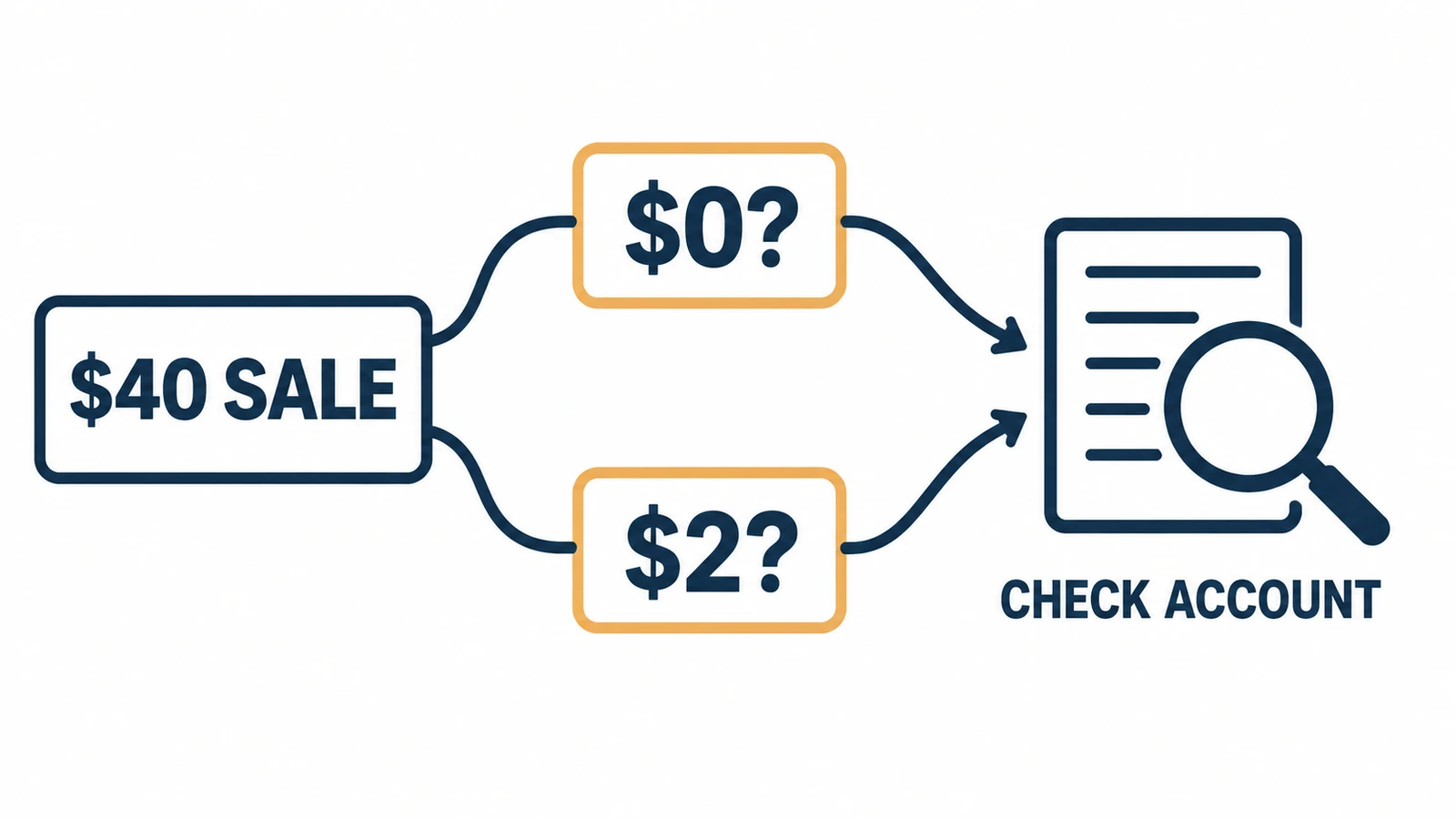
Then work out what remains from the sale:
Customer payment − supplier product cost − destination shipping − confirmed Modalyst order fee − store/payment fees − expected return cost = money left before advertising and overhead.
The $2 difference can matter, but it is only one cost. We do not have a selected product price or shipping quote here, so there is no honest “typical profit” to give you. You need the actual supplier charge for the item and country you plan to serve.
One bag sale, with both fee outcomes: the following product, freight, payment, allowance and advertising inputs are invented. The $35 monthly plan is the dated Start Up figure above, allocated over 50 orders; this is not a supplier quote or a typical profit.
The same order under either fee rule
- Customer receipt before tax: $40.
- Bag and destination freight: $12 + $8.
- Payment charge and problem allowance: $1.50 + $1.50.
- Monthly app allocation: $35 ÷ 50 = $0.70.
These modeled costs total $23.70 before the disputed order fee. A different order volume changes the app allocation.
The fee changes the amount you can spend
- No order fee: $40 − $23.70 = $16.30 before ads.
- 5% of the $40 retail sale: another $2 leaves $14.30.
With an invented $10 acquisition cost, those amounts become $6.30 and $4.30. Taxes, import charges and overhead are outside this case. Ask support which fee applies to your account, then replace every assumed cost with your actual order lines.
A markup is how much you add to the buying cost to set a selling price. Modalyst says the Wix Find Products to Sell route starts with a 1.6× markup and adds shipping to the product price. That default gets a price onto a product; it does not settle your payment fees, returns, taxes or final customer checkout. Pricing rules.
03
How a customer order reaches the supplier
For a marketplace supplier, the connected store sends order and delivery details through Modalyst. You pay the supplier’s product and shipping charges, and the supplier prepares the goods. An order appearing in the app means there is work to complete; it does not mean a parcel has left the warehouse.
AliExpress items follow a different payment route. The order reaches Modalyst, you check the selected shipping method, and the item, variant and customer details sync to AliExpress. You then complete payment on AliExpress. Its guide says the final cost can differ because of shipping, the customer’s country, taxes or rounding. AliExpress order guide.
| Part of the order | Modalyst marketplace supplier | AliExpress-sourced product |
|---|---|---|
| Before adding it to your store | Check the supplier, exact variant, destination and shipping charge | Check the seller, variant and shipping method for the customer’s country |
| After the customer pays you | Pay the supplier for the product and shipping | Check the method in Modalyst, sync the order and pay on AliExpress |
| While waiting for the parcel | Follow supplier preparation, dispatch and tracking | Follow the paid AliExpress order and returned tracking |
| If a return is needed | Obtain the marketplace supplier’s return address and terms | Ask the AliExpress seller for authorization and the current return route |
On a phone, swipe the table sideways to compare every column.
Processing time is the time spent preparing the order; transit time is the parcel’s journey after dispatch. Your customer needs both parts of the delivery estimate. Supplier tracking information becomes useful after the carrier and number are entered and passed back through the connected systems. Supplier shipping guide.
Before taking many orders, follow one small, permitted purchase all the way through. Use the exact item and destination, pay the actual supplier charge, then see how tracking reaches your store. That teaches you the work your account needs. It is a suggested trial, not an order we placed for this review.
04
What happens if the customer returns it
Your customer bought from your store, so your store needs to give them a usable answer. Start with the source of the product, the reason for the return and the supplier’s correct address.
Get the address before the arrival deadline
Modalyst’s marketplace return help says undamaged, unworn goods must reach the supplier within 14 days after the customer receives them. It is an arrival deadline, not simply a deadline for asking to return. Obtain the address early enough for the parcel to get there. Marketplace return procedure.
Return shipping also depends on the reason. Modalyst’s supplier help says the supplier pays return shipping for a damaged item, wrong item or quality problem; the retailer pays in other cases.
Keep photos, the order number, tracking and the supplier conversation when explaining a problem. Do not assume every change-of-mind return comes with a prepaid label. Supplier shipping and return costs.
For an AliExpress item, follow that seller’s current terms. Modalyst’s older guide tells merchants to obtain an RMA, meaning return authorization, and the return address from the seller, then coordinate the tracked parcel and refund or exchange. The guide is dated 2020; it does not prove that your chosen item has free returns today. AliExpress return guide.
Your buyer’s rights need a separate answer
The supplier’s deadline governs what your store may recover upstream. Your customer’s rights depend on applicable consumer law and your store’s promises. A supplier refusing a late claim does not, by itself, remove a customer’s right to a remedy.
If you promise free return postage and the supplier does not reimburse it, budget the difference. The supplier refund and customer refund are separate payments.
Why the two return windows can differ
For covered UK online purchases, the general rule gives the buyer 14 days after delivery to notify cancellation and another 14 days to return the goods; exceptions apply. That illustrates why a supplier’s 14-day arrival rule cannot simply become the shop’s policy. See the UK government’s return guidance for its scope.
05
When the first order goes wrong
Imagine your store promises delivery in five days, but the supplier checkout offers only a slower method for the customer’s country. This is an illustrative problem, not an order we observed. Before paying for an unsuitable service, find out whether another workable method exists. If it does not, tell the customer the changed timing and offer the appropriate delay or cancellation/refund choice.
Silently choosing slower shipping leaves the customer expecting the original date. Pause or correct the listing before the next buyer gets the same promise. Keep the original offer and supplier answer so you can explain what changed, without asking the customer to unravel it themselves.
A stock change needs the same care. If the black bag is unavailable, a blue bag is not automatically an acceptable replacement. Ask the customer before substituting, pause the affected color and find out whether any supplier payment already made can be canceled or refunded under that order’s terms.
For a request on day 13, submit the marketplace supplier claim promptly and confirm whether the return can arrive in time. Do not invent a customer deadline to make that happen. Handle the customer’s request under the applicable rights and your store policy, even if you cannot recover the full cost from the supplier. AliExpress goods need their separate seller-authorization route.
06
Should you use Modalyst?
Try Modalyst when you run Wix or Shopify, find products that suit your customers and can afford the full purchase and shipping cost. Start with a few items whose product details, delivery and returns you understand. The app’s convenience is useful when it saves you repeated product and order entry for those items.
Upgrade for usable products or required access
Upgrade when the viable collection or required supplier access needs it. Having 200 saved ideas but only 12 suitable products is an illustrative reason to stay with a small allowance. Pro makes more sense when a real shortlist needs its marketplace/name-brand access than when unlimited products simply looks impressive.
Choose another supplier or approach when the desired item has shipping, payment or return terms your store cannot support. Buying a larger plan does not repair that product choice. App reviews can suggest questions about importing, support or freight, but isolated praise and complaints do not measure what will happen to your orders. Our automation software guide helps compare the broader tool choices.
Need a supplier for the bag you want to sell? AIDrop’s sourcing service can help compare China suppliers, samples, quality checks, packaging and shipping.
Send the product link, destination countries and expected monthly orders. Include how your store sends orders; the connection with a chosen supplier needs separate agreement.
07
Common questions
Does Modalyst’s supplier return deadline set my customer policy?
No. It limits the upstream claim described here. Your store must separately meet applicable consumer rights and its own promises. Confirm the supplier’s address and deadline early, but do not copy an arrival deadline into your customer terms as if it overrode those obligations.
Is Modalyst free?
Hobby has a $0 monthly subscription and a 25-product limit. You still pay for products and shipping. The two official fee pages conflict about an additional order fee, so use your account’s confirmed billing terms rather than assuming every order is free.
Does Modalyst ship products and handle returns?
Suppliers ship the goods. Modalyst helps pass order and tracking information, while the selected supplier’s terms govern the upstream return. Your store still answers the customer. Marketplace and AliExpress return routes differ.
Should I buy Pro for branded products?
Choose Pro when your actual shortlist requires its access and the complete order costs work. An unlimited allowance does not prove that the product, supplier or shipping route suits your store.
Dropshipping Automation Software: Compare Tools, Costs and Workflows
Compare dropshipping software by supplier fit, pricing, stock updates and order handling. Build a workable setup with
CJdropshipping Review: Costs, Warehouses, Quality and Fulfillment Fit
CJdropshipping is a practical option for sellers who want sourcing, store connections, packaging and fulfillment in one

CJdropshipping vs DSers: Who Sources, Pays and Ships the Order?
CJdropshipping can source and physically fulfill an order; DSers maps a store product to supported external suppliers
