
Dropshipping email marketing works best when each message fits what the customer has actually done. Start with a permitted welcome email and a checkout reminder that stops when the buyer pays. Keep receipts and delivery updates accurate, then send product help or a relevant next offer when the buyer is ready.
The mistake to avoid is easy to picture: a customer pays, then receives “You left something behind.” Or a parcel is still moving while an email says “Enjoy your order.” You need a few clear rules before you need a long sequence of emails.
01
Start with permission, not every address in the store
A customer gives you an email address to place an order. That address lets you communicate about the order; it does not automatically mean they want sales offers. Keep your order-service audience separate from contacts who are eligible for marketing.
Shopify’s contact guidance describes newsletter, checkout and account sign-in subscriptions. Check what the customer sees beside the signup box. If you intend to send checkout reminders as well as news and offers, make that clear in the consent wording. Record where the signup came from, when it happened, the wording used and the current subscription state. Keep your own record where the tools do not expose all those details.
The form matters too. Shopify Forms lets a merchant choose how marketing consent is captured, or choose not to subscribe people at all. A support form should not quietly turn “Where is my parcel?” into a subscription.
Check the exact subscription trigger
If you use Shopify Flow, inspect its exact trigger—the event that starts the automated message. The Customer subscribed to email marketing trigger works with storefront forms and excludes third-party forms. The welcome templates described on that page exclude checkout subscribers to avoid sending a new-customer discount straight after payment. These are rules for that trigger and those templates; other tools can have different subscription routes.
Message purpose affects the US rule
For US commercial email, the FTC’s CAN-SPAM guide requires accurate sender information and subject lines, a valid postal address and a working opt-out, among other rules. Make the promotional purpose clear. When a message mixes service and sales, its primary purpose matters; a receipt with a large promotion is not automatically treated as a purely transactional email. Permission requirements also vary by market.
Honor an opt-out across all your marketing senders. A later order or service update must not silently put that person back on the promotional list. Genuine receipts and necessary order help remain a separate matter.
02
Build a welcome email and one useful checkout reminder
Welcome a new subscriber with a short introduction: what the store sells, where to find a suitable product and what to expect from shipping and returns. If signup promised an offer, show its actual terms. Someone who has just bought does not need the same first-purchase pitch as someone still browsing.
A checkout reminder should make the unfinished purchase easy to find. Show the exact items and variants, link to the correct checkout and give the buyer a way to ask about shipping or returns. Do not say you reserved an item unless your stock system really holds it.
The crucial rule is to stop the next reminder when the customer buys. Klaviyo’s abandoned-cart guide uses “Placed Order zero times since starting this flow.” Put that condition in the flow’s profile filters, not only an entry-time metric trigger filter.
Klaviyo’s current filter guidance says profile eligibility is checked before actions. A failed check skips that action; it does not necessarily remove the contact from the entire flow. Inspect the later actions too.
On a phone, swipe sideways to compare all columns.
| What starts it | What should prevent the next promotion | |
|---|---|---|
| Welcome | An eligible new subscriber joins through the chosen route | Opt-out; purchase where the message offers a first-order incentive |
| Checkout reminder | A known eligible contact leaves an unfinished checkout | A completed purchase, opt-out or another relevant exclusion |
| Product help or repeat offer | A supported order or product-use event | Cancellation, refund, open problem or ineligible marketing state |
Here is sample marketing copy with placeholders. Replace every field with your store’s real information and apply the relevant permission, sender and mailing requirements before using it.
Subject: Your [product name] checkout is still available
Hi [first name],
You can return to the [product and variant] you selected here: [exact checkout link].
Before ordering, see [shipping information] and [return policy]. If you have a question about the item or destination, reply and we’ll help you check it.
[Store name and valid physical postal address]
[Working unsubscribe link]
Test this with a controlled contact. Subscribe, open the welcome email and check its links and unsubscribe. Start a checkout, then pay while the reminder is waiting. The next recovery email should be skipped. Record what happened; an “active” setting does not prove that the purchase filter worked.
Test payment before the queued reminder
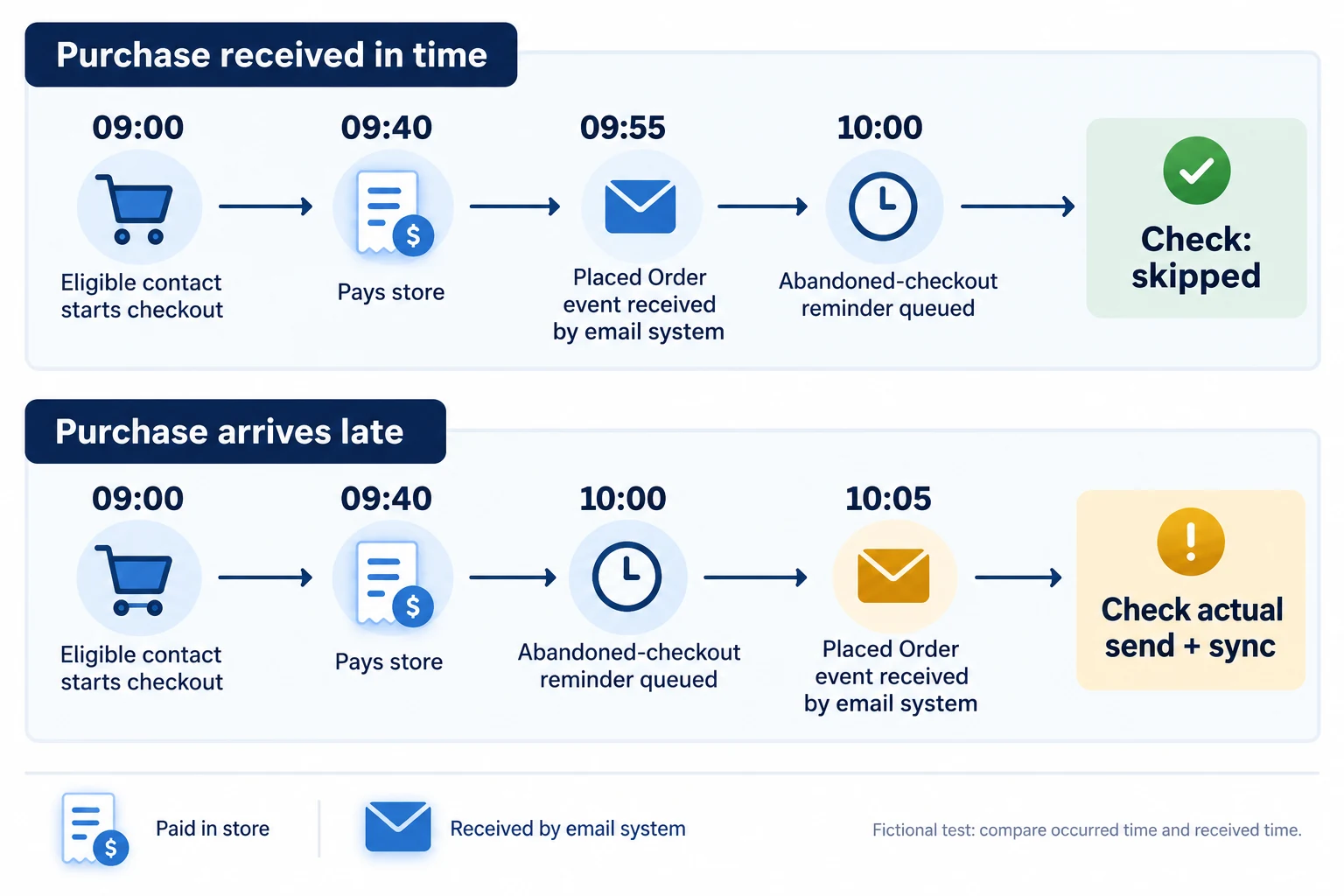
Use a fictional payment-during-delay record to test the reminder. The contact is eligible for the promotional flow, starts checkout at 09:00, pays at 09:40, and has an email scheduled for 10:00. These times are example inputs, not an integration result.
On a phone, swipe sideways to compare all columns.
| Time in the same test timezone | Record to inspect | Expected check |
|---|---|---|
| 09:00 | Started Checkout received for the test contact | Correct checkout and variant enter the flow |
| 09:40 | Order paid in the store; keep the order ID | Store receipt confirms this order, not supplier dispatch |
| 09:55 | Placed Order reaches the email profile | The purchase exists before the scheduled filter check |
| 10:00 | Queued reminder’s actual recipient status | With the purchase recorded and the stated filter, the reminder should be skipped |
Now change only the received time to 10:05. The store payment still happened at 09:40, but the purchase was not yet available to the email system at 10:00. Compare occurred and received timestamps in the profile’s activity details, then inspect the reminder’s actual status. Klaviyo’s troubleshooting guidance identifies this sync delay as a cause of recovery messages after purchase.
Keep the test flow controlled while fixing the connection or rule. Save what actually sent or skipped and check later queued messages before making it live for customers. Changing the email wording will not repair a missing purchase event.
03
Let the order decide what the message can say
After payment, the customer wants to know what is happening to the purchase. An order confirmation, a shipping update and an arrival message need different evidence. Keep the order number and correct parcel attached to each one.
On a phone, swipe sideways to compare all columns.
| Order information you have | Useful message | What it does not prove |
|---|---|---|
| Placed Order | Receipt and accurate processing expectations | The supplier shipped it |
| Fulfilled Order | A verified fulfillment or tracking update | The parcel reached the buyer |
| Delivered Shipment, where supported | Arrival follow-up or suitable product help | The item is correct or every parcel in the order arrived |
| Cancelled or Refunded Order | Explain the cancellation, refund or remedy | The buyer should keep receiving the original sales follow-up |
Fulfillment cannot replace a missing delivery event
Klaviyo’s Shopify data reference says delivery events sync only when that information is available in Shopify, which supports those notifications for certain carriers. Its order-flow troubleshooting guide also distinguishes placed and fulfilled orders. If your route has no dependable delivery event, do not use “fulfilled” as a substitute. Use an accurate tracking link and a help route instead. The dropshipping tracking guide explains those parcel checks.
For each order message, note the event, order ID, customer state, claim in the subject, destination link and condition that stops a queued message. If a basket travels in two parcels, identify which parcel the event describes. One delivery scan should not become “Your whole order has arrived.”
For a hypothetical test, a customer pays and the supplier later marks the item fulfilled. No supported carrier delivery event follows.
The checkout reminder should stop; the receipt can confirm payment; a supported tracking update can describe shipment progress. An arrival or refill email should wait for suitable evidence.
If the order is cancelled or refunded, check that its planned review, refill and cross-sell messages also stop where appropriate. This is a test to run, not an integration result observed for this article.
If unclear supplier or parcel information is making customer updates difficult, AIDrop’s returns and exception service can help coordinate China-side order, shipping and issue evidence. Send a product link, destination and an anonymized example via contact. You still choose and configure the email rules; the service is not a promise of a software connection or automatic delivery event.
04
Help the buyer use the product before asking for more
Product help can make the first purchase easier: how to fit the part, care for the material or use the chosen version correctly. Use verified instructions for that exact item. A new buyer may need setup help; a returning buyer may already know it and need a compatible replacement instead.
Choose the time from the product and delivery evidence. A fragile item may need an arrival check before anything else. A refill should follow the likely use cycle. A one-time gift may have no useful repeat offer. Klaviyo’s post-purchase and replenishment guides describe different flows for those purposes, not one compulsory delay for every store.
Before a promotion sends, check that the buyer is eligible, the suggested item is relevant and no unresolved return or delivery problem makes the offer inappropriate. A shipping status alone cannot answer all three questions. If there is no suitable next item or supported timing, leave that promotional message unsent.
This sample product-help email contains marketing placeholders. Use it only when the product-use context is accurate and the recipient is eligible for the message.
Subject: Getting started with your [product name]
Hi [first name],
For your [ordered variant], start with [verified care or setup step]. You can find the full instructions here: [product-specific help link].
If the parcel hasn’t arrived or anything is wrong, reply with your order number so we can help.
When you need [relevant refill or accessory], check that [specific compatibility condition] matches your item: [correct product link].
[Store name and valid physical postal address]
[Working unsubscribe link]
A message can be helpful and still contain a sales offer, so do not assume product advice removes its marketing requirements. Keep necessary support available to a buyer who opts out of promotions.
Watch replies, opt-outs, returns and “Where is my order?” questions beside repeat orders. An email platform’s attributed sale tells you it credited the message; it does not prove the message caused the purchase. The customer retention guide explains how to give buyers a fair reorder window and compare their experience.
05
Check the sending domain and unsubscribe
Ask your email provider to confirm authentication for the domain shown in your sender address. Authentication is how receiving services check that your provider is allowed to send for your domain. Use the provider’s actual setup and verification steps rather than assuming that adding a logo makes the sender ready.
Personal Gmail bulk-sender requirements
Google’s sender guidelines set additional requirements for senders delivering more than 5,000 messages a day to personal Gmail accounts. These include SPF and DKIM authentication, DMARC and one-click unsubscribe for marketing or subscribed messages, alongside other sender requirements. Those abbreviations are domain-authentication records your provider can help configure.
Google also requires a visible unsubscribe link in the message body; a footer link alone is not the one-click header function described in its FAQ.
Check the other mailbox providers too
Yahoo’s bulk-sender guidance likewise calls for easy unsubscribe and a visible body link, and says requests should be honored within two days. These provider rules are separate from the legal rules for permission and message purpose. Meeting them does not guarantee inbox placement.
Send to controlled mailboxes before increasing volume. Check the displayed sender, mobile layout, links and opt-out behavior. After unsubscribing, the contact should stop receiving later promotions from the relevant tools. If you cannot verify authentication or suppression, fix that before adding more sequences.
06
Test the whole journey before switching it on
Follow one controlled contact and order through the actual store and email tools. Keep a log with contact state, order ID, event time, queued message, actual send or suppression, and the link opened. The result you want is a message that agrees with the order, not just a flow that appears enabled.
Run both the positive and negative cases:
- Where a signup checkbox is available, test it unchecked and checked. Confirm the resulting marketing state and welcome behavior. Do the same for checkout opt-in; a non-subscriber can still need a receipt after paying.
- Abandon a checkout, then complete payment during the email delay. Verify the queued reminder stops and the receipt contains the correct purchase.
- Use the platform’s safe test method to inspect cancellation and refund exits. Check scheduled review, cross-sell and refill messages as well as recovery.
- Inspect the supported shipment events for the actual carrier route. Check partial parcels, the chosen variant, dynamic help or product links and the wording of each update.
- Unsubscribe and check later promotional sends. Keep a genuine customer-service route available.
No such account test was performed for this article. These checks need your store’s real event data and the provider’s supported test method. Missing events or a third-party form that does not trigger a workflow may require a different setup; copy changes will not fix that connection.
After launch, review a small set of sent messages against their orders. Track completed checkout recoveries, repeat orders, opt-outs, support replies and conflicting messages. Fix incorrect order-state claims or failed suppression first. Then test one timing or copy change so you can see what it affects.
07
Common questions
Can I send promotions to everyone who receives a receipt?
Do not assume that. A genuine receipt and a promotional email serve different purposes. Check the contact’s marketing eligibility, the message’s actual purpose and the rules for the markets you serve. In the US, adding order details to a sales message does not automatically make it transactional.
How long should I wait before sending a post-purchase email?
It depends on what the email says. A receipt follows the order; a shipment update needs supported shipment information; product-use advice and refill offers need appropriate delivery and use context. Avoid a fixed wait that tells someone to enjoy a product still in transit.

Dropshipping Customer Retention: Earn the Next Order After the First Delivery
A practical retention plan for dropshipping stores: meet the first-order promise, choose a relevant follow-up, and measure
Dropshipping Marketing: A Plan from First Visit to Repeat Order
Plan dropshipping acquisition, product-page conversion and repeat sales around realistic margins. Compare channels and measure costs and

Dropshipping SEO: Build Search Pages Customers Can Trust
A practical SEO plan for dropshipping stores: map searches to the right pages, verify supplier claims, link
