
Personalized product dropshipping requires more than passing an order to a supplier. Capture the customer’s choices on the correct order line, check that the product and production method support them, approve the required design version and release only that combination of variant, quantity and file. Keep the original request and changes available through fulfillment and after-sales.
The right design on the wrong item is still a failed order. A preview can look correct while an export attaches it to another size, another customer’s unit or an older file. Test the complete path from storefront input to the packed personalized product.
The print-on-demand guide explains the broader production model. This article focuses on the order-specific information and decisions that make personalization workable.
01
Define exactly what the customer can change
Specify the base product and allowed personalization: text, a date, a photograph, an uploaded design, a color choice or a defined combination. Show the placement and production method accurately. A name printed on a pouch, a name embroidered into it and a name on a removable label are different offers.
Confirm the limits with the actual producer. These can include supported fonts and scripts, usable print area, line count, image requirements, embroidery detail, engraving suitability and available variants. Do not publish a broad promise such as “any design” when the supplier can only perform a small set of operations.
Explain which parts are fixed. If the preview changes a text color but the zipper, fabric or background remains standard, say so. Customers should not have to infer the manufacturing boundary from a generic product mockup.
Separate the example from the customer’s final result
Use example names and artwork clearly as examples. Show enough detail to communicate placement and scale, but do not present an illustrative rendering as a photograph of the buyer’s finished item. Where a proof is supplied, explain what it can verify and what remains subject to the actual material and production process.
Before expanding the options, test a physical sample where it matters. The dropshipping samples guide helps define what is being checked. A sample validates that sampled configuration; it does not automatically approve every font, material and image a future customer may upload.
02
Capture the instructions as structured order information
Use separate fields for decisions that need separate interpretation. A single box labeled “anything else?” can mix the personalization, delivery request and unrelated message. The producer may miss which text should actually appear on the product.
A practical text-personalization form can capture:
- The exact text to reproduce, including punctuation and line breaks.
- The chosen font or approved style identifier.
- Placement and any supported color choice.
- The base product variant and quantity.
- A file attachment when the offered design requires one.
- Whether a proof is required and the customer’s approval status.
Explain required fields before submission. An empty required name should stop the order from entering an automatic production path. If a field is optional, define what a blank value means; it should not cause the supplier to print the example text by default.
Keep delivery instructions out of production text. “Happy Birthday, Maya” and “Please deliver before Friday” belong in different places. A freeform order note should not be treated as print-ready artwork without review.
Bind personalization to the line, not just the order
Shopify’s line-item documentation describes name-and-value properties for custom information, including engraving text captured from a product form. That identifies a useful storage mechanism; you still need to verify that the theme, app, export and supplier receive it correctly.
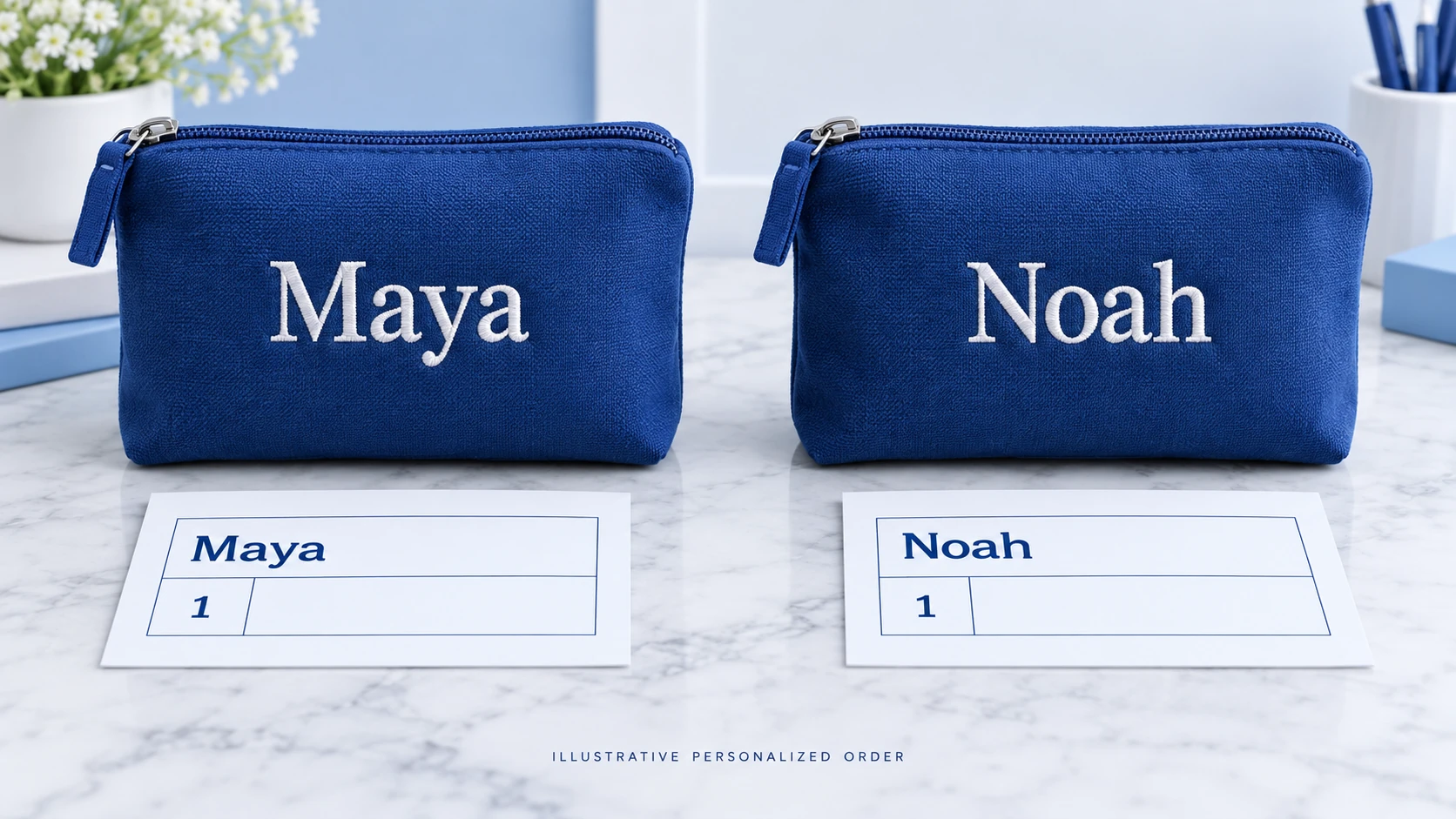
Suppose one customer orders two identical blue pouches, one reading “Maya” and the other “Noah.” Preserve two distinguishable personalized units or line records with their respective instructions. A quantity of two next to one text field can otherwise create two copies of Maya.
In that hypothetical order, the records should remain distinct from input through packing: blue pouch, Maya, quantity one; blue pouch, Noah, quantity one. Their shared base variant does not make their production instructions interchangeable.
03
Check text beyond its visible length
Preserve the customer’s intended characters
Keep the submitted text as received and compare it with the production output. Accents, apostrophes, punctuation, spaces, non-Latin scripts and line breaks can be changed by a form, spreadsheet, font or export. Do not silently remove characters because a downstream tool cannot render them.
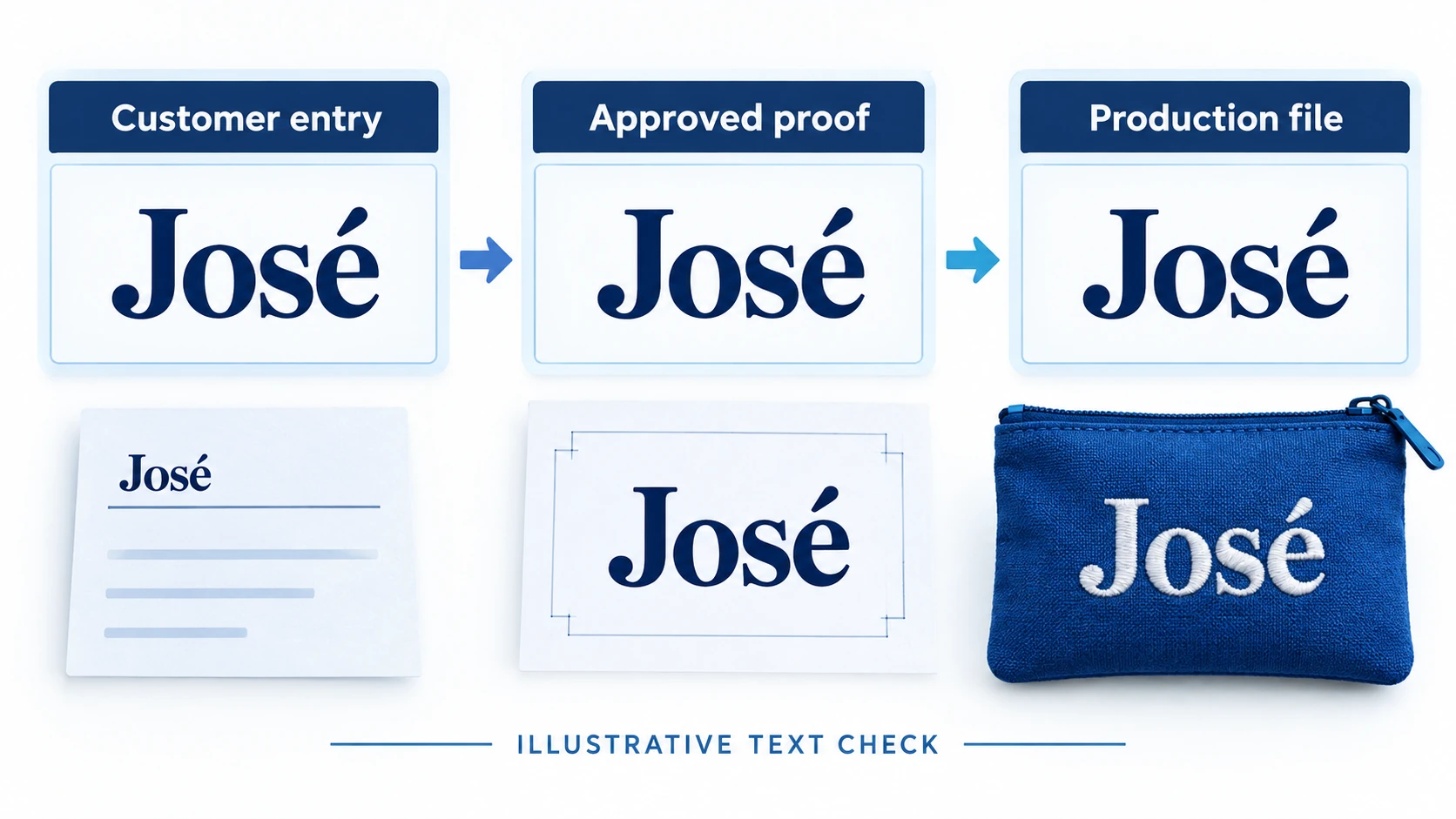
For example, “José” and “Jose” are visibly different names. A preview that drops the accent should trigger a correction or a clear alternative for the customer to approve. Auto-capitalizing every entry can also change what was requested.
Unicode’s normalization guidance explains that equivalent-looking text can use different encoded sequences. A technically consistent export therefore needs more than a visual glance at the input field. Preserve the original request, use a defined text-handling process and test the rendered result in the actual production font.
A character limit is not a fit guarantee
Ten wide letters can occupy more space than ten narrow ones. A rule expressed only as “maximum 12 characters” may still produce text too large for the intended area. Check line length, text size, line breaks and placement in the production layout.
Decide what happens when text does not fit: ask for shorter wording, offer an approved smaller size, change the supported layout or stop for clarification. Do not shrink it until it becomes illegible merely to keep the order moving.
Test the scripts and combinations you actually offer. An accented Latin name, a right-to-left script and an emoji can require different font and layout support. If a character set is unsupported, disclose that before purchase and avoid presenting a substitute glyph as a successful output.
Review the visible proof and the exported file
An on-screen preview and a production export may use different fonts or rendering engines. Compare both with the original request. A proof approved in one format should not be recreated from memory in another tool after approval.
In an illustrative name check, the customer entry, approved proof and production file all show “José.” If any stage shows “Jose” or a missing-character box, hold the order. The purpose is preserving the requested spelling, not treating one screenshot as proof that every downstream system works.
04
Make uploaded files usable and traceable
State the accepted formats and supplier-specific requirements for the offered product. Check the actual file, not only its filename extension. Confirm that it opens, contains the intended content and has enough detail at the required output size. Do not invent a universal resolution rule for every print, engraving or embroidery process.
Check the crop, orientation, background, transparency and placement. A square product area can cut off faces in a wide photograph if the crop is applied automatically. Show the relevant result in the proof rather than asking the customer to approve an unrelated full-size image.
Use a stable file identifier and version for the approved production asset. If a link expires or the customer replaces a shared file, the producer should not unknowingly receive different content under the same instruction. Retain the approved version through the required operational period using suitable access controls.
Ask about rights without pretending that a checkbox settles them
Tell customers to submit content they are entitled to use, and establish a process for questionable requests. A customer upload does not automatically authorize printing another brand’s logo, a protected design or a person’s image. Review the actual use and relevant rights when needed.
The copyright and trademarks guide covers that wider review. Keep uploaded photographs and personal details available only to the parties that need them for the order. Do not reuse a customer’s personalized artwork in marketing without the relevant permission.
05
Approve a specific version before release
Define what the proof includes: the ordered variant, exact text or file, placement, size relationship, relevant colors and any limitation of the representation. Identify the order line and proof version on the internal approval record.
Ask the customer to check the parts they can judge, such as spelling, image selection and layout. Do not use proof approval to make them responsible for a manufacturing fault or an undisclosed technical change. The supplier still needs to produce the approved specification.
A changed proof needs a new approval record
Suppose proof v1 uses the wrong date and the customer requests a correction. Mark v1 superseded, create v2 and obtain the approval required by your process. A reply approving v1 should not automatically authorize v2, and an agent should not search an email thread and choose whichever attachment appears newest.
Record who approved the version and when, together with the exact file or rendered proof. If approval is not required for a particular simple personalization offer, still retain the customer’s submitted details and the validated production version. Make the difference clear in the product promise.
If the customer does not respond, follow the disclosed process and applicable obligations. Send a clear reminder with the missing decision and effect on timing. Do not manufacture approval or silently substitute example text to meet a production target.
06
Separate review, approval and production submission
The order may need several holds: missing information, unreviewed file, customer proof pending, payment issue or production acceptance pending. Name the missing condition rather than using a generic status that every team interprets differently.
Printify’s personalized-order instructions describe manual review and approval before submission. They also warn that Shopify’s “Request fulfillment” button overrides those personalization settings and sends the order to production without review. That is a specific integration behavior to test and control if you use that setup, not a rule for every supplier.
Before release, verify the approved file, base variant, quantity, print or personalization area, shipping destination and supplier order reference. Record the provider’s acceptance. A successful storefront payment or an outgoing API request does not prove that the correct production job was accepted.
Define the change cutoff by the actual production state
Explain when a change can still be requested and when production may prevent it. If you publish a time-based cutoff, make sure the operation can honor it and identify the time zone. Do not promise edits “within one hour” while an integration sends the order into production immediately.
When a customer requests a change, first establish whether the current job can be held. Get that acknowledgment before issuing a replacement file. If the producer has started, explain the actual available options and relevant rights; changing a note in the store does not reverse work already done.
For an illustrative version change, v1 is marked superseded, v2 is approved, and only v2 is attached to the released job. The release record names the order line, variant and quantity as well as the file. That binding prevents the correct artwork from being produced on the wrong item.

07
Handle failures without creating duplicate production
If submission times out or the integration returns an unclear result, check whether the supplier already created the job before resending. Retain a stable order reference or supported idempotency mechanism so a retry can be matched to the same intended action.
If the supplier rejects the file, identify the exact reason: unsupported font, unreadable upload, missing placement, incompatible variant or another issue. Hold the affected line and obtain the necessary correction. Do not mark a rejected production request fulfilled merely because the order exists in the store.
Correct the right unit in a multi-item basket
A two-unit personalized order can contain one approved job and one awaiting correction. Keep those statuses distinct. Decide whether the shipment should wait for both or whether an appropriate split is offered, and explain the timing to the buyer.
If only Noah’s pouch needs a revised file, the correction should not replace Maya’s artwork. Reconcile the item-level references at production and packing, including when a supplier groups jobs by base SKU. An efficient batch process still needs to preserve individual personalization.
If a file or text is changed after approval without authorization, stop release where possible and restore a traceable approved state. Keep the incident record so the same import or template rule can be checked across other affected orders.
08
Check the personalized item before packing
Compare the finished unit against the approved instruction, within the agreed inspection scope. Verify the base variant, personalization content, placement, quantity and relevant visible quality. A check that the name is present does not establish that it is the correct name.
Keep the inspected unit connected to the packing instruction. Two correct products can still reach the wrong recipients if they are mixed after checking. Use an order-line reference through packing and map each shipped parcel back to the relevant items.
Photographs can document a particular visible check when the service supports them, but do not imply that one photograph verifies every surface, functional requirement or unseen defect. Define the check and its limits with the producer using the quality-control guide.
Confirm what the customer receives in the order message: the actual selected details, relevant proof or summary, and the delivery expectation. Support should be able to retrieve those details without asking the buyer to reconstruct the request from memory.
09
Include personalization work in the price and timeline
Budget the base product, personalization charge, artwork preparation, review, proof revisions, handling, shipping and payment costs. Identify which costs recur per order and which belong to setup. A low base-product price can hide substantial manual preparation.
For a hypothetical $35 sale, assume $12 for the base product and personalization, $3 for review work, $5 shipping and $1 payment fees. Contribution before other costs is $35 − $12 − $3 − $5 − $1 = $14. If an additional approved revision requires another $3 of work, it becomes $11. These invented amounts are not an AIDrop price list.
If the merchant makes an error requiring a replacement, another $12 product plus $5 shipping would reduce the original $14 contribution to −$3 before any recovery. Record what actually happened instead of assuming every remake will be funded by the supplier.
For timing, separate waiting for customer information, proof preparation, approval, production and transit. A faster shipping option does not remove an unresolved proof. Explain which estimate begins when and how missing information changes the practical schedule without overriding applicable customer rights.
10
Resolve personalization mistakes on their facts
Compare the original submission, approved version, released file and delivered item. That sequence helps distinguish a customer’s requested spelling from an import change, a wrong file or a production fault. Do not begin by assuming that proof approval ends the investigation.
If the supplier printed Noah on Maya’s unit, identify the affected line and arrange the appropriate remedy. If the customer approved the exact text that was produced but now wants different wording, assess that different request under the disclosed offer and applicable law. Keep the explanation factual and specific.
UK government returns guidance lists personalized or custom-made items among categories with different change-of-mind treatment, while retaining protections for faulty goods. That does not support a universal “no refunds on personalized items” statement. Review the rules for the actual selling market and defect.
Use the returns process to coordinate any refund, remake or authorized return. Personalization can reduce an item’s resale value, but that commercial fact does not erase the customer’s applicable remedy.
11
Test the complete path with difficult examples
Before release, test a normal name, a long name, an accented character, a supported non-Latin script, an empty required field, an unsuitable upload and a changed proof. Include two identical base variants with different personalizations in the same basket.
Check each supported purchase route, including mobile and any accelerated checkout, to establish that required information is preserved. Verify the order record, export, supplier acceptance, proof version, packed item and customer message. Test failures as well as the easy path: a rejected file, unclear submission response and cancellation before production.
Run only safe, appropriate test orders and control any real production costs. Record what was verified and what still depends on an untested provider feature. Fix a failed mapping or missing hold before accepting ordinary orders through that path.
The product section of the Dropshipping Hub connects product selection with supplier and fulfillment decisions. Personalization works when the exact details survive every handoff, not simply when the storefront displays an attractive preview.
12
Frequently asked questions
Can I put all personalization in an order note?
Only if the complete workflow reliably associates it with the correct units and interprets it correctly. Structured line-level fields are usually clearer for multiple items. Test the supplier’s actual received instructions rather than assuming a note is transferred.
Does every order need a customer proof?
That depends on the offered process and product. Explain when proof approval is included or required. Even without a customer proof, validate the submitted information and preserve the version sent to production.
Is a character limit enough to prevent printing errors?
No. Check supported characters, font rendering, spacing, placement and actual output size. Different text can occupy different space even when the character count is the same.
Can I refuse all returns because the product is personalized?
Do not apply that blanket rule. Change-of-mind treatment and remedies for faults or incorrect production can differ. Check the actual market and order, and preserve the evidence needed to understand what was requested and supplied.
