

Yes, you can use Snapchat Ads for a dropshipping product. Start with one item you can supply and a vertical ad that opens its matching mobile page. You do not need a product catalog for every ad.
If you choose Dynamic Ads, maintain a catalog and match its product IDs to your site events. Judge the test against paid store orders, actual supplier costs and refunds, as well as Snap’s reported results.
Imagine a shopper sees a quick clip of a medium gray under-bed storage bag. They tap, but the page opens with the large cream bag selected. Its price and delivery window differ. The ad may earn a cheap click, yet the buyer has landed on a different offer. If they buy anyway, the supplier may receive an order for the cream size. That is the first thing to fix, ahead of creative hooks or audience tactics.
This guide follows one hypothetical medium-gray bag from Snapchat to checkout and supplier dispatch. For decisions shared by all channels, use the dropshipping advertising guide. The examples below are proposed checks, not results from an AIDrop campaign.
01
Check the product before buying its first impression
The fastest way to waste an ad test is to send traffic to a product the store cannot deliver as advertised. For the medium gray bag, collect the supplier SKU, a current photo or sample, actual dimensions, stock status, current item cost, shipping route to the target destination and a return/damage process. If those fields are missing, an attractive video will create a stronger promise than the merchant can keep.
Item
What to verify for this one SKU: Gray medium bag in the ad is the supplier’s sellable gray medium reference
Hold the ad if…: Footage shows another size or an unapproved supplier photo
Price and stock
What to verify for this one SKU: The page and supplier agree on current price/availability
Hold the ad if…: The ad or page shows a stale sale/stock claim
Delivery
What to verify for this one SKU: Handling plus transit supports the page’s destination-specific estimate
Hold the ad if…: No carrier route or dispatch timing is confirmed
Returns
What to verify for this one SKU: The store can tell buyers who handles damage and where returns go
Hold the ad if…: Only a vague “easy returns” badge exists
Evidence
What to verify for this one SKU: Every visible and spoken product claim can be checked
Hold the ad if…: Clip says “waterproof” or “fits every bed” without support
Snap’s ad policies apply to both the creative and its destination. Snap says it may request substantiation or proof of rights and can reject misleading claims, irrelevant destinations, dead links and pages that do not work on mobile. That makes the product page part of the ad, not an afterthought. If you borrowed a supplier video, get permission to use it and confirm the pictured version is what buyers receive. A generated demonstration must not imply a real test that never happened.
Review the actual offer, not the business-model label
Do not take “dropshipping” as either automatic permission or automatic rejection. It describes who holds the stock. The ad review sees the offer, claims, creative and landing experience. The merchant still has to operate the order and customer promise. If you need to rebuild the page itself, the one-SKU dropshipping product-page guide shows what the buyer should see before checkout.
02
Make a vertical ad that keeps the product recognizable
Snap’s Single Image or Video specifications describe a full-screen 9:16, 1080 × 1920 canvas. You can test a still or video; format alone will not make it perform. For the gray bag, a useful short clip could show the bag flat under a bed, pull it out, unzip it and reveal what was packed. Keep the product visible early. If a phone’s top or bottom interface covers a measurement, disclosure or key action, move it into the central safe area and preview the real export.
One clip should answer one buyer question. For this bag: “Will it fit under a low bed?” Show the measured clearance required and the actual bag, not an exaggerated empty room. A second cut might answer “How does it open?” with a close-up of the zipper and handles. Do not paste a generic “50% off today” line over both if the sale is not real. The plain physical action will also give the landing page a clear continuation.
Medium gray should stay medium gray
The handoff is simple: the ad shows medium gray, its tap opens medium gray, the first page image is medium gray, and the price/stock remain medium gray when added to cart. Test that path on an ordinary phone using the final ad URL. A browser preview that never touches the product selector misses the common wrong-variant failure.
The visual route worth checking is ad → mobile page → selected variant → cart. When these four states disagree, change the creative or destination before changing targeting.
03
Choose a plain ad or a catalog-backed ad on purpose
You can start with a single image or video ad that links to one page. A product catalog is not a universal prerequisite for every Snapchat ad. For a small test of one bag, the simpler route lets you inspect the creative and page match without adding feed maintenance to the first question.
Snap also offers Product Catalog Ads and Dynamic Ads. Its catalog setup documentation says products can be added manually or through a feed, while Dynamic Ads documentation describes catalog-led ads personalized using the Snap Pixel or another supported measurement path. Use a catalog when you have a real set of accurately maintained variants and want product-specific ads or retargeting. Do not upload hundreds of supplier listings simply because the tool accepts a file.
| Route | What it gives you | Extra job you take on |
|---|---|---|
| Single image/video ad | One chosen creative and one deliberate destination | Keep ad claim, product page and live offer aligned |
| Manual Product Catalog Ad | Product fields and imagery from a catalog | Maintain approved item IDs, links, price and availability |
| Dynamic Ads | Product selection informed by catalog and site signals | Match catalog IDs to Pixel item IDs and verify relevant events |
On a phone, swipe the table sideways to compare every column.
The account and creative screens can change. Snap’s current business setup guide describes an account, business account and Public Profile for Ads Manager use. Check the current flow in your own account rather than following a screenshot from a year-old tutorial. The decision you need before opening the interface is which product and which destination you are testing.
Set the account fields before the first ad
Use Snap’s official Ad Accounts setup for your own advertiser. Account setup is separate from whether this bag and creative pass review.
- In Ads Manager, open the navigation and choose Ad Accounts → + New Ad Account.
- Enter the actual advertiser and link its Public Profile. Check Currency and Time Zone before creating the account; Snap says those account fields cannot be changed later.
- Complete the appropriate billing details and payment method. Use the current campaign flow to choose the goal, budget and audience for this exact bag.
- Before launch, preview the creative and open the final mobile link: medium gray must remain selected through cart. A created account alone does not show that the ad, event or supplier path works.
04
If you use Dynamic Ads, match the ID before the audience
The ID joins the ad, product and event
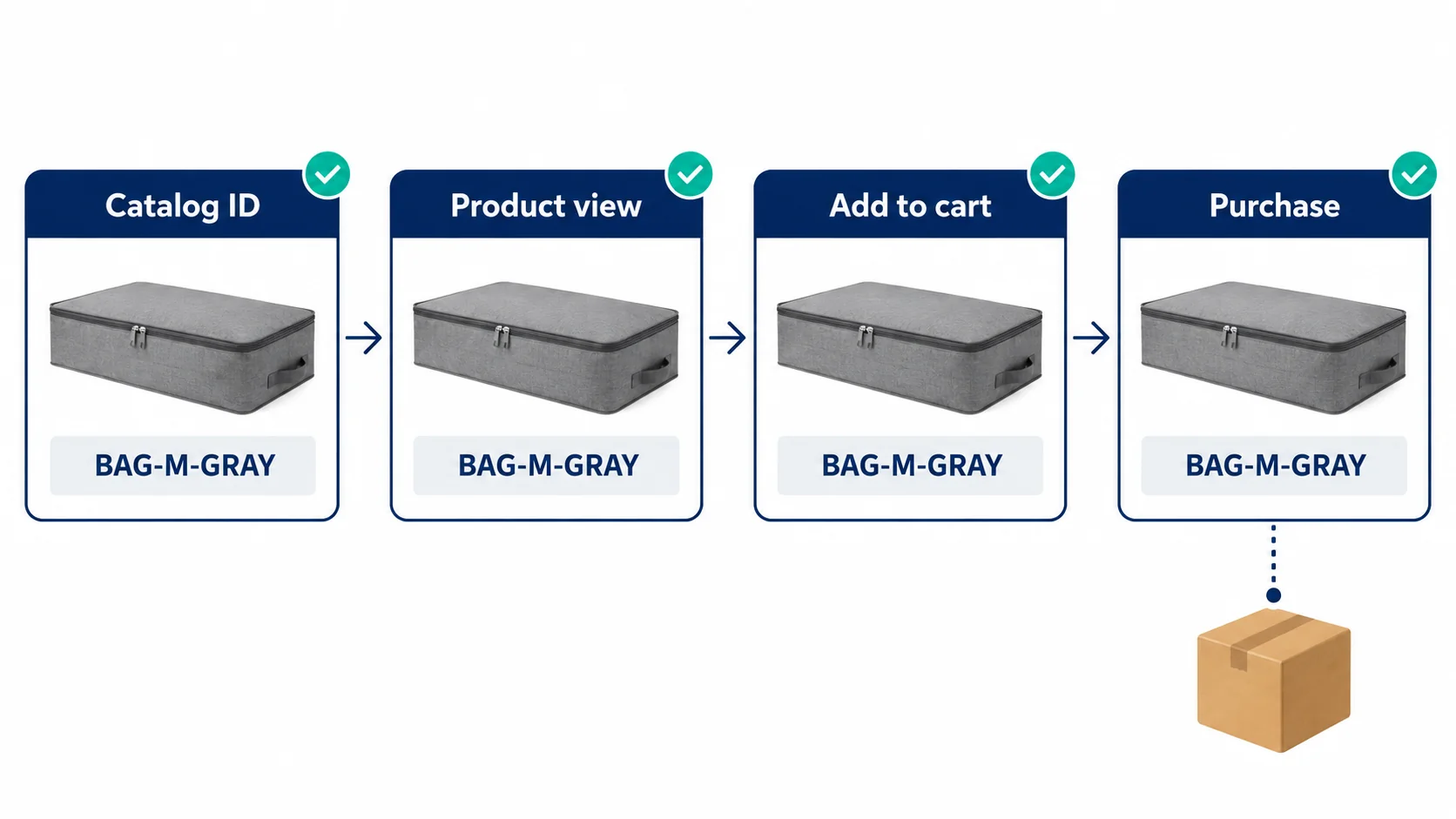
Think of the item ID as the join between four records, not a decorative feed field. The creative shows the medium gray bag; the tap opens its medium gray page; the catalog row has id BAG-M-GRAY; and the Pixel’s item ID for a view, cart or purchase must identify that same variant. Snap’s catalog specification requires catalog id to match Pixel item_ids for Dynamic Ads retargeting. If the page sends BAG-L-CREAM, Snap may match the shopper to the wrong item or fail to match the intended one. Fix the product identity before using retargeting results to judge an audience.
Start with one paid order
Inspect one test journey in that order: tap URL, selected variant, catalog ID, event item ID, then the paid store order and supplier SKU. Also check whether the same purchase is being recorded twice by separate browser and server paths before interpreting a reported conversion count. An event count can help diagnose tracking, but only the store and supplier records show that the bag was paid for and could ship.
Use the real identifier your implementation actually sends; BAG-M-GRAY is only an illustrative code.
A matched ID cannot fix a wrong URL
The feed also needs a working product link, image, price and availability. Snap says an out-of-stock catalog item is excluded from ads, and it can use the title and price in the creative. Check the mobile link if you provide one; it can take precedence for web ad clicks. A perfectly matched Pixel cannot rescue a feed whose URL sends people to a cream bag or whose old price has expired. (Snap product catalog fields)
Run a small identity test with one live product page and one catalog row:
- Supplier and store: Exact medium-gray SKU and selected variant
- Snap catalog: Unique
id, image, price, stock and product URL - Snap Pixel:
item_idson product view/cart for this same catalog ID - Purchase event: One completed store order, with the expected bag and order value
Snap’s Dynamic Ads/Pixel help describes catalog and item-ID passback. Product views, cart actions and purchases are separate events. Use a controlled order check to confirm Purchase occurs on completion, rather than a cart click or repeated thank-you-page event. See the Purchase event example.
Feed eligibility and event deduplication are separate
Resolve catalog item-level errors before relying on Dynamic Ads. The catalog formatting help covers feed requirements; the next example explains the separate task of recognizing one purchase across browser and server.
This does not require treating the Pixel as an accounting system. It is an ad-delivery signal; keep it separate from store payment and supplier acceptance records.
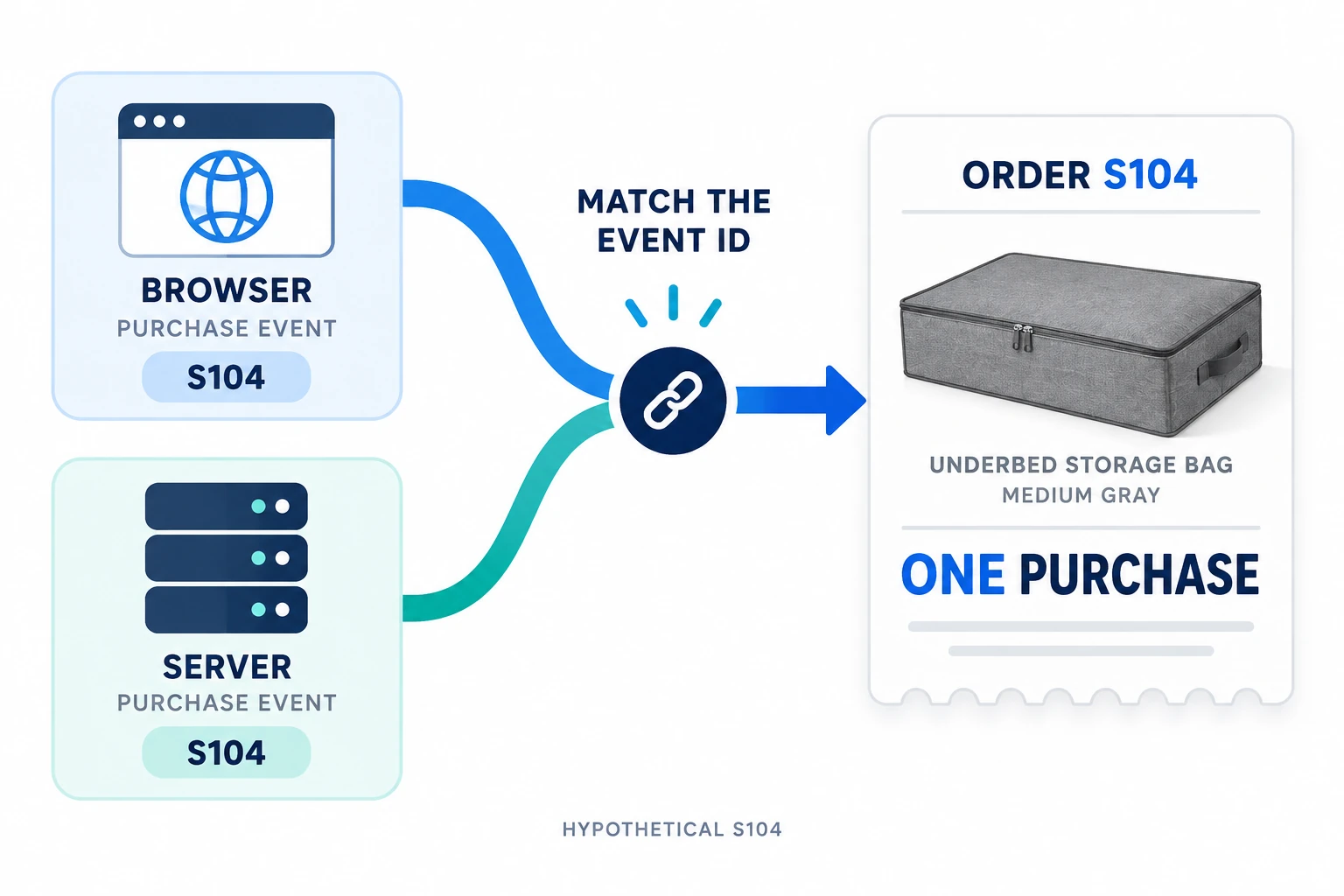
Trace one purchase through Pixel and CAPI
Use Snap’s Test Signals Setup guide to inspect your chosen Pixel with Snap Pixel Helper and Events Manager’s Test Events tool. The separate developer deduplication guide explains how browser and server records can represent one purchase.
Check the product first
View medium gray, add it to cart and use your authorized test-order procedure. Keep its real store order ID and the product ID sent by the integration. A catalog-backed journey should identify the same gray variant; BAG-M-GRAY is only our example label.
Match the two event paths
For fictional order S104, a Web Pixel PURCHASE could carry client_dedup_id=S104-purchase and transaction_id=S104. The CAPI v3 PURCHASE should use the same Pixel ID and event name, event_id=S104-purchase and custom_data.order_id=S104. Use actual unique values from your implementation, not S104 copied into every order.
Read the result
Confirm the payloads and Events Manager’s dedup diagnostics, then compare with the single paid store order. Two raw browser/server submissions can be correct when deduplicated. If the IDs differ or a refresh generates a new purchase, repair that sender before trusting the reported count; Snap says diagnostics changes can take up to 24 hours to appear.
Your connector may manage these fields for you. Verify its output before adding another tracking tag. Event Quality Score concerns matching signals to Snapchat users; it does not prove that the bag was supplied or that the campaign made a profit.
05
Read a small test without mistaking a click for a business result
Set a bounded test amount you can afford before launch, but do not borrow a universal dollar figure from a forum post. Write down the question: can this vertical ad bring a buyer to the correct page and create a paid order you can fulfill with acceptable contribution? The first observations are technical: ad approved or rejected; taps to a working mobile URL; selected SKU and price correct; event path firing once. If those fail, increasing spend only gathers more bad data.
Look beyond the purchase counter
When an order appears, open the store record. Check payment status, exact variant, customer destination, discount, tax/shipping and refund status. Then open the supplier record: exact product and shipping bill, acceptance and dispatch. The ad dashboard may attribute a purchase according to its reporting rules, but it does not know by itself that the supplier shipped the right gray bag or that a later refund erased the margin.
Use a compact test sheet; fill it from actual records, never from the hypothetical bag:
Snapchat
The value you enter: Spend, taps, reported purchase events and attribution window
Why it matters: Describes platform delivery and modeled credit
Store
The value you enter: Paid orders for this SKU, order revenue and customer shipping paid
Why it matters: Establishes merchant cash/order reality
Supplier
The value you enter: Item cost, delivery charge, accepted orders and dispatch
Why it matters: Shows whether the sale can be fulfilled
After-sale
The value you enter: Refunds, replacements, payment fees and support costs
Why it matters: Reveals what remains after reported revenue
Count the store order once
For a sale-level check, subtract supplier item and shipping, payment costs, discounts you funded, and relevant refund/replacement costs from the revenue you actually keep; then consider the ad spend associated with the test. This is a decision framework, not a promise of a precise attribution formula. If the same order appears in Snap, Google Analytics and another ad channel, do not add those platform conversions together as though they were three physical orders. Your store order ID is the starting point.
Use the next three cases to decide what to repair before spending more. A single day of attractive reported ROAS cannot establish supplier reliability or the eventual return cost.
Use the symptom to choose the next fix
Keep one observation beside one change, so the next test can tell you whether that change helped.
Taps, but the wrong offer
Open the actual ad destination on a phone. Correct the selected variant, price or availability and verify cart before changing audience.
One paid order, suspicious purchase counts
Compare order IDs, event triggers and dedup fields. Fix an extra tag or changed ID where found; do not assume every raw second submission is a second sale.
Paid orders, but no contribution
Replace estimated item/freight/remedy inputs with the actual bills. A supplier refusal or negative result after ad costs calls for offer or fulfillment work before more spend.
Use a recorded spend limit for the next controlled test. There is no dollar budget or ROAS target that makes every dropshipping offer viable.
06
What to do with the result
A continue decision means the exact product, page, route, events and paid-order economics have all passed your small check. Continue observing stock and supplier performance as you spend more; a new supplier batch or changed delivery route can invalidate the original ad promise.
A hold decision means a specific part is unresolved. Name it: wrong variant URL, unsupported product claim, no permission for footage, feed ID mismatch, duplicate purchase event, missing shipping route or negative contribution after real bills.
If your China-side uncertainty is the product sample, packing or dispatch route, send AIDrop Agent the SKU and target country. We can discuss the operational facts to check before that ad promise is made. We do not claim to run your Snapchat account or guarantee the campaign result.
Questions about Snapchat dropshipping ads
Do I need a catalog before running my first ad?
Not for every single image or video ad. A deliberate one-product link can be simpler to test. Dynamic Ads add catalog maintenance and matching site signals, so choose that route for a reason.
Why are there no purchase events?
Check the chosen Pixel and the actual event path with Snap’s testing tools. Confirm an authorized completed order triggers Purchase. A created ad account, page visit or cart click is not a completed-order event.
Do two Pixel and CAPI submissions mean two sales?
No. The browser and server can legitimately send the same conversion. Check shared identifiers and dedup diagnostics, then count the real store orders. Missing or changing identifiers need correction.
Does a good reported ROAS mean the product is profitable?
It reports revenue attributed under the platform’s rules. Compare it with paid orders, supplier item and shipping costs, payment fees and after-sale costs. Keep the same test period and do not add another channel’s attributed count as a new physical order.
Dropshipping Marketing: A Plan from First Visit to Repeat Order
Plan dropshipping acquisition, product-page conversion and repeat sales around realistic margins. Compare channels and measure costs and

Dropshipping SEO: Build Search Pages Customers Can Trust
A practical SEO plan for dropshipping stores: map searches to the right pages, verify supplier claims, link

Dropshipping Customer Retention: Earn the Next Order After the First Delivery
A practical retention plan for dropshipping stores: meet the first-order promise, choose a relevant follow-up, and measure
