
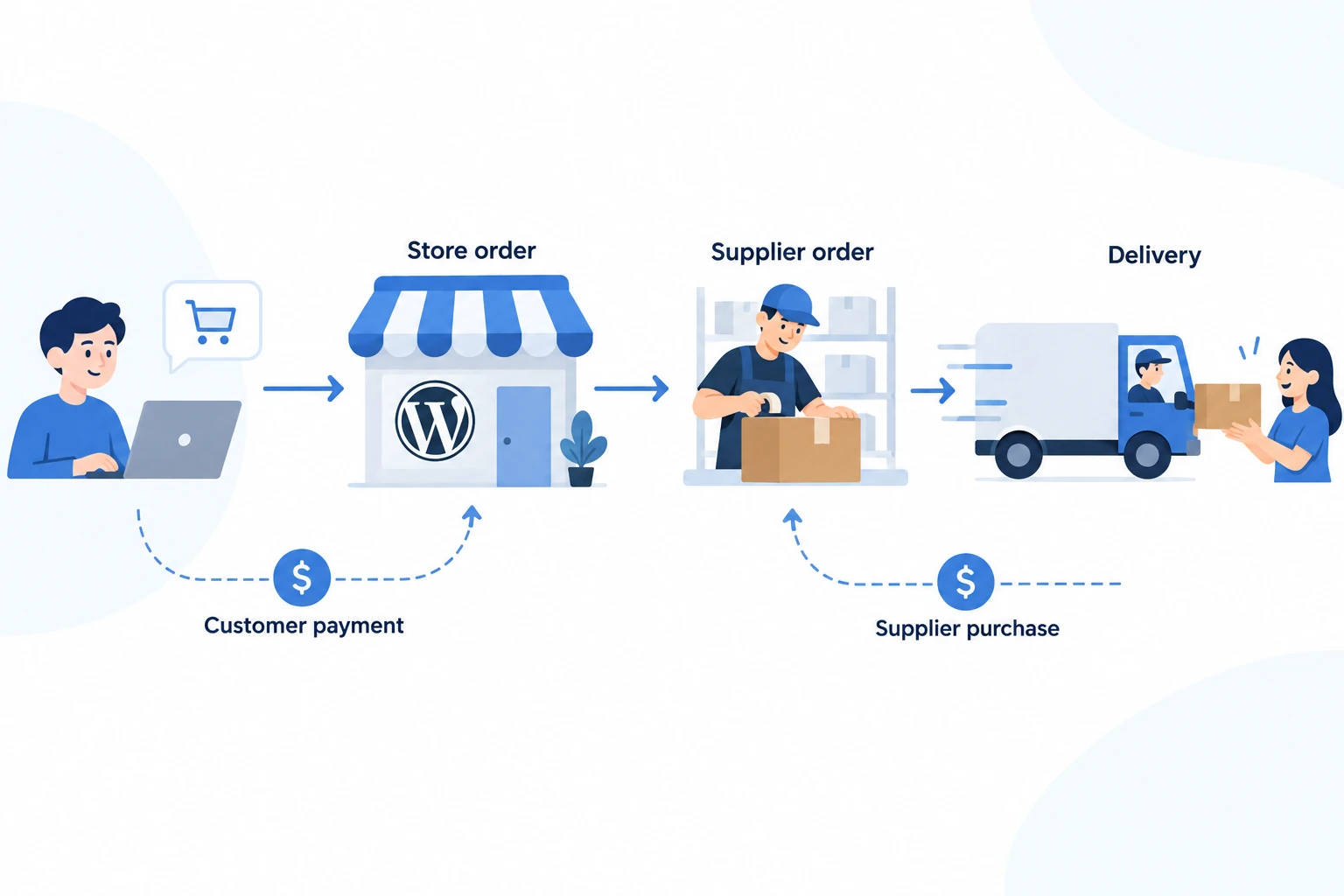
WooCommerce dropshipping means running a WordPress store that takes customer orders while a supplier ships the products directly to those customers. WooCommerce handles your catalog and checkout. You choose the products, arrange fulfillment, set the offer and deal with the customer when something goes wrong.
You can start with a small catalog and manual supplier ordering. As orders grow, a suitable integration can reduce repeated data entry. Start by proving that one order reaches the right supplier with the right variant and delivery details. Expanding an untested catalog only makes mistakes harder to locate.
01
What WooCommerce dropshipping involves
There are two purchases in a typical order. The customer pays your store; you then purchase fulfillment from the supplier. The customer’s payment, your supplier payment and the parcel’s movement are separate events, even when software displays them together.
WooCommerce suits merchants who want control over their WordPress site, content and integrations and can take responsibility for maintaining that system. That work can be delegated to a host or developer, but somebody still needs to own checkout failures, updates and backups.
The trade-off is practical. You can adapt the store to an existing supplier arrangement, but you must check how the individual pieces behave together. A product importer, payment gateway and shipping extension do not automatically agree on when an order is ready to ship.
If you are still deciding how your store should operate, the platform and store operations section connects the broader decisions. For a WooCommerce launch, begin with one market, a manageable product range and a named person responsible for daily exceptions.
02
Build the store foundation
Prepare a domain, WordPress hosting, HTTPS, a WooCommerce-compatible theme and a working business email address. Ask the host how backups are restored and whether a separate staging site is available. A staging site lets you investigate changes without exposing customers to an unfinished checkout.
Install and activate WooCommerce, then work through its setup checklist. Set the actual business location, currency and intended selling destinations. Woo’s current setup documentation covers products, payments, store design, tax settings and shipping. Payment-provider options depend on the store’s country and setup information.
Keep the first version focused. A buyer should be able to identify the business, understand the product, see delivery and return information, contact you and complete checkout on a phone. Test those tasks before spending time on decorative sections.
Add only extensions with a defined job. Keep a short record of which plugin owns product imports, stock updates, supplier ordering and tracking emails. This becomes useful when two extensions try to update the same field or send the same notification.
03
Choose the product and supplier together
A promising product still needs an offer you can fulfill. Establish what the buyer needs, what comparable products cost in the target market and why someone would choose your store. The product research guide explains how to turn demand signals into a testable product brief.
Ask a prospective supplier about the exact variant, availability, processing time, delivery route, packaging and returns arrangement. Order a sample and compare it with the specification you intend to publish. Record differences rather than quietly copying the supplier’s description.
Before accepting orders, settle these details:
- How the supplier receives and acknowledges each order.
- When payment is due and when the order becomes difficult to cancel.
- How stock or price changes reach your store.
- What happens when a parcel is lost, damaged or contains the wrong item.
- Which delivery destinations and product variants are supported.
Keep the evidence attached to the specific supplier and product. A useful sample from one seller does not approve another seller’s similar listing. Likewise, a convenient plugin connection does not establish that the supplier can meet your promised delivery window.
For regulated or technically complex products, resolve the applicable product and transport requirements before listing them. A store connection cannot determine whether the actual item and its supporting documents satisfy the requirements of the market you plan to serve.
04
Set up products that match the supplier order
Use a simple product for a single fixed item and a variable product when buyers choose options such as size or color. WooCommerce supports individual prices, stock information and other data for variations. Its variable-product documentation explains how those options are configured.
Give each sellable variant an unambiguous identifier. Match that identifier to the supplier’s exact variant, not just its product title. Titles can change, and two products can share a photograph while including different accessories.
For example, an organizer sold as DESK-BLACK-2 might mean a black two-piece set. Save the supplier product reference, the black option, the two-piece pack quantity and the agreed packaging. If the supplier changes the listing to a single piece, pause the mapping until the offer is checked again.
Review imported titles, dimensions, images and delivery claims before publishing. Use images you have permission to use, and write descriptions that match the approved item. Do not mark a physical item as virtual merely because another company ships it.
Decide who controls stock and price updates. If an integration owns those fields, a manual edit may be overwritten. Set a rule for stale or missing stock data; the inventory management guide covers how to keep the selling decision connected to supplier availability.
05
Configure shipping and customer expectations
Set shipping destinations and methods from the routes your supplier can actually support. WooCommerce matches a customer to the first applicable shipping zone, so specific regions belong above broader ones. An address matching a zone with no methods cannot obtain a shipping option. See Woo’s shipping-zone rules.
Try an ordinary address, a remote address and an excluded destination. Compare the checkout result with the supplier’s quote. An apparently convenient worldwide flat rate can leave you accepting an order that costs more to ship than the entire margin.
The checkout charge and the supplier’s shipping bill are different amounts. You may charge the customer a fixed amount or include shipping in the retail price, but you still need to cover the route’s actual cost.
Separate processing time from transit time in the customer-facing promise. Explain possible split deliveries if products ship independently. Where several products share one cart, check the combined supplier cost rather than assuming the second item travels free.
Confirm how duties or other delivery charges are handled for the intended route before describing the final price. Publish only the arrangement you have established, including any customer action required at delivery.
06
Connect payments and budget the full cost
Choose a payment provider that supports the actual business, products, country and currencies. Complete its account checks and review its payout timing, refund process and applicable fees. A successful checkout does not mean that the proceeds are immediately available to pay the supplier.
Your budget needs three parts: recurring store costs, costs attached to each order and cash available while payments settle. Hosting, paid extensions, email services and technical support belong in the first part. Product cost, shipping, payment charges, acquisition and expected service losses belong in the second.
Consider this illustrative calculation, not a price quote or profit forecast. A $40 sale with $15 product cost, $7 shipping, $2 payment and transaction costs, $8 acquisition cost and a $2 allowance for refunds or replacements leaves $6 before fixed overhead and tax. A further $5 shipping charge reduces that remainder to $1.
Use your own provider fees and observed costs in the calculation. Keep taxes collected for remittance separate from usable sales revenue. Configure the tax treatment that applies to your business and market; selecting a software setting does not establish the underlying obligation.
Before increasing traffic, make sure you can fund supplier purchases and reasonable refunds during the payout gap. More orders can increase the cash you need even when the individual sales appear profitable.
07
Decide what releases an order
Define the checks that must pass before an order is sent for fulfillment: confirmed payment under your gateway’s workflow, usable delivery details, correct variant mapping, available stock and an acceptable supplier price.
WooCommerce’s Processing status normally means payment has been received and the order awaits fulfillment. On hold can require payment confirmation. Neither is a supplier’s acceptance message. The official order-status definitions also explain why a manually marked refund does not necessarily return the customer’s money.
Choose a handoff method that matches the supplier. The WooCommerce Dropshipping extension documents supplier-grouped order emails and PDF packing slips. Other connected services handle product imports and supplier purchases. Establish what your chosen tool actually sends and what response proves acceptance.
Maintain a connection between these records:
- Store order: customer, paid items, destination and chosen service.
- Supplier order: supplier reference, accepted variants, quantities and cost.
- Shipment: parcel reference, included items, carrier and tracking events.
One store order can create several supplier orders or parcels. Keep those relationships visible so a tracking update for one item does not imply that everything has shipped. For a China-side arrangement, the WooCommerce integration service page is a starting point for discussing the required handoff and responsibilities.
08
Complete a safe first test
Begin with checkout and payment tests on staging, with outbound fulfillment connections disabled or explicitly placed in their supported test mode. A test payment is not a universal stop signal for supplier software. Woo warns that extensions may treat test orders as real orders; read its testing-order guidance before creating them.
Use your own test details and keep the test isolated from real customer communications. Confirm the selected variant, shipping method, payment result, order details and expected email content. Test a declined payment and an unsupported destination as well as the successful path.
Then arrange one intentional, paid pilot purchase with the supplier. Treat it as a real purchase with a known recipient and a controlled quantity. Follow it from supplier acceptance through carrier handoff to delivery, and compare the received item with the product page.
For the organizer example, the pilot should answer three questions: did the customer select the black two-piece set, did the supplier accept that exact set, and did two matching pieces arrive? A correct order total alone cannot answer them.
Record any correction before importing more products or enabling unattended release. Resolve a wrong mapping at its source; editing one order without fixing the product connection leaves the next buyer exposed to the same mistake.
09
Recover exceptions without duplicating orders
When a supplier request times out, first determine whether the supplier created an order. Compare the store reference, time, recipient and supplier records. An unknown result should be investigated before a new purchase is sent. Otherwise, one customer payment can produce two supplier charges and two parcels.
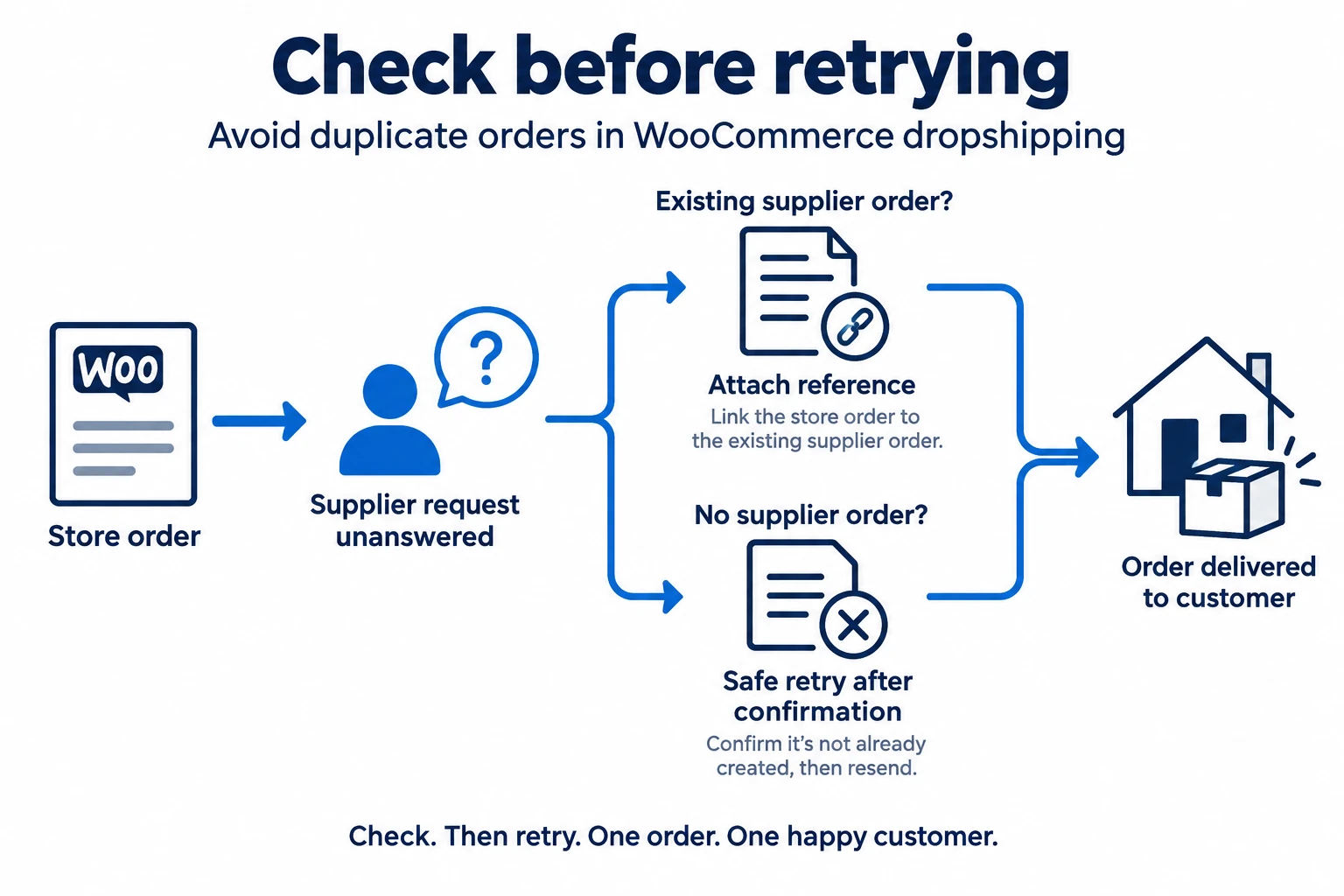
If no order exists and the connection is working again, retry through the documented recovery process. If an order does exist, attach its reference and resume tracking. Keep enough notes that another operator can see which outcome was confirmed.
Handle other exceptions at the same level of detail. Pause an unavailable variant; obtain approval before substituting a product; confirm whether an address change reached the supplier before dispatch. Keep a cancellation request open until the relevant supplier response is known.
For a refund, track the customer remedy and the supplier claim separately. The supplier’s refusal does not make the customer’s message disappear. Check the payment provider’s actual refund result and tell the customer what has been completed, not merely which status somebody selected in the store.
10
Maintain the store and improve the offer
Assign someone to review paid orders without supplier acceptance, accepted orders without shipment progress, stock-sync failures and customer requests. Choose review intervals that fit your order volume and service promises; a failure list that nobody checks is not a recovery process.
Keep WordPress, WooCommerce, the theme and extensions maintained. Woo’s update guidance recommends current backups and staging checks before production changes. Test the combination your store uses, including checkout, payment, order notifications and supplier connections.
Be careful when restoring a store backup. Preserve and reconcile orders created after that backup so that a technical recovery does not erase a customer purchase or trigger another supplier order.
Finally, judge growth by completed orders and customer outcomes. Improve unclear product descriptions, investigate repeated delivery complaints and compare actual margin with your estimate. Bring more traffic to the store once the offer and fulfillment process can support it.
11
Frequently asked questions
Can I dropship with WooCommerce without a special plugin?
Yes. You can enter products and place supplier orders manually. A plugin becomes useful when its specific function reduces work you can no longer manage reliably. Manual fulfillment still needs clear records and a way to detect missed orders.
Is WooCommerce dropshipping free?
The core WooCommerce software is free, but running the business has costs. Budget for hosting, payment processing, supplier purchases, shipping and any paid tools or support. Include working capital instead of treating customer revenue as immediately available cash.
Does an imported tracking number prove dispatch?
No. Look for the carrier event showing possession of the parcel. Keep the customer’s message consistent with the evidence, especially when a label exists but the supplier has not handed over the shipment.
