
To connect CJdropshipping to eBay, install CJ’s eBay app if needed, authorize the correct eBay account, then list or connect your product variants. Import eligible paid orders, review their details and pay CJ before expecting fulfillment. Check the live eBay offer and the tracking returned to the buyer’s order separately.
The store connection is only the beginning. It gives CJ access to exchange information; it does not establish that every variation is matched, every supplier order is funded or every parcel has been collected.
This guide follows CJ’s published documentation reviewed on September 19, 2026. CJ has updated parts of its interface: current help describes an Apps entry, while older tutorials use My CJ and Authorization. The instructions below distinguish the documented steps from checks you should perform in your account; they do not represent a live test of your store.
01
Confirm the selling arrangement and shipment origin
Before authorizing an app, confirm the product and supplier relationship you intend to use. eBay permits dropshipping from a wholesale supplier; listing an item and then buying it from another retailer or marketplace for delivery to the buyer is not allowed. A store connection does not approve a sourcing arrangement.
Keep the relevant supplier agreement, product details and fulfillment terms. Find out which warehouse can actually supply the selected variation and how orders will be accepted. Our eBay dropshipping guide covers the business model and seller responsibilities around the integration.
Shipment origin needs product-level attention. eBay’s item-location policy requires accurate dispatch-location information throughout the listing, and tracking must match that location. A supplier having a US warehouse does not mean a particular blue organizer is stocked there.
If the approved origin is unavailable, pause that offer while finding an acceptable solution. Do not retain a domestic dispatch promise while silently switching fulfillment to China.
02
Connect the correct eBay account
CJ’s current connection help, updated in June 2026, starts with its eBay app. The documented entry is Apps → Install App. Find eBay in the cross-border ecommerce platform section and install it. If eBay already appears under Apps, this installation step can be skipped.
Open the eBay app and start the store-authorization process. Older versions of CJ’s navigation call this Authorization → eBay → Add Store. Follow the entry shown in your account rather than looking for a menu label that belongs to an older interface.
During authorization:
- Confirm that the eBay account currently signed in is the one you want to connect.
- Where CJ requests the store name, use the eBay user ID specified by its instructions, rather than inventing a display name.
- Review the application and permissions on eBay’s authorization screen, then grant access if they match the intended connection.
- Return to CJ and verify that the correct store is listed as connected.
The older official authorization tutorial documents the account redirect and return to the connected-store list. That account-identity check remains useful even when navigation changes.
If the wrong store appears, stop before importing products. Correct the connection using the relevant account controls. If authorization fails, save the displayed error and the affected store ID for support; do not share passwords, authorization tokens or customer records in a public screenshot.
You do not need to build a custom CJ API connection merely to use this native eBay integration. Custom integrations are a different implementation with their own credentials and maintenance requirements.
03
Choose whether to list a new product or connect an existing one
Listing and connecting are different actions. Listing creates an offer from a CJ product. Connecting links an offer you already have to the CJ product that will fulfill it.
For a new offer, open the chosen CJ product and use its listing function. Select the correct eBay store and marketplace. Review the category, title, required item specifics and the variations to include. CJ’s eBay listing help describes Products and Variant Pricing steps, including shipping assumptions, selling price and listing quantity.
For an existing offer, use CJ’s product-connection function and select the corresponding store product. Find the exact matching CJ item, then match its variants. CJ’s automatic-order tutorial explains both listing and connecting as ways to establish this relationship.
Do not create another listing simply because an existing one is not connected. First identify the current listing and the missing connection. Duplicate offers make stock and orders harder to trace and may create separate marketplace-policy problems.
An image match is a starting point for finding a product, not sufficient confirmation. Compare dimensions, material, included accessories, pack count and the exact variant. A photograph of a set can resemble the supplier’s single-unit listing while representing a different customer purchase.
04
Match every variant before accepting orders
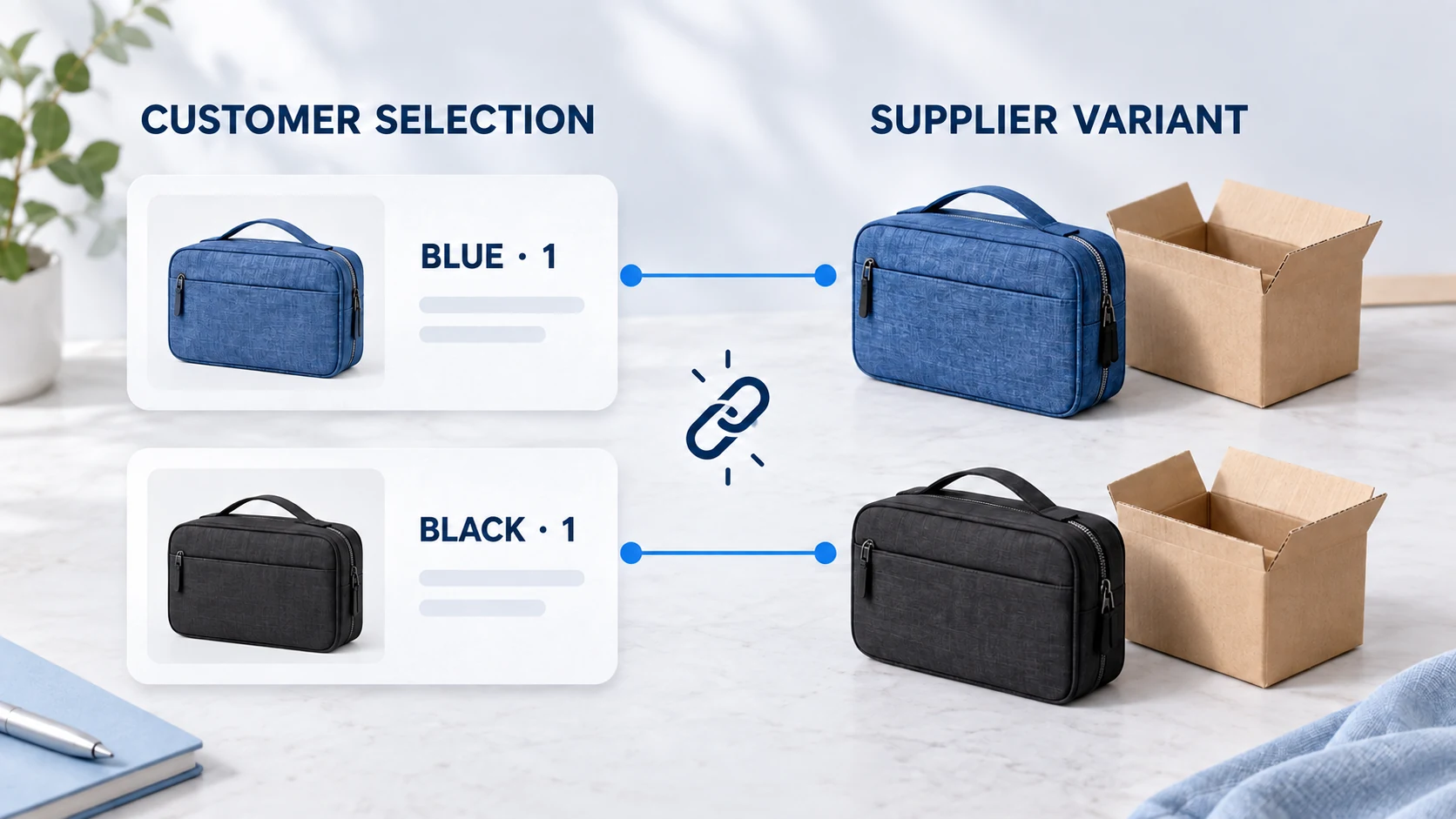
Suppose you plan to sell a travel organizer in blue and black. Your store uses the hypothetical SKUs ORG-BLUE-1 and ORG-BLACK-1. The supplier has a separate variant identifier for each color.
| Customer selection | Store record | Supplier record to confirm |
|---|---|---|
| One blue organizer | ORG-BLUE-1 | Exact blue variant, one unit, approved warehouse |
| One black organizer | ORG-BLACK-1 | Exact black variant, one unit, approved warehouse |
| Two blue organizers | Quantity 2 of ORG-BLUE-1 | Two units of the blue variant, unless the offer explicitly sells a two-pack |
These identifiers are examples, not real CJ product codes. The important point is that color and pack quantity survive the transfer. Connecting the parent “travel organizer” product does not establish the meaning of every option beneath it.
CJ’s invalid-order help describes orders held when an item lacks a CJ product or variant connection. If the product is connected but a variant is missing, fix the variant. Reconnecting the parent product repeatedly may leave the actual problem untouched.
Inspect every order line before release, especially after changing options in eBay or replacing a supplier product. A new size or color can create a new mapping requirement. Keep a record of the eBay listing ID, store SKU and CJ variant used so support can investigate the specific item rather than the whole catalog.
05
Price and inspect the offer on eBay
Choose shipping assumptions for the warehouse, destination and service you will use. The estimate needs to describe the actual parcel, including quantity and packaging. CJ’s documented Variant Pricing step uses these choices in its displayed shipping estimate; a different destination can change the cost.
Calculate your own selling price. Include product, shipping, fulfillment or packaging charges, applicable eBay fees, advertising, currency conversion and an allowance for exceptions. A supplier’s recommended listing price is not a promise of net profit.
For example, an illustrative $30 sale with $11 product cost, $6 shipping, $4.50 in assumed marketplace charges, $2 advertising and $1.50 expected exception cost leaves $5 before fixed overhead and income tax. If the actual shipping charge is $9, it leaves $2. These assumed charges are not an eBay rate quote; substitute the fees for your account, category and site.
After submission, open the offer on eBay. Check the chosen variation’s picture and price, pack quantity, currency, item specifics, available quantity, dispatch location and delivery estimate. Confirm that the return policy matches the process you can provide.
A listing error should be corrected from its actual message. A missing identifier requires accurate product information or a valid category-specific exemption; do not use “Does not apply” as a universal workaround. A selling-limit error needs attention to your account’s current limit, not repeated resubmission or a number copied from an old tutorial.
06
Import the order, then confirm and pay CJ
When an eligible customer order arrives, find it in CJ’s Store Orders import area. CJ’s documented workflow includes a store-order synchronization action, followed by checking the imported order and submitting payment.
The CJ FAQ on missing eBay orders identifies several causes: payment is still processing, the order is already marked shipped, or product information has changed and its connection needs attention. Check those states before assuming the app itself has failed.
Use the original eBay order number to compare the records. Review the delivery address, item, variant, quantity, warehouse, shipping service and payable amount. Correct an unmatched item before moving forward. An imported order is information received, not a supplier purchase completed.
Then follow CJ’s order confirmation and payment flow. Save the resulting CJ order reference against the eBay order. If payment fails or the result is uncertain, look up the order’s current state before pressing Pay again or making a manual replacement order.
| State you can observe | What it establishes | What still needs to happen |
|---|---|---|
| eBay store connected | The store authorization exists | Product and order details still need to match |
| Customer order imported | CJ has received an order record | Resolve any invalid line and confirm the purchase |
| Supplier payment confirmed | The purchase has been funded | Sourcing, preparation and dispatch may remain |
| Tracking number assigned | A shipment record or label exists | Check physical carrier acceptance and movement |
| Delivery recorded | The carrier reports delivery | Resolve any buyer issue through the appropriate process |
Keep enough available funds for supplier orders. Customer payment through eBay does not mean the matching payout is already in your bank account. A valid connection with an unfunded purchase still leaves the buyer waiting.
07
Follow tracking through to the buyer’s order
After CJ releases tracking, compare the carrier and number with the shipment and the original eBay order. Verify that the information appears correctly on eBay; do not assume every account or service setting returns it identically.
A label-created event is not evidence that the carrier has received the package. If the first physical scan is missing, investigate with CJ using the supplier order and tracking reference. Give the buyer an update based on known events rather than repeating an unsupported delivery estimate.
Multi-item orders need special attention. If two products leave different warehouses, one tracking number may describe only part of the order. Record which items belong to each parcel, and check the marketplace’s supported method of showing the shipments. Do not mark every item as dispatched merely because one parcel has moved.
When tracking and the promised origin disagree, investigate the fulfillment route. An attractive delivery claim in the description cannot correct a parcel that actually started somewhere else.
08
Resolve the state that actually failed
The most useful error report identifies what succeeded and where progress stopped. “CJ does not work” gives support much less to investigate than a store ID, listing ID, order number and the visible failure.
| Symptom | First useful check | Response before proceeding |
|---|---|---|
| Authorization fails | Signed-in eBay account and entered store identity | Correct the account or capture the authorization error |
| Listing rejected | eBay’s returned category, identifier, variation or account-limit message | Correct the named requirement; do not repeatedly clone the offer |
| Order missing in CJ | Paid/unshipped state and product connection | Repair the relevant state, then synchronize and search by order number |
| Order in Invalid Orders | Every product line and selected variant | Match the missing item or variant, then update the order |
| Order remains unpaid | Payment result and current CJ order state | Resolve funding without creating a second supplier purchase |
| CJ tracking absent on eBay | Correct order reference, carrier and return-sync settings | Fix the update or use the supported manual process without inventing shipment events |
These checks narrow the problem; they are not a guarantee that every failure has one cause. If an error persists, send support the smallest relevant record and explain what you already verified. Keep the customer response moving separately where a deadline applies.
09
Keep returns and ongoing checks with the seller
The integration does not transfer your relationship with the buyer to CJ. Decide where returns go, who pays the relevant shipping and how a replacement or refund is authorized. Compare your obligations on eBay with the supplier remedy available for the specific problem.
A supplier investigation can take longer than the response window you owe the buyer. Track the two matters separately: the customer’s remedy and any money you may recover from CJ. Our dropshipping returns guide explains that handoff in more detail.
Review changes that can break an otherwise working setup: newly added variations, edited SKUs, warehouse changes, expired authorization, altered shipping costs and another tool taking control of stock or orders. If you install a second application, decide which system submits purchases before enabling it.
Start with a small assortment whose products and terms you can verify. A direct sample order can check the physical item and packaging. Then follow a legitimate customer order through the connected workflow, keeping its references together. Expand once the offer, supplier purchase and shipment records agree.
10
Integration questions
Does connecting the store automatically pay for orders?
Store authorization alone does not establish an automatic payment arrangement. CJ’s documented order flow includes confirmation and payment. Inspect the payment settings available in your account and maintain funds for whatever purchasing authority you enable.
Should I connect eBay using CJ’s API key?
Use CJ’s native eBay app and authorization process for the standard integration. A custom API implementation is separate work and is not a substitute for selecting the right eBay account in the native connection.
Why is a connected product still producing an invalid order?
A particular variant or another line in the order may remain unmatched. Check the exact customer selection against its CJ variant, not only whether the parent product appears connected.
Will CJ keep every eBay quantity and price updated automatically?
Confirm the current behavior and supported settings for your actual eBay connection. Do not infer eBay functionality from a Shopify tutorial or treat a broad automation claim as proof. Inspect the live quantity and price after a known change, with a safe test or provider-assisted demonstration.
Can I change the warehouse after the buyer orders?
Only after checking the consequences for the agreed product, cost, dispatch location and delivery promise. A warehouse change that contradicts the offer needs resolution with the applicable marketplace process; it should not happen silently.
